Kafka

Kafka
The distributed commit log that powers real-time data at LinkedIn, Uber, and Netflix — not just a message queue, but a persistent, replayable event store.
Kafka:
The Distributed Commit Log That Powers Real-Time Data (LinkedIn's Gift to the World)
🎯 Challenge 1: The Million Messages Problem Imagine this scenario: Your e-commerce site processes 1 million events per second:
- User clicks
- Product views
- Shopping cart updates
- Order placements
- Payment confirmations
Each event needs to reach multiple systems:
- Analytics service (for dashboards)
- Recommendation engine (for personalized suggestions)
- Inventory service (for stock updates)
- Email service (for notifications)
- Fraud detection (for security)
Pause and think: How do you reliably deliver 1 million messages per second to multiple consumers without losing data or overwhelming systems?
The Answer: Apache Kafka acts as a distributed, fault-tolerant message highway! It's like a super-efficient postal service that:
✅ Handles millions of messages per second (high throughput)
✅ Never loses messages (durable storage)
✅ Lets multiple services read the same data (pub-sub model)
✅ Scales horizontally (add more servers)
✅ Replays historical data (time travel for events!)
Key Insight: Kafka isn't just a message queue - it's a distributed commit log that stores all your events in order, forever!
🎬 Interactive Exercise: The Newspaper Analogy
Traditional Message Queue (RabbitMQ):
Newspaper Stand:
├── You buy a newspaper
├── It's removed from the stand
└── Next person can't read YOUR newspaper
Message consumed = Message deleted Each consumer gets different messages
Kafka (Distributed Log):
Library Archive:
├── Newspapers are filed in order (never deleted)
├── Anyone can read any newspaper
├── Multiple people can read the same newspaper
└── You can re-read old newspapers anytime
Messages are stored = Multiple consumers can read Each consumer tracks their own reading position Messages persist (configurable retention)
Real-world parallel: Traditional queues are like a to-do list where you cross off tasks. Kafka is like a diary where you write everything down and can re-read it anytime!
The Kafka Advantage:
Traditional Queue:
Producer → Queue → Consumer A (message deleted)
✓ Processed
✗ Can't be re-read
Kafka:
Producer → Topic → Consumer A (reads at offset 0)
→ Consumer B (reads at offset 0)

All consumers can read the same data!
🏗️ Core Concepts: Topics, Partitions, and Offsets
- Topics (The Categories):
A Topic is like a category or feed:
Topic: "user-clicks"
├── All user click events go here
├── Stored indefinitely (or based on retention)
└── Multiple consumers can subscribe
Topic: "payments"
├── All payment events go here
├── Critical data, longer retention
└── Separate from user-clicks

Think of topics as different newspapers:
-
Sports topic = Sports section
-
News topic = News section
-
Business topic = Business section
- Partitions (The Parallelism):
A Topic is split into Partitions for scalability:
Topic: "user-clicks" (split into 3 partitions)

Why partitions?
├── Parallelism (multiple consumers can read simultaneously)
├── Scalability (distribute across servers)
├── Ordering (guaranteed within a partition)
└── Throughput (spread the load)
- Offsets (The Bookmarks):
Each message has an offset (position number):
Partition 0:
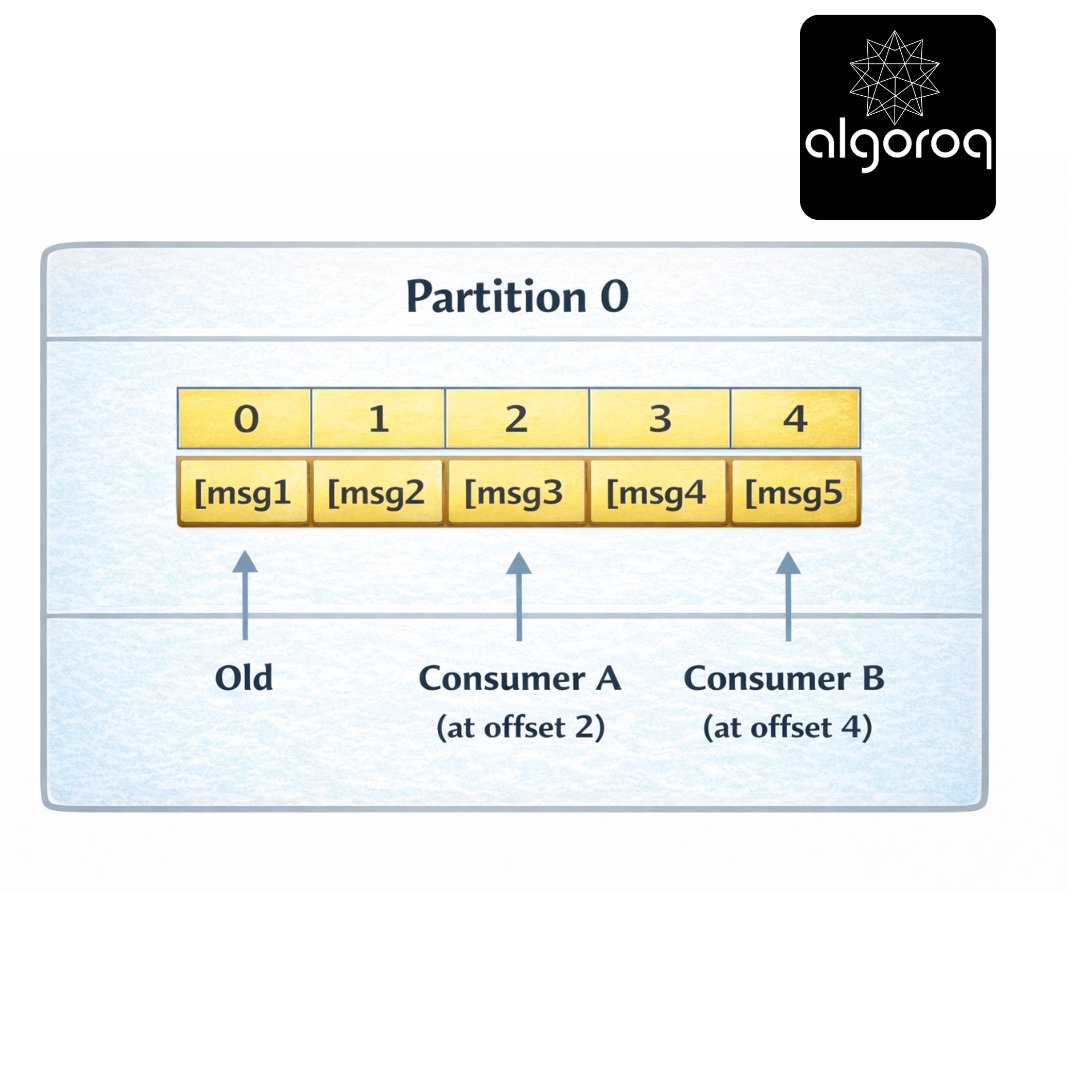
Each consumer tracks its own offset:
-
Consumer A: "I've read up to offset 2"
-
Consumer B: "I've read up to offset 4"
-
New Consumer: "Start from offset 0"
Real-world parallel:
-
Topic = Book series (Harry Potter)
-
Partition = Different volumes (Vol 1, 2, 3)
-
Offset = Page number (your bookmark)
🎮 Decision Game: Choosing Partition Count
Context: You're designing a Kafka topic for different use cases. How many partitions?
Scenarios: A. Low-volume admin logs (10 msgs/sec) B. User activity tracking (100,000 msgs/sec) C. Payment transactions (must be ordered per user) D. IoT sensor data (1 million msgs/sec)
Options:
- 1 partition
- 3-10 partitions
- 20-50 partitions
- 100+ partitions
Think about throughput vs ordering...
Answers:
A. Low-volume admin logs → 1-3 partitions (1) Reason: Low volume, simplicity matters
B. User activity tracking → 20-50 partitions (3) Reason: High volume, need parallelism
C. Payment transactions → 3-10 partitions (2) Reason: Need ordering per user (partition by user_id)
D. IoT sensor data → 100+ partitions (4) Reason: Extremely high volume, maximum parallelism
Key Insight: More partitions = more parallelism, but also more complexity. Choose based on throughput needs!
Partition Key Strategy:
// Partition by user ID (same user always same partition) producer.send(new ProducerRecord<>( "user-clicks", userId, // Key determines partition clickData // Value (the actual message) ));
Result:
User 123 → Partition 0 (all events in order)
User 456 → Partition 2 (all events in order)
User 789 → Partition 1 (all events in order)
🚨 Common Misconception: "Kafka is Just a Message Queue... Right?"
You might think: "Kafka is like RabbitMQ but bigger."
The Key Difference: Message Queue vs Event Log
Message Queue (RabbitMQ):
├── Message consumed = Message deleted
├── Focus: Task distribution
├── Use case: "Process this job once"
├── Metaphor: To-do list
└── Example: Send email, process order
Event Log (Kafka): ├── Message consumed = Still stored
├── Focus: Event streaming
├── Use case: "Record what happened"
├── Metaphor: Bank statement
└── Example: User clicked, payment made
Visual Comparison:
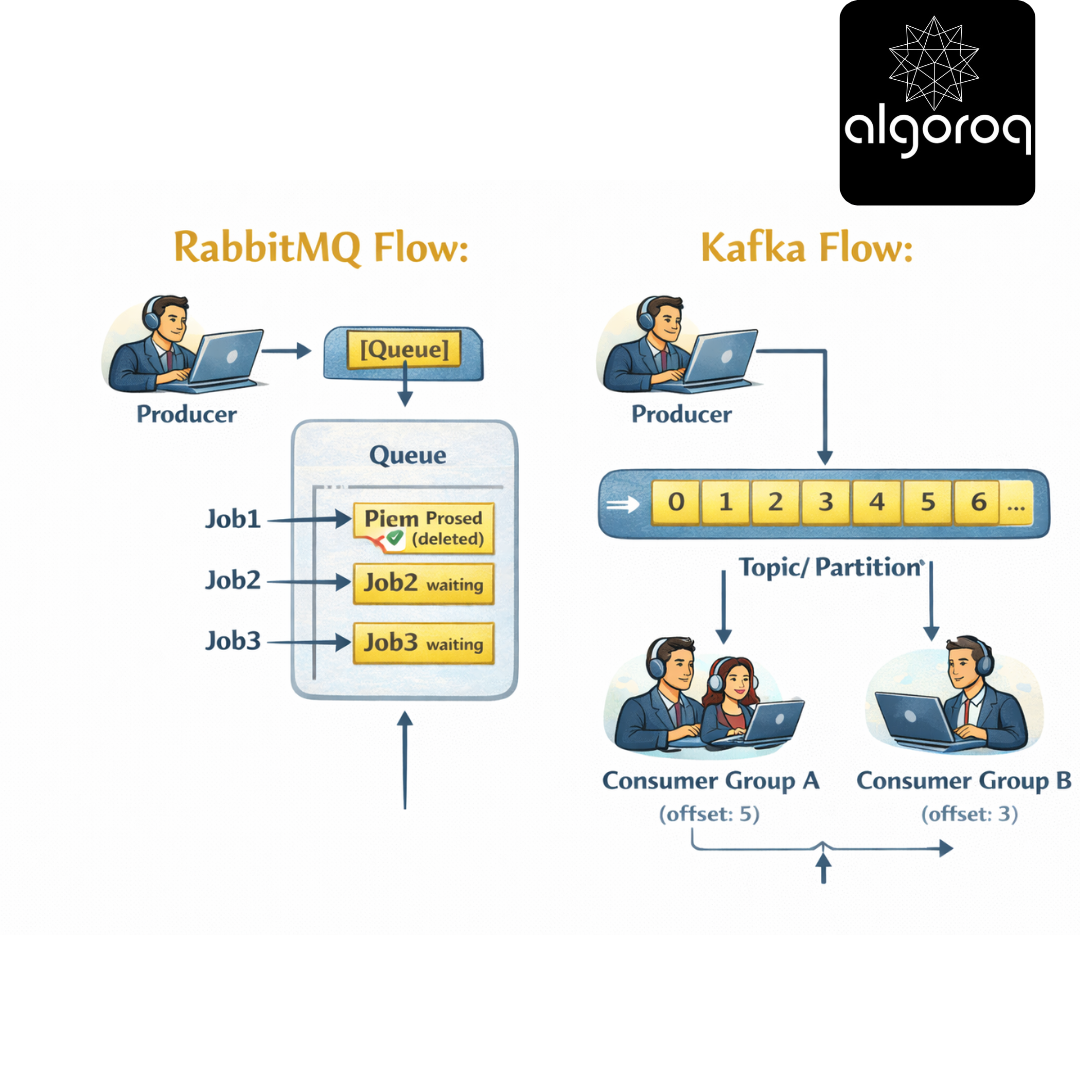
Messages stay! Multiple consumers can read!
When to use what:
Use Kafka when:
✅ High throughput (millions of msgs/sec)
✅ Need to replay events
✅ Multiple consumers need same data
✅ Building event-driven architecture
✅ Real-time analytics
Use RabbitMQ when:
✅ Traditional task queues
✅ Complex routing logic
✅ One-time job processing
✅ Lower throughput (<10k msgs/sec)
✅ Priority queues needed
Real-world parallel: RabbitMQ is like a job board (take task, it's removed). Kafka is like Twitter (tweets stay, everyone can read).
👥 Consumer Groups: Parallel Processing Magic
The Problem:
One Consumer reading from one partition:
Producer: 10,000 msgs/sec
Consumer: 1,000 msgs/sec
Result: Consumer falls behind! 💀
The Solution: Consumer Groups
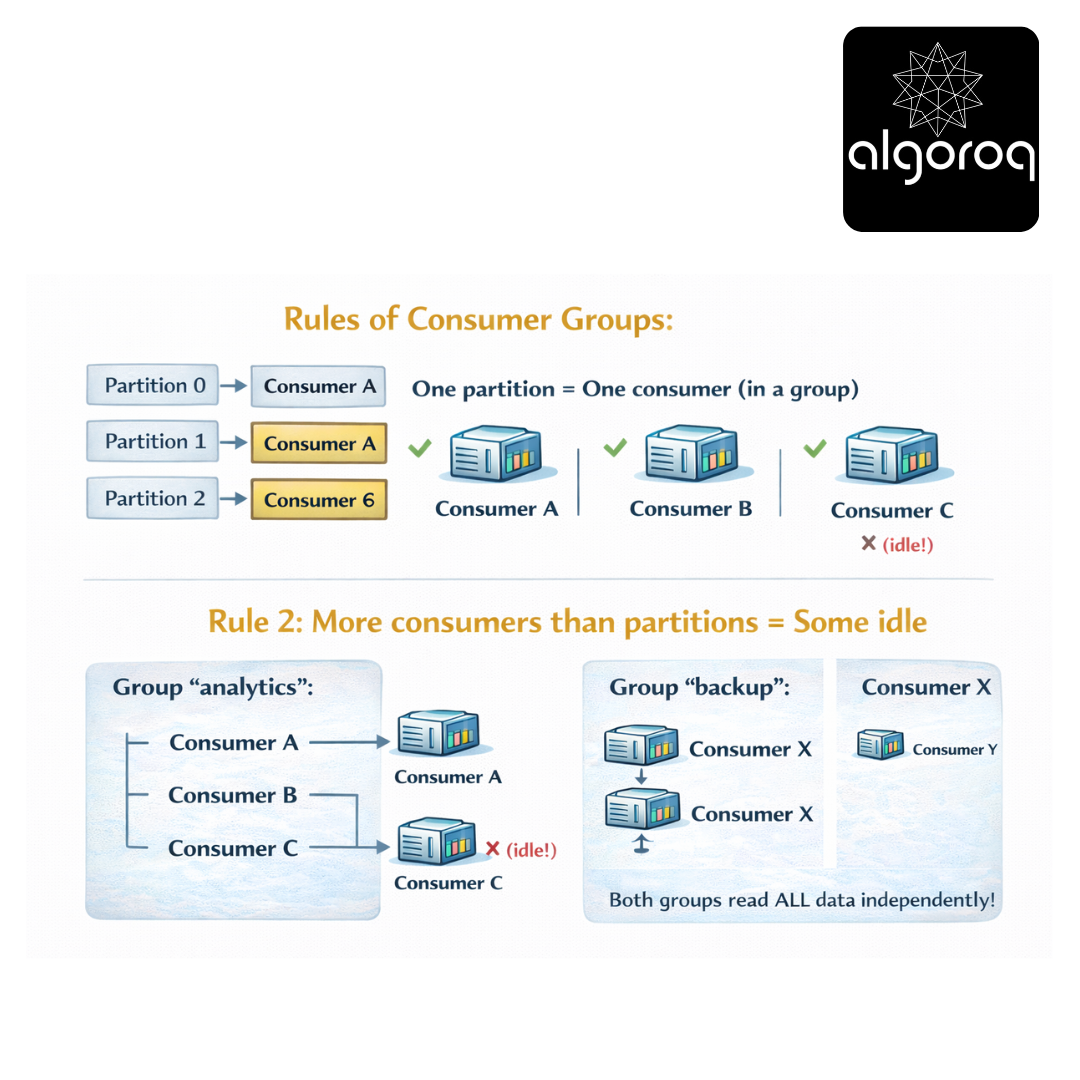
Topic: "user-clicks" (3 partitions)

Each consumer in the group reads from one partition! Load is distributed automatically!
Rules of Consumer Groups:
Rule 1: One partition = One consumer (in a group)
Rule 2: More consumers than partitions = Some idle
Rule 3: Different groups = Independent reading
Both groups read ALL data independently!
Code Example:
Real-world parallel: Consumer groups are like assembly line workers. Each worker (consumer) handles one station (partition), and together they process all items (messages) efficiently!
⚖️ Rebalancing: When Consumers Join or Leave
Scenario: Consumer crashes or new consumer joins
Before (3 consumers, 3 partitions):
Partition 0 → Consumer A
Partition 1 → Consumer B
Partition 2 → Consumer C
Consumer B crashes! 💥
Rebalancing happens...
After (2 consumers, 3 partitions):
Partition 0 → Consumer A
Partition 1 → Consumer A (took over!)
Partition 2 → Consumer C
Load redistributed automatically!
The Rebalancing Process:
-
Group Coordinator detects consumer failure
"Consumer B hasn't sent heartbeat!"
-
Trigger rebalance
"Stop processing, redistribute partitions"
-
Assign partitions to remaining consumers
Partition 0 → Consumer A
Partition 1 → Consumer A
Partition 2 → Consumer C
-
Resume processing
"Continue from last committed offset"
Adding a Consumer:
Before (2 consumers, 3 partitions):
Partition 0 → Consumer A
Partition 1 → Consumer A
Partition 2 → Consumer C
New Consumer D joins! 🎉
After (3 consumers, 3 partitions):
Partition 0 → Consumer A
Partition 1 → Consumer D (newly assigned)
Partition 2 → Consumer C
Better load distribution!
Real-world parallel: Rebalancing is like a restaurant redistributing tables when servers clock in/out. Work is automatically redistributed for even load!
📨 Producing Messages: Getting Data Into Kafka
Basic Producer:
Delivery Guarantees:
acks = 0 (fire and forget):
Producer → Kafka ⚡ (doesn't wait for ack)
Speed: Fastest
Reliability: Lowest (messages can be lost)
acks = 1 (leader ack):
Producer → Leader → ✓ Ack
Speed: Fast
Reliability: Medium (can lose if leader fails before replication)
acks = all (all replicas):
Producer → Leader → Replica 1 → Replica 2 → ✓ Ack
Speed: Slower
Reliability: Highest (won't lose data)
Real-world parallel:
-
acks=0 = Tossing mail in mailbox (fast, might get lost)
-
acks=1 = Handing to postal worker (get receipt, pretty safe)
-
acks=all = Certified mail with multiple signatures (slow, very safe)
🔄 Partition Assignment Strategies
How messages get assigned to partitions:
- Null Key (Round Robin):
// No key specified
Distribution: Msg 1 → Partition 0
Msg 2 → Partition 1
Msg 3 → Partition 2
Msg 4 → Partition 0 ... (cycles through partitions)
- With Key (Hash-Based):
// With key
Same key → Always same partition!
user123 → Partition 1 (always)
user456 → Partition 2 (always)
user789 → Partition 0 (always)
- Custom Partitioner:
Real-world parallel:
-
Round robin = Dealing cards evenly
-
Hash-based = Students assigned to classrooms by last name
-
Custom = VIP line at airport (special handling)
💾 Offset Management: Never Lose Your Place
Automatic Offset Commit:
Consumer automatically commits offset every 1 second Easy, but can lose messages if consumer crashes!
Manual Offset Commit (Safer):
Offset Strategies:
Strategy 1: Commit after each message
Strategy 2: Commit after batch (common)
Strategy 3: Commit at intervals
Seeking to Specific Offset:
Real-world parallel: Offset management is like bookmarking. Automatic = bookmark updates while you read. Manual = you choose when to place bookmark.
🏛️ Kafka Architecture: How It All Fits Together
The Complete Picture:
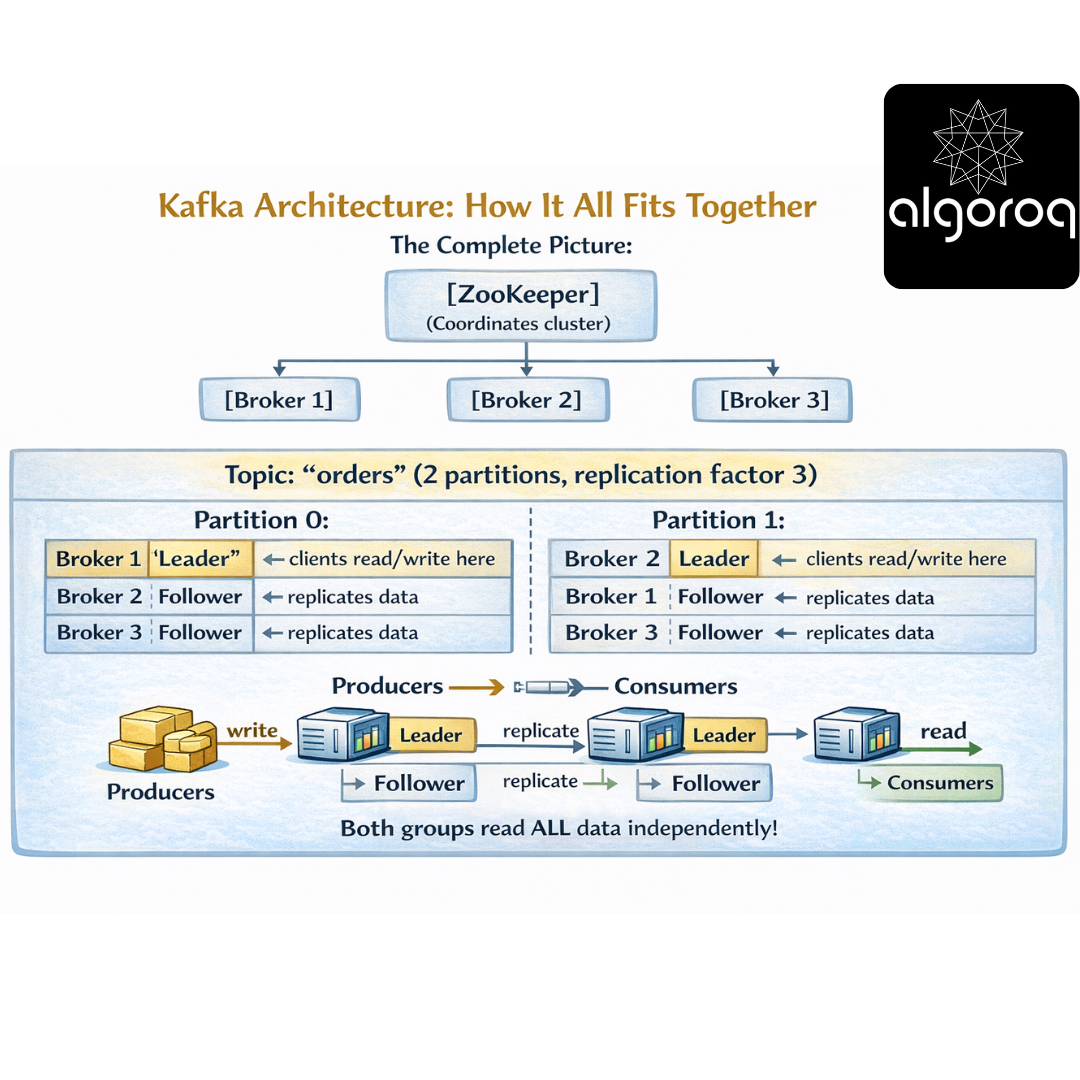
Replication for Fault Tolerance:
Normal Operation:
Leader (Broker 1): [msg1][msg2][msg3]
Follower (Broker 2): [msg1][msg2][msg3] ✓ In sync
Follower (Broker 3): [msg1][msg2][msg3] ✓ In sync
Leader Fails! 💥
ZooKeeper: "Broker 1 is down!"
Election: "Broker 2 is now the leader!"
New Leader (Broker 2): [msg1][msg2][msg3] ← Now serves clients
Follower (Broker 3): [msg1][msg2][msg3] ← Still replicating
No data lost! Clients continue seamlessly!
Real-world parallel: Kafka cluster is like a library system with multiple branches. Each book (partition) has copies at different branches (replicas). If one branch burns down, others have the same books!
🎪 Real-World Use Cases
- Activity Tracking (LinkedIn):
User Actions → Kafka → Multiple Consumers
├─ Analytics Dashboard
- Log Aggregation (Netflix):
Microservices → Kafka → Log Storage
Service A logs ─┐ ├─ Elasticsearch
Service B logs ─┤ ├─ Splunk
Service C logs ─┘ └─ S3 Archive
- Stream Processing (Uber):
Ride Events → Kafka → Stream Processor → Kafka → Consumers
(pickup, (calculate (rider app,
dropoff, real-time driver app,
location) metrics) analytics)
- Event Sourcing (E-commerce):
Commands → Kafka (Event Log)
[OrderCreated]
Can rebuild state by replaying events!
💡 Final Synthesis Challenge: The Data Highway
Complete this comparison: "Traditional databases are like taking snapshots of current state. Kafka is like..."
Your answer should include:
-
Event storage model
-
Multiple consumers
-
Replay capability
-
Scalability
Take a moment to formulate your complete answer...
The Complete Picture: Kafka is like a never-ending highway where every event is recorded:
✅ Events written in order as they happen (immutable log)
✅ Multiple lanes for parallel processing (partitions)
✅ Anyone can drive on it simultaneously (consumer groups)
✅ Can review past trips anytime (replay from any offset)
✅ New highways added as needed (horizontal scaling)
✅ Backup routes if one fails (replication)
✅ Organized by destination (topics)
✅ Extremely high traffic capacity (millions msgs/sec)
This is why:
-
LinkedIn uses Kafka for activity tracking (where it was invented!)
-
Netflix uses Kafka for log aggregation (monitoring billions of events)
-
Uber uses Kafka for real-time pricing (surge calculations)
-
Airbnb uses Kafka for stream processing (real-time analytics)
Kafka transforms data from point-in-time snapshots into continuous event streams!
🎯 Quick Recap: Test Your Understanding Without looking back, can you explain:
-
What's the difference between topics, partitions, and offsets?
-
How do consumer groups enable parallel processing?
-
Why can multiple consumers read the same Kafka data?
-
When would you use Kafka vs a traditional message queue?
Mental check: If you can answer these clearly, you've mastered Kafka fundamentals!
🚀 Your Next Learning Adventure Now that you understand Kafka basics, explore:
Advanced Kafka:
-
Kafka Streams (stream processing framework)
-
KSQL (SQL for stream processing)
-
Exactly-once semantics (idempotent producers)
-
Kafka Connect (integrate external systems)
Operations & Production:
-
Kafka cluster sizing and tuning
-
Monitoring with JMX metrics
-
Security (SSL, SASL authentication)
-
Multi-datacenter replication
Related Technologies:
-
Apache Flink (advanced stream processing)
-
Apache Pulsar (Kafka alternative)
-
Confluent Platform (enterprise Kafka)
-
Schema Registry (message schema management)
Real-World Patterns:
-
Event sourcing with Kafka
-
CQRS (Command Query Responsibility Segregation)
-
Change Data Capture (CDC) with Kafka
-
Building real-time data pipelines
Key Takeaways
- Kafka is a distributed commit log, not just a message queue — messages are persisted and can be replayed by any consumer
- Partitions are the unit of parallelism — more partitions enable more concurrent consumers for higher throughput
- Consumer groups enable parallel consumption — each partition is assigned to exactly one consumer in a group
- Kafka guarantees ordering within a partition — use the same partition key for messages that must be processed in order
- Retention is time or size based — messages aren't deleted after consumption, enabling replay and multiple consumer patterns
Unlock with Pro
Unlock the full content and everything at this level.
Get Pro — $9/moAlready a member? Log in