Simple Mail Transfer Protocol (SMTP)

SMTP: The Postal Service of the Internet (And Why Your Email Actually Works)
The 40-year-old protocol that still powers email delivery — understanding how messages hop between servers on their way to your inbox.
🎯 Challenge 1: The Email Mystery
Imagine this scenario: You write an email on Gmail and hit send to your friend using Outlook. Within seconds, your message travels across continents, through multiple servers, gets checked for spam, and lands perfectly in their inbox.
Pause and think: Your email provider is Google. Your friend's is Microsoft. How does your email know where to go? What language do these different systems speak to each other?
The Answer: SMTP (Simple Mail Transfer Protocol)
SMTP is like the international postal service agreement that makes mail deliverable worldwide. Just as a letter sent from Japan can reach Brazil because all countries follow universal postal standards, Gmail can email Outlook because they all speak SMTP!
Key insight: SMTP is the universal language that allows ANY email system to talk to ANY other email system!
📬 Interactive Exercise: The Letter Journey
Scenario: You want to send a physical letter from your home to a friend in another city. What's the journey?
Think about the steps:
-
You write the letter and put it in your mailbox
-
Your postal carrier picks it up
-
It goes to your local post office
-
Gets sorted and forwarded to the destination city
-
Goes to your friend's local post office
-
Their postal carrier delivers it to their mailbox
Question: Why doesn't the mail carrier from your neighborhood drive directly to your friend's house across the country?
SMTP's Email Journey: The Digital Version
Email works exactly the same way with multiple "post offices" (mail servers):

Real-world parallel: SMTP servers are like postal distribution centers. Each handles mail for their "region" (domain), and they pass mail between each other using a standard protocol.
Key Email Addresses Decoded:
-
-
yourname= Your mailbox number -
@= "at the post office of" -
gmail.com= The post office (mail server domain)
-
🤝 The Conversation: How SMTP Servers Talk
Scenario: You're at a formal dinner party. Before starting a conversation, what happens?
Think about it:
-
You introduce yourself politely
-
State your purpose
-
The other person acknowledges
-
You proceed with your message
-
You say goodbye
SMTP does exactly this! Here's a real SMTP conversation:

Mental model: SMTP is like two postal workers having a professional conversation, confirming every step before handing off the mail!
🚨 Common Misconception: "Email Travels Directly... Right?"
You might think: "When I send an email, it flies directly from my computer to my friend's computer, right?"
The reality: Your email takes a multi-hop journey through several servers!
The Complete Email Journey:
Step 1: You hit SEND
↓
Step 2: Your email client (Gmail app/website) connects to Gmail's SMTP server
↓
Step 3: Gmail's SMTP server looks up "Where does @outlook.com receive mail?"
↓
Step 4: Gmail's server connects to Outlook's MX (Mail Exchange) servers
↓
Step 5: Outlook's server receives and stores the email
↓
Step 6: Your friend's email client (Outlook app) retrieves it via IMAP/POP3
Real-world parallel: Like mailing a package:
-
You drop it at a local postal center (your SMTP server)
-
It gets routed through regional hubs (DNS lookups, relay servers)
-
Arrives at destination postal center (recipient's SMTP server)
-
Recipient picks it up from their mailbox (IMAP/POP3)
Challenge question: Why isn't SMTP used to retrieve emails from the server to your app? (Hint: Think about the direction of the protocol)
🎮 Decision Game: Email Delivery Scenarios
Context: You're sending emails. What happens in each case?
Scenario A: Invalid Email Address
You send to: nobody@fakemadeupdomainthatdoesntexist.com
What happens?
-
A. Email gets lost in the void
-
B. Your email server immediately tells you "Address doesn't exist"
-
C. Your email bounces back after delivery attempt fails
-
D. It gets delivered anyway
Think about it... What would a postal service do with a non-existent address?
Scenario B: Mailbox Full
You send to a valid address, but their inbox has 0 bytes of space left.
What happens?
-
A. Email overwrites old emails
-
B. Email gets delivered anyway and stored elsewhere
-
C. Server rejects it and sends a bounce message
-
D. Email waits in queue until space is available
Scenario C: Spam Filter Triggered
Your email contains phrases like "FREE MONEY" and "CLICK HERE NOW!"
What happens?
-
A. Email is delivered normally
-
B. Email goes to spam/junk folder
-
C. Email is rejected entirely
-
D. Server asks sender to verify they're human
Answers Revealed:
Scenario A: Answer C - Email bounces back!
Your Server: "RCPT TO: <nobody@fake.com>"
Fake Server: ← "550 No such user"
(That mailbox doesn't exist!)
Your Server: [Generates bounce message back to you] "Mail delivery failed: No such user"
Real-world parallel: Like mail returned with "Address Unknown" stamped on it!
Scenario B: Answer C - Rejected with bounce!
Your Server: "RCPT TO: <friend@outlook.com>"
Their Server: ← "552 Mailbox full"
Your Server: [Sends bounce notification] "Recipient's mailbox is full"
Mental model: Like a physical mailbox stuffed with letters - no room for more!
Scenario C: Answer B - Goes to spam folder!
Their Server: [Receives email via SMTP]
[Spam filter analyzes content]
Key insight: SMTP successfully delivered it, but the receiving server's spam filter moved it before the user saw it!
🔐 Security Challenge: The Envelope Problem
Scenario: You mail a postcard with sensitive information. Anyone handling it can read your message!
Question: How do you send something private through the postal system?
Think about it...
The Solution: Envelopes (or Email Encryption)
Original SMTP (1982): Like sending postcards - completely readable!
[Your Message in Plain Text] "Hey Bob, my password is: hunter2"
↓
Anyone intercepting can read it! 😱
Modern SMTP with TLS/SSL: Like sending in a locked envelope!
[Your Message]
↓
[Encrypted with TLS] "a8f3$jK9#mL2pQ7@vN4..."
↓
Only the recipient's server can decrypt and read it! ✅
How Email Encryption Works:
Your Server: "EHLO smtp.gmail.com"
→
Friend's Server
(Hello, do you support encryption?)
Friend's Server: ← "250-STARTTLS" (Yes! Let's encrypt)
Your Server: "STARTTLS" → Friend's Server (Let's start encryption)
Friend's Server: ← "220 Ready to start TLS" (Encryption activated!)
[Now all communication is encrypted]
Real-world parallel: Like switching from postcards to sealed envelopes mid-conversation!
STARTTLS = "Start Transport Layer Security" - Upgrades the connection to encrypted
🚰 Problem-Solving Exercise: The Spam Tsunami
Scenario: You run an email server. A spammer tries to send 10,000 emails per second through your server to random addresses.
What happens?
-
Your server crashes?
-
All emails get delivered?
-
Your server gets blacklisted?
-
Something prevents this?
Solution: SMTP Rate Limiting & Authentication!
Modern SMTP servers have protective mechanisms:
1. Authentication Required (Like ID Checks)
Spammer: "MAIL FROM: <spam@evil.com>"
Your Server: ← "530 Authentication required" (Show me your ID first!)
2. Rate Limiting (Like Speed Limits)
Legitimate User: [Sends 50 emails/hour] ✅ Allowed
Spammer: [Tries 10,000 emails/hour] ❌ Blocked
Your Server: "450 Too many messages, slow down!"
3. SPF/DKIM/DMARC (Like Authentication Seals)
Spammer pretends to be: "amazon@amazon.com"
Receiving Server checks:
SPF Record: "Is this REALLY from Amazon's servers?" ❌ NO
DKIM: "Is this signed by Amazon?" ❌ NO
DMARC: "Amazon's policy says reject these!" ❌ REJECT
Result: Email rejected before delivery!
Mental model:
- SPF = Return address verification ("Is this really from that post office?")
- DKIM = Tamper-evident seal ("Has this letter been opened?")
- DMARC = Policy enforcement ("What should we do if it fails checks?")
🧩 The Three Email Protocols: SMTP vs IMAP vs POP3
Scenario: You've learned SMTP delivers mail. But how do you CHECK your mail?
Think about a physical mailbox:
- Delivery: Postal carrier puts mail IN your mailbox (SMTP)
- Checking mail: You open your mailbox and READ letters (IMAP/POP3)
The Protocol Comparison:
SMTP (Simple Mail Transfer Protocol)
📤 PURPOSE: Sending/delivering email
🔄 DIRECTION: Client → Server or Server → Server
🚀 ANALOGY: The postal delivery truck
IMAP (Internet Message Access Protocol)
📥 PURPOSE: Reading email, keeping it on server
🔄 DIRECTION: Client ← Server
📱 ANALOGY: Looking at letters through a mailbox window (they stay in the box)
POP3 (Post Office Protocol v3)
📬 PURPOSE: Downloading email, removing from server
🔄 DIRECTION: Client ← Server (then deletes)
💼 ANALOGY: Taking letters OUT of the mailbox to bring home
Comparison Chart:
| Feature | SMTP | IMAP | POP3 |
|---|---|---|---|
| Direction | Outgoing | Incoming | Incoming |
| Default Port | 25, 587 | 143, 993 | 110, 995 |
| Keeps mail on server? | N/A | ✅ Yes | ❌ No |
| Multi-device sync? | N/A | ✅ Yes | ❌ No |
| Use case | Sending | Modern checking | Old-school checking |
Real-World Example:
You send an email on your phone: [Your Phone] --SMTP--> [Gmail Server] --SMTP--> [Friend's Server] ↓ You check email on your laptop: [Your Laptop] <--IMAP-- [Gmail Server] (Email stays on server) ↓ You check email on your tablet: [Your Tablet] <--IMAP-- [Gmail Server] (Same emails appear!)
Why IMAP is better than POP3:
- ✅ Read on phone, still there on laptop
- ✅ Mark as read on one device, syncs everywhere
- ✅ Create folders on server, accessible anywhere
- ✅ Modern email experience
When POP3 made sense (1990s):
- Limited server storage
- Mostly used one computer
- Downloaded to your PC's hard drive
🎪 Interactive Journey: The Complete Email Lifecycle
Let's follow an email from creation to reading:
Step-by-Step Journey:
1️⃣ YOU COMPOSE EMAIL [Gmail app on your phone] To: friend@outlook.com Subject: Dinner tonight? Message: Want to grab pizza?
2️⃣ SMTP CLIENT → SERVER (Your outgoing mail) Your App: --SMTP--> Gmail's SMTP Server Port: 587 (or 465 for SSL) Authentication: Your Gmail password/OAuth
3️⃣ DNS LOOKUP (Finding the recipient's mail server) Gmail Server: "Where does @outlook.com receive mail?" DNS Server: "outlook.com MX record: outlook-com.mail.protection.outlook.com"
4️⃣ SERVER → SERVER (Inter-server delivery) Gmail SMTP: --SMTP--> Outlook SMTP Server Port: 25 (server-to-server) Encryption: TLS (if supported)
5️⃣ SPAM FILTERING (Receiving server checks) Outlook Server:
✅ SPF: Valid
✅ DKIM: Signed correctly
✅ Content: Not spammy
→ Deliver to inbox ✅
6️⃣ STORAGE (Mail sits on server) [Outlook Server stores email in friend@outlook.com's mailbox]
7️⃣ RETRIEVAL (Your friend checks email) Friend's App: <--IMAP-- Outlook's IMAP Server Port: 993 (IMAP over SSL) Result: Email appears in inbox! 📧
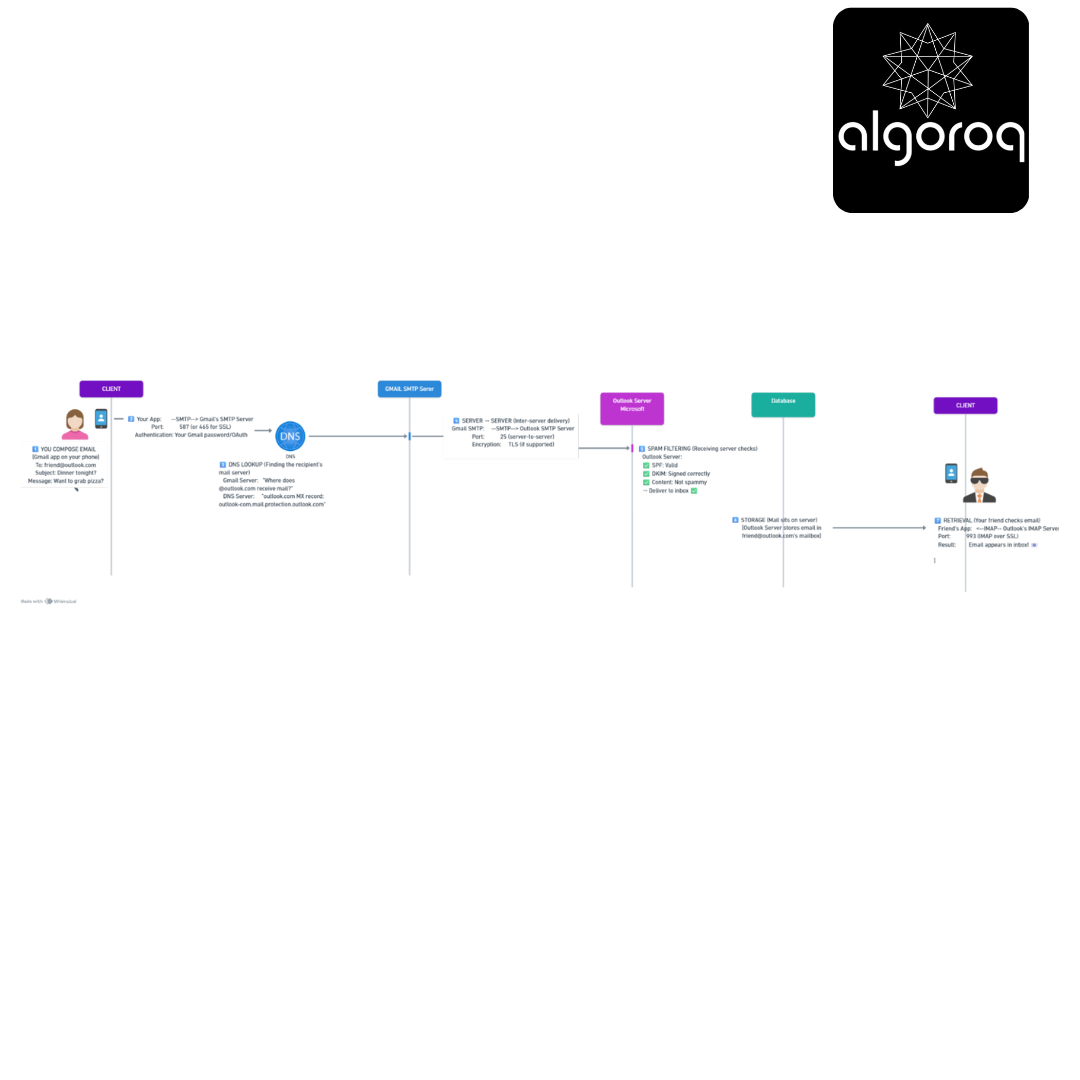
Total time: Usually 1-30 seconds!
Challenge question: At which step does encryption protect your email?
-
Between you and Gmail? ✅ Yes (TLS)
-
Between Gmail and Outlook servers? ✅ Yes (TLS if both support it)
-
While stored on Outlook's server? ⚠️ Only if server uses encryption at rest
-
Between Outlook server and your friend? ✅ Yes (TLS)
🔍 Investigation: Why Email Sometimes Fails
Mystery Cases - Can You Solve Them?
Case 1: The Delayed Email
Symptom: Email sent at 9 AM, arrives at 2 PM
Possible Causes: A. Recipient's server was down temporarily B. Greylisting (anti-spam technique) C. Server queue was backed up D. All of the above ✅
What happens with delays:
Gmail: [Tries to deliver]
Outlook: ← "450 Try again later" (Greylisting)
Gmail: [Waits 15 minutes]
Gmail: [Tries again]
Outlook: ← "250 OK" (Now accepted!)
Real-world parallel: Like a delivery driver finding your gate closed, coming back later when it's open.
Case 2: The Bounce Message
Sympt🌍 Email works worldwide regardless of provider
SMTP transforms email from a closed system into a universal communication platform!
🎯 Quick Recap: Test Your Understanding
Without looking back, can you explain:
- Why does SMTP need multiple servers instead of direct computer-to-computer delivery?
- What's the difference between SMTP, IMAP, and POP3?
- How does SPF/DKIM/DMARC prevent email spoofing?
- Why might a legitimate email go to spam?
- What happens when you send to a non-existent email address?
Mental check: If you can answer these clearly, you've mastered SMTP fundamentals! If not, revisit the relevant sections above.
🚀 Your Next Learning Adventure
Now that you understand SMTP, you're ready to explore:
Immediate Next Steps:
- Email Security Deep Dive: SPF records, DKIM signing, DMARC policies
- Modern Authentication: OAuth2 for email, App-specific passwords
- Email Deliverability: Sender reputation, IP warming, blacklists
Related Protocols:
- DNS and MX Records: How mail servers are discovered
- TLS/SSL: How email encryption actually works
- MIME: How attachments and HTML emails are encoded
Advanced Topics:
- Email Server Setup: Running your own mail server (Postfix, Sendmail)
- Anti-Spam Techniques: Bayesian filtering, machine learning
- Email Marketing: Bulk email best practices, unsubscribe handling
- Modern Alternatives: How Slack/Discord messaging differs from email
Real-World Applications:
- Transactional Emails: Password resets, order confirmations
- Email Marketing Platforms: Mailchimp, SendGrid architecture
- Corporate Email Systems: Microsoft Exchange, Google Workspace
- Email Client Development: Building your own email app
Next recommended read: "DNS: The Internet's Phone Book" to understand how email servers find each other!
Key Takeaways
- SMTP is the protocol for sending email — it handles delivery between mail servers, not retrieval (that's IMAP/POP3)
- Email delivery involves multiple hops — sender's client → sender's SMTP server → recipient's SMTP server → recipient's mailbox
- SPF, DKIM, and DMARC prevent email spoofing — these DNS records authenticate that an email actually came from the claimed sender
- Most applications use email APIs (SendGrid, SES) rather than running SMTP servers — they handle deliverability, bounces, and compliance
Unlock with Pro
Unlock the full content and everything at this level.
Get Pro — $9/moAlready a member? Log in