Web Real Time Communication (WEBRTC)

Web Real Time Communication (WEBRTC)
The browser standard for peer-to-peer audio, video, and data — powering Google Meet, Discord, and every modern video calling application.
WebRTC: Real-Time Communication Without Middlemen (How Your Browser Became a Phone)
🎯 Challenge 1: The Telephone Paradox Imagine this scenario: You want to video chat with your friend across the world. Traditional approach? Your video goes to a server in California, then bounces to your friend in Tokyo.
The problem:
- Your video travels 10,000 miles to California
- Then travels another 5,000 miles to Tokyo
- Total: 15,000 miles for two people who might be 100 miles apart!
- Plus: Server delay, bandwidth costs, and privacy concerns
Pause and think: What if your browser could talk DIRECTLY to your friend's browser, peer-to-peer, no server middleman?
The Answer: WebRTC (Web Real-Time Communication) allows browsers to connect directly! It's like:
- Traditional: You → Post Office → Friend (slow, monitored)
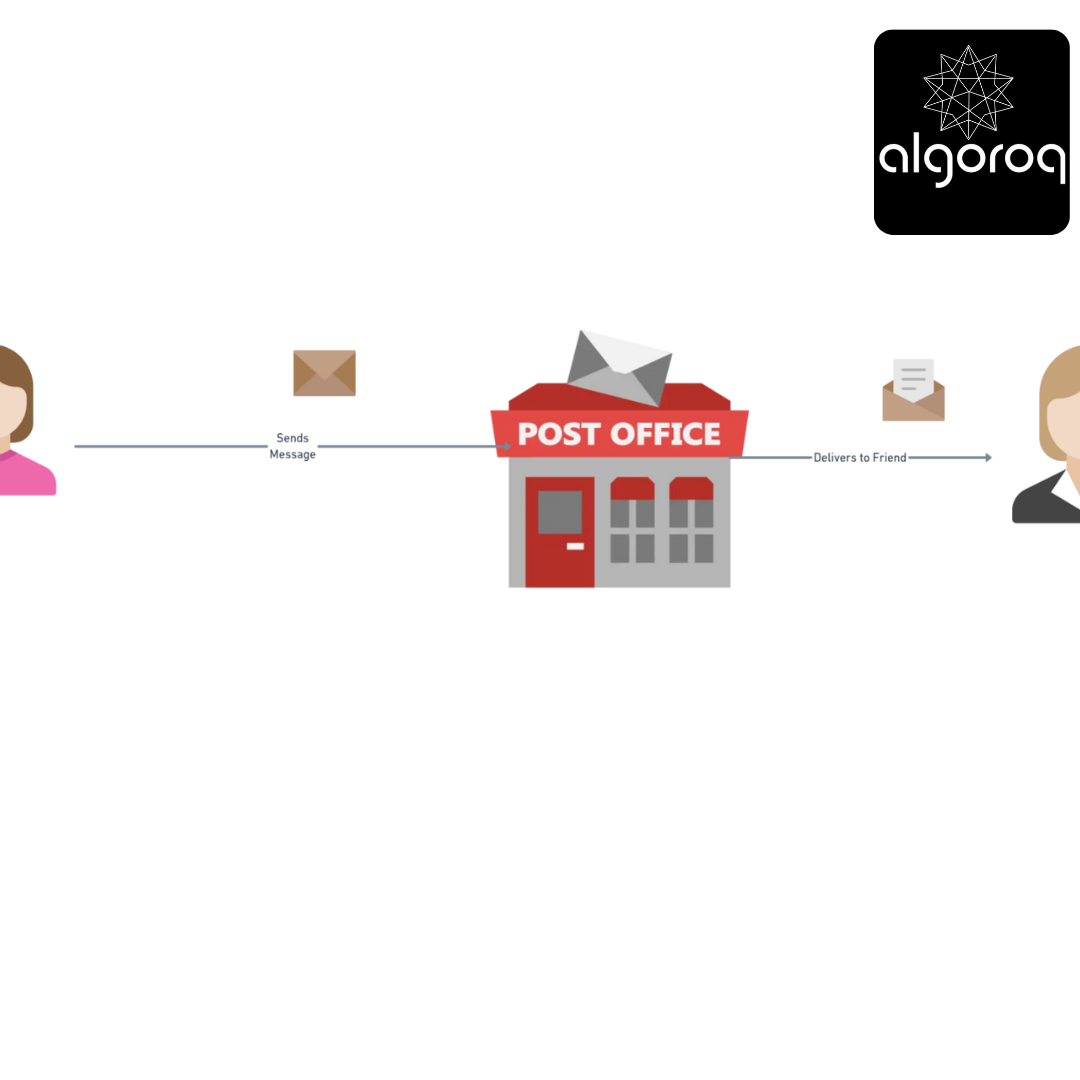
- WebRTC: You → → → Friend (direct, fast, private)
Add Headings (Format > Paragraph styles) and they will appear in your table of contents.
Key Features:
✅ Peer-to-peer connections (no server middleman for media)
✅ Real-time audio and video (low latency)
✅ Data channels (send any data, not just video)
✅ Built into browsers (no plugins needed!)
✅ Encrypted by default (secure)
Key Insight: WebRTC turns every browser into a communication endpoint, eliminating the need for expensive media servers!
🎥 Interactive Exercise: The Video Call Setup Dance Scenario: You want to video call a friend. Think about what needs to happen:
Traditional (Server-based like Zoom):
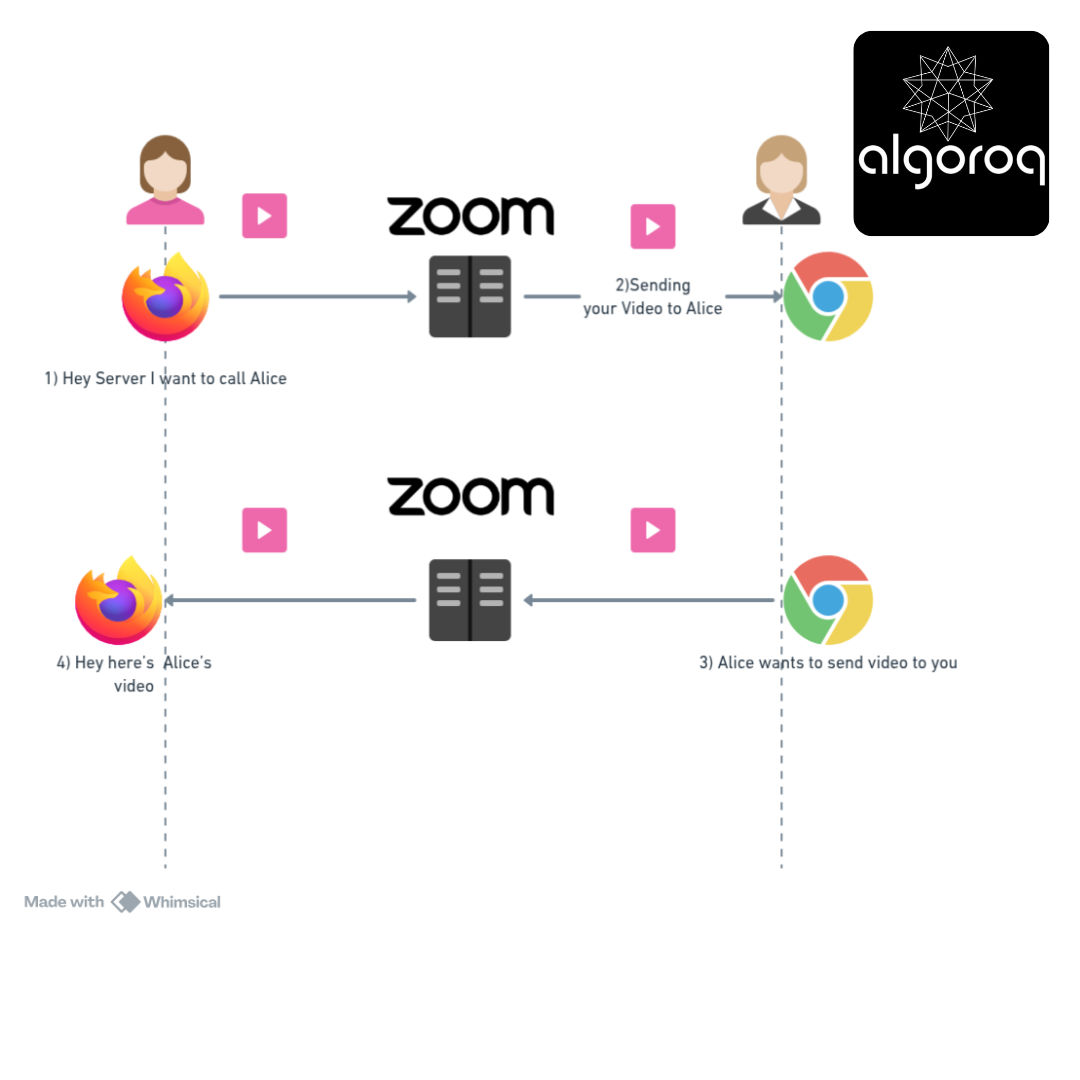
Problem: Server sees everything, costs bandwidth, adds latency
WebRTC (Peer-to-peer):
You: "Hey server, how do I reach Alice?" Server: "Alice is at IP 123.45.67.89, here's the connection info" You: [Establish direct connection to Alice]
[Your video] → → → Alice (DIRECT!)
[Alice's video] → → → You (DIRECT!)
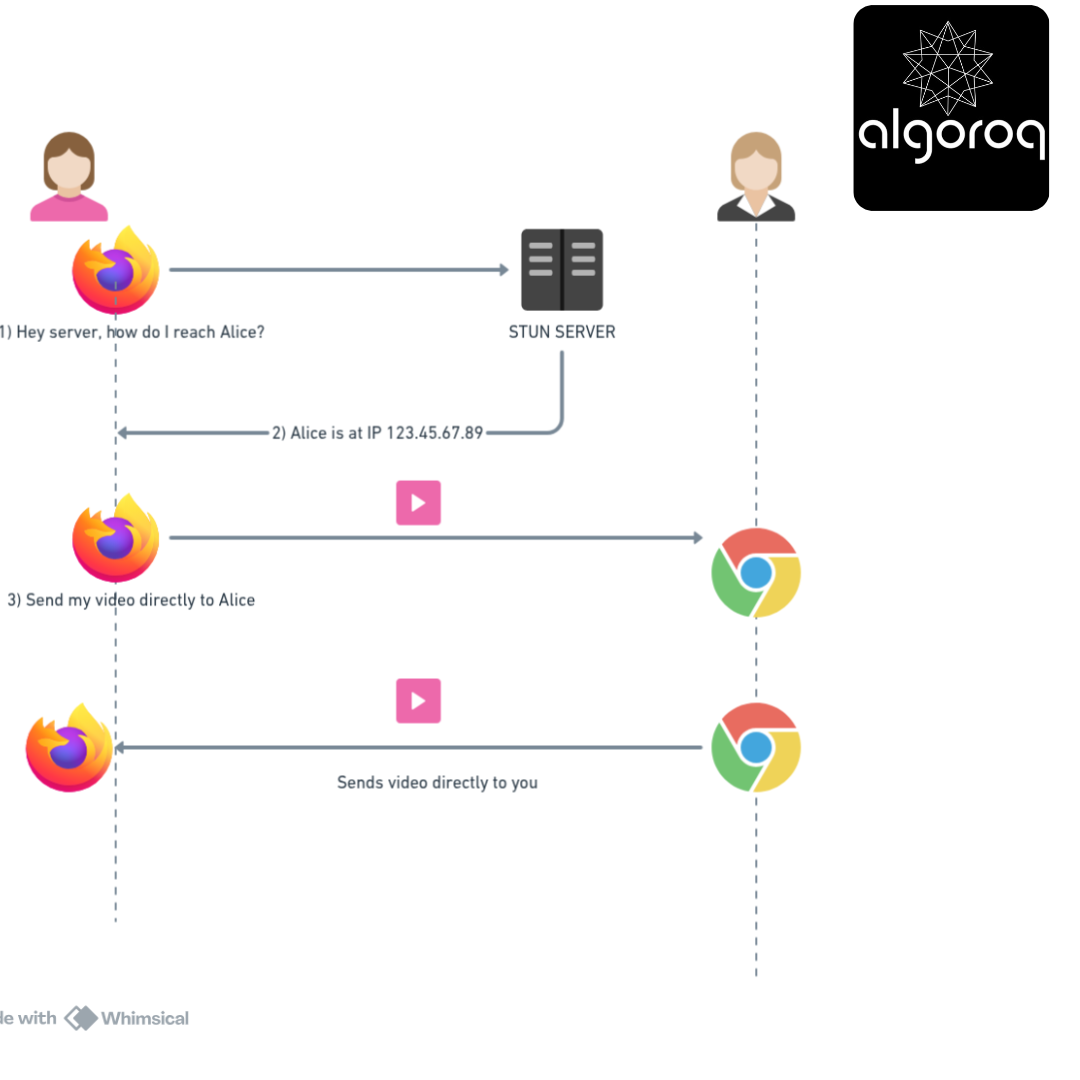
Server: "What are you two talking about?" You: "None of your business! 😎" (encrypted!)
Real-world parallel: WebRTC is like getting someone's phone number from a directory (server), but then calling them directly. The directory doesn't listen to your conversation!
But wait... there's a catch! (The NAT Problem)
🚨 Common Misconception: "Direct Connection Means Simple... Right?" You might think: "If it's peer-to-peer, I just need my friend's IP address and we connect!"
The NAT Problem (Network Address Translation):
The Internet Reality:
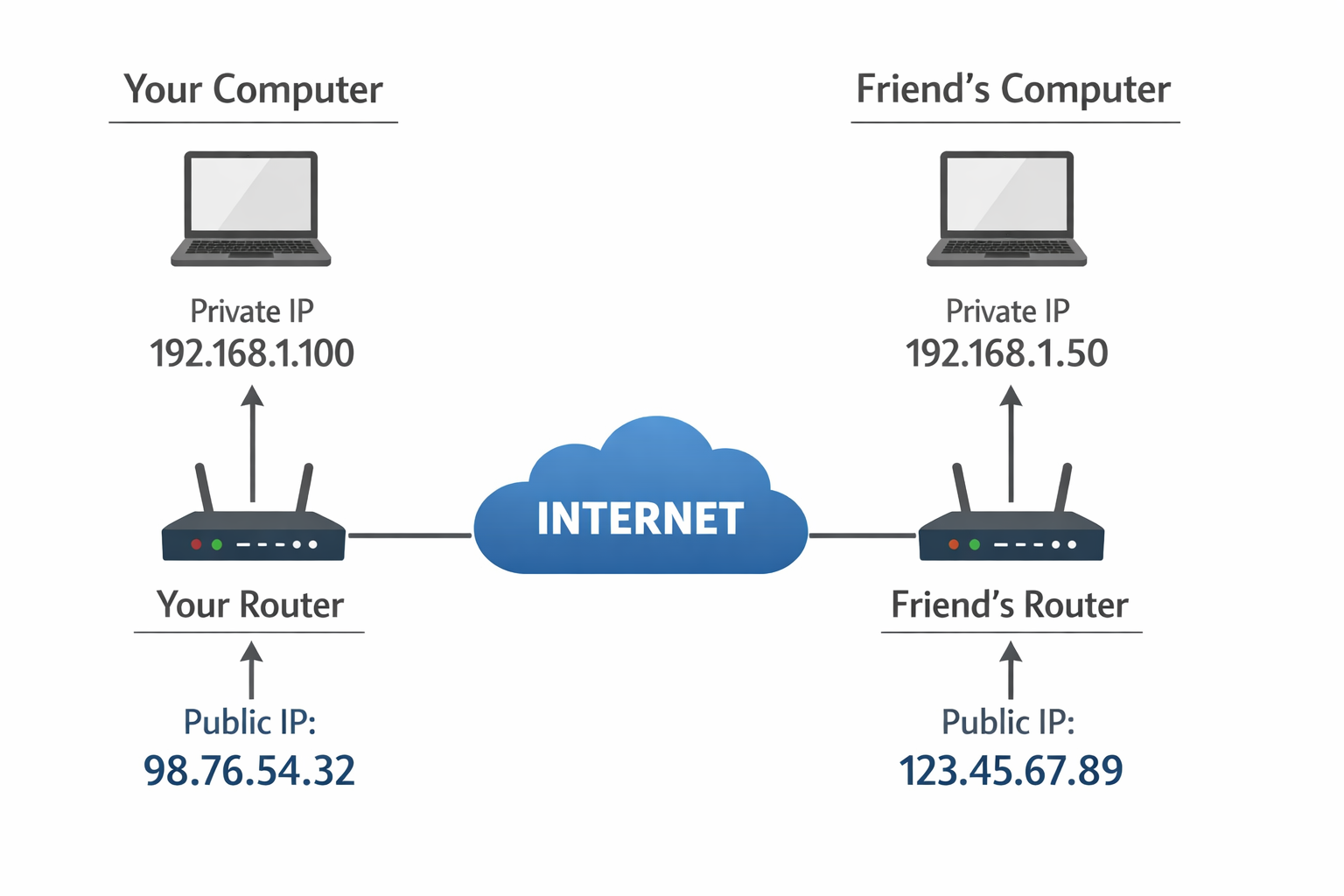
Problem: You can't directly call 192.168.1.50! That's your friend's PRIVATE address behind their router! Your packets don't know how to reach it!
Mental model: It's like apartment buildings. Your friend lives in "Apartment 50" but you need the building's street address first. "Apartment 50" means nothing without the building address!
The WebRTC Solution: ICE (Interactive Connectivity Establishment) WebRTC tries multiple connection strategies:
- STUN: "Hey router, what's my public IP?" (NAT discovery)
- TURN: "Can't connect directly? Relay through this server" (fallback)
- ICE: "Try all methods and pick the best one!" (smart coordinator)
The Connection Process:
Step 1: STUN Discovery You → STUN Server: "What's my public IP and port?" STUN → You: "You're reachable at 98.76.54.32:5000"
Step 2: ICE Candidate Gathering You gather all possible ways to reach you:
-
Direct: 192.168.1.100:5000 (local network)
-
STUN: 98.76.54.32:5000 (public IP)
-
TURN: relay.server.com:3478 (backup relay)
Step 3: Exchange Candidates (via signaling server)
You → Signaling Server → Friend: "Here are all my addresses"
Friend → Signaling Server → You: "Here are all my addresses"
Step 4: ICE Tries Connections
ICE: "Can I reach 192.168.1.50 directly?" → ❌ Failed
ICE: "Can I reach 123.45.67.89:5000?" → ✅ SUCCESS! (Hole punching through NAT worked!)
If all else fails:
ICE: "Fine, relay through TURN server" → ✅ Works but slower
Real-world parallel: Like trying to deliver a package:
-
Try front door (direct connection)
-
Try side door (NAT hole punching)
-
Leave with building manager (TURN relay)
🤝 The Signaling Dance: How Peers Find Each Other
The Setup Paradox: To connect peer-to-peer, you first need to... not be peer-to-peer! 😅
The Handshake Process (SDP Exchange):
You and Friend need to exchange:
-
Media capabilities ("I can do H.264 video, Opus audio")
-
Network information (ICE candidates)
-
Security keys (encryption)
This exchange happens via a Signaling Server:
- You Create an Offer (SDP):
┌─────────────────────────────────────┐
│ SDP (Session Description Protocol) │
│ "I want to send video at 720p" │
│ "I support H.264 and VP8 codecs" │
│ "My ICE candidates are: ..." │
│ "My encryption fingerprint: ..." │
└─────────────────────────────────────┘
-
Send offer via Signaling Server: You → WebSocket/HTTP → Signaling Server → Friend
-
Friend Creates an Answer:
┌─────────────────────────────────────┐
│ "I accept! Here's my info:" │
│ "I'll use H.264 at 720p too" │
│ "My ICE candidates are: ..." │
│ "My encryption fingerprint: ..." │
└─────────────────────────────────────┘
-
Send answer back: Friend → Signaling Server → You
-
Exchange ICE Candidates: Both: "Found new way to reach me!" → Signaling Server → Other person
-
Finally, Direct Connection Established! 🎉 You ←──────[Encrypted Media]──────→ Friend (Signaling server no longer involved!)
🔊 Media Streams: Getting Your Camera and Microphone
The getUserMedia Magic:
What happens behind the scenes:
-
Browser: "Website wants camera access!" User: [Clicks Allow] ✅
-
Browser opens hardware: Camera → Captures frames → Video Track Microphone → Captures audio → Audio Track
-
MediaStream object created: Stream = { videoTrack, audioTrack }
-
Send to peer connection: Tracks → Encoder → Network → Friend's Decoder → Friend's speakers/screen
Real-world parallel: Like setting up a live TV broadcast:
-
Permission to use studio
-
Camera and microphone setup
-
Video feed starts
-
Broadcast to viewers
Common controls:
🔐 Security: Why WebRTC is Secure by Default
The Encryption Stack:
Layer 1: DTLS (Datagram Transport Layer Security)
├── Handshake authentication
└── Key exchange
Layer 2: SRTP (Secure Real-time Transport Protocol)
├── Encrypt audio
└── Encrypt video
Layer 3: SCTP (for data channels)
└── Encrypted arbitrary data
Result: End-to-end encryption, mandatory!
The Security Flow:
Step 1: Exchange fingerprints via signaling You: "My certificate fingerprint: ABC123..." Friend: "My certificate fingerprint: XYZ789..."
Step 2: DTLS handshake Browser: "Prove you're the person with fingerprint ABC123" Friend: [Provides certificate] Browser: "Verified! ✅ Establishing encrypted channel..."
Step 3: All media encrypted
Your pixels → [Encrypted] → → → [Decrypted] → Friend's screen
Even if someone intercepts packets:
Attacker: [Captures encrypted data]
Attacker: "All I see is: $#&@!#@$#&@..." 🤷
Mental model: Like sending a locked box where only your friend has the key. The postal service (network) can't open it even if they tried!
Why this matters:
❌ Traditional servers: Can see/record your video
✅ WebRTC P2P: Server never sees media, only sees connection coordinates
Real-world parallel: Like using a courier vs. mailing a postcard:
- Postcard: Everyone can read it (unencrypted server calls)
- Locked package: Only recipient can open (WebRTC)
🚰 Adaptive Bitrate: Handling Bad Networks
The Challenge: Internet speed fluctuates!
Perfect WiFi: ▓▓▓▓▓▓▓▓▓▓ (High quality video)
On the bus: ▓▓▓░░░░░░░ (Spotty connection)
In tunnel: ▓░░░░░░░░░ (Barely connected)
Question: How does video call stay smooth?
WebRTC's Solution: Adaptive Bitrate
Network Fast (5 Mbps available):
├── Send 1080p video @ 2.5 Mbps
├── High quality audio @ 128 kbps
└── Smooth experience ✨
Network Slows (1 Mbps available):
├── Drop to 480p video @ 800 kbps
├── Reduce audio to 64 kbps
└── Still works, just lower quality
Network Terrible (200 kbps available):
├── Audio only @ 32 kbps
├── Video paused/frozen
└── Call continues! 🎯
How it works:
-
Monitor connection:
RTCPeerConnection detects:
-
Packet loss percentage
-
Round-trip time (latency)
-
Available bandwidth
-
-
Adjust encoding:
High bandwidth → videoTrack.bitrate = 2500000
Low bandwidth → videoTrack.bitrate = 500000
-
Switch codecs if needed:
VP8 (high quality) ←→ H.264 (efficient) ←→ VP9 (adaptive)
Code snippet:
// Monitor connection stats
Real-world parallel: Like a car's automatic transmission. Uphill? Lower gear. Highway? High gear. WebRTC automatically shifts quality based on network conditions!
📊 Data Channels: Beyond Audio and Video
Surprise! WebRTC isn't just for video calls!
Data Channels = Send ANY data peer-to-peer!
Use cases:
├── File sharing (no server middleman!)
├── Gaming (low-latency game state)
├── Collaborative editing (real-time sync)
├── Screen sharing annotations
└── Chat messages (encrypted!)
Creating a Data Channel:
// Create data channel
Real-world parallel: Data channels are like having a private encrypted tunnel between you and your friend. Send files, messages, game moves—anything!—without a server seeing it.
Configuration options:
Reliable (like TCP): ordered: true maxRetransmits: unlimited → Use for: File transfers, chat messages
Unreliable (like UDP): ordered: false maxRetransmits: 0 → Use for: Gaming, live sensor data, video frames
🌐 The Complete WebRTC Architecture
Putting it all together:
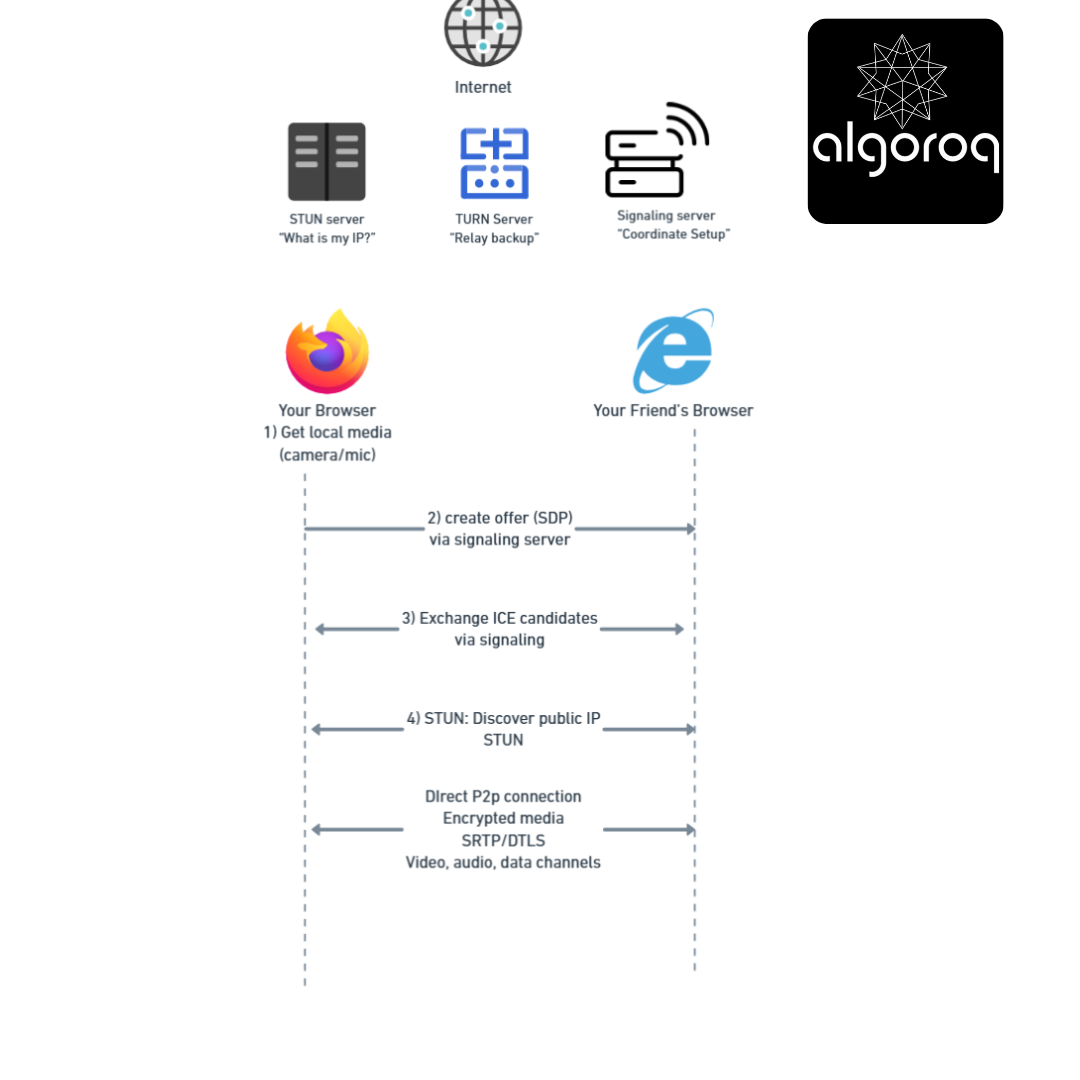
The Timeline:
0ms: User clicks "Call"
10ms: getUserMedia() - Get camera/mic
200ms: Create RTCPeerConnection
210ms: Create SDP offer
220ms: Send offer via signaling → Friend
500ms: Friend receives offer
510ms: Friend creates answer
520ms: Friend sends answer → You
800ms: You receive answer
810ms: ICE candidates exchanged
1000ms: STUN servers contacted
1200ms: ICE connectivity checks
1500ms: 🎉 Direct connection established!
1510ms: Media starts flowing
Total time to connect: ~1.5 seconds!
💡 Final Synthesis Challenge: The Revolution Comparison
Complete this comparison: "Traditional video calling is like mailing a videotape to a friend via a postal service. WebRTC is like..."
Your answer should include:
- How connections are established
- Where media flows
- Security implications
- Latency considerations
Take a moment to formulate your complete answer...
The Complete Picture: WebRTC is like having a direct video wire from your house to your friend's house:
✅ Initial setup requires asking neighbors for directions (signaling server)
✅ Once found, you connect directly - no middleman (peer-to-peer)
✅ The wire is encrypted - only you and friend can understand signals (DTLS/SRTP)
✅ Adjusts picture quality based on wire capacity (adaptive bitrate)
✅ If direct wire fails, reroutes through a relay station (TURN fallback)
✅ Can send anything through the wire, not just video (data channels)
✅ Built into every modern communication device (browser-native)
This is why:
- Video calls are more private (server can't see media)
- Latency is lower (no server relay delay)
- Costs are lower (no server bandwidth charges)
- Quality adapts to your connection automatically
WebRTC makes real-time, secure, peer-to-peer communication accessible to any web developer!
🎯 Quick Recap: Test Your Understanding Without looking back, can you explain:
- What problem does STUN solve?
- Why do we need a signaling server if connections are peer-to-peer?
- When would you use TURN instead of direct P2P?
- What's the difference between mesh and SFU architectures?
Mental check: If you can answer these clearly, you've mastered WebRTC fundamentals!
🚀 Your Next Learning Adventure Now that you understand WebRTC, explore:
Advanced Topics:
- Simulcast: Sending multiple quality versions simultaneously
- SVC (Scalable Video Coding): Layered encoding for flexibility
- Perfect Negotiation Pattern: Handling offer/answer conflicts
- Insertable Streams: Custom media processing
Popular WebRTC Libraries:
- Simple-Peer: WebRTC wrapper for easy P2P
- PeerJS: Simplified WebRTC API with fallbacks
- mediasoup: Production-grade SFU server
- Janus: Versatile WebRTC gateway
Real-World Implementations:
- Video conferencing (Zoom, Google Meet architecture)
- Live streaming (Twitch low-latency)
- Gaming (real-time multiplayer state sync)
- File sharing (peer-to-peer transfer apps)
Key Takeaways
- WebRTC enables peer-to-peer audio, video, and data communication in browsers — no plugins or server relay required for media
- Signaling establishes the connection — peers exchange SDP offers/answers and ICE candidates through a signaling server
- STUN/TURN servers handle NAT traversal — STUN discovers public IPs, TURN relays traffic when direct connection fails
- WebRTC is used by Google Meet, Discord, and most video calling apps — the standard for real-time communication in the browser
Unlock with Pro
Unlock the full content and everything at this level.
Get Pro — $9/moAlready a member? Log in