Rabbitmq

RabbitMQ
A traditional message broker with sophisticated routing — direct, topic, fanout, and headers exchanges give you fine-grained control over message delivery.
RabbitMQ: The Smart Message Router (When You Need Flexible Delivery)
🎯 Challenge : The Office Mail Room Problem Imagine this scenario: You're running a large office building with 100 departments. Every day, thousands of messages need to be delivered:
-
Some urgent (priority)
-
Some go to multiple departments (broadcast)
-
Some need complex routing ("If finance AND approved, then accounting")
-
Some need confirmation of delivery
Traditional approach: Hire a mail person to memorize all rules and hand-deliver everything.
Smart approach: Set up a mail room with:
-
Multiple sorting bins (queues)
-
Routing rules (exchanges)
-
Labels that determine where mail goes (bindings)
Pause and think: How do you efficiently route messages with complex delivery rules?
The Answer: RabbitMQ is your intelligent message broker! It's like a sophisticated mail room that:
✅ Routes messages based on rules (exchanges)
✅ Stores messages until ready for delivery (queues)
✅ Supports complex routing patterns (bindings)
✅ Guarantees delivery (acknowledgments)
✅ Handles priorities (urgent messages first)
✅ Distributes work fairly (load balancing)
Key Insight: RabbitMQ excels at flexible, intelligent message routing with delivery guarantees!
🏢 Interactive Exercise: The Mail Room Model
Traditional Direct Delivery (Without RabbitMQ):

Problems:
-
Service A must know about B, C, D (tight coupling)
-
If Service B is down, what happens?
-
How to add Service E without changing Service A?
-
No delivery guarantees
RabbitMQ Mail Room (With Message Broker):
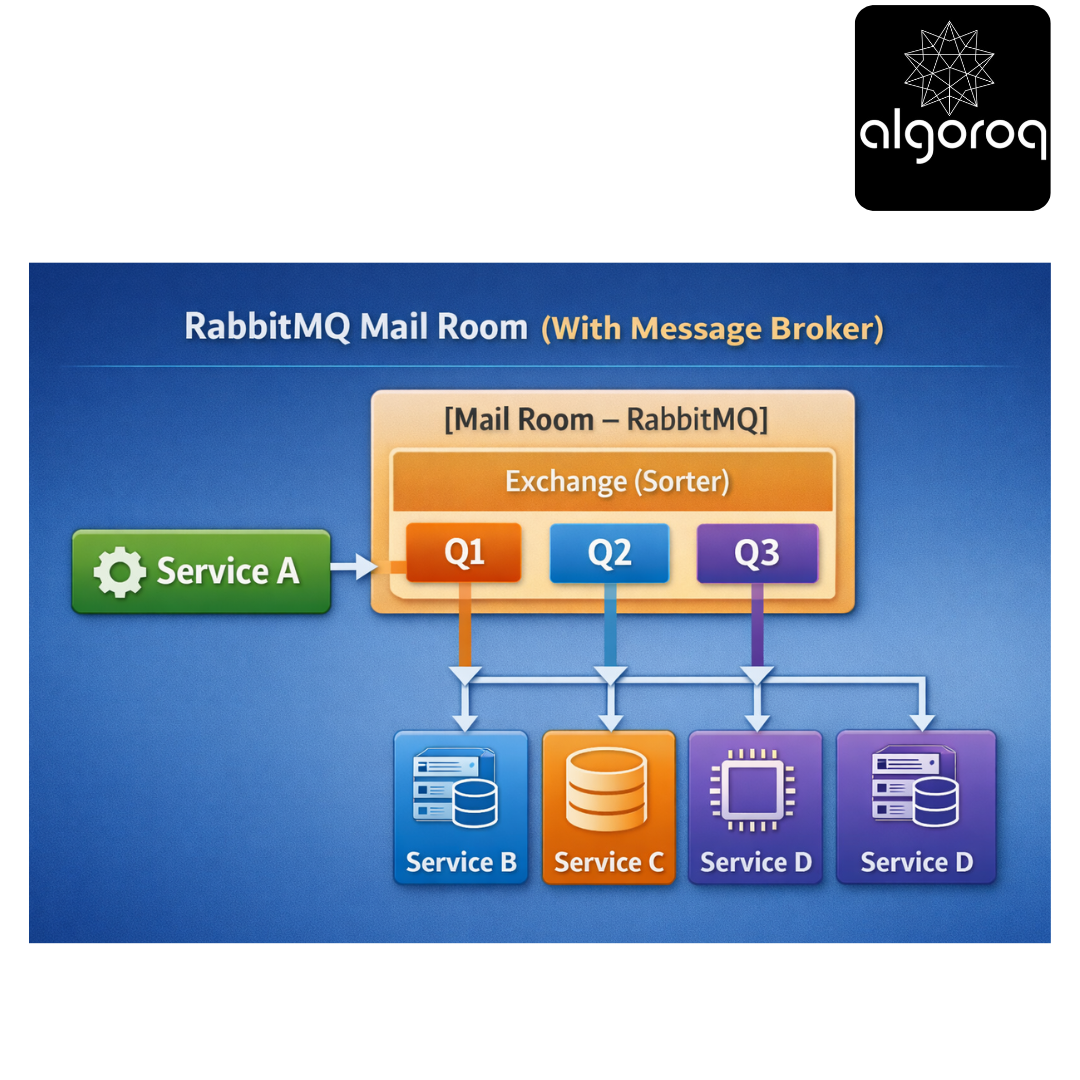
Benefits:
✅ Service A doesn't know about B, C, D (decoupled)
✅ Messages wait in queue if service is down
✅ Add Service E by adding new queue (no code changes)
✅ Guaranteed delivery with acknowledgments
Real-world parallel: RabbitMQ is like a post office. You drop mail at the post office (exchange), they sort it (routing), hold it in mailboxes (queues), and deliver when the recipient is ready!
🎭 The Three Core Concepts: Exchanges, Queues, Bindings
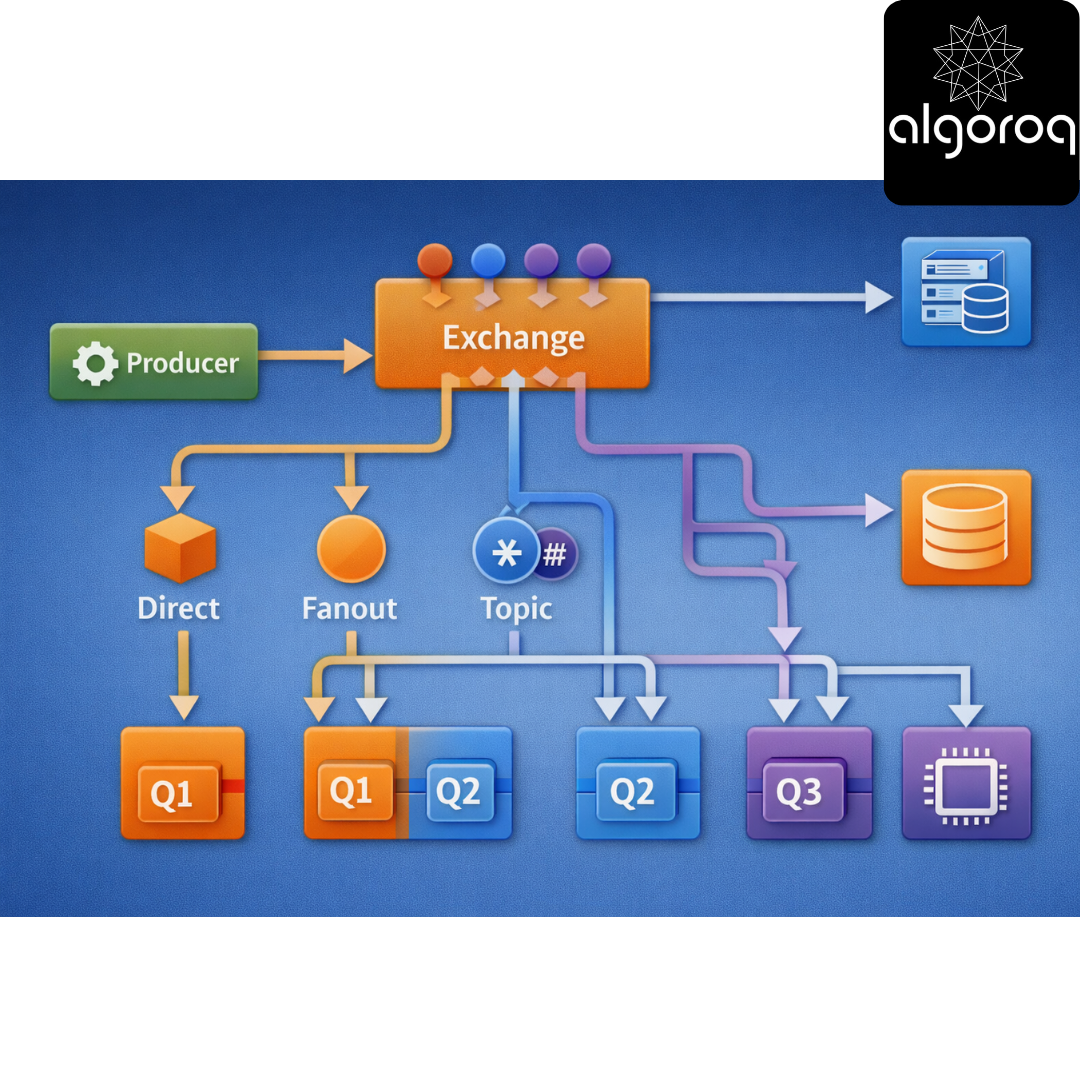
- Exchanges (The Sorting Facility):
An Exchange receives messages and routes them to queues:
Producer → Exchange → Routes to → Queue(s) → Consumer
Types of Exchanges:
├── Direct (route by exact key match)
├── Fanout (broadcast to all queues)
├── Topic (pattern matching)
└── Headers (route by message headers)
- Queues (The Mailboxes):
A Queue stores messages until consumers are ready:

Features:
├── FIFO (first in, first out)
├── Persistent (survives broker restart)
├── Exclusive (single consumer only)
└── Auto-delete (deleted when unused)
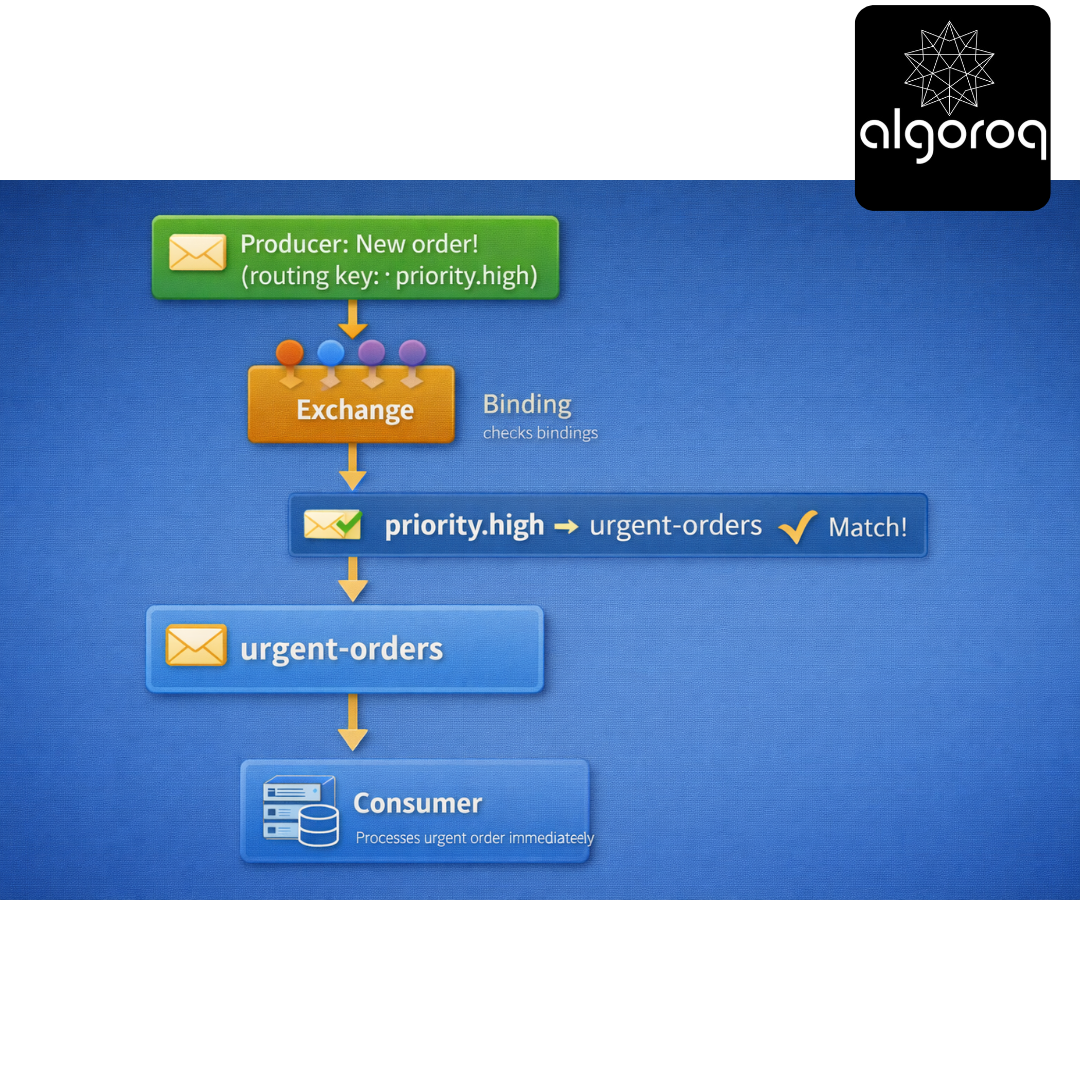
- Bindings (The Routing Rules):
A Binding connects Exchange to Queue with a rule:
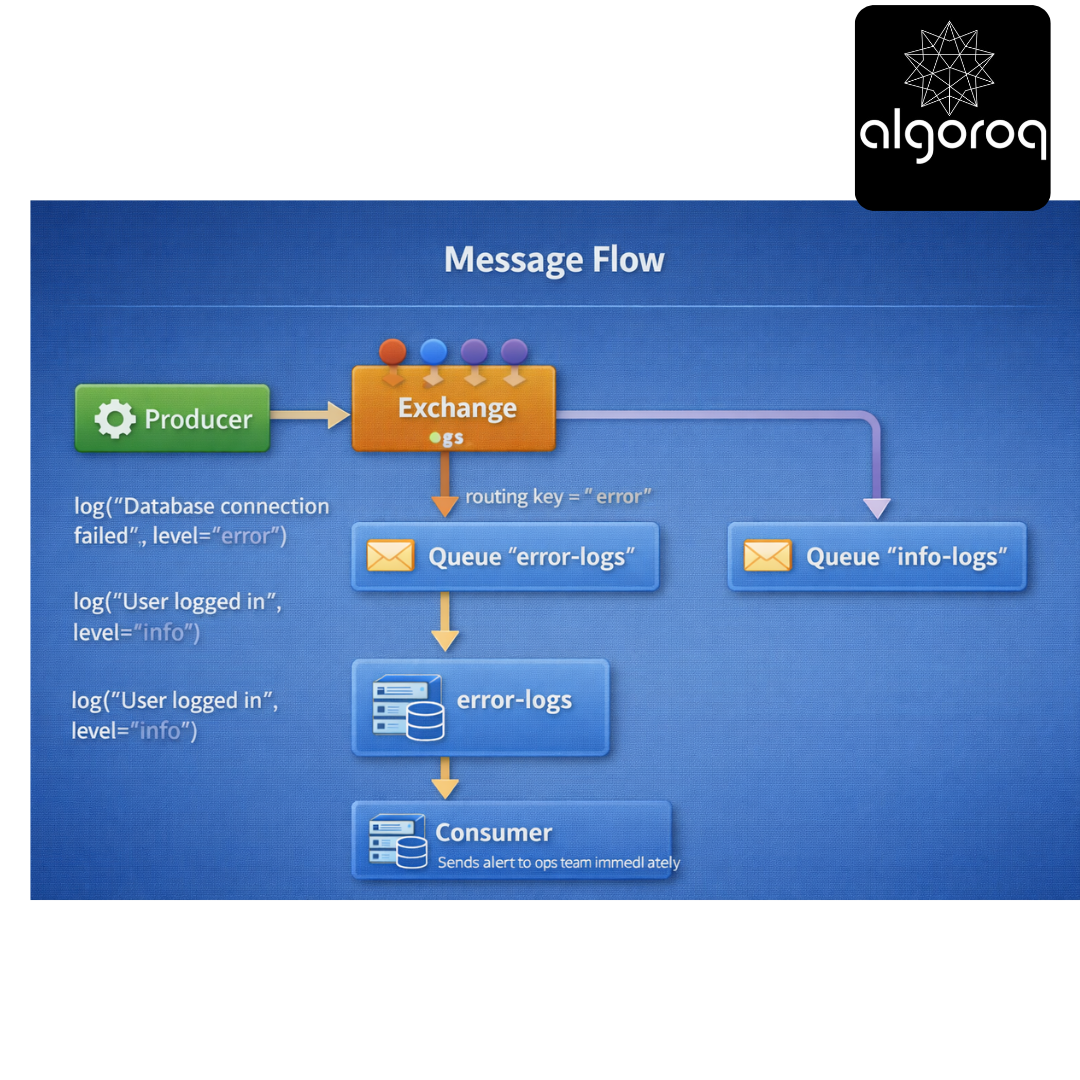
Visual Flow:
Real-world parallel:
-
Exchange = Mail sorter (decides where mail goes)
-
Queue = Mailbox (holds mail)
-
Binding = Address rules (ZIP code → neighborhood)
🔀 Exchange Types: Choosing the Right Router
- Direct Exchange (Exact Match Routing):
Use case: Route messages by exact key
Setup: Exchange: "logs" (type: direct) Queues:
-
"error-logs" (binding key: "error")
-
"info-logs" (binding key: "info")
-
"debug-logs" (binding key: "debug")
-
Message Flow:
Code example:
Real-world parallel: Direct exchange is like apartment mail - exact apartment number needed.
- Fanout Exchange (Broadcast to All):
Use case: Send same message to multiple queues
Setup: Exchange: "notifications" (type: fanout) Queues:
-
"email-queue"
-
"sms-queue"
-
"push-queue"
-
Message Flow:
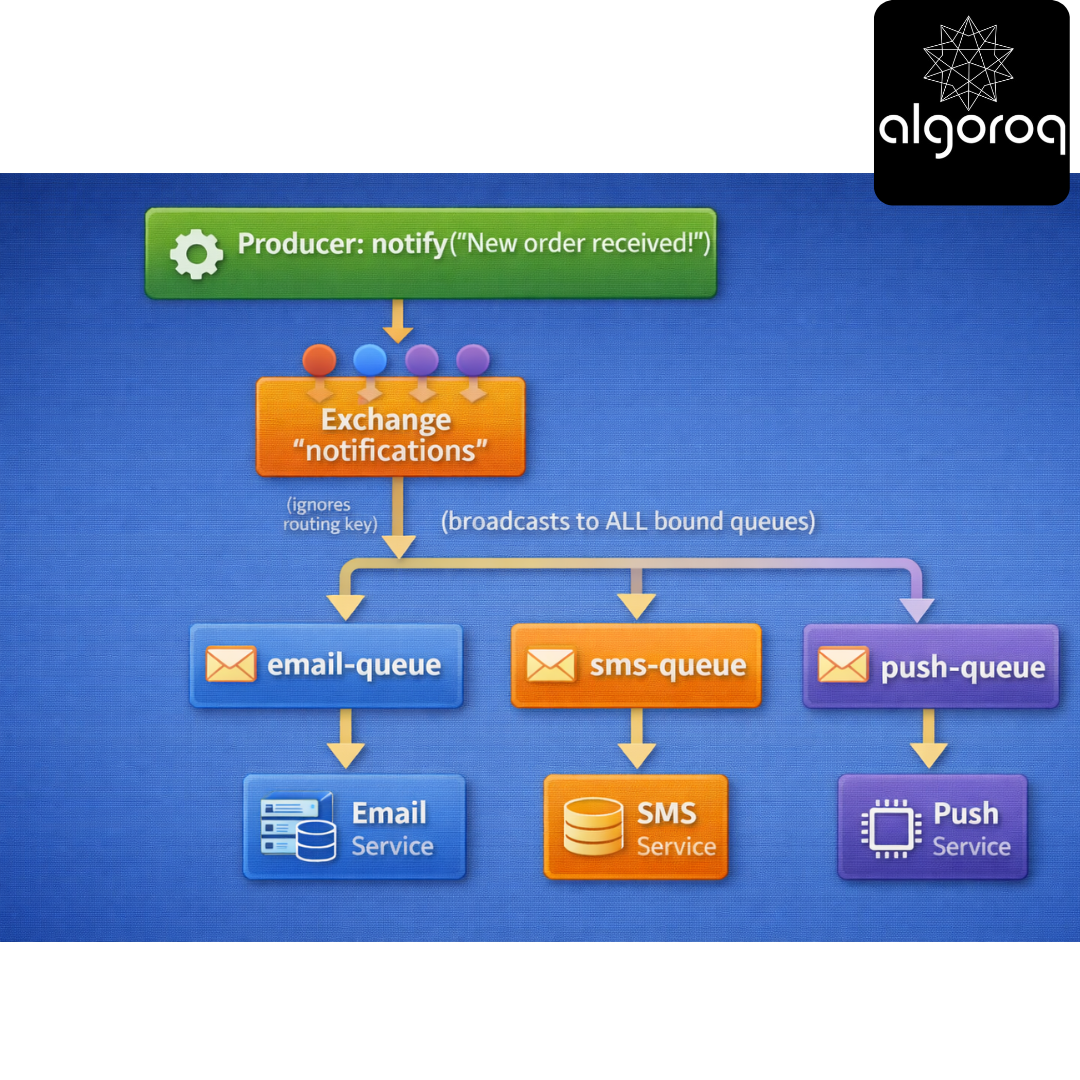
Same message reaches ALL queues simultaneously!
Code example:
All 3 queues receive the message!
Real-world parallel: Fanout is like a PA system - everyone hears the announcement.
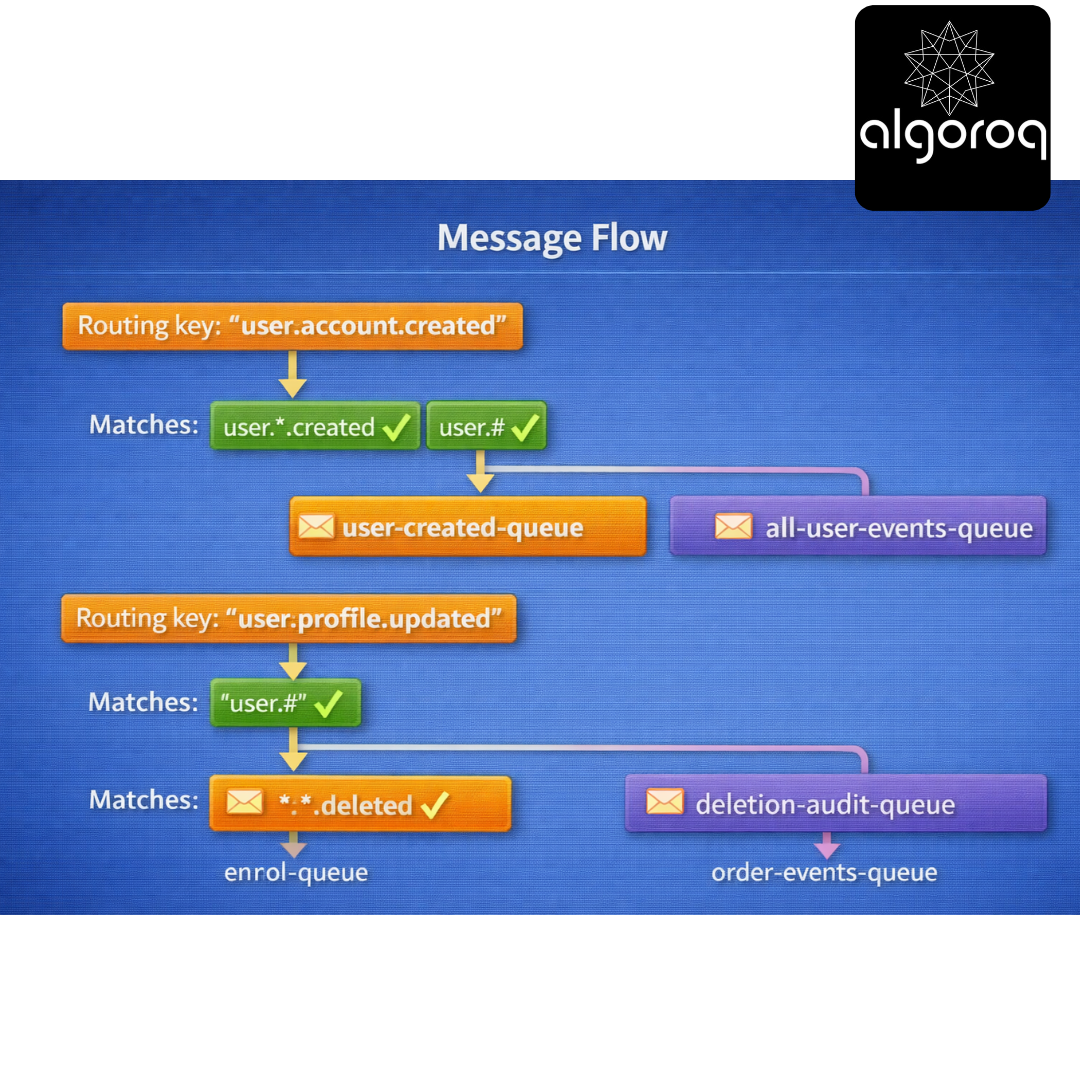
- Topic Exchange (Pattern Matching):
Use case: Flexible routing with wildcards
Wildcards:
- (star) = exactly one word
(hash) = zero or more words
Setup: Exchange: "events" (type: topic) Bindings:
- "user.*.created" → user-created-queue
- "user.#" → all-user-events-queue
- "..deleted" → deletion-audit-queue
- "order.#" → order-events-queue*
Message Flow: Routing key: "user.account.created" ↓ Matches: "user..created" ✓ "user.#" ✓ ↓ Goes to: user-created-queue AND all-user-events-queue
Routing key: "user.profile.updated" ↓ Matches: "user.#" ✓ ↓ Goes to: all-user-events-queue
Routing key: "order.payment.deleted" ↓ Matches: "..deleted" ✓ "order.#" ✓ ↓ Goes to: deletion-audit-queue AND order-events-queue
Code example:
Real-world parallel: Topic exchange is like organizing files:
-
"docs/2024/january/*.pdf" = specific pattern
-
"docs/#" = everything under docs*
- Headers Exchange (Attribute-Based Routing):
Use case: Route based on message properties, not routing key
Setup: Exchange: "tasks" (type: headers) Binding to "priority-queue": headers: {'priority': 'high', 'department': 'sales'} x-match: 'all' (must match ALL headers)
Binding to "sales-queue": headers: {'department': 'sales'} x-match: 'any' (match ANY header)
Message with headers: {'priority': 'high', 'department': 'sales'} ↓ Matches: priority-queue ✓ (both headers match) sales-queue ✓ (department matches)
Real-world parallel: Headers exchange is like email filters - route based on multiple attributes (sender, subject, has attachment).
🎮 Decision Game: Which Exchange Type?
Match the use case to the exchange type:
Use Cases: A. Log messages by severity level B. Notify all microservices of a new deployment C. Route events like "user.profile.updated" and "user.account.deleted" D. Distribute tasks based on multiple attributes (priority + category) E. Send payment confirmations to specific currency queues
Exchange Types:
- Direct
- Fanout
- Topic
- Headers
Think about routing complexity...
Answers:
A. Log messages by severity → Direct (1) Exact match: "error", "warn", "info"
B. Notify all microservices → Fanout (2) Broadcast to everyone
C. Route user events with patterns → Topic (3) Pattern: "user.." or "user.#"
D. Multiple attributes → Headers (4) Match on: priority=high AND category=urgent
E. Currency-specific routing → Direct (1) Exact match: "USD", "EUR", "GBP"
🚨 Common Misconception: "Messages Are Immediately Deleted After Reading... Right?"
You might think: "Once a consumer reads a message, it's gone."
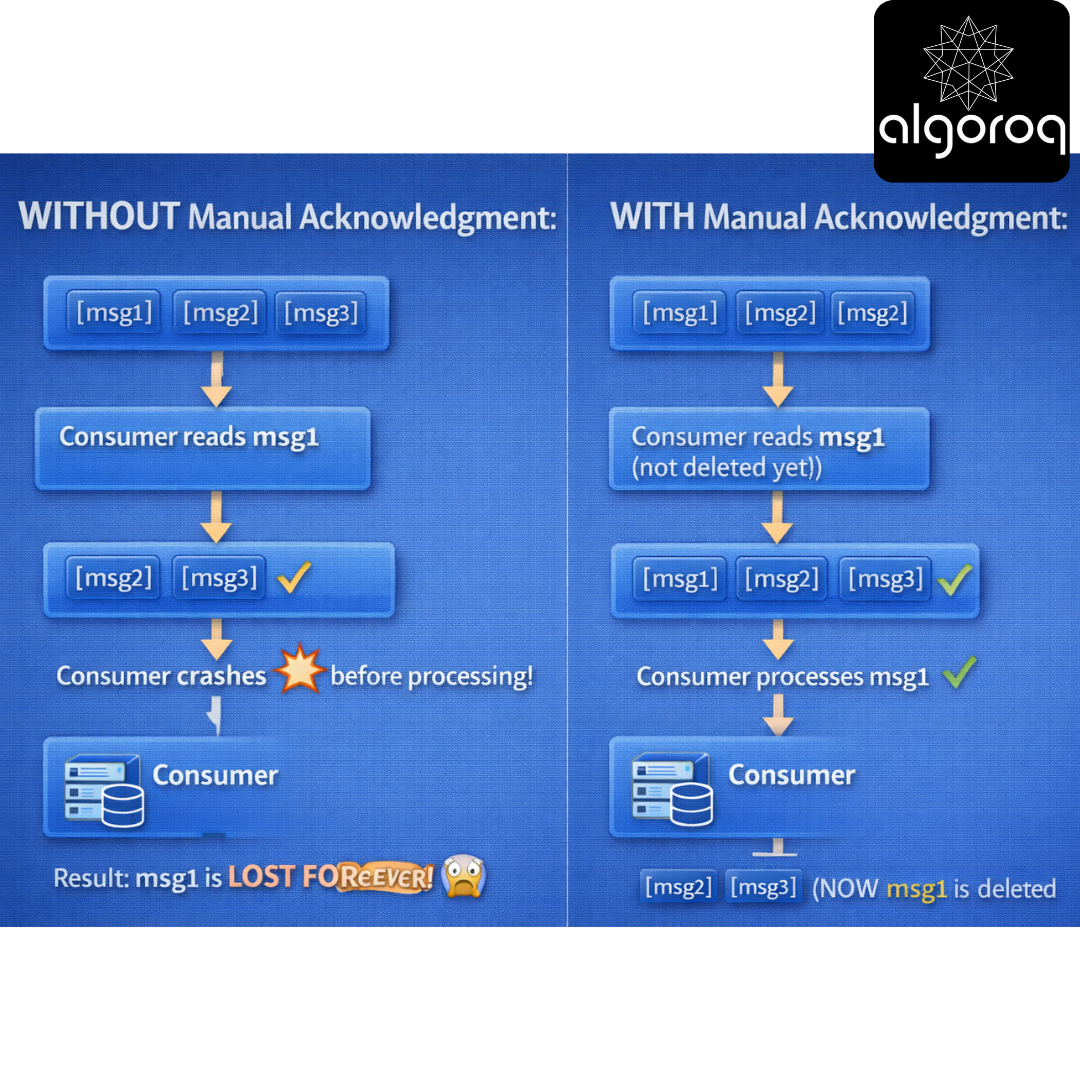
The Reality: Acknowledgments Control Deletion!
Without Acknowledgment (Auto-ack):
With Manual Acknowledgment:
If consumer crashes before ACK:
Code example:
Acknowledgment Options:
basic_ack:
├─ Positive acknowledgment
└─ "I processed this successfully, delete it"
basic_nack (requeue=True):
├─ Negative acknowledgment with requeue
└─ "I couldn't process this, put it back for someone else"
basic_nack (requeue=False):
├─ Negative acknowledgment without requeue
└─ "This message is bad, discard it or send to dead letter"
basic_reject:
├─ Reject single message
└─ Same as basic_nack but for one message only
Real-world parallel: Acknowledgments are like signing for a package:
- Auto-ack = Leave at door (risky if you're not home)
- Manual ack = Sign on receipt (safe, confirms you got it)
💪 Work Distribution: Fair Dispatch
The Problem:
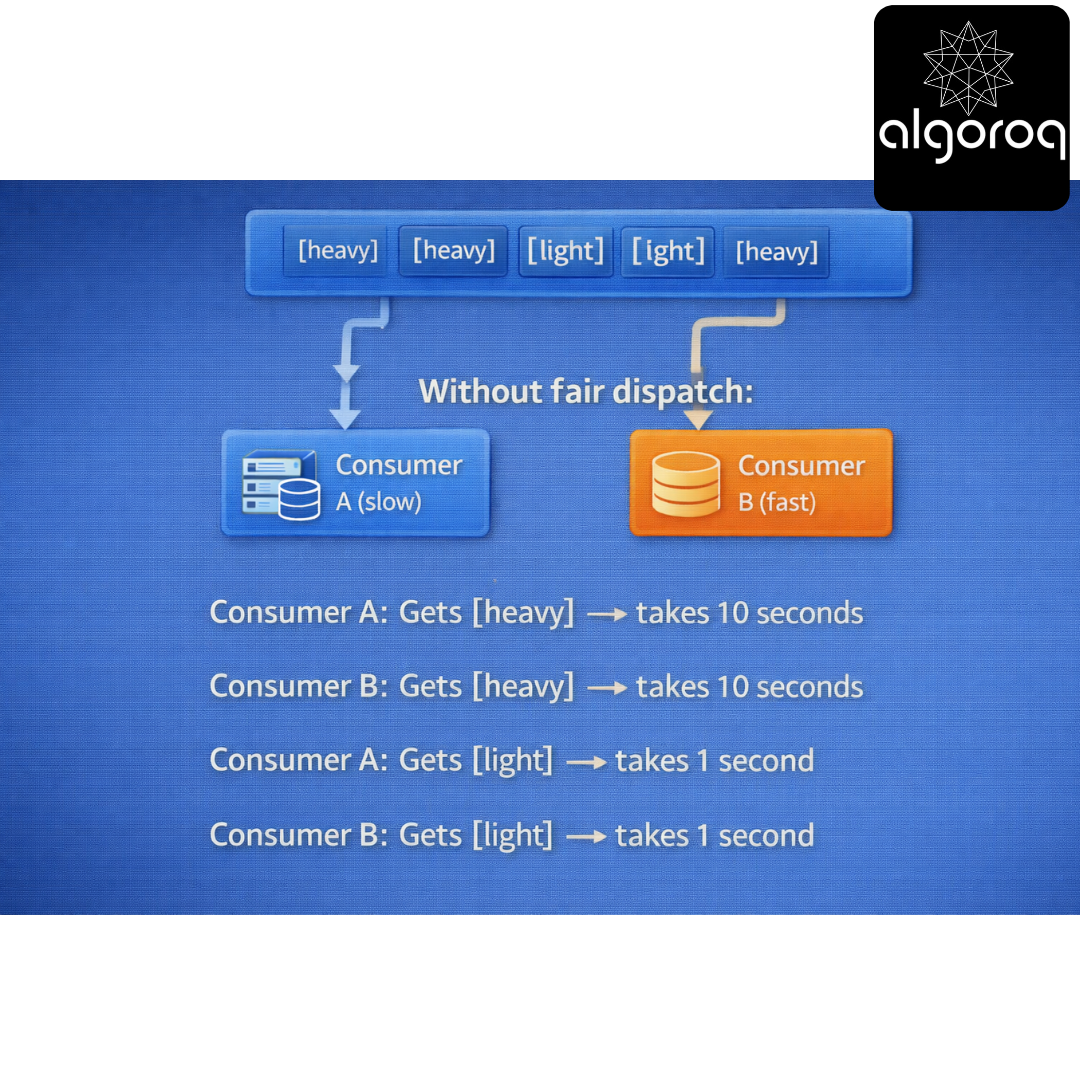
Without fair dispatch:
Consumer A: Gets [heavy] → takes 10 seconds
Consumer B: Gets [heavy] → takes 10 seconds
Consumer A: Gets [light] → takes 1 second
Consumer B: Gets [light] → takes 1 second
Consumer B finishes early but waits! Inefficient!
Solution: Prefetch Count (QoS)
Set prefetch to 1 (one message at a time)
channel.basic_qos(prefetch_count=1)
Now: Consumer A: Gets [heavy] (10 sec) → busy
Consumer B: Gets [heavy] (10 sec) → busy
(both busy, no messages dispatched yet)
Consumer B finishes first!
Consumer B: Gets [light] (1 sec) → processes immediately
Consumer A: Still working on first message...
Consumer B: Gets [light] (1 sec) → processes immediately
Consumer B: Gets [heavy] (10 sec)
Consumer A: Finishes, gets next message
Fair distribution based on availability! ✨
Prefetch Strategies:
prefetch_count = 1:
├─ Most fair distribution
├─ Best for variable message sizes
└─ Slightly lower throughput
prefetch_count = 10:
├─ Better throughput
├─ Less fair (fast consumer gets ahead)
└─ Good for uniform message sizes
prefetch_count = 0 (unlimited):
├─ All messages delivered at once
├─ No fairness
└─ Risk of overwhelming slow consumers
Real-world parallel: Prefetch is like task assignment. prefetch=1 means "only give me a task when I finish the current one" (fair). prefetch=10 means "give me 10 tasks at once" (efficient if uniform).
🏗️ Advanced Features: Beyond Basic Messaging
- Dead Letter Exchange (DLX):
Handle failed messages:
Normal flow: Queue "orders" → Consumer processes ✓
Failed flow: Queue "orders" → Consumer fails ❌ → After X retries → Send to Dead Letter Exchange → Routes to "failed-orders" queue → Manual intervention needed
Setup: queue_args = { 'x-dead-letter-exchange': 'dlx', 'x-dead-letter-routing-key': 'failed', 'x-message-ttl': 60000, # 60 seconds 'x-max-length': 10000 # Queue size limit } channel.queue_declare(queue='orders', arguments=queue_args)
Real-world parallel: DLX is like undeliverable mail - goes to special processing center.
- Message TTL (Time To Live):
Expire old messages:
queue_args = { 'x-message-ttl': 60000 # Messages expire after 60 seconds }
Or per-message: channel.basic_publish( exchange='', routing_key='orders', body='Order data', properties=pika.BasicProperties( expiration='60000' # This message expires in 60 sec ) )
Expired messages: ├─ Deleted automatically └─ Or sent to DLX if configured
Real-world parallel: TTL is like expiration dates on food - discard after certain time.
- Priority Queues:
Process important messages first:
Result: Priority 10 messages processed before priority 1!
Real-world parallel: Priority queue is like airport boarding - first class boards first!
- Message Persistence:
Survive broker restart:
Trade-off: ✅ Data survives broker crash ❌ Slower (disk writes)
Real-world parallel: Persistence is like saving documents - slower but won't lose work if computer crashes.
🎪 RabbitMQ vs Kafka: When to Use What?
Comparison Table: Here's the markdown table:
| Feature | RabbitMQ | Kafka |
|---|---|---|
| Model | Message queue | Distributed log |
| Routing | Complex (exchanges) | Simple (topics) |
| Message retain | Deleted after ack | Stored (configu.) |
| Delivery | Push to consumer | Consumer pulls |
| Throughput | 20K-50K msgs/sec | 1M+ msgs/sec |
| Latency | Lower (<10ms) | Higher (~50ms) |
| Ordering | Per queue | Per partition |
| Priorities | Yes ✓ | No ✗ |
| Complex route | Yes ✓ | No ✗ |
| Replay | No ✗ | Yes ✓ |
| Best for | Task queues | Event streaming |
Use RabbitMQ when:
✅ Need complex routing (topic exchanges, headers)
✅ Need message priorities
✅ Traditional task queue pattern
✅ Lower latency critical
✅ Need push-based delivery
✅ Work distribution among workers
✅ RPC patterns
Example scenarios:
├─ Order processing system
├─ Background job processing
├─ Email/SMS notification service
├─ Image processing pipeline
└─ Microservice communication (simple)
Use Kafka when:
✅ High throughput (millions of messages)
✅ Event sourcing / event streaming
✅ Need message replay
✅ Multiple consumers need same data
✅ Log aggregation
✅ Real-time analytics
✅ Building event-driven architecture
Example scenarios:
├─ Activity tracking (user actions)
├─ Log aggregation from services
├─ Real-time analytics pipeline
├─ Change data capture (CDC)
└─ Event sourcing systems
Real-world parallel:
-
RabbitMQ = Postal service (flexible routing, one-time delivery)
-
Kafka = Newspaper archive (everyone can read, stored forever)
🔧 Production Best Practices
- Connection Management:
- Error Handling:
- Publisher Confirms:
💡 Final Synthesis Challenge: The Intelligent Delivery System
Complete this comparison: "Simple message passing is like throwing notes over a fence. RabbitMQ is like..."
Your answer should include:
-
Routing flexibility
-
Delivery guarantees
-
Message handling
-
Decoupling benefits
Take a moment to formulate your complete answer...
The Complete Picture: RabbitMQ is like a sophisticated postal service with intelligent routing:
✅ Multiple sorting centers (exchanges) with different routing rules
✅ Secure mailboxes (queues) that hold items safely
✅ Flexible address schemes (bindings with patterns)
✅ Delivery confirmation (acknowledgments)
✅ Express delivery (priority messages)
✅ Undeliverable mail handling (dead letter queues)
✅ Sender doesn't need to know recipient (decoupling)
✅ Messages wait safely if recipient unavailable
This is why:
-
Uber uses RabbitMQ for dispatch system (complex routing)
-
Instagram uses RabbitMQ for asynchronous tasks
-
Reddit uses RabbitMQ for background job processing
-
Zalando uses RabbitMQ for order processing pipeline
RabbitMQ transforms simple message passing into reliable, flexible communication infrastructure!
🎯 Quick Recap: Test Your Understanding Without looking back, can you explain:
-
What's the difference between exchanges, queues, and bindings?
-
When would you use a topic exchange vs a direct exchange?
-
Why are manual acknowledgments safer than auto-ack?
-
When should you use RabbitMQ vs Kafka?
Mental check: If you can answer these clearly, you've mastered RabbitMQ fundamentals!
🚀 Your Next Learning Adventure Now that you understand RabbitMQ, explore:
Advanced RabbitMQ:
-
Clustering and high availability
-
Federation and Shovel plugins
-
RabbitMQ streams (Kafka-like features)
-
Custom plugins development
Patterns & Best Practices:
-
RPC patterns with RabbitMQ
-
Work queues with multiple workers
-
Pub/Sub patterns
-
Request/Reply patterns
Production Operations:
-
Performance tuning and optimization
-
Monitoring with Prometheus
-
Security (SSL/TLS, authentication)
-
Backup and disaster recovery
Related Technologies:
-
Apache ActiveMQ (JMS broker)
-
Amazon SQS (managed queue service)
-
Azure Service Bus (cloud messaging)
-
NATS (lightweight messaging)
Real-World Implementations:
-
Building resilient microservices with RabbitMQ
-
Event-driven architecture patterns
-
CQRS with RabbitMQ
-
Saga patterns for distributed transactions
Key Takeaways
- RabbitMQ is a traditional message broker with flexible routing — supports direct, topic, fanout, and headers exchange types
- Messages are removed after acknowledgment — unlike Kafka, consumed messages don't persist for replay
- RabbitMQ excels at complex routing patterns — routing keys and exchange types enable sophisticated message filtering
- Use RabbitMQ for task queues and RPC-style messaging — where message acknowledgment and complex routing matter more than replay
Unlock with Pro
Unlock the full content and everything at this level.
Get Pro — $9/moAlready a member? Log in