Monoliths to Microservices

Monoliths to Microservices
The spectrum from a single deployable unit to independently deployed services — and why most teams should start monolithic and extract services only when they need to.
🏢 Monolith vs Microservices: The Building Story
Let’s learn about two companies building their office spaces.
Company A: The Single Building (Monolith)
Company A's Office:
━━━━━━━━━━━━━━━━━━━━━━━━━━━━━━━━

Everyone in ONE place:
✓ Easy communication (walk to any floor)
✓ Shared infrastructure (one server room)
✓ Simple management (one building)
Advantages:
- Want to talk to marketing? Walk upstairs
- Need to check servers? Go to basement
- Problem with electricity? Fix once for everyone
- Building maintenance? One contract
Disadvantages:
- Fire on floor 3? Evacuate ENTIRE building
- Renovating floor 4? Disrupts everyone
- Building at capacity? Can't expand easily
- Elevator breaks? No one can move between floors
Company B: The Campus (Microservices)
Company B's Campus:
━━━━━━━━━━━━━━━━━━━━━━━━━━━━━━━━

Each building:
✓ Independent utilities
✓ Own entrance/exit
✓ Can be renovated separately
✓ Can scale individually
Advantages:
- Fire in Sales building? Others keep working
- Renovate Engineering? Doesn't affect Marketing
- Engineering growing? Build bigger Engineering building
- Each building optimized for its needs
Disadvantages:
- Cross-building meetings? Need to travel
- Coordination is harder (phone calls, emails)
- More maintenance contracts (one per building)
- More expensive (multiple infrastructures)
Now Let's Apply This to Software
Monolithic Application Architecture:
E-Commerce Monolith:
━━━━━━━━━━━━━━━━━━━━━━━━━━━━━━━━

All code in ONE repository ONE deployment ONE database ONE server (or replicas of the same thing)
Real-world flow:
User Action: "Add item to cart"
━━━━━━━━━━━━━━━━━━━━━━━━━━━━━━━━
-
Request hits monolith
-
Auth module checks user
-
Catalog module validates product
-
Cart module adds item
-
Inventory module reserves stock
-
All happens in ONE application
-
All shares ONE database
If ANY part fails → Entire request fails
Microservices Architecture:
E-Commerce Microservices:
━━━━━━━━━━━━━━━━━━━━━━━━━━━━━━━━

Each service:
-
Independent codebase
-
Independent database
-
Independent deployment
-
Independent scaling
Real-world flow:
User Action: "Add item to cart"
━━━━━━━━━━━━━━━━━━━━━━━━━━━━━━━━
-
API Gateway receives request
-
Gateway → Auth Service: "Is user logged in?"
Auth Service: "Yes, user_id: 42" ✓
-
Gateway → Product Service: "Does product exist?"
Product Service: "Yes, product_id: 789" ✓
-
Gateway → Cart Service: "Add item to cart" Cart Service: "Added! Cart has 3 items" ✓
-
Gateway → Inventory Service: "Reserve stock" Inventory Service: "Reserved!" ✓
-
Gateway → Notification Service: "Send confirmation" (Happens async, doesn't block response)
Result sent to user: "Item added!" ✓
Notice: Each service operates independently!
The Evolution Story
Let see how companies typically evolve:
Phase 1: The Startup (Monolith is Perfect)
Day 1: You and 3 co-founders
━━━━━━━━━━━━━━━━━━━━━━━━━━━━━━━━
Team: 3 engineers
Users: 0 (you just launched!)
Traffic: Maybe 100 requests/day
Architecture:
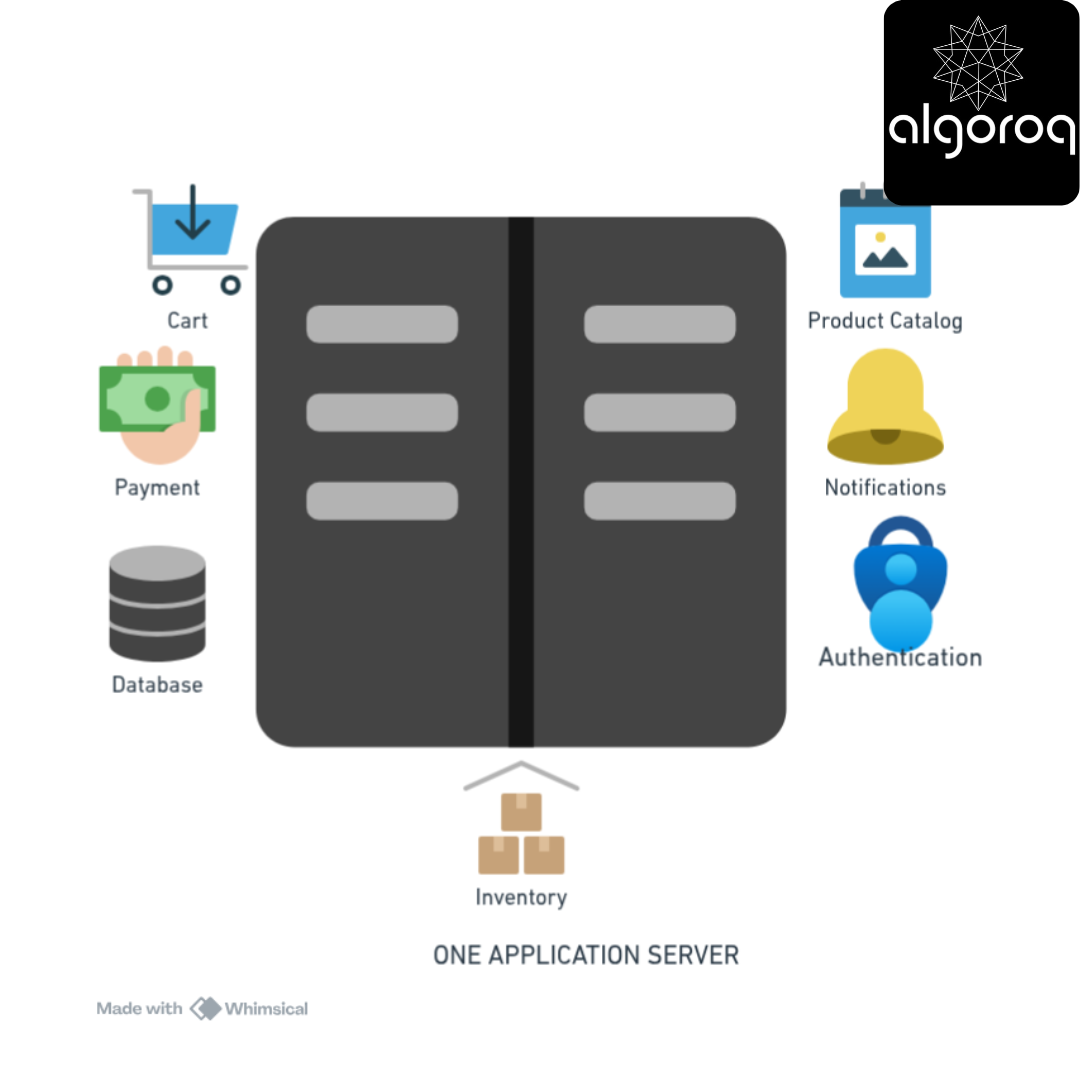
Why monolith?
✓ Fast to build
✓ Easy to debug (everything in one place)
✓ Simple deployment (one command)
✓ Cheap ($50/month hosting)
This is PERFECT for a startup! Don't overcomplicate!
Phase 2: Growing Pains (Monolith Struggles)
Year 2: Some Success! ━━━━━━━━━━━━━━━━━━━━━━━━━━━━━━━━
Team: 20 engineers Users: 100,000 Traffic: 1 million requests/day
Problems with monolith:
❌ Deploy takes 30 minutes
❌ One bug crashes everything
❌ Can't scale individual features
❌ Engineers step on each other's code
❌ Tests take 1 hour to run
Example problem: Engineer A fixes the checkout page Engineer B updates the product search Deploy: Both changes go together Result: If B's code has a bug, A's fix can't deploy!
Team frustrated: "We need microservices!"
Phase 3: The Transition (Painful but Necessary)
Year 3: Breaking Apart the Monolith
━━━━━━━━━━━━━━━━━━━━━━━━━━━━━━━━
Start extracting services one by one:
Month 1: Extract Authentication
┌──────────────────┐ ┌──────────┐
│ Monolith │───────▶│ Auth │
│ (minus auth) │ │ Service │
└──────────────────┘ └──────────┘
Month 3: Extract Payments ┌──────────────────┐ ┌──────────┐ ┌──────────┐
│ Monolith │──▶│ Auth │ │ Payment │
│ │ │ Service │ │ Service │
└──────────────────┘ └──────────┘ └──────────┘
Month 6: Extract Product Catalog [Monolith] → [Auth] → [Payment] → [Catalog]
Year end: Major services extracted Remaining: Some core logic in monolith (that's OK!)
Phase 4: Microservices at Scale (Complex but Powerful)
Year 5: Mature Microservices
━━━━━━━━━━━━━━━━━━━━━━━━━━━━━━━━
Team: 200 engineers (20 teams of 10) Users: 10 million Traffic: 1 billion requests/day
Architecture: 50+ microservices Each team owns 2-3 services
Benefits realized:
✓ Payment team deploys 10x/day (independent!)
✓ Search team scales separately (they have high traffic)
✓ Bug in Reviews service? Everything else works
✓ Can use different tech (Payment in Java, Search in Go)
Challenges:
❌ Complex debugging ("Which service is slow?")
❌ Need service mesh, monitoring, tracing
❌ More expensive infrastructure
❌ Requires DevOps expertise
The Real-World Decision Matrix
When to Use Monolith:
Scenario 1: Brand New Startup
━━━━━━━━━━━━━━━━━━━━━━━━━━━━━━━━
✓ Small team (<10 engineers)
✓ Validating product-market fit
✓ Need to move FAST
✓ Budget constrained
Use monolith! Focus on product, not architecture.
Scenario 2: Simple CRUD Application
━━━━━━━━━━━━━━━━━━━━━━━━━━━━━━━━
✓ Basic operations (Create, Read, Update, Delete)
✓ Low traffic (<100k requests/day)
✓ Predictable scaling needs
Use monolith! Don't over-engineer.
Scenario 3: Internal Tools
━━━━━━━━━━━━━━━━━━━━━━━━━━━━━━━━
✓ Used by your own team
✓ Infrequent changes
✓ Not business-critical
Use monolith! Simple is better.
When to Use Microservices:
Scenario 1: Scaling Different Features Differently
━━━━━━━━━━━━━━━━━━━━━━━━━━━━━━━━━━━━━━━━━━━━━━
Example: Video streaming platform
-
Video encoding: CPU-intensive, needs powerful servers
-
User profiles: Lightweight, needs many small servers
-
Recommendations: GPU-intensive, needs specialized hardware
With microservices: Scale each independently! ✓
With monolith: Must scale everything together ❌
Scenario 2: Multiple Teams
━━━━━━━━━━━━━━━━━━━━━━━━━━━━━━━━
✓ >50 engineers
✓ Teams want autonomy
✓ Need parallel development
Microservices enable team independence ✓
Scenario 3: Different Technology Needs
━━━━━━━━━━━━━━━━━━━━━━━━━━━━━━━━━━━
Example: E-commerce
-
Search: Best in Elasticsearch
-
Real-time chat: Best in Node.js
-
ML recommendations: Best in Python
-
Payment processing: Best in Java (security, libraries)
Microservices let you use best tool for each job! ✓
Scenario 4: High Availability Requirements
━━━━━━━━━━━━━━━━━━━━━━━━━━━━━━━━━━━━━━━
✓ Can't afford downtime
✓ Need to deploy multiple times/day
✓ One feature failing shouldn't affect others
Microservices provide isolation! ✓
The Hybrid Approach: Best of Both Worlds
Here's what smart companies actually do:
The "Modular Monolith" (Year 1-3)
━━━━━━━━━━━━━━━━━━━━━━━━━━━━━━━━

Same codebase, but organized into clear modules Each module has defined boundaries Easy to extract later if needed!
This is what I recommend for most startups:
- Simple like a monolith
- Organized like microservices
- Can evolve when necessary
Common Mistakes
Mistake 1: Premature Microservices
❌ Startup with 3 engineers builds 15 microservices
Result:
-
Spends 80% time on infrastructure
-
20% on product features
-
Complex debugging
-
Slow development
Outcome: Runs out of money before product-market fit
✓ Better: Start with monolith
-
90% time on product
-
10% on infrastructure
-
Fast iteration
-
Find product-market fit
-
Then consider microservices
Mistake 2: Too Many Microservices
❌ Creating a service for every tiny feature
Example:
-
User name service
-
User email service
-
User password service
-
User preferences service
Problem: Network overhead exceeds benefits!
To display user profile: 4 API calls instead of 1 4× latency 4× potential points of failure
✓ Better: Group related functionality
- User service (handles all user data)
Mistake 3: Shared Database
❌ "We have microservices!"
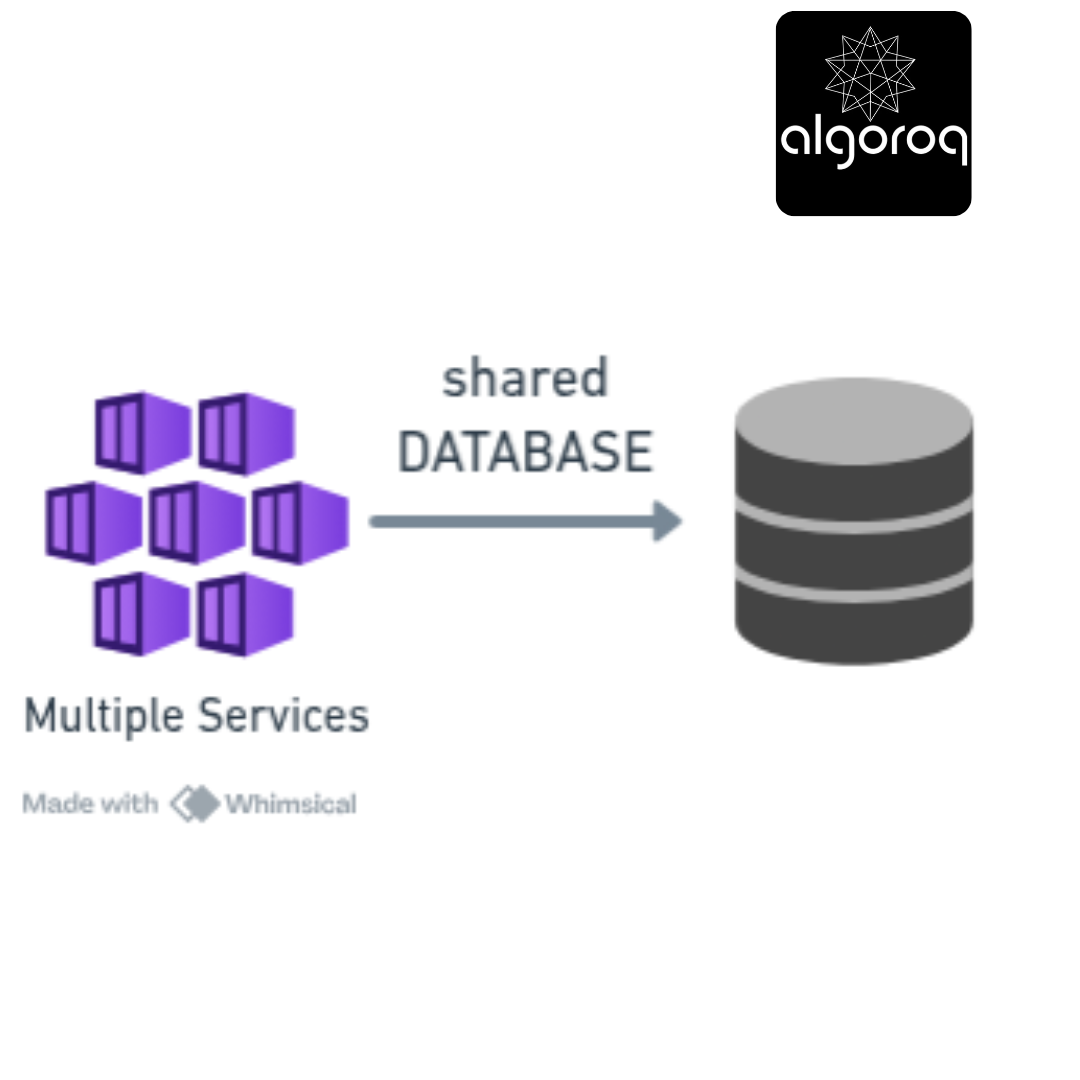
Problem: Not real microservices!
-
Services still tightly coupled
-
Schema change affects all services
-
No independent scaling
✓ Real microservices: Each service owns its data!

Monolith vs Microservices Comparison
| Dimension | Monolith | Microservices |
|---|---|---|
| Deployment | One unit, all or nothing | Independent per service |
| Scaling | Scale entire app | Scale individual services |
| Development speed | Fast early on | Faster at scale with many teams |
| Debugging | Easy (single process, one log) | Hard (distributed tracing needed) |
| Data management | One database | Database per service |
| Team structure | One team can own everything | One team per service |
| Failure blast radius | One bug can crash everything | Failures are isolated |
| Operational complexity | Low | High (networking, service discovery, monitoring) |
| Best for | Startups, small teams, MVPs | Large orgs, independent teams, varied scaling needs |
Key Takeaways
- Monoliths are simpler to develop, deploy, and debug — the right choice for most early-stage products and small teams
- Microservices enable independent deployment and scaling — but add complexity in networking, data consistency, and observability
- Don't start with microservices — extract services from a monolith when you have clear bounded contexts and team scaling needs
- The Strangler Fig pattern migrates from monolith to microservices incrementally — replacing one component at a time, not a full rewrite
- Conway's Law applies — your system architecture will mirror your team communication structure
Unlock with Pro
Unlock the full content and everything at this level.
Get Pro — $9/moAlready a member? Log in