MQTT

The Whisper Network: How Millions of Devices Talk Without Shouting
🎯 Challenge 1: The Smart Home Problem
Imagine you have a smart home with 50 devices: lights, sensors, thermostats, cameras, and door locks. Each device needs to communicate, but here's the catch:
The Traditional Approach (HTTP Polling)
Every device asks the server repeatedly:
Problems:
- ❌ Wastes bandwidth (50 requests/second = 4.3M requests/day!)
- ❌ Drains battery (constant polling)
- ❌ High server load (processing millions of empty requests)
- ❌ Not real-time (delayed by polling interval)
- ❌ Doesn't scale (1000 devices = 86.4M requests/day!)
The MQTT Approach (Publish/Subscribe)
Devices subscribe once, receive updates when they happen:
Benefits:
-
✅ Minimal bandwidth (only send when there's news)
-
✅ Battery efficient (no constant polling)
-
✅ Low server load (push only when needed)
-
✅ Real-time (instant delivery)
-
✅ Scales easily (1M devices, same efficiency)
Pause and think: What if devices could "subscribe" to topics and only receive messages when something actually happens?
The Answer: MQTT
MQTT (Message Queuing Telemetry Transport) is a lightweight publish/subscribe messaging protocol designed for constrained devices and unreliable networks.
Key insight: Instead of constantly asking "Any news for me?", devices say "Tell me when there's news about X" and go to sleep until notified.
🏗️ Core MQTT Concepts
1. The Broker (The Post Office)
The MQTT broker is like a post office that routes messages between publishers and subscribers.
Broker's Job:
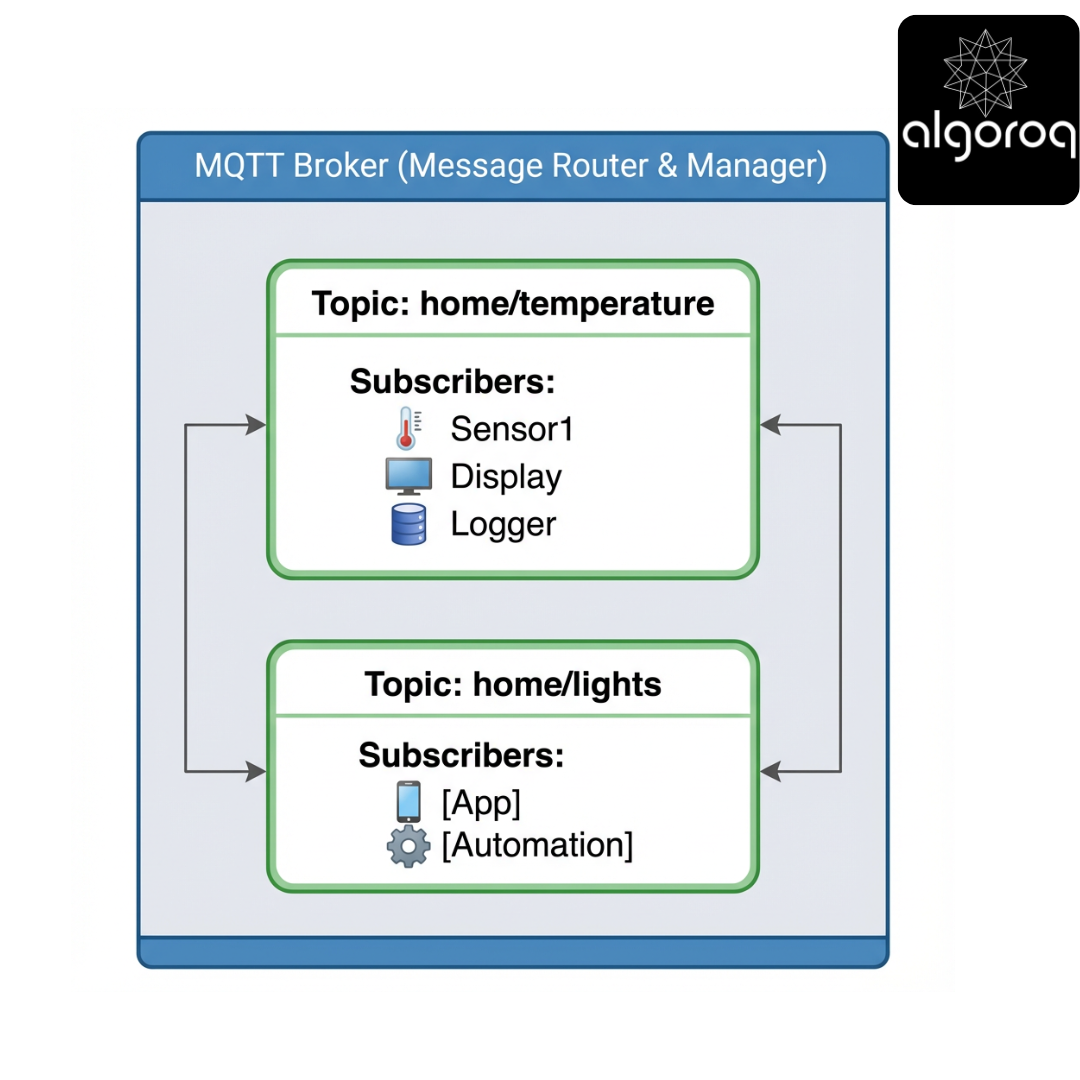
Features:
Popular MQTT Brokers:
- Mosquitto - Open-source, lightweight
- HiveMQ - Enterprise-grade, scalable
- EMQX - Distributed, high-performance
- AWS IoT Core - Managed cloud service
2. Publishers (The Senders)
Publishers send messages to topics without knowing who will receive them.
Publisher Example:
Key Point: Publishers don't care who's listening. They just send to a topic.
3. Subscribers (The Listeners)
Subscribers register interest in topics and receive messages when they're published.
Subscriber Example:
Key Point: Subscribers don't know who's publishing. They just listen to topics.
4. Topics (The Addressing System)
Topics are hierarchical strings that organize messages, like a file system path.
Topic Structure:
Topic Hierarchy Example:
5. Wildcards (The Pattern Matching)
Subscribe to multiple topics at once using wildcards.
Single-level wildcard (+):
Multi-level wildcard (#):
Practical Examples:
🎬 Interactive Exercise: HTTP vs MQTT
Scenario: Smart Garden System
You have 100 soil moisture sensors that need to report data every 5 minutes.
HTTP Approach (Request/Response)
Every 5 minutes, each sensor:
Characteristics:
Costs:
-
❌ High bandwidth (HTTP headers overhead)
-
❌ Battery drain (maintain HTTP connection)
-
❌ Server processes 28,800 requests/day
-
❌ Firewall/NAT traversal issues
MQTT Approach (Publish/Subscribe)
Each sensor publishes when it has data:
Characteristics:
Benefits:
-
✅ 93% less bandwidth (1.44 MB vs 20.16 MB)
-
✅ Battery efficient (persistent connection)
-
✅ Broker handles routing (server just subscribes)
-
✅ Works through NAT/firewalls
Real-world parallel: HTTP is like mailing individual letters. MQTT is like having a subscription to a newspaper — you only get what's relevant, when it's published.
🎯 Quality of Service (QoS) Levels
MQTT provides three levels of message delivery guarantee:
QoS 0: At Most Once (Fire and Forget)
How it works:
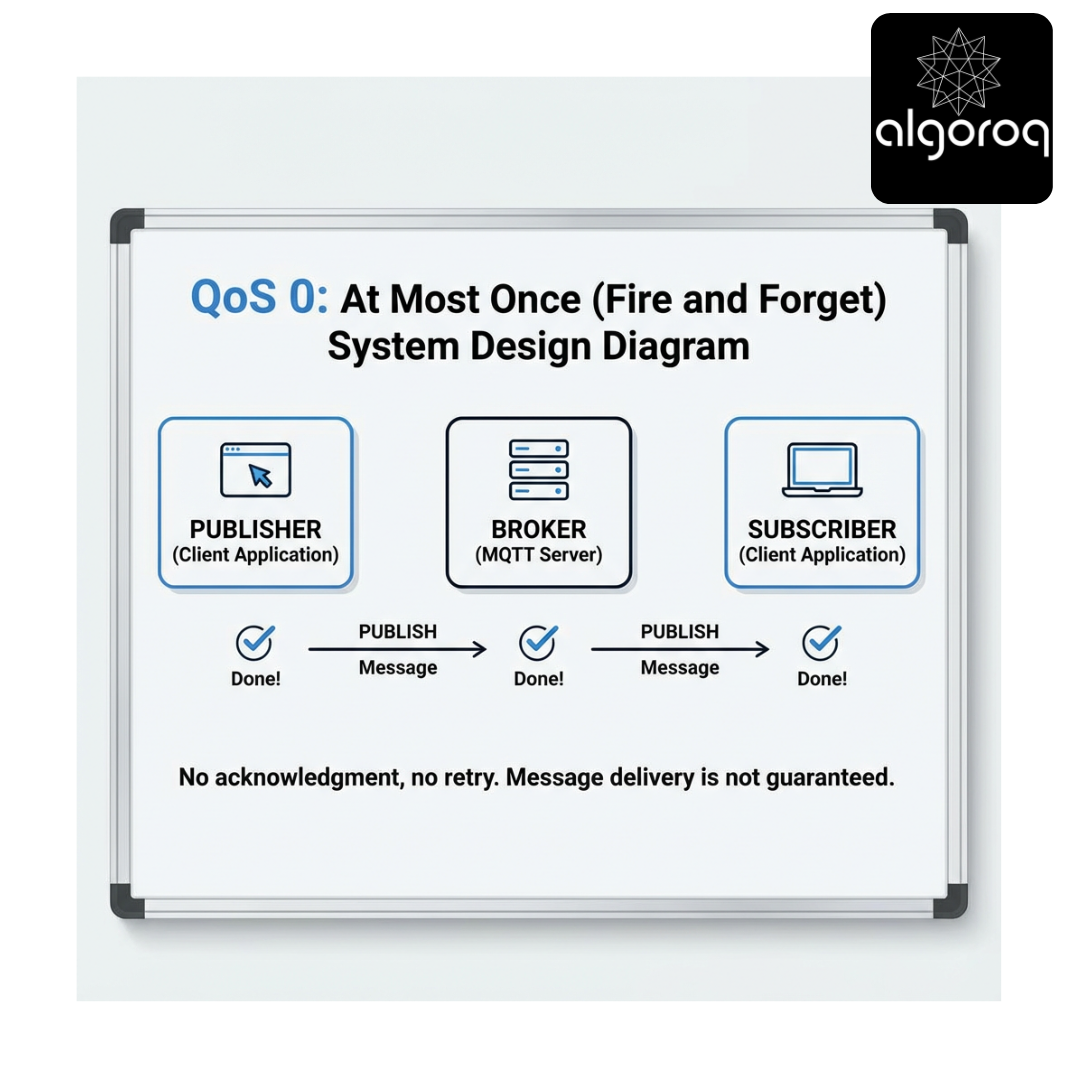
Characteristics:
-
✅ Fastest delivery
-
✅ Lowest overhead
-
❌ No delivery guarantee
-
❌ Message may be lost
Use when: Loss is acceptable (e.g., frequent sensor readings where next reading compensates)
Example:
QoS 1: At Least Once (Acknowledged Delivery)
How it works:

Characteristics:
- ✅ Delivery guaranteed
- ✅ Low overhead
- ⚠️ May deliver duplicates
- ✅ Most commonly used
Use when: Messages are important but duplicates are acceptable
Example:
QoS 2: Exactly Once (Assured Delivery)
How it works:
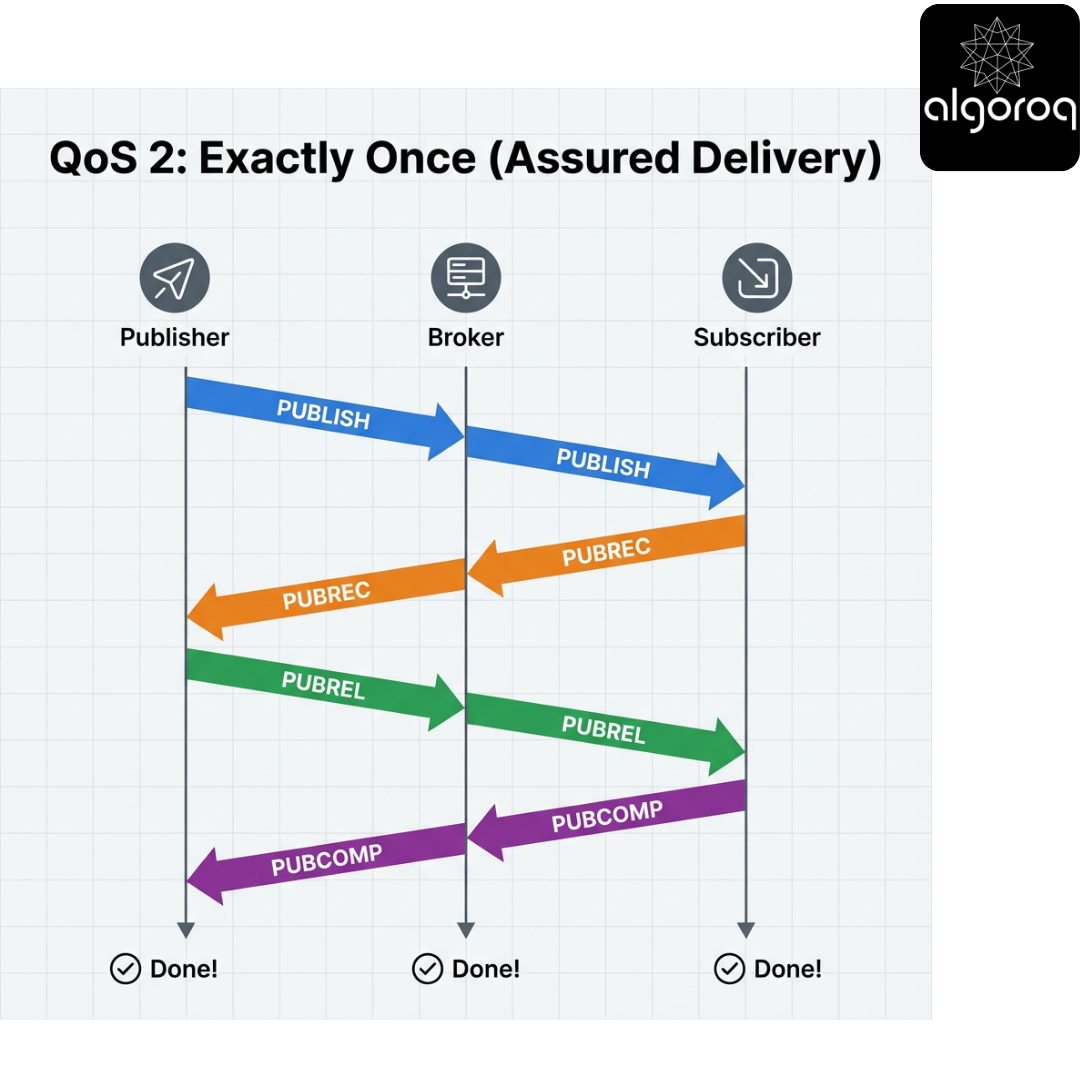
Characteristics:
- ✅ Exactly once delivery guaranteed
- ✅ No duplicates
- ❌ Highest overhead
- ❌ Slowest delivery
Use when: Duplicates would cause problems (e.g., financial transactions, critical commands)
Example:
QoS Decision Matrix
| Use Case | Recommended QoS | Reason |
|---|---|---|
| Temperature sensor | 0 | High frequency, loss acceptable |
| Motion detection | 1 | Important but duplicates OK |
| Door lock/unlock | 1 | Must arrive, duplicate is safe |
| Alarm trigger | 2 | Critical, no duplicates |
| Stock price feed | 0 | High frequency, latest matters |
| Payment confirmation | 2 | Must be exactly once |
| Chat message | 1 | Should arrive, duplicates filtered |
🔧 Advanced MQTT Features
1. Retained Messages (The Sticky Note)
When you publish with the "retained" flag, the broker stores the last message and delivers it immediately to new subscribers.
Without Retained Message:
With Retained Message:
Code Example:
Use Cases:
- Device status (online/offline)
- Configuration values
- Last known sensor readings
- Current state information
2. Last Will and Testament (LWT) (The Goodbye Message)
A message the broker sends automatically if a client disconnects unexpectedly.
How It Works:
Code Example:
Monitoring Example:
Use Cases:
- Device health monitoring
- Automatic failover
- Connection status tracking
- Alert generation
3. Persistent Sessions (The Memory)
The broker remembers subscriptions and queues messages for disconnected clients.
Without Persistent Session:
With Persistent Session:
Code Example:
Requirements:
- Client must use a unique client ID
- Set
clean_session=False - Messages must be published with QoS > 0
Use Cases:
- Mobile apps (intermittent connectivity)
- Battery-powered devices (periodic wake-up)
- Critical command delivery
- Offline message buffering
4. Keep-Alive (The Heartbeat)
Clients and brokers send periodic "ping" messages to detect broken connections.
How It Works:
Configuration:
Guidelines:
- Short interval (10-30s): Real-time monitoring, fast failure detection
- Medium interval (60s): Standard applications
- Long interval (120-300s): Battery-powered devices
🎮 Decision Game: When to Use MQTT?
Match the scenario to the best protocol:
Scenarios:
A. Real-time stock trading dashboard B. Firmware update download (100 MB) C. Smart home temperature sensors (100 devices) D. RESTful API for user authentication E. Chat application (1000 concurrent users) F. Serving web pages G. IoT sensors on oil rig (unreliable network) H. Video streaming
Options:
- HTTP/HTTPS (Request/Response)
- MQTT (Pub/Sub messaging)
- WebSocket (Bidirectional streaming)
- Other (FTP, RTSP, etc.)
Answers:
A. Stock trading dashboard → WebSocket (3) Real-time bidirectional data, but HTTP-based. WebSocket better than MQTT for browser integration.
B. Firmware update (100 MB) → HTTP/Other (1/4) Large file transfer - use HTTP or FTP, not optimized for MQTT.
C. Smart home sensors → MQTT (2) Perfect use case: many devices, low bandwidth, pub/sub pattern.
D. User authentication → HTTP (1) Standard request/response pattern, works well with REST.
E. Chat application → MQTT or WebSocket (2/3) Both work! MQTT for lightweight mobile apps, WebSocket for web browsers.
F. Serving web pages → HTTP (1) Standard protocol for web content delivery.
G. IoT on oil rig → MQTT (2) Unreliable network, need persistent sessions, low bandwidth - MQTT excels here.
H. Video streaming → Other (4) Use RTSP, HLS, or WebRTC - not designed for MQTT.
🚨 Common Misconception: "MQTT is Just for IoT... Right?"
You might think:
"MQTT is only for tiny embedded devices and sensors."
The Reality:
MQTT is excellent for ANY scenario requiring efficient, real-time, pub/sub messaging!
Modern MQTT Use Cases:
Mobile Applications:
Gaming:
Financial Services:
Social Media:
Enterprise Applications:
Real-World Examples:
Facebook Messenger:
- Uses MQTT for mobile message delivery
- Chosen for battery efficiency and real-time delivery
AWS IoT Core:
- Handles billions of MQTT messages
- Supports both IoT devices and web/mobile apps
📊 MQTT vs HTTP vs WebSocket
| Feature | MQTT | HTTP | WebSocket |
|---|---|---|---|
| Connection | Persistent | Request/Response | Persistent |
| Pattern | Pub/Sub | Client/Server | Bidirectional |
| Overhead | 2 bytes | 100s of bytes | ~2 bytes |
| Real-time | ✅ Excellent | ❌ Polling needed | ✅ Excellent |
| Bandwidth | ✅ Minimal | ❌ High | ✅ Low |
| Battery | ✅ Efficient | ❌ Draining | ✅ Efficient |
| QoS | ✅ Built-in (0,1,2) | ❌ None | ❌ None |
| Offline | ✅ Persistent sessions | ❌ No | ❌ No |
| Broker | ✅ Required | ❌ Not needed | ❌ Not needed |
| Browser | ⚠️ Via WebSocket | ✅ Native | ✅ Native |
| NAT/Firewall | ✅ Works well | ✅ Works well | ✅ Works well |
🔐 MQTT Security Best Practices
1. Authentication
2. Authorization (Topic-based Access Control)
3. Network Security
🎯 Complete MQTT Example: Smart Home System
Architecture:

Temperature Sensor (Publisher):
Automation Engine (Subscriber + Publisher):
Mobile App (Subscriber + Publisher):
🎓 Key Takeaways
-
MQTT is lightweight and efficient - Designed for constrained devices and low-bandwidth networks
-
Publish/Subscribe pattern - Decouples publishers from subscribers for scalable architecture
-
QoS levels provide guarantees - Choose between fire-and-forget, acknowledged, and exactly-once delivery
-
Topic-based routing - Hierarchical topics with wildcards enable flexible message routing
-
Built for unreliable networks - Persistent sessions, retained messages, and LWT handle connection issues
-
Not just for IoT - Excellent for any real-time, event-driven application (messaging, gaming, notifications)
-
Security matters - Always use TLS, authentication, and topic-based authorization in production
-
Broker is critical - Choose and configure your broker carefully for your scalability needs
📚 Further Learning
Getting Started:
- Install Mosquitto broker locally
- Try the Python
paho-mqttlibrary - Experiment with MQTT Explorer (GUI tool)
Advanced Topics:
- MQTT 5.0 features (user properties, shared subscriptions)
- Cluster setup for high availability
- Bridge configuration for multi-broker setups
- Integration with time-series databases
Popular MQTT Platforms:
- AWS IoT Core - Managed MQTT for AWS
- Azure IoT Hub - Microsoft's IoT platform
- Google Cloud IoT Core - GCP MQTT service
- HiveMQ Cloud - Enterprise MQTT cloud
🔧 Quick Reference
Connection:
Publish:
Subscribe:
Last Will:
Callbacks:
Real-world parallel: MQTT is like having a smart assistant who knows exactly who cares about what information and only tells people what they need to know, when they need to know it — instead of everyone constantly asking "Any news for me?"
Unlock with Pro
Unlock the full content and everything at this level.
Get Pro — $9/moAlready a member? Log in