Webhooks

Webhooks
Webhooks: Don't Call Us, We'll Call You (The Reverse API Pattern) 🎯 Challenge 1: The Pizza Delivery Dilemma Imagine this scenario: You order pizza online and want to know when it arrives.
Option A (Polling): You check the door every 30 seconds for an hour
- Check... nothing
- Check... nothing
- Check... nothing
- Check... nothing (getting tired...)
- Check... PIZZA IS HERE! (finally!)
Option B (Webhooks): Pizza place calls you when it arrives
- You go about your day
- Ring ring "Pizza's at your door!"
- You open the door immediately
Pause and think: Which option wastes less energy and gives you instant notification?
The Answer: Webhooks are Option B! Instead of constantly asking "Is it ready yet?" (polling), the server proactively tells you when something happens (push notification).
Traditional API (Polling):
Every 30 seconds: You → Server: "Any updates?" Server → You: "No, not yet"
You → Server: "Any updates?" Server → You: "No, not yet"
You → Server: "Any updates?" Server → You: "Yes! Here's the data!"
Webhook (Event-Driven):
[Time passes... you do other work...]
Server → You: "HEY! Something happened! Here's the data!" You: "Thanks! I'll process it right away"
Key Insight: Webhooks reverse the communication pattern - the server becomes the client, calling YOUR endpoint when events occur!
🎬 Interactive Exercise: The Movie Theater Analogy
Scenario: You want to watch a movie that's currently sold out.
Polling Approach:
You: Walk to theater → "Tickets available?" Theater: "No"
30 minutes later... You: Walk to theater → "Tickets available?" Theater: "No"
30 minutes later... You: Walk to theater → "Tickets available?" Theater: "No"
30 minutes later... You: Walk to theater → "Tickets available?" Theater: "Yes! Just became available!"
Problem:
- Wasted trips ⛽
- Delayed notification ⏰
- Theater answers same question repeatedly 😤
Webhook Approach:
You: "Here's my phone number. Call me when tickets are available" Theater: "Got it! We'll let you know"
[You go about your day...]
Theater: Calls you "Tickets are available!" You: Rush to theater and buy immediately
Benefits:
- No wasted trips ✅
- Instant notification 🔔
- Theater only calls when needed 🎯
Real-world parallel: Webhooks are like signing up for notifications instead of constantly refreshing a page!
🔌 How Webhooks Work: The Anatomy
The Setup Phase:
-
You provide an endpoint (webhook URL): "Call me at: https://myapp.com/webhook"
-
You register for events: "Tell me about: payment.succeeded, payment.failed"
-
Server stores your preferences:
Setup complete! ✅
The Event Flow:
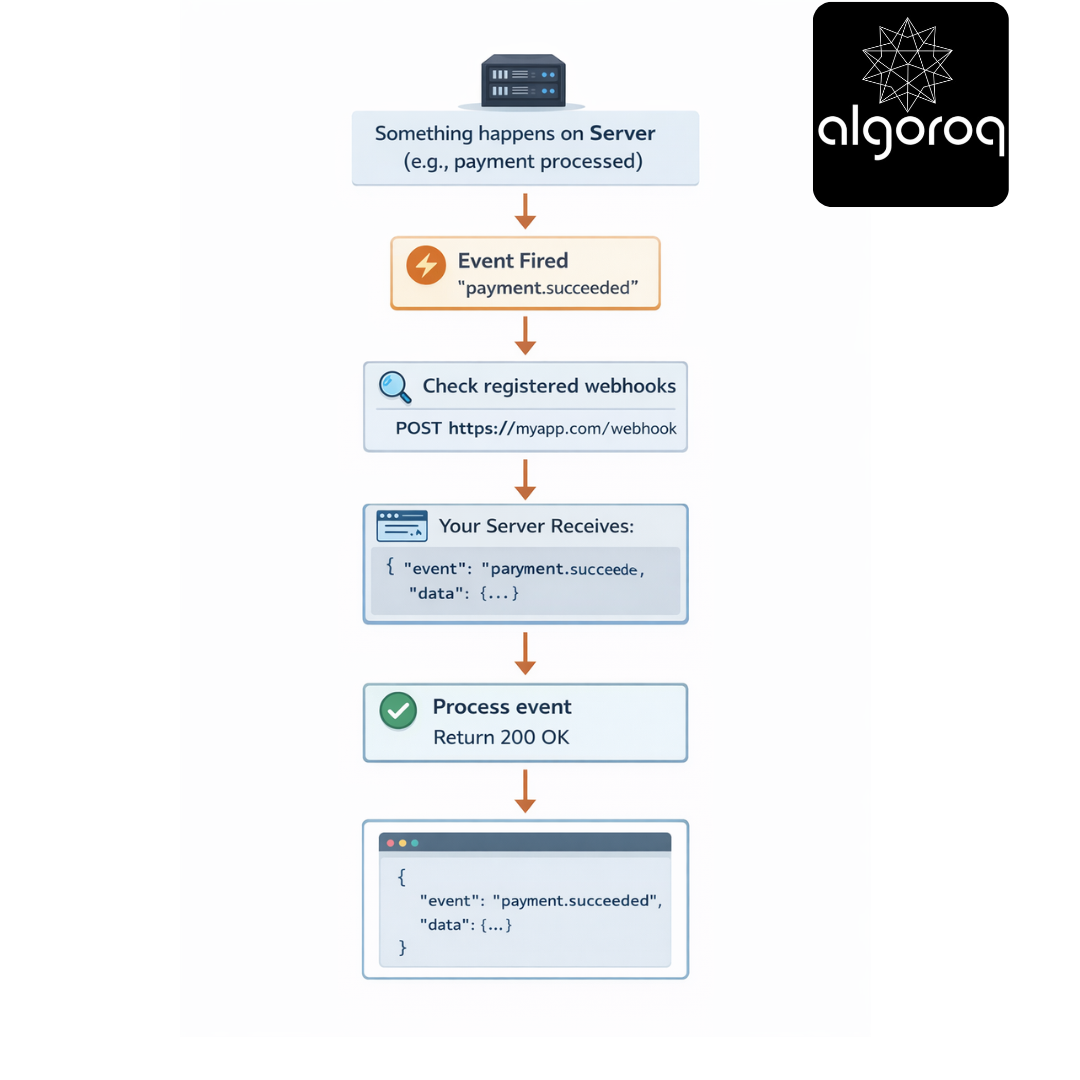
Code snippet (Receiving a webhook):
// Your webhook endpoint
Real-world parallel: Webhooks are like having a doorbell. When someone arrives (event happens), they ring (HTTP POST), and you answer (process event).
🚨 Common Misconception: "Webhooks Are Just API Calls... Right?"
You might think: "Isn't this just a normal API?"
The KEY difference: WHO initiates the call!
Traditional API (You control timing): You decide WHEN to ask
Webhook (Server controls timing): Server decides WHEN to tell you

Mental model:
- API = You calling a restaurant to check if your table is ready
- Webhook = Restaurant calling you when table is ready
Why this matters:
Polling approach (every minute):
├── 60 API calls per hour
├── Most return "no update"
├── Wastes server resources
├── Wastes your compute checking
└── Delays notification (up to 1 minute)
Webhook approach:
├── 1 call only when something happens
├── Instant notification (< 1 second)
├── No wasted calls
└── More efficient for both parties
Key differences:
| Aspect | Traditional API | Webhook |
|---|---|---|
| Direction | You → Server | Server → You |
| Control | You control timing | Server controls timing |
| Purpose | Fetch data | Get notified |
| When | Whenever you want | When event occurs |
| Efficiency | Low (polling) | High (event-driven) |
🎮 Decision Game: When to Use Webhooks?
Context: You're building different features. Which should use webhooks?
A. Checking current weather temperature
B. Getting notified when a payment is completed
C. Displaying your current account balance
D. Getting alerts when your server goes down
E. Showing a user's profile information
F. Tracking package delivery status updates
Think about it... Which benefit from real-time push notifications?
Answers:
✅ B. Payment completed Reason: Instant notification needed, unpredictable timing
✅ D. Server down alerts Reason: Critical real-time alert, can't afford polling delay
✅ F. Package delivery updates Reason: Events happen sporadically, immediate notification valuable
❌ A. Current weather Reason: User-initiated request, data needed on-demand
❌ C. Account balance Reason: User wants to see it NOW, not wait for push
❌ E. User profile Reason: Static data fetched when needed
The Golden Rule: Use webhooks when you need to REACT to events, not when you need data ON-DEMAND.
Perfect for webhooks:
├── Payment processing (Stripe, PayPal)
├── CI/CD pipelines (GitHub, GitLab)
├── Monitoring alerts (Datadog, PagerDuty)
├── Chat messages (Slack, Discord)
├── Order status updates (Shopify, WooCommerce)
└── IoT device events (sensors, smart home)
Not suitable for webhooks:
├── User profile lookups (user-initiated)
├── Search queries (on-demand)
├── Current prices (real-time display)
└── Form submissions (synchronous feedback needed)
🔐 Security: Trust But Verify
The Impostor Problem:
Scenario: You receive a webhook:
| POST https://yourapp.com/webhook { "event": "payment.succeeded", "amount": 100.00, "user_id": 12345 } |
|---|
Question: How do you know this is really from the payment provider and not a malicious actor trying to trick you?
Solution 1: Webhook Signatures (HMAC)
How it works:
-
Provider gives you a secret key: "sk_live_abc123xyz"
-
Provider computes signature:
| signature = HMAC-SHA256(request_body, secret_key) signature = "a1b2c3d4e5f6..." |
|---|
- Provider sends webhook with header:
| X-Signature: sha256=a1b2c3d4e5f6... |
|---|
- You verify:
| computed = HMAC-SHA256(request_body, "sk_live_abc123xyz") if (computed === received_signature): ✅ Authentic! else: ❌ Reject! Possible attack! |
|---|
Code snippet (Verification):
Solution 2: Webhook Verification Endpoints
Some providers (like Slack) verify your endpoint:
Step 1: You register endpoint "https://yourapp.com/webhook"
Step 2: Provider sends test request:
| POST https://yourapp.com/webhook { "type": "url_verification", "challenge": "3eZbrw1aBm2rZgRNFdxV2595E9CY3gmdALWMmHkvFXO7tYXAYM8P" } |
|---|
Step 3: You must echo back the challenge:
| Response: { "challenge": "3eZbrw1aBm2rZgRNFdxV2595E9CY3gmdALWMmHkvFXO7tYXAYM8P" } |
|---|
Step 4: Provider confirms endpoint is valid ✅
Solution 3: IP Allowlisting
// Only accept webhooks from known IPs
Real-world parallel: Webhook verification is like:
- Signature = Checking someone's ID matches their appearance
- Challenge = Secret handshake to prove authenticity
- IP Allowlist = Only opening door for people from specific addresses
Security Best Practices:
✅ ALWAYS verify webhook signatures
✅ Use HTTPS endpoints (never HTTP!)
✅ Keep webhook secrets in environment variables
✅ Validate payload structure before processing
✅ Log all webhook attempts (for forensics)
✅ Implement rate limiting (prevent DoS)
✅ Use webhook secret rotation periodically
❌ NEVER trust webhook data blindly
❌ NEVER use HTTP endpoints (unencrypted)
❌ NEVER commit secrets to code
❌ NEVER skip signature verification
⚙️ Handling Webhook Failures: Retry Logic
The Delivery Problem:
Provider sends webhook: Provider → Your Server... ❌ Timeout (server down)
What happens next?
Webhook providers typically implement retry logic:
Attempt 1 (immediate): ❌ Failed
Wait 1 minute
Attempt 2 (1min later): ❌ Failed
Wait 5 minutes
Attempt 3 (6min later): ❌ Failed
Wait 15 minutes
Attempt 4 (21min later): ✅ SUCCESS!
Common retry patterns:
├── Exponential backoff (1min, 2min, 4min, 8min...)
├── Fixed intervals (1min, 1min, 1min...)
└── Fibonacci sequence (1min, 2min, 3min, 5min, 8min...)
Your Response Requirements:
✅ GOOD: Return 200 status within 30 seconds
❌ BAD: Take 60 seconds to process
Idempotency: The Duplicate Problem
Scenario: Your server was slow, so provider retried. You receive the same webhook TWICE!
Webhook 1: "Payment of $100 succeeded" [Process: Add $100 to user account]
Webhook 2: "Payment of $100 succeeded" (DUPLICATE!) [Process: Add $100 AGAIN?!] ← DISASTER!
User gets $200 instead of $100! 💸
Solution: Idempotency Keys
Real-world parallel: Idempotency is like having a ticket stub at an event. Try to enter twice with the same stub? Security says "You already entered!"
Status Code Guide: Here's the properly formatted table:
| Status Code | Description |
|---|---|
| 200 OK | Webhook received and processed successfully |
| 201 Created | Acceptable (but 200 is standard) |
| 204 No Content | Acceptable (but 200 is standard) |
| 400 Bad Request | Invalid payload structure |
| 401 Unauthorized | Failed signature verification |
| 403 Forbidden | IP not allowlisted |
| 404 Not Found | Wrong endpoint |
| 429 Too Many | Rate limit exceeded (will retry later) |
| 500 Server Error | Your server issue (will retry) |
🛠️ Real-World Examples
Example 1: Stripe Payment Webhooks
Example 2: GitHub Webhooks
Example 3: Slack Slash Commands
🎪 Webhook vs. Other Patterns
Comparison Table:
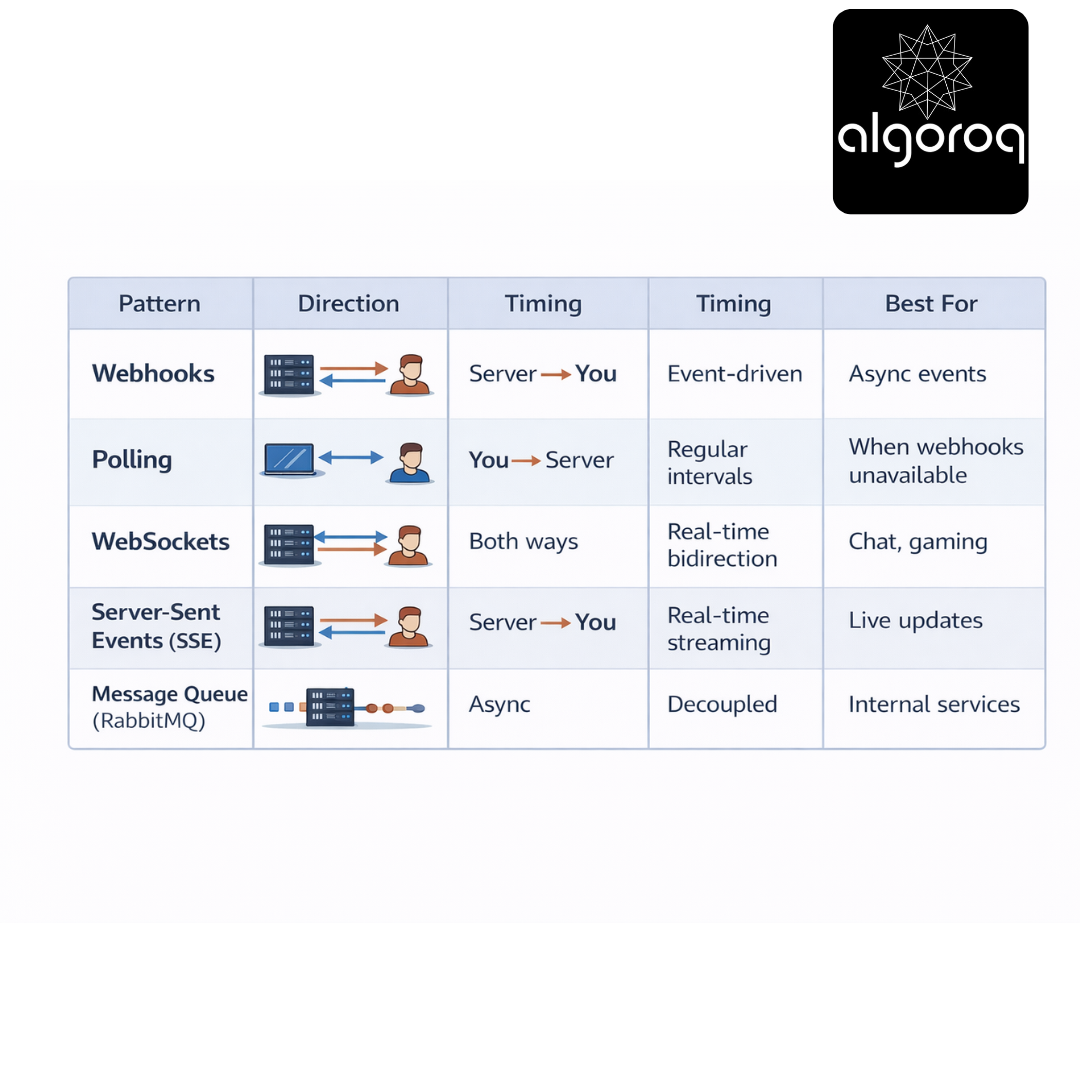
When to use what:
Scenario: Payment completed Best: Webhook ✅ Why: One-time event, instant notification needed
Scenario: Live chat Best: WebSocket ✅ Why: Bidirectional, continuous conversation
Scenario: Stock price updates Best: SSE or WebSocket ✅ Why: Continuous stream of data
Scenario: No webhook support Best: Polling 😞 Why: Only option available (but less efficient)
Scenario: Internal microservices Best: Message Queue (Kafka/RabbitMQ) ✅ Why: Reliable, supports multiple consumers
Real-world parallel:
- Webhook = Doorbell (ring when someone arrives)
- Polling = Checking the door every minute
- WebSocket = Phone call (continuous two-way conversation)
- SSE = Radio broadcast (continuous one-way stream)
- Message Queue = Post office box (reliable delivery, check when convenient)
💡 Final Synthesis Challenge: The Restaurant Notification System
Complete this comparison: "Traditional polling is like constantly calling a restaurant to check if your table is ready. Webhooks are like..."
Your answer should include:
- How notifications are initiated
- Resource efficiency
- Timing accuracy
- User experience
Take a moment to formulate your complete answer...
The Complete Picture: Webhooks are like giving the restaurant your phone number so they call you when your table is ready:
✅ You provide a callback (phone number/webhook URL)
✅ Restaurant notifies you proactively when ready (event-driven push)
✅ No wasted effort checking repeatedly (efficient)
✅ Instant notification the moment it's ready (real-time)
✅ You can do other things while waiting (async processing)
✅ Restaurant controls timing (server initiates)
✅ Must verify it's really the restaurant calling (security)
✅ Handle missed calls gracefully (retry logic)
This is why:
- Payment processors use webhooks (instant transaction confirmation)
- CI/CD platforms use webhooks (trigger deployments on code push)
- Monitoring services use webhooks (instant alerts)
- E-commerce platforms use webhooks (order status updates)
Webhooks transform polling nightmares into elegant event-driven architectures!
🎯 Quick Recap: Test Your Understanding Without looking back, can you explain:
- How are webhooks different from traditional APIs?
- Why is webhook signature verification important?
- What is idempotency and why does it matter?
- When should you use webhooks vs. polling?
Mental check: If you can answer these clearly, you've mastered webhook fundamentals!
🚀 Your Next Learning Adventure Now that you understand Webhooks, explore:
Advanced Webhook Topics:
- Webhook payload transformation and filtering
- Multi-tenant webhook management
- Webhook event replay and debugging
- Building your own webhook provider
Related Patterns:
- Server-Sent Events (SSE): One-way streaming
- WebSockets: Full-duplex real-time communication
- Message Queues: Reliable async message delivery
- Event Sourcing: Storing events as source of truth
Real-World Implementations:
- Stripe's webhook best practices
- GitHub's webhook events catalog
- Twilio's webhook security guide
- Building webhook infrastructure at scale
Key Takeaways
- Webhooks are HTTP callbacks triggered by events — the server pushes data to your URL instead of you polling for changes
- Webhooks invert the polling pattern — instead of asking "is there new data?" every N seconds, you get notified when data changes
- Always verify webhook signatures — use HMAC to ensure the request actually came from the expected sender
- Design webhook handlers to be idempotent — the same webhook may be delivered multiple times due to retries
- Respond with 200 quickly, then process async — slow webhook handlers cause timeouts and retries from the sender
Unlock with Pro
Unlock the full content and everything at this level.
Get Pro — $9/moAlready a member? Log in