API Gateway

🏢 API Gateway: The Smart Receptionist of Your API World
The Office Building Story
Okay, imagine this . You're running a huge company with multiple departments: Sales, Engineering, HR, Customer Support, and Billing. Each department has its own office, its own phone number, its own way of doing things.
Now, here's the problem: Your customers need to interact with all these departments, but it's chaos. One customer calls Sales directly at (555) 0101, another calls Support at (555) 0202, someone else somehow got the Engineering department's direct line... You see where I'm going with this?
This is what happens without an API Gateway.
Now, imagine you hire a brilliant receptionist who sits at the front desk. Every call comes to ONE number: (555) 0100. This receptionist:
- Knows which department handles what
- Checks if the caller is authorized to talk to that department
- Routes the call to the right place
- Keeps track of how many calls each customer makes
- Can even translate between different languages
This receptionist IS your API Gateway!
What an API Gateway Actually Does
Let’s see what happens when a client makes an API request through a gateway:
Without API Gateway (The Chaos):
━━━━━━━━━━━━━━━━━━━━━━━━━━━━━
Mobile App ──────> http://users-service.internal:3000/users
Web App ──────────> http://orders-service.internal:4000/orders
Partner API ──────> http://payments-service.internal:5000/pay
Problems:
❌ Clients need to know ALL service addresses
❌ Each service handles its own security
❌ No central logging or monitoring
❌ Services are exposed directly to the internet
❌ CORS needs configuration on every service
Now watch what happens WITH an API Gateway:
With API Gateway (The Order):
━━━━━━━━━━━━━━━━━━━━━━━━━━━━━
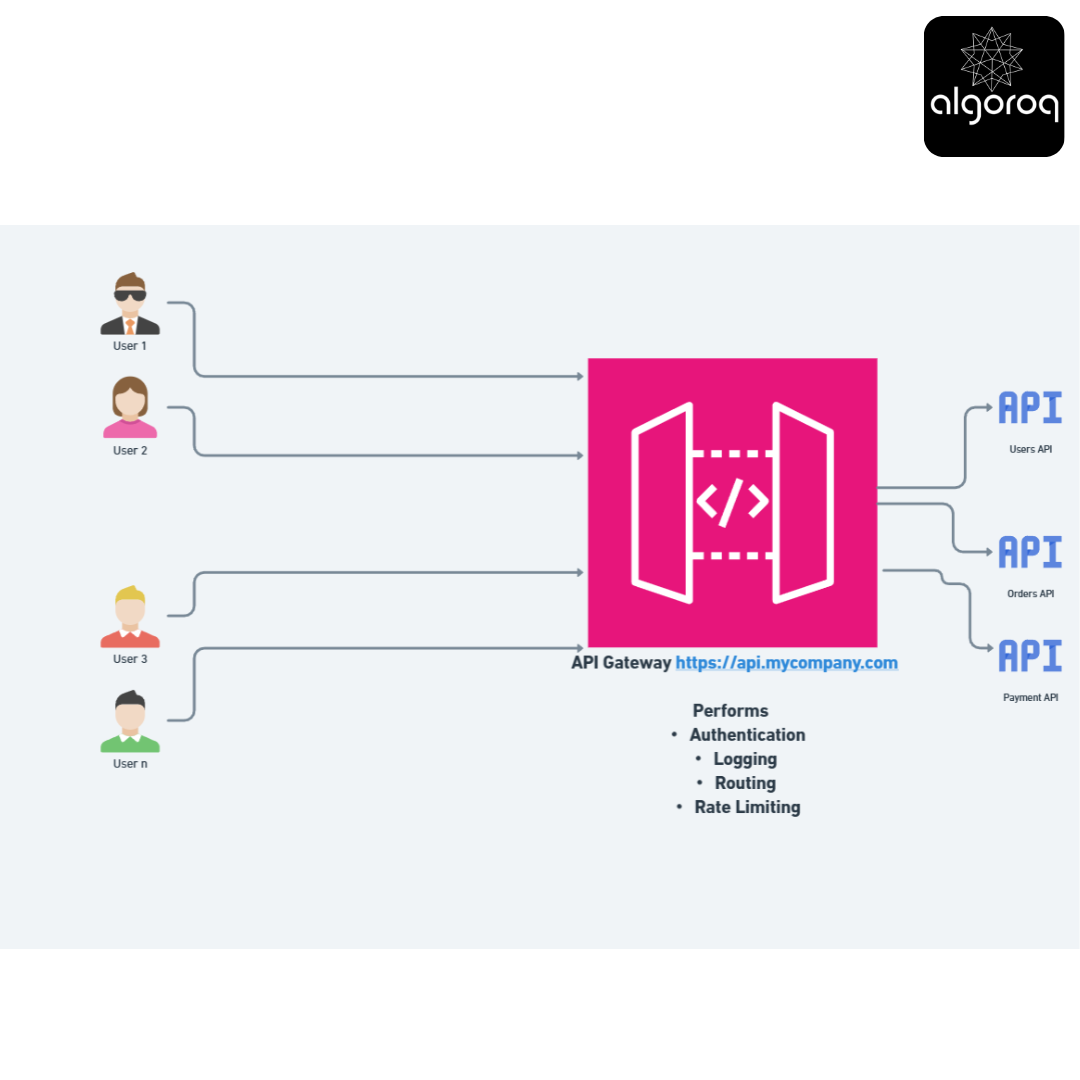
Let’s Walk You Through a Real Request
Imagine you're building a food delivery app. Here's what happens when a user wants to see their order history:
Step 1: Client Makes Request
The client doesn't know (or care) that there are multiple services behind the scenes. They just talk to one address: api.foodapp.com
Step 2: API Gateway Receives Request
Now, the gateway springs into action. Think of it like a very efficient receptionist checking a visitor:
Gateway thinks:
"Okay, I received a request for /orders. Let me check my list..."
-
Authentication Check:
"Does this Bearer token exist and is it valid?"
→ Checks token with Auth service
→ Token is valid for user_id: 12345 ✓
-
Authorization Check: "Is this user allowed to access orders?"
→ User is logged in ✓
→ User has 'customer' role ✓
-
Rate Limiting Check:
"Has this user made too many requests?"
→ User made 45 requests this minute
→ Limit is 100/minute ✓
→ Allowed to proceed
-
Routing Decision:
"Which internal service handles /orders?"
→ Looking at my routing table...
→ /orders → Forward to orders-service:3001
Step 3: Gateway Forwards to Internal Service
Gateway forwards to Orders Service:
━━━━━━━━━━━━━━━━━━━━━━━━━━━━━━━
Original request:
Gateway transforms it to:
Notice what changed:
• Changed the domain to internal service
• Added user information (so service doesn't re-validate)
• Added request ID for tracking
• Removed the original Bearer token (security!)
Step 4: Service Responds
Orders Service responds:
Step 5: Gateway Returns Response
Gateway enriches the response:
Gateway added:
• Request ID (for debugging)
• Rate limit info (so client knows their remaining quota)
The Real Power: What If Something Goes Wrong?
Here's where API Gateways really shine. Let’s see some scenarios:
Scenario 1: Service is Down
Client: GET /orders
Gateway: "Let me route this to orders-service..."
tries to connect
"Hmm, orders-service isn't responding"
Gateway's options:
A. Return a friendly error:
503 Service Unavailable
"Orders service is temporarily down. Try again in a few minutes."
B. Retry with a backup:
tries orders-service-backup
C. Return cached data:
"Here's your order history from 5 minutes ago"
Without a gateway, the client would just get a connection timeout - terrible user experience!
Scenario 2: Service is Slow
Client: GET /orders
Gateway:
waits 1 second
Returns: 504 Gateway Timeout "Request took too long. Please try again."
The gateway prevents one slow service from making your entire app feel sluggish.
Popular API Gateways You'll Encounter
Let me tell you about the ones you're most likely to use:
1. Amazon API Gateway (AWS)
- Great for serverless applications
- Integrates beautifully with AWS Lambda
- Example: Your startup uses Lambda functions for everything
2. Kong
- Open source, very powerful
- Plugin-based architecture
- Example: Large companies running on-premise
3. NGINX
- Can be configured as a gateway
- Extremely fast
- Example: High-traffic websites
4. Express Gateway (Node.js)
- Built on Express.js
- Great if your team knows JavaScript
- Example: Small to medium startups
Key Takeaways
- An API gateway is a single entry point for all client requests — handles routing, authentication, rate limiting, and load balancing
- API gateways decouple clients from backend services — clients call one endpoint, the gateway routes to the correct microservice
- Common API gateway features include request transformation, caching, and logging — reducing boilerplate in every backend service
- Kong, AWS API Gateway, and Nginx are popular choices — each with different strengths in performance, features, and ecosystem integration
Log in to keep reading
Create a free account to keep reading and track your progress.
Log in — it's free