Database Indexing

Database Indexing
The single most impactful database optimization — indexes can turn a 10-second full table scan into a 1-millisecond lookup.
Database Indexing - The Library Card Catalog
🎯 Challenge 3: The Phonebook Problem
Scenario: You need to find "John Smith" in a phonebook with 100,000 names.
Method A: Start at page 1, check every single name until you find John Smith
- Time: Could take 50,000 comparisons on average! 😰
Method B: Use alphabetical organization:
- Open to middle (probably around "M")
- Too far? Go left
- Not far enough? Go right
- Repeat until found
- Time: About 17 comparisons! ⚡
Question: How is Method B so much faster?
The Answer: Indexing!
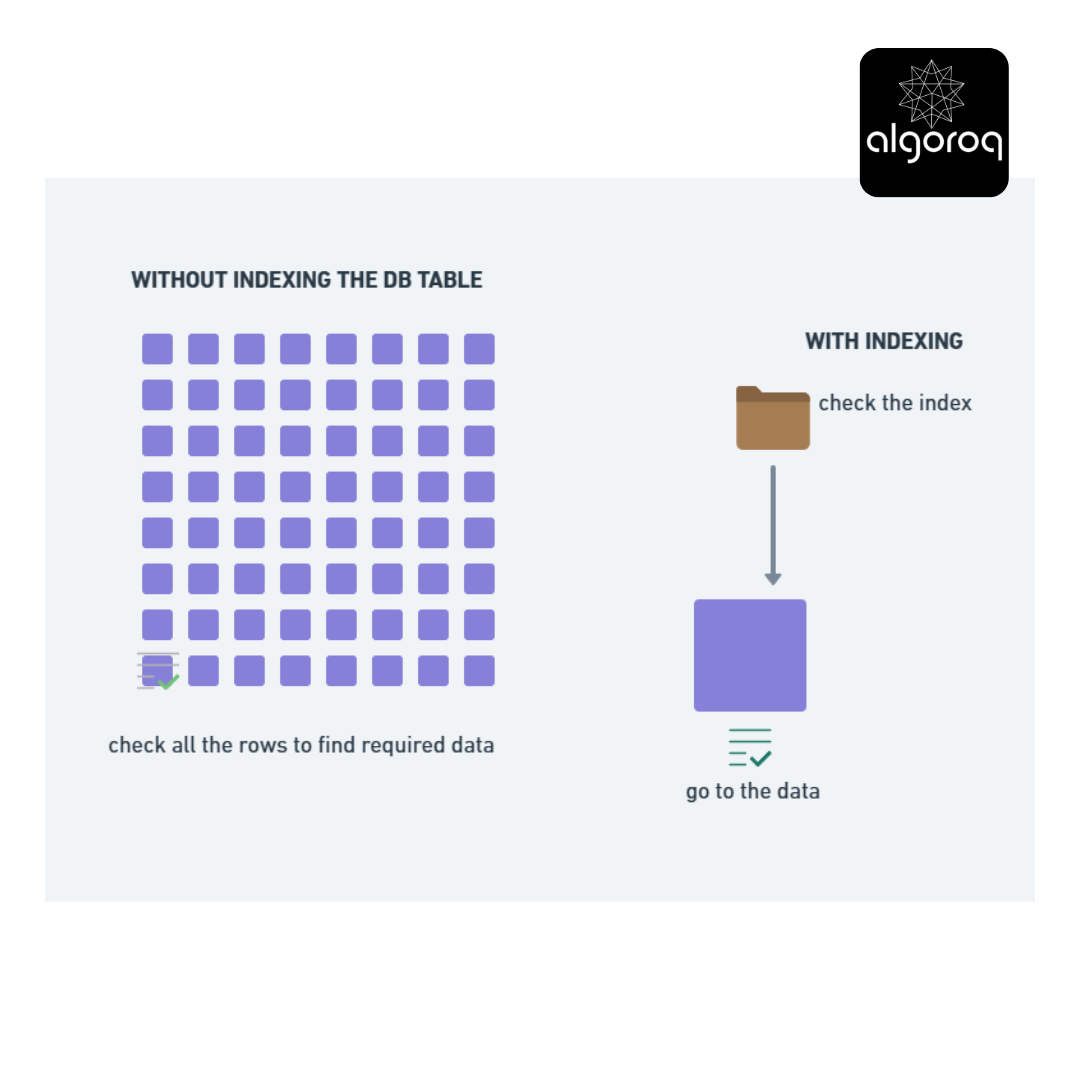
A database without indexes = Reading every single row to find what you need
A database with indexes = Jump directly to the data you want
📚 What Is an Index?
Think of it like:
- 📖 Index at the back of a textbook
- 🗂️ Card catalog in a library
- 📇 Contacts list sorted by name on your phone
Example: Finding a book in a library
Without Index:
Walk through EVERY aisle Check EVERY book title Found it after searching 50,000 books! ⏰ 2 hours
With Index (Card Catalog):
Look up "Pride and Prejudice" in catalog Card says: "Aisle 12, Shelf 5, Position 3" Walk directly there ⚡ 2 minutes
🗄️ How Database Indexes Work
Imagine a USERS table without index:
Finding user with email "bob@example.com":
Row 1: alice@example.com ❌ Row 2: charlie@example.com ❌ Row 3: david@example.com ❌ ... Row 50,000: bob@example.com ✓ FOUND!
Time: Scanned 50,000 rows (SLOW! 😰)
Same table WITH index on email:
Email Index (automatically sorted): alice@example.com → Row 1 bob@example.com → Row 50,000 ✓ charlie@example.com → Row 2 david@example.com → Row 3 ...
Database uses index:
- Binary search in index (fast!)
- Index points to Row 50,000
- Jump directly to that row
Time: Scanned ~17 entries (FAST! ⚡)
🎮 Interactive Exercise: When to Add an Index?
You have a PRODUCTS table with 1 million products:
Common queries:
Question: Which columns should you index? Think about it...
🎯 Indexing Guidelines: When to Index
✅ GOOD candidates for indexing:
- Primary keys (usually auto-indexed)
- Reason: Constantly used for lookups
- Foreign keys (columns that reference other tables)
- Reason: Used in JOIN operations
- Columns frequently used in WHERE clauses
- Example:
WHERE email = '...' - Reason: Speeds up filtering
- Example:
- Columns used for sorting (ORDER BY)
- Example:
ORDER BY created_at DESC - Reason: Avoids sorting entire table
- Example:
❌ POOR candidates for indexing:
- Rarely queried columns
- Example:
descriptiontext field - Reason: Index overhead not worth it
- Example:
- Columns with many duplicates
- Example:
gender(only M/F values) - Reason: Index doesn't narrow down much
- Example:
- Very small tables
- Example: Table with 50 rows
- Reason: Full scan is already fast
💰 The Cost of Indexes:
Benefits:
- ⚡ Dramatically faster SELECT queries
- 🎯 Efficient searching and filtering
- 📊 Faster sorting and joining
Costs:
- 💾 Extra storage space (indexes take up room)
- ⏱️ Slower INSERT/UPDATE/DELETE (must update indexes too)
- 🔧 Maintenance overhead
Mental model: Think of indexes like shortcuts in a video game. They get you places faster, but they take time to build and maintain!
📊 Index Types: Quick Overview
Primary Index (Clustered):
- Determines physical order of data on disk
- Like books sorted on library shelves
- One per table
Secondary Index (Non-Clustered):
- Separate structure pointing to data
- Like card catalog pointing to books
- Multiple per table
Unique Index:
- Ensures no duplicate values
- Like social security numbers
Composite Index:
- Index on multiple columns together
- Like phonebook sorted by (LastName, FirstName)
Example:
Index on single column
Composite index
Unique index
🔥 Real-World Performance Example
Query without index:
Execution time: 8 seconds (full table scan)
Rows examined: 10,000,000
Same query WITH index
Execution time: 0.003 seconds
⚡ Rows examined: 50 (via index)
Speed improvement: 2,667x faster!
Visual analogy:
🎯 Final Synthesis: Putting It All Together
The Complete Picture: Building a Library System
Let's apply everything we've learned!
1️⃣ Database Choice:
- Need structured data (books, members, loans)
- Need relationships (members ←→ loans ←→ books)
- Need accuracy (can't lose loan records!)
- Choice: SQL Database with ACID properties ✓
| 2️⃣ Table Design with Keys
3️⃣ Add Indexes for Performance
4️⃣ CRUD Operations:
Create: New member joins
Read: Find overdue books
Update: Return a book
UPDATE loans
Delete: Remove old loan records
5️⃣ ACID Transaction: Loan a book
-- All or nothing!**
🏆 Quick Recap: Test Your Understanding
Without looking back, can you explain:
- When would you choose SQL vs NoSQL?
- What does each letter in ACID stand for and why does it matter?
- Why would adding an index make a query faster?
- What's the difference between a Primary Key and a Foreign Key?
- What do the letters in CRUD stand for?
Mental check: If you can answer these clearly, you've mastered database fundamentals! 🎓
Common Mistakes
| Mistake | Why it's wrong | Correct approach |
|---|---|---|
| Indexing every column | Slows down writes and wastes storage | Only index columns used in WHERE, JOIN, and ORDER BY |
| Wrong column order in composite indexes | Index isn't used for queries that don't match the leftmost prefix | Put the most selective, most queried column first |
| Not using EXPLAIN | Guessing whether queries use indexes | Always verify with EXPLAIN ANALYZE before and after adding indexes |
| Indexing low-cardinality columns | Boolean or enum columns have too few distinct values for an index to help | Indexes work best on columns with many distinct values |
| Never removing unused indexes | Every index slows writes | Audit and drop indexes that queries no longer use |
Key Takeaways
- Indexes speed up reads dramatically at the cost of slower writes — like a book's index, they let the database jump directly to relevant rows
- B-tree indexes are the default and handle most query patterns — efficient for equality, range queries, and sorting
- Only index columns you actually query frequently — each index adds overhead to INSERT, UPDATE, and DELETE operations
- Composite indexes cover queries on multiple columns — column order in the index matters (leftmost prefix rule)
- Use EXPLAIN to verify your queries actually use indexes — a missing or unused index is a common source of slow queries
Log in to keep reading
Create a free account to keep reading and track your progress.
Log in — it's free