Content Delivery Network

CDN (Content Delivery Network) - Global Speed Boost
🎯 Challenge 4: The Pizza Delivery Problem
Scenario: You own a pizza restaurant in New York. Customers order from:
- New York (local)
- California (3,000 miles away)
- Tokyo (7,000 miles away)
Method A: Centralized Kitchen
- All pizzas made in New York
- New York customer: 10 min delivery ✓
- California customer: 6 hour flight 😰
- Tokyo customer: 14 hour flight 😱
Method B: Distributed Kitchens
- Kitchens in New York, LA, Tokyo
- Each serves local customers
- New York customer: 10 min ✓
- California customer: 10 min ✓
- Tokyo customer: 10 min ✓
Question: Which method serves all customers faster?
The Answer: CDN = Distributed Kitchens for the Internet!
Definition: A CDN is a network of servers distributed globally that store copies of your content closer to users.
🌐 How CDN Works: The Journey of a Cat Video
Without CDN (Origin Server Only):
User in Tokyo requests cat video from US server:

Round trip:
- Request: 150ms
- Video download: 5 seconds
- Total: 5.15 seconds ⏱️
With CDN (Edge Servers):
User in Tokyo requests cat video:
Step 1: Request goes to nearest CDN edge server
If cached:
- Request: 10ms4
- Video download: 0.5 seconds
- Total: 0.51 seconds ⚡ (10x faster!)
If NOT cached (first request): Tokyo 🇯🇵 ─── 🇯🇵 Tokyo CDN ─────────── 🇺🇸 Origin (10ms) (150ms)
- CDN fetches from origin: 5.15s
- CDN caches for future requests
- Future Tokyo users: 0.51s ⚡
🗺️ CDN Architecture: Global Network
Visual map:
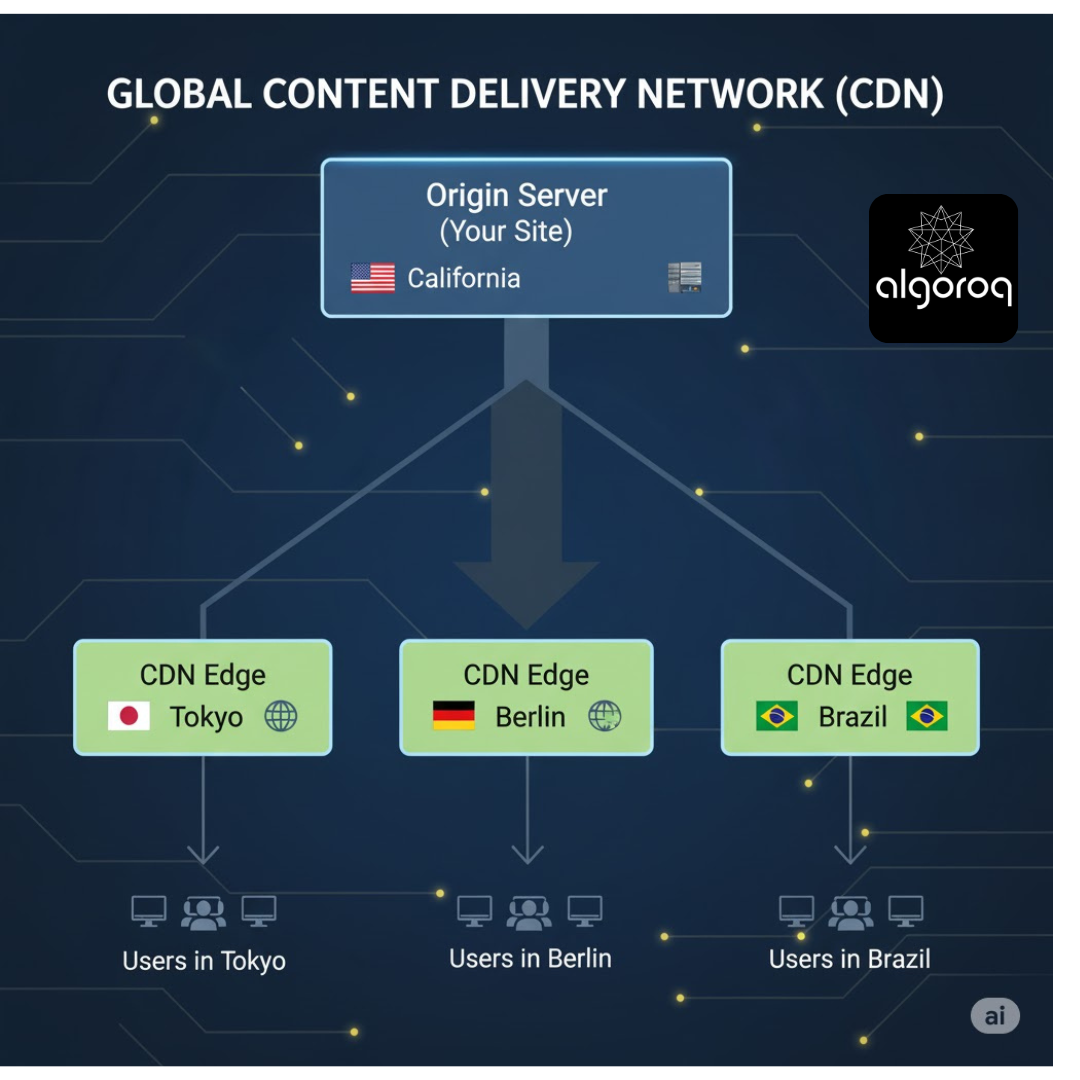
How it works:
- You upload content to origin server
- CDN automatically replicates to edge servers
- User requests content
- DNS routes to nearest edge server
- Edge server serves cached content (fast!)
- If not cached, fetches from origin and caches
📦 What CDNs Cache
✅ Perfect for CDN:
- Static files (images, CSS, JavaScript)
- Videos and audio
- Software downloads
- PDF documents
- Web fonts
- Libraries (jQuery, Bootstrap)
❌ Not for CDN:
- User-specific data (shopping cart)
- Real-time data (stock prices)
- Dynamic personalized content
- Frequently changing content
- Private/authenticated content
Example: E-commerce site
CDN (Cached): ✅ Product images ✅ Logo, icons ✅ CSS stylesheets ✅ JavaScript files ✅ Product videos
Origin Server (Dynamic): ❌ User account info ❌ Shopping cart ❌ Checkout process ❌ Inventory counts ❌ Personalized recommendations
🚀 CDN Benefits: Real Numbers
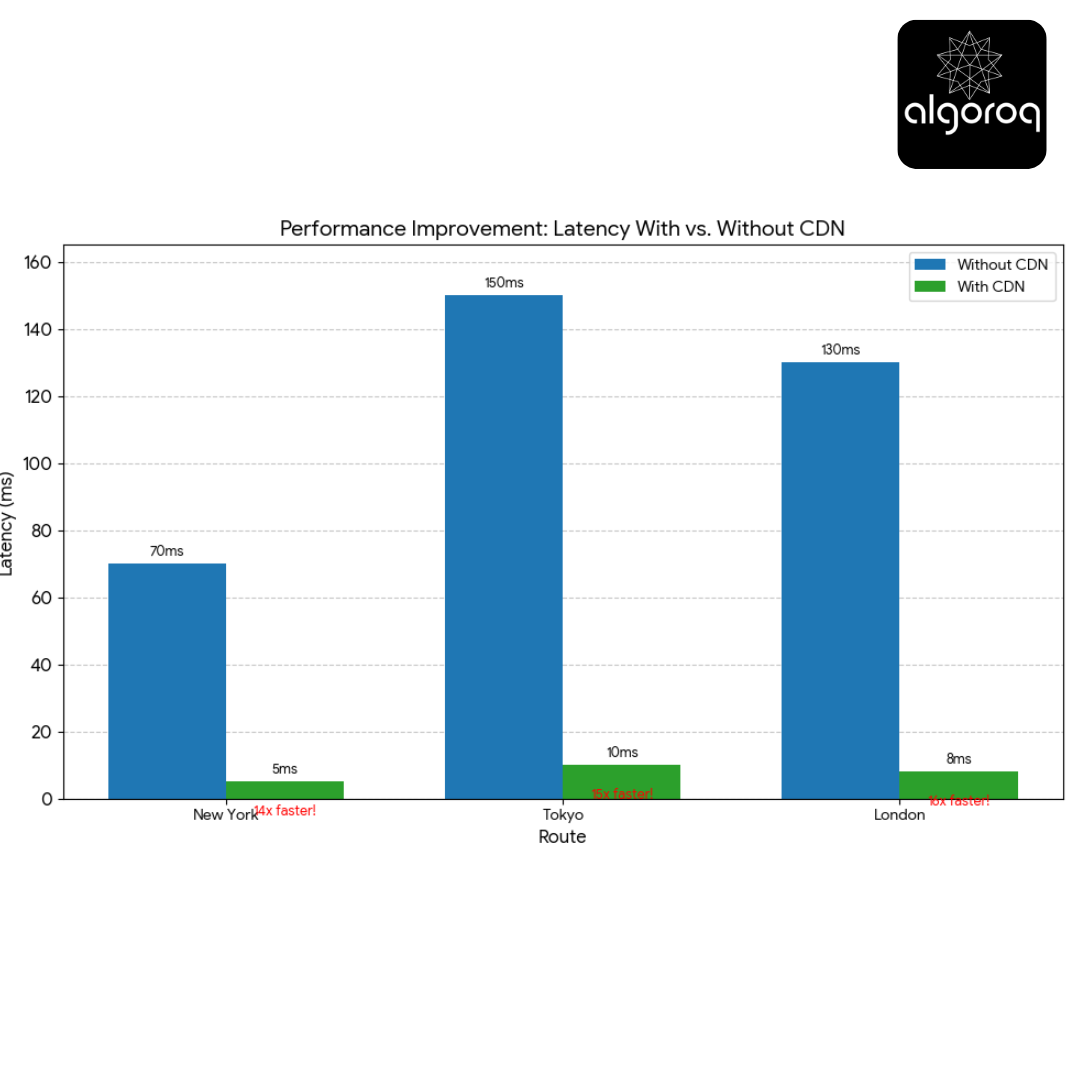
Performance improvement:
Without CDN: New York → California Server: 70ms latency Tokyo → California Server: 150ms latency London → California Server: 130ms latency
With CDN: New York → New York Edge: 5ms latency (14x faster!) Tokyo → Tokyo Edge: 10ms latency (15x faster!) London → London Edge: 8ms latency (16x faster!)
Bandwidth savings:
Without CDN: 1 million requests × 2 MB image = 2 TB from origin Cost: $200/TB = $400
With CDN (90% cache hit): 100k requests × 2 MB = 200 GB from origin 900k served from cache (free!) Cost: $200/TB × 0.2 TB = $40
Savings: $360 (90% cheaper!) 💰
🎮 Interactive Exercise: CDN or Origin?
Decide which should be served from CDN vs Origin:
| Content | CDN or Origin? | Why? |
|---|---|---|
| Company logo (logo.png) | ? | ? |
| User's profile picture | ? | ? |
| jQuery library (3rd party) | ? | ? |
| Shopping cart total | ? | ? |
| Product catalog page | ? | ? |
| Live chat messages | ? | ? |
Answers:
-
Company Logo: CDN ✅
- Static, same for everyone
- Rarely changes
- Perfect for caching
- Cache for: 1 year
-
User Profile Picture: CDN ✅
- Static image
- Same for all viewers
- Changes rarely
- Cache for: 24 hours
-
jQuery Library: CDN ✅✅✅
- Public library
- Never changes (versioned)
- Used by millions of sites
- Cache for: Forever! (immutable)
-
Shopping Cart Total: Origin ❌
- User-specific
- Changes frequently
- Must be real-time accurate
- Never cache
-
Product Catalog: Hybrid 🤔
- HTML: Origin (personalized prices/stock)
- Images: CDN (static product photos)
- Smart caching strategy
-
Live Chat Messages: Origin ❌
- Real-time
- User-specific
- Constantly changing
- Never cache
🛠️ Setting Up CDN: Code Example
Cloudflare CDN Setup:
AWS CloudFront: (CDN provider by Amazon)
// Configure CloudFront distribution
// URLs automatically routed through CloudFront//
https://d1234.cloudfront.net/images/product.jpg |
🎯 CDN Cache Control Headers
Control how CDN caches your content:
Cache-Control directives:
public - Anyone can cache
private - Only browser can cache (not CDN)
no-cache - Must revalidate before using
no-store - Never cache
max-age=3600 - Cache for 1 hour
immutable - Never changes, cache forever
must-revalidate - Check with origin if expired
🔥 CDN Cache Invalidation: Updating Cached Content
Problem: You update logo.png on origin, but CDN still serves old cached version!
Solution 1: Wait for TTL to expire
❌ Slow! Could take hours/days Not acceptable for urgent updates
Solution 2: Cache Busting (Versioning)
✅ Best practice! CDN sees new URL, fetches new file
Solution 3: Manual Purge/Invalidation
💡 Popular CDN Providers
Cloudflare 🌐
-
Cloudflare as a free tier available
-
It has availability across 200+ locations worldwide
-
DDoS protection included
-
It is considered great for small-medium sites
Amazon CloudFront ☁️
-
Cloud front is amazon’s Pay-as-you-go cdn service
-
Integrates with AWS
-
400+ edge locations (high availability)
-
Enterprise-grade
Fastly ⚡
-
Real-time purging
-
Edge computing (VCL)
-
Premium performance
-
Used by: GitHub, Shopify
Akamai 🏢
-
Largest CDN (4,000+ locations)
-
Enterprise focus
-
Most expensive
-
Used by: Apple, Facebook
Key Takeaways
- CDNs cache content at edge servers close to users — reducing latency from 150ms to 15ms for geographically distant users
- Pull CDNs fetch content on first request (cache miss) — simpler to set up, only caches what's actually requested
- Push CDNs proactively replicate content to all edge servers — better for large, predictable content like software releases
- Cache-Control headers drive CDN behavior — set long TTLs for static assets and use content-hashed filenames for safe cache busting
- CDNs also provide DDoS protection and TLS termination — security benefits beyond just performance
Log in to keep reading
Create a free account to keep reading and track your progress.
Log in — it's free