Rate Limiting

🚦 Rate Limiting: The Traffic Control System
Okay, imagine you own a popular ice cream shop. On a hot summer day, if you let everyone in at once, what happens?
- The shop is overcrowded
- Service slows down
- Ice cream melts
- Staff gets overwhelmed
- Everyone has a bad experience
So what do smart shop owners do? They control the flow - only let in a certain number of people at a time.
That's rate limiting!
Why APIs Need Rate Limiting
Let’s first see what happens WITHOUT rate limiting:
Scenario: Your API can handle 1000 requests/second
Malicious User (or bug):
Result:
-
Your server gets 1 MILLION requests instantly
-
Server crashes
-
ALL users (good and bad) can't access your API
-
You're paying for all that bandwidth
-
Your database melts
Cost: Thousands of dollars Downtime: Hours or days
With rate limiting:
After 100 requests from that user: ━━━━━━━━━━━━━━━━━━━━━━━━━━━━━━━
Response:
429 Too Many Requests
Retry-After: 60
The client can see: "Okay, I have 742 requests left. The limit resets at 1730123456 Let me pace myself
Rate Limit Exceeded:
━━━━━━━━━━━━━━━━━━━━
Different Limits for Different Users
Professional APIs often have tiered limits:
Free Tier:
━━━━━━━━━━
-
100 requests/hour
-
1000 requests/day
Example response:
Pro Tier ($29/month):
━━━━━━━━━━━━━━━━━━━━
-
10,000 requests/hour
-
No daily limit
Example response:
Enterprise Tier (Custom):
━━━━━━━━━━━━━━━━━━━━━━━
-
Unlimited requests
-
Dedicated servers
Example response:
How to Design Your Rate Limits
Let’s lay out a solid design Framework:
Step 1: Calculate your capacity
Your server can handle:
-
10,000 requests/second
-
You have 1000 users
-
Average user makes 100 requests/day
Math: 10,000 req/sec × 60 × 60 = 36 million req/hour capacity
1000 users × 100 req/day = 100,000 req/day needed
You have PLENTY of capacity!
Safe rate limit: 1000 requests/hour per user (Far below capacity, but generous for users)
Step 2: Set tiered limits
Free: 100/hour (prevents abuse, encourages upgrade)
Pro: 10,000/hour (reasonable for paid users)
Enterprise: Custom (negotiate based on needs)
Step 3: Monitor and adjust
After 1 month:
-
90% of users never hit limit ✓
-
5% hit limit occasionally → Probably okay
-
5% hit limit constantly → Contact them (might be bugs or need upgrade)
Rate Limiting Best Practices
Here are the rules to keep in mind:
1. Always return helpful headers
✓ X-RateLimit-Limit
✓ X-RateLimit-Remaining
✓ X-RateLimit-Reset
✓ Retry-After (when blocked)
2. Give clear error messages
❌ "Too many requests"
✓ "You've made 1000/1000 requests. Limit resets in 45 minutes at 3:00 PM."
3. Different limits for different endpoints
GET /users → 10,000/hour (reading is cheap)
POST /users → 100/hour (writing is expensive)
POST /send-email → 10/hour (external service costs money)
4. Document your limits
Your API docs should clearly state:
-
What the limits are
-
How they're calculated
-
What headers to check
-
What happens when exceeded
🎓 Putting It All Together: A Complete API
Let me show you how ALL these concepts work together in a real system:
Real-World Scenario: Photo Sharing API
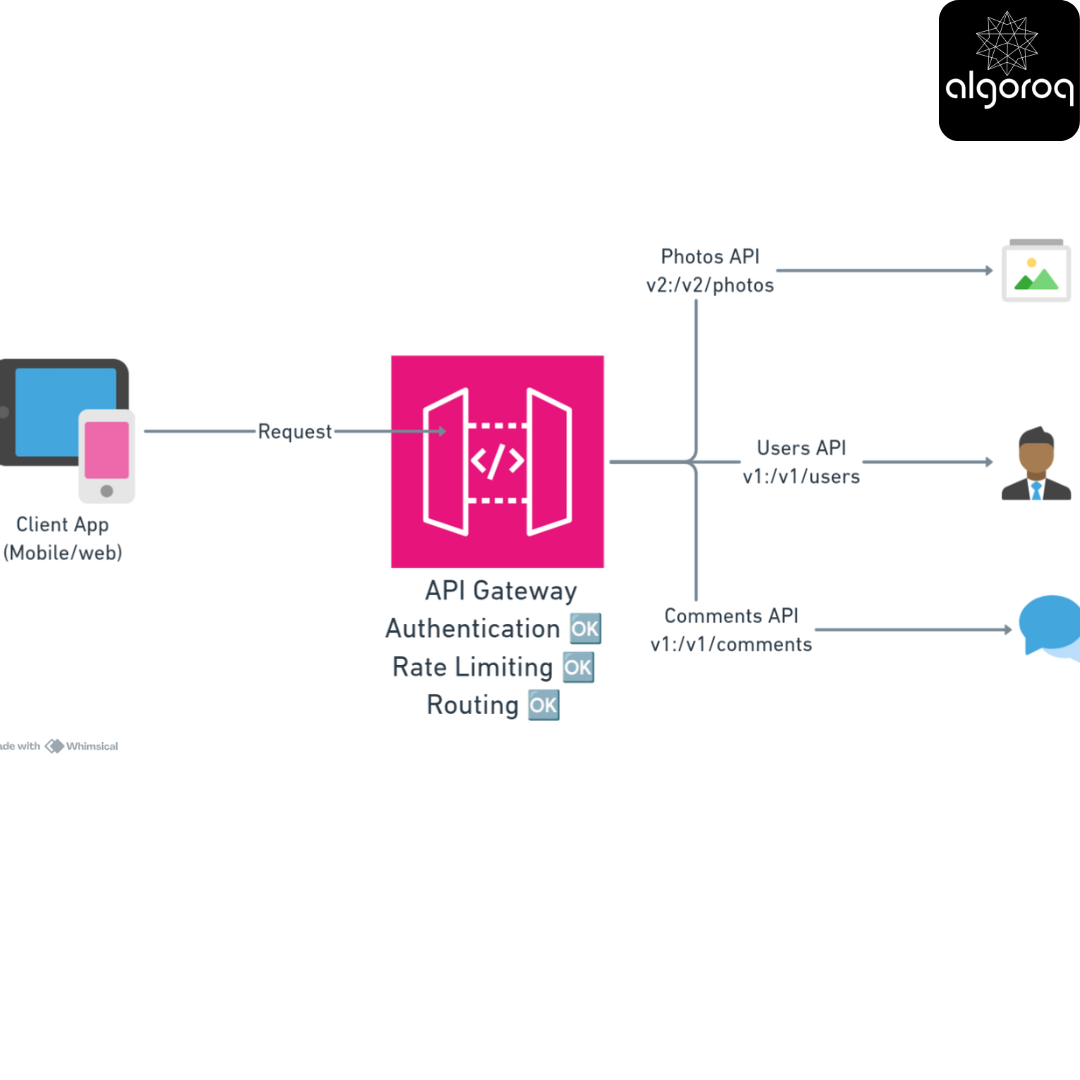
Example Request Flow:
━━━━━━━━━━━━━━━━━━━━━
- Get photos from a specific user, filtered by date:
-
Gateway checks:
✓ Authentication (Bearer token)
✓ Rate limit (500/1000 remaining)
✓ Routes to Photos API v2
-
Photos API returns:
4 Client continues scrolling:
✅ Final Checklist: Are You Ready?
You've mastered advanced API concepts if you can:
API Gateway:
- Explain why gateways centralize authentication
- Describe how routing works
- Understand when to use a gateway
Parameters:
- Choose between path and query parameters correctly
- Design clean, logical URLs
- Understand hierarchical structure
Pagination:
- Implement offset pagination
- Implement cursor pagination
- Choose the right method for your use case
Versioning:
- Identify breaking vs non-breaking changes
- Version your APIs properly
- Deprecate old versions responsibly
Rate Limiting:
- Calculate appropriate limits
- Return helpful rate limit headers
- Implement tiered limits
Congratulations! You now understand professional API design! 🎉
Key Takeaways
- Rate limiting protects APIs from abuse and ensures fair usage — without it, one client can overwhelm the entire system
- Token bucket and sliding window are the most common algorithms — token bucket allows bursting, sliding window prevents boundary spikes
- Always return 429 status codes with Retry-After headers — well-behaved clients will back off automatically
- Implement rate limiting at the API gateway level — before requests reach your application code
Log in to keep reading
Create a free account to keep reading and track your progress.
Log in — it's free