Cache Hits vs Miss

Cache Hit vs Cache Miss - The Performance Game
🎯 Challenge 2: The Book Detective
Scenario: You're looking for a book in a library:
Situation A: You check the front desk → Book is there! → Take it (10 seconds)
Situation B: You check the front desk → Book is NOT there → Go to storage room → Search shelves → Find it → Bring to front (15 minutes)
Question: Which situation is faster? What's the speed difference?
The Answer: Cache Hit vs Cache Miss!
Cache Hit: Data found in cache (Situation A) - Fast! ⚡
Cache Miss: Data not in cache, must fetch from source (Situation B) - Slow! ⏱️
📊 Understanding Cache Hits and Misses
Visual flow:

🎮 Real-World Example: Video Streaming
Say you are watching "Stranger Things" on Netflix
And end up being the first viewer in your city (Cache Miss):
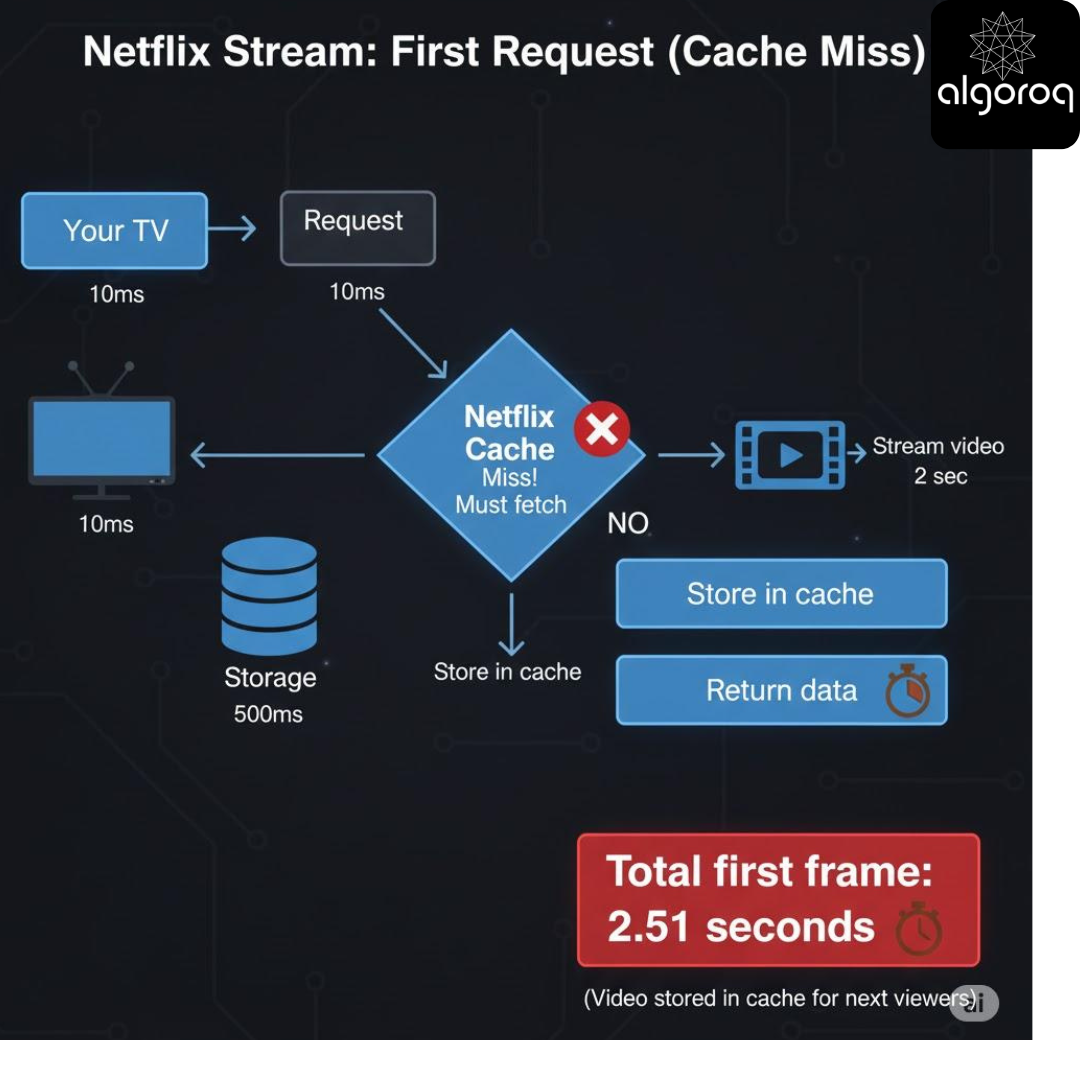
The diagram shows how video is fetched from the original server and then stored in the cache
Now the second viewer of “stranger things “ in your city access netflix to experience video stream faster as it was cached :
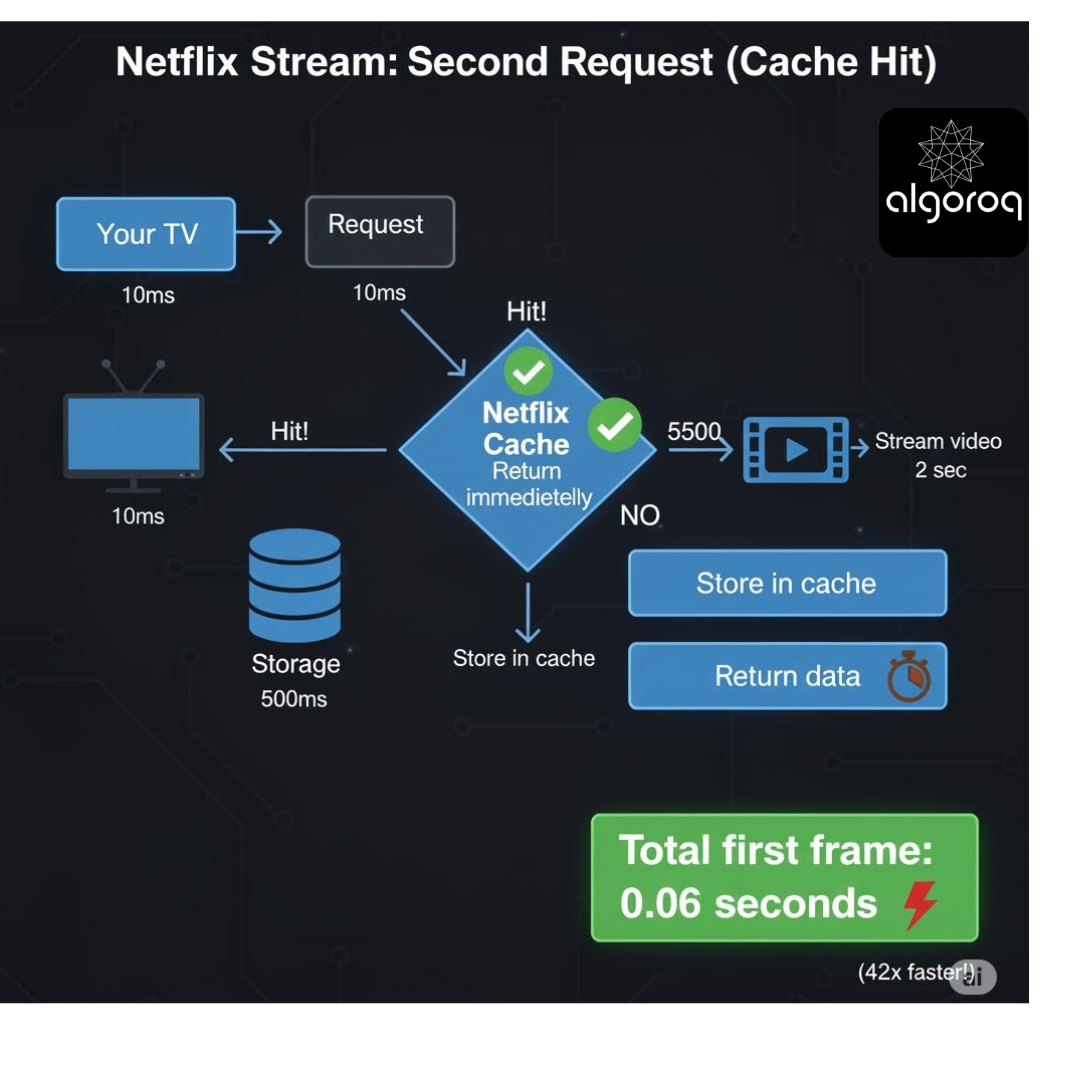
📈 Cache Hit Ratio: The Success Metric
Formula:
Cache Hit Ratio = Cache Hits / Total Requests × 100%
Example:
- 1000 requests
- 850 cache hits
- 150 cache misses
Hit Ratio = 850/1000 = 85%
What different ratios mean:
95-99% Hit Ratio: 🌟 Excellent! - Most requests served from cache - Minimal database load - Great user experience
80-94% Hit Ratio: ✅ Good - Decent caching effectiveness - Room for improvement - Database still moderately busy
50-79% Hit Ratio: ⚠️ Needs Work - Half requests hitting database - Cache strategy needs review - High database load
Below 50% Hit Ratio: ❌ Poor - Cache not effective - Might be caching wrong data - Consider removing cache (overhead without benefit)
🔍 Why Cache Misses Happen
1. Cold Start (Empty Cache)
In our netflix example for “stranger things “ the application had just started Cache was empty
First request for each item = Miss
Example: Request 1 (Product A): Miss ❌ → Load from DB Request 2 (Product A): Hit ✅ → From cache Request 3 (Product B): Miss ❌ → Load from DB Request 4 (Product B): Hit ✅ → From cache
2. Cache Expiration (TTL)
Say a phone on amazon has a bumper offer on Christmas but just for 5 minutes
Price data cached at 10:00 AM (TTL: 5 minutes) Request at 10:04 AM: Hit ✅ Request at 10:06 AM: Miss ❌ (Expired!) → Refresh from database
3. Cache Eviction (Full Cache)
Say we have a current cache size of 100 items and all of them get filled up
Cache capacity: 100 items Currently: 100 items (full!) New item requested: Must remove old item → Miss for the evicted item
4. Cache Invalidation (Data Changed)
Product price changes in database Cache entry invalidated (removed) Next request: Miss ❌ → Fetch fresh data
💻 Code Example: Tracking Hits and Misses
🎪 Interactive Exercise: Calculate Hit Ratio
Scenario: Let us consider an E-commerce website over 1 hour
The homepage (popular): Let’s say we have 10,000 requests The First request: Misses the essential data it loads from DB (cache miss) and stores it into the cache Now for the next 9,999 requests: The content is served from cache
Hits: 9,999 | Misses: 1
Product page (100 different products): Let us say each product is requested 50 times Total requests: 5,000 (100 * 50) First request for every product is a cache miss since its not being fetched yet (100 misses) Subsequent requests: Hits (4,900 hits)*
Hits: 4,900 | Misses: 100
User profiles (1,000 different users):
Each user profile viewed 2 times Total requests: 2,000 First view: Miss (1,000 misses) Second view: Hit (1,000 hits) Hits: 1,000 | Misses: 1,000
Question: What's the overall cache hit ratio?
Calculate:
Total Hits: 9,999 + 4,900 + 1,000 = 15,899 Total Misses: 1 + 100 + 1,000 = 1,101 Total Requests: 15,899 + 1,101 = 17,000
Hit Ratio = 15,899 / 17,000 = 93.52% 🌟
This is excellent! Homepage caching is very effective.
🚀 Optimizing for Cache Hits
Strategy 1: Cache Warming (Pre-populate)
In cache warming you don’t wait for the first request instead we already add the data to the cache
For instance netflix might be aware the people are going to watch “stranger things”, “squid games” so they can prepopulate the cache with videos
// Don't wait for first request - warm cache at startup
Strategy 2: Longer TTL for Stable Data
Say we are accessing an ecommerce website like Amazon the content on the homepage changes daily based on recommendation or say there is a Black Friday Sale or Halloween Sale or Big Billion Sale (India) the page content has to show content with new offers so homepage content has to be changing based on day, based on time based on the user gender, age, recommendation and all such factors
Strategy 3: Predictive Caching
Say a user views product A (a phone) Now he/she is very likely to view related Products B (phone cover), C (tempered glass), D (charging brick) So products B,C,D could be pre-fetched and cached!
📊 Monitoring Cache Performance
Key metrics to track:
- Average Response Time
- Cache Size
- Eviction Rate
- Staleness
- Alert Thresholds
- Eviction Rate
Log in to keep reading
Create a free account to keep reading and track your progress.
Log in — it's free