Internet Protocol

7. Internet Protocol (IP) - Interactive Learning Guide
🎯 Challenge 1: The Addressing Mystery
Imagine this scenario: You're sending a message to your friend across the internet. Your computer knows your friend's IP address is 192.168.1.50, but there are millions of routers between you. How does your message find its way?
Pause and think: What system could help route this message correctly?
The Answer: IP (Internet Protocol) acts as the internet's addressing and routing system. Just like every house has a unique address so the postal service knows where to deliver mail, every device has an IP address so data packets know where to go.
Key insight: IP's primary job isn't to ensure delivery - it's to provide addressing and routing so packets can travel across multiple networks.
🚨 Common Misconception: "IP Guarantees Delivery... Right?"
You might think: "If IP is handling my packets, surely it guarantees they'll arrive safely, right?"
Actually: IP provides best-effort delivery only!
Think of it like this: IP is like sending postcards through regular mail:
- The postal service tries its best to deliver your postcard
- But there's no guarantee it will arrive
- No guarantee it arrives in order (if you send multiple postcards)
- No tracking number or delivery confirmation
🔍 Investigation: Connection or No Connection?
Scenario: Your video call app needs to send 100 packets to your friend. Does IP:
- Option A: Establish a "connection" first, like a phone call, then send all packets through that connection?
- Option B: Just throw each packet into the network independently, like dropping 100 letters in a mailbox?
Think about it for a moment...
The Reality: IP is connectionless (Option B)!
Each packet is independent and travels on its own:
- No "setup" or "handshake" before sending
- Each packet can take a different route
- Packets might arrive out of order
- No relationship between packets at the IP level
Visual Mental Model: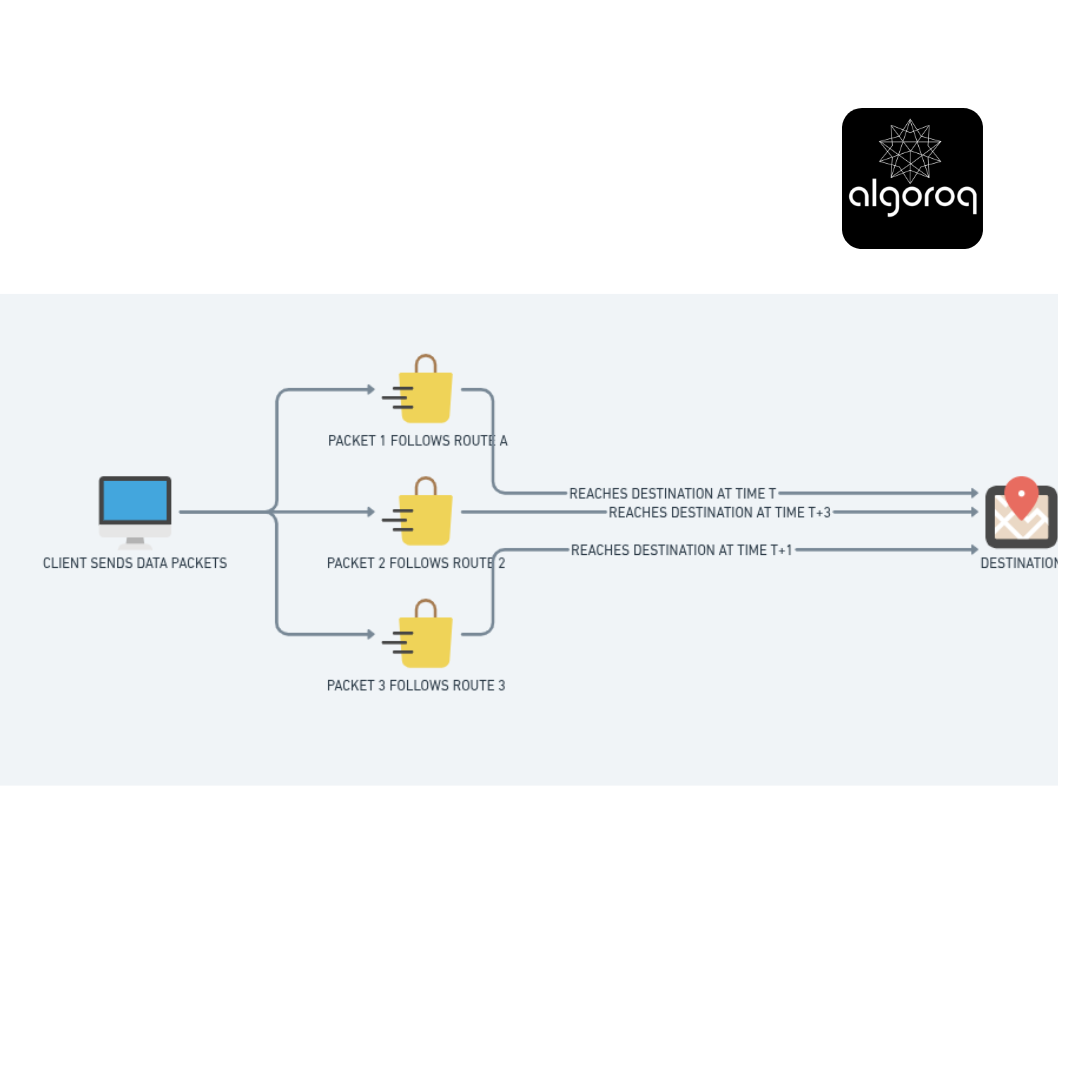
🧩 Problem-Solving Exercise: The Oversized Packet
Scenario: You're sending a 3000-byte packet, but the network path has a section that only allows 1500-byte packets.
What do you think happens?
- The packet gets rejected?
- The packet waits for the restriction to be lifted?
- Something else?
Solution: Fragmentation!
IP breaks the large packet into smaller pieces:
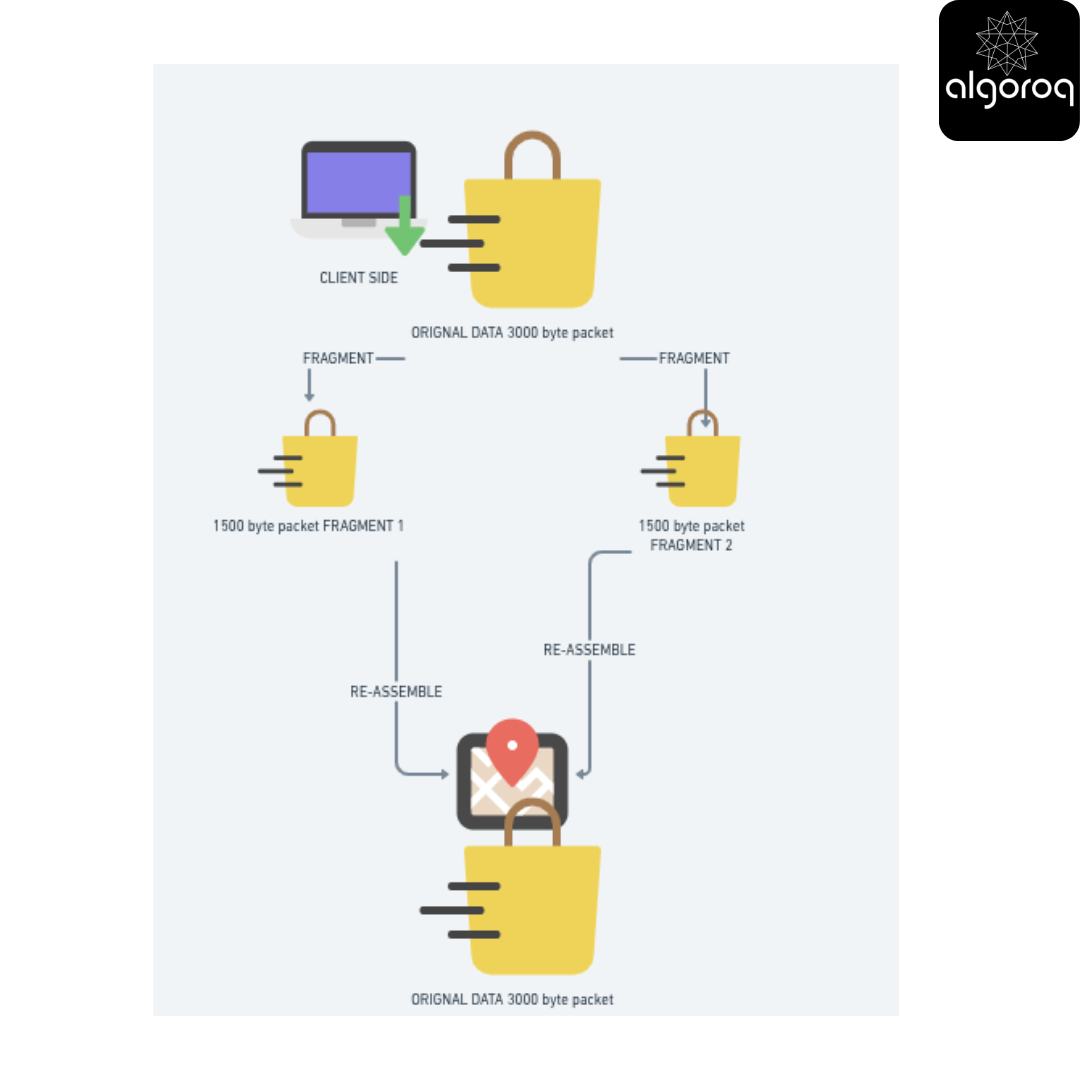
Real-world parallel: Like moving a large sofa that won't fit through the door - you take it apart, move the pieces separately, and reassemble inside!
🎮 Quick Decision Game: IPv4 vs IPv6
Context: IPv4 addresses look like 192.168.1.1 (four numbers, each 0-255)
Calculate with me:
- Each number: 0-255 = 256 possibilities
- Four numbers: 256 × 256 × 256 × 256 = 4.3 billion addresses
Question: With 8+ billion people on Earth and multiple devices per person (phone, laptop, tablet, smartwatch, IoT devices), do we have enough IPv4 addresses?
The IPv6 Solution:
IPv4 is running out! IPv6 was created with 128-bit addresses (vs IPv4's 32-bit).
Mind-blowing fact: IPv6 provides:
- 340 undecillion addresses (that's 340 trillion trillion trillion!)
- Enough to assign billions of addresses to every grain of sand on Earth
Analogy shift:
- IPv4 = 10-digit phone numbers (running out of combinations)
- IPv6 = 39-digit phone numbers (essentially unlimited)
🚦 Scenario: The Infinite Loop Problem
Imagine this nightmare scenario:
A misconfigured router creates a loop:
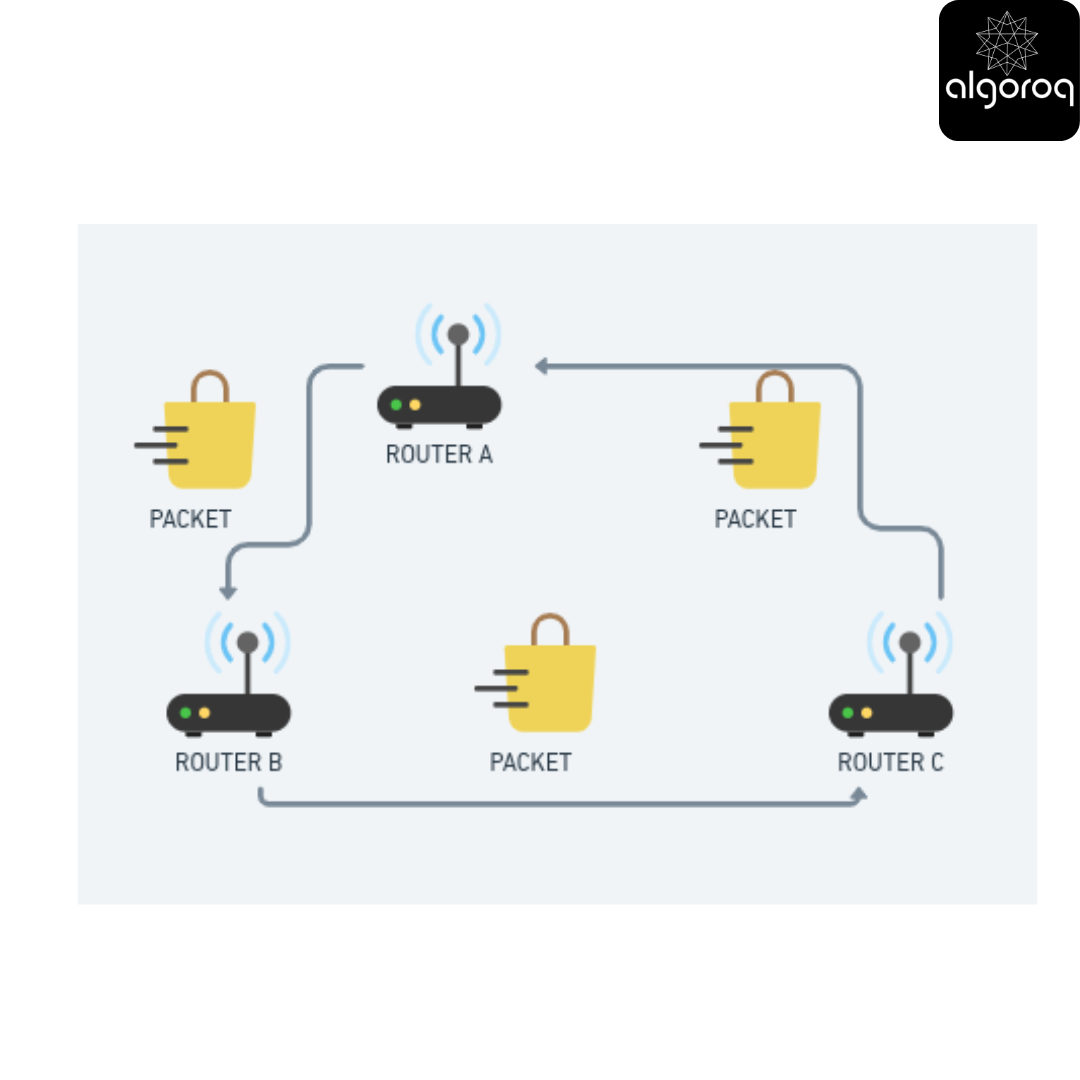
Without intervention, what happens? The packet bounces forever, clogging the network!
Your solution: How would you prevent this?
IP's Built-in Solution: TTL (Time to Live)
Every IP packet has a hop counter (TTL):
- Starts at a number (e.g., 64)
- Decreases by 1 at every router
- When it reaches 0, the packet is discarded
Mental model: It's like a self-destruct timer on a letter. If it bounces through too many post offices (exceeds the hop limit), it destroys itself rather than circulating forever.
Try this thought experiment: If TTL starts at 64, what's the maximum number of routers your packet can pass through? (Answer: 64)
🗺️ Interactive Journey: How Packets Find Their Way
Follow this packet's journey:
Step 1: You send a packet to 8.8.8.8 (Google's DNS)
Step 2: Your router receives it and asks: "Is this for my local network?"
- No? → Check routing table, forward to next hop
Step 3: Next router does the same: "Is destination on my network?"
- No? → Check routing table, forward again
Step 4: This repeats until...
- A router says "Yes! This destination is on my network!"
- Packet delivered!
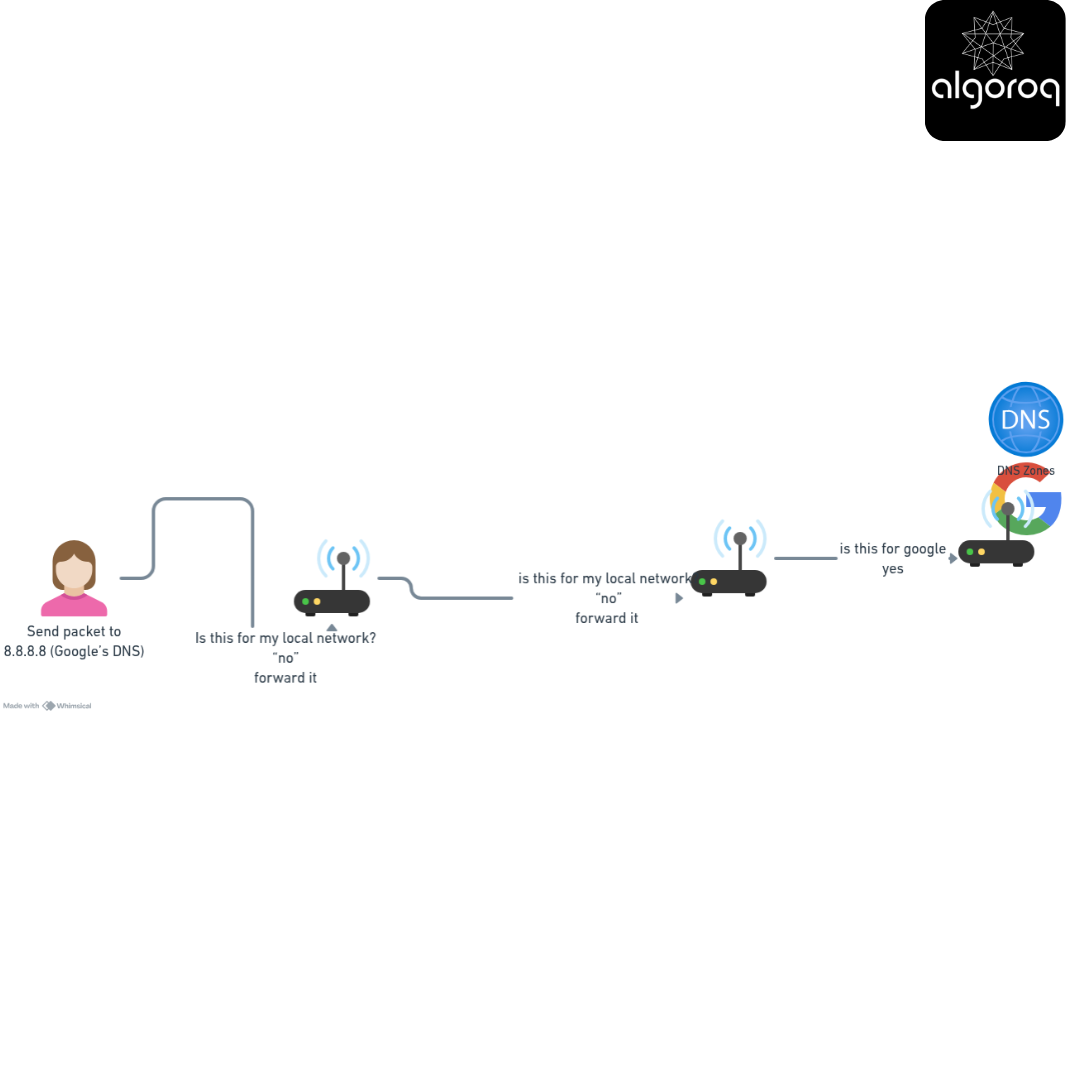
Key realization: Each router only knows the next best hop, not the entire path. It's like GPS that recalculates at every turn, not a pre-planned route.
📦 Decode the IP Header: Detective Exercise
Every IP packet has a header with crucial information. Can you match the field to its purpose?
The fields:
- Source IP Address
- Destination IP Address
- Protocol (e.g., 6 = TCP, 17 = UDP)
- TTL (Time to Live)
- Total Length
Think: What information is absolutely essential for routing a packet?
Answers revealed:
- Source IP: Return address - where packet came from
- Destination IP: Delivery address - where packet is going
- Protocol: What's inside the package (TCP data? UDP data?)
- TTL: Self-destruct counter - prevents infinite loops
- Total Length: Size of the entire packet
Analogy: The IP header is exactly like a package label with sender address, recipient address, contents description, size/weight, and handling instructions!
💡 Final Synthesis Challenge
Put it all together: Based on what you've learned, explain why this statement is TRUE:
"IP is unreliable, yet the internet works reliably."
Think about:
- What does IP provide?
- What does IP NOT provide?
- What other protocols fill the gaps?
The Big Picture Answer:
IP's job is focused: addressing and routing. It's intentionally simple and fast.
The reliability stack:
Application Layer (HTTP, FTP) ← User experiences reliability here
Transport Layer (TCP) ← Adds reliability, ordering, error checking
Network Layer (IP) ← Provides addressing & routing (best-effort)
Key insight: By keeping IP simple and "unreliable," we gain:
- Speed - No overhead for connection management
- Flexibility - Can use TCP for reliability or UDP for speed
- Scalability - Routers don't need to track connection state
This is brilliant design - separating concerns lets each layer do what it does best!
🎯 Your Next Learning Adventure
Now that you understand IP, you're ready to explore:
Immediate next steps:
- Transmission Control Protocol (TCP the backbone of Reliable Internet communication)
- How does ARP translate IP addresses to physical MAC addresses? (The missing link!)
- What is ICMP, and why does "ping" work? (Network diagnostics decoded)
- How do routers actually make decisions? (Routing protocols: OSPF, BGP, RIP)
Deep dives:
- Subnetting: Why is
192.168.1.0/24different from192.168.1.0/16? - IPv6 transition: How is the world moving from IPv4 to IPv6?
- NAT: How do multiple devices share one public IP address?
Key Takeaways
- IP addresses uniquely identify devices on a network — IPv4 uses 32 bits (4.3 billion addresses), IPv6 uses 128 bits
- IP is a best-effort, connectionless protocol — packets may arrive out of order, be duplicated, or get lost
- Subnetting divides networks into smaller segments — CIDR notation (e.g., 10.0.0.0/24) defines the network and host portions
- NAT allows multiple devices to share one public IP — essential for IPv4 address conservation in home and corporate networks
Log in to keep reading
Create a free account to keep reading and track your progress.
Log in — it's free