Domain Name System

DNS (Domain Name System)
Challenge 1: The Phone Book Problem
Imagine this scenario: You want to call your friend Sarah. You know her name is "Sarah Johnson," but that doesn't help you dial her phone. You need her phone NUMBER: 555-0123.
Now imagine the entire internet:
- Google.com exists at
142.250.185.46 - Facebook.com exists at
157.240.241.35 - GitHub.com exists at
140.82.121.4
Pause and think: How would you browse the web if you had to memorize IP addresses for every website? Could you remember even 10 of them?
The Answer: DNS (Domain Name System) is the internet's phone book. It translates human-friendly names into computer-friendly numbers.
Without DNS:
You type: 142.250.185.46
Browser: Connects to Google
Problem: Nobody can remember this!
With DNS:
You type: google.com
DNS: "That's 142.250.185.46"
Browser: Connects to 142.250.185.46
You never see the number!
Key insight: DNS is the reason the internet is usable by humans. It's one of the oldest and most critical internet protocols, created in 1983!
Interactive Exercise: The Global Directory System
Scenario: You're looking for a business phone number for "Joe's Pizza" in "Springfield, Illinois, USA."
Think about how you'd organize this:
- Start with COUNTRY directory
- Then STATE directory
- Then CITY directory
- Then BUSINESS listings
- Find "Joe's Pizza"
Why this hierarchy?
- Can't put all businesses worldwide in one book (too big!)
- Different organizations manage different levels
- Updates happen locally (Springfield updates its businesses, not the USA)
DNS works EXACTLY like this!
The DNS Hierarchy:
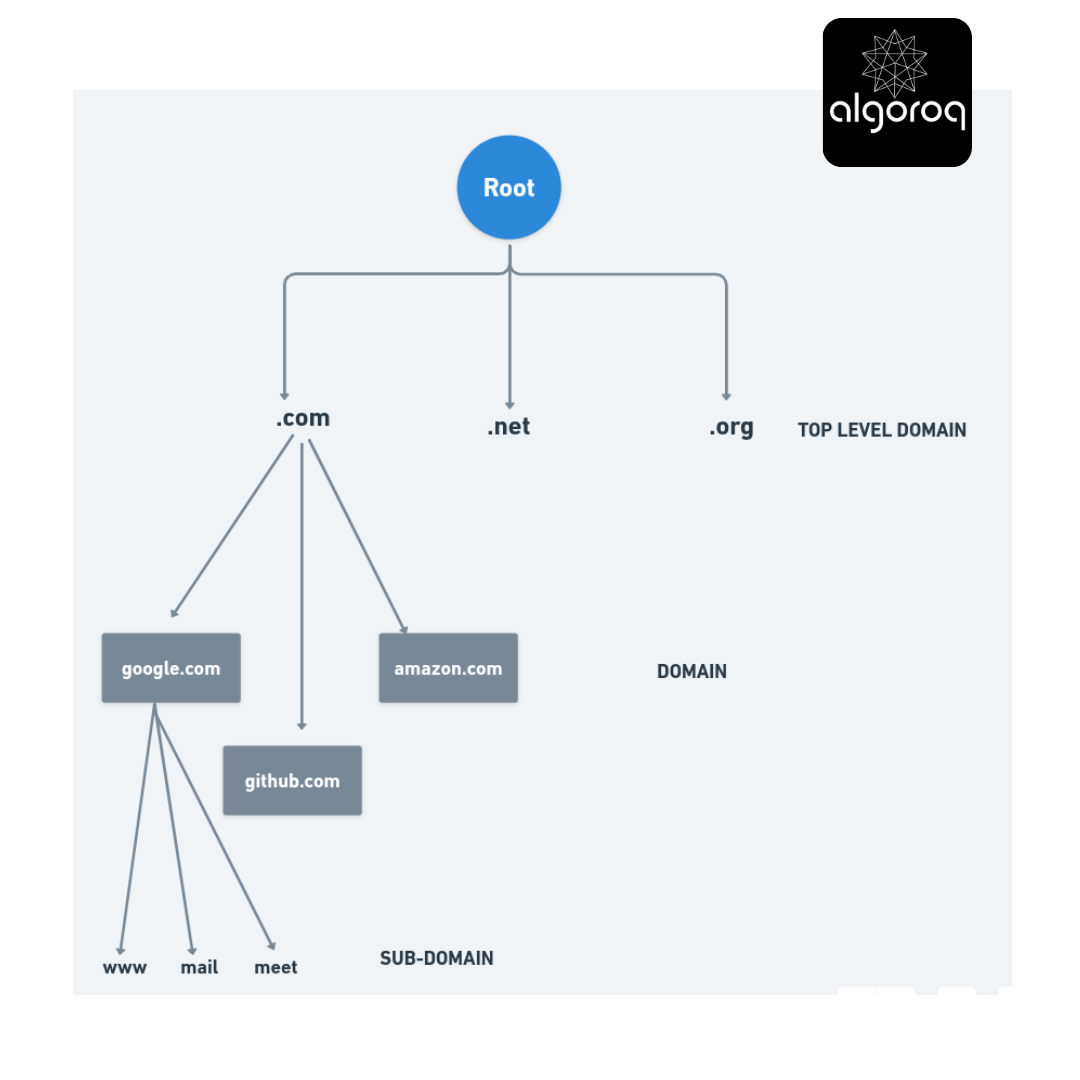
Reading a domain right-to-left:
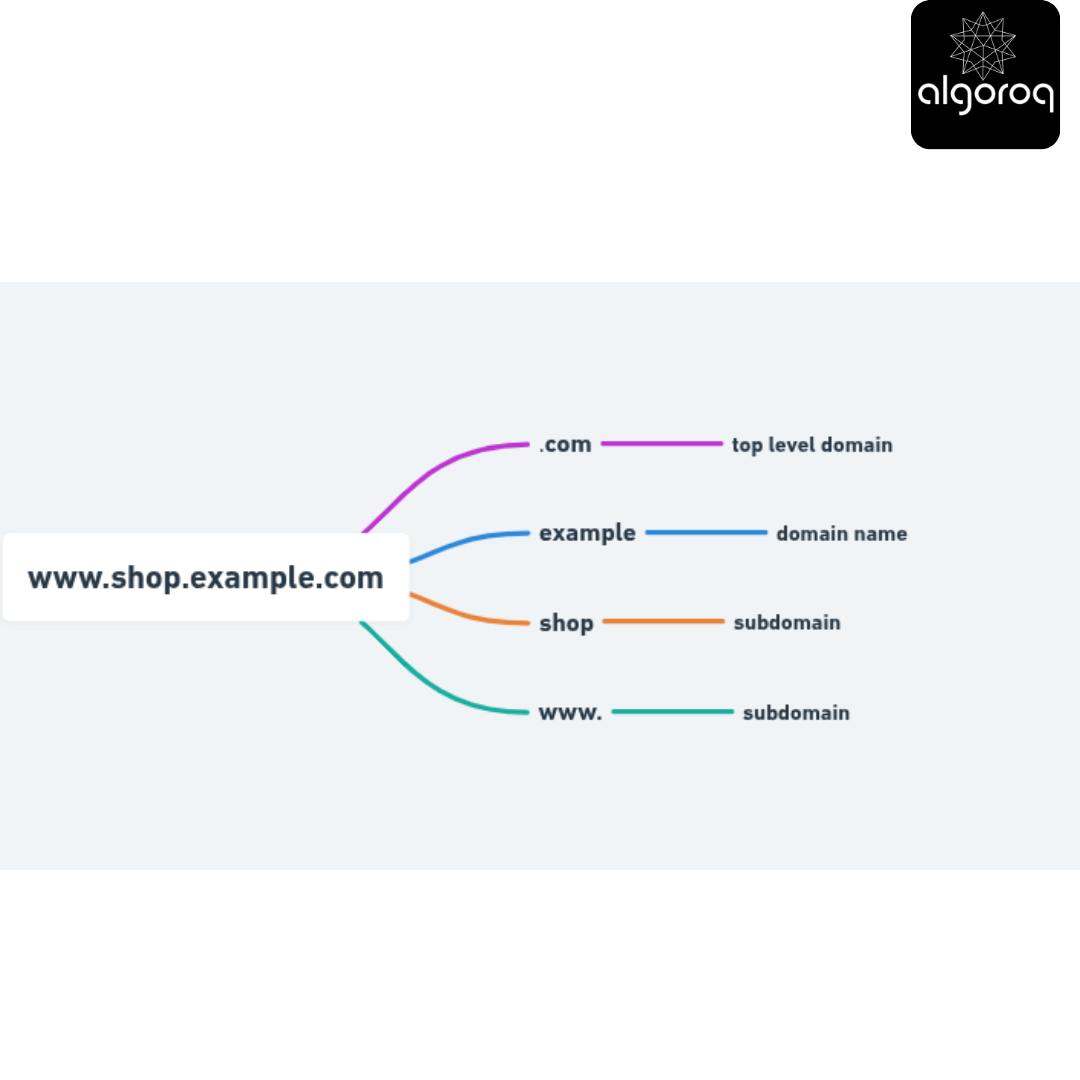
Real-world parallel: Like a mailing address read backwards:
John Smith
123 Main St
Springfield
Illinois
USA
Becomes: USA.Illinois.Springfield.MainSt123.JohnSmith
Common Misconception: "DNS is Just a Simple Lookup Table... Right?"
You might think: "It's just a giant database where you look up names and get IPs, right?"
Actually: DNS is a distributed, hierarchical, cached system with multiple server types and complex resolution processes!
What makes DNS complex:
1. It's distributed:
- No single DNS server has all the answers
- Millions of DNS servers worldwide
- Each manages its own zone
2. It's hierarchical:
- Root servers know about .com, .org, .uk
- TLD servers know about domains in their TLD
- Authoritative servers know about their specific domain
3. It's cached:
- Every server caches answers
- Reduces load on authoritative servers
- Speeds up repeated queries
4. It has multiple record types:
- Not just "name → IP"
- Email servers (MX records)
- Aliases (CNAME records)
- Text data (TXT records)
- Many more!
Mental model: DNS is like a system of interconnected libraries, not one big phone book.
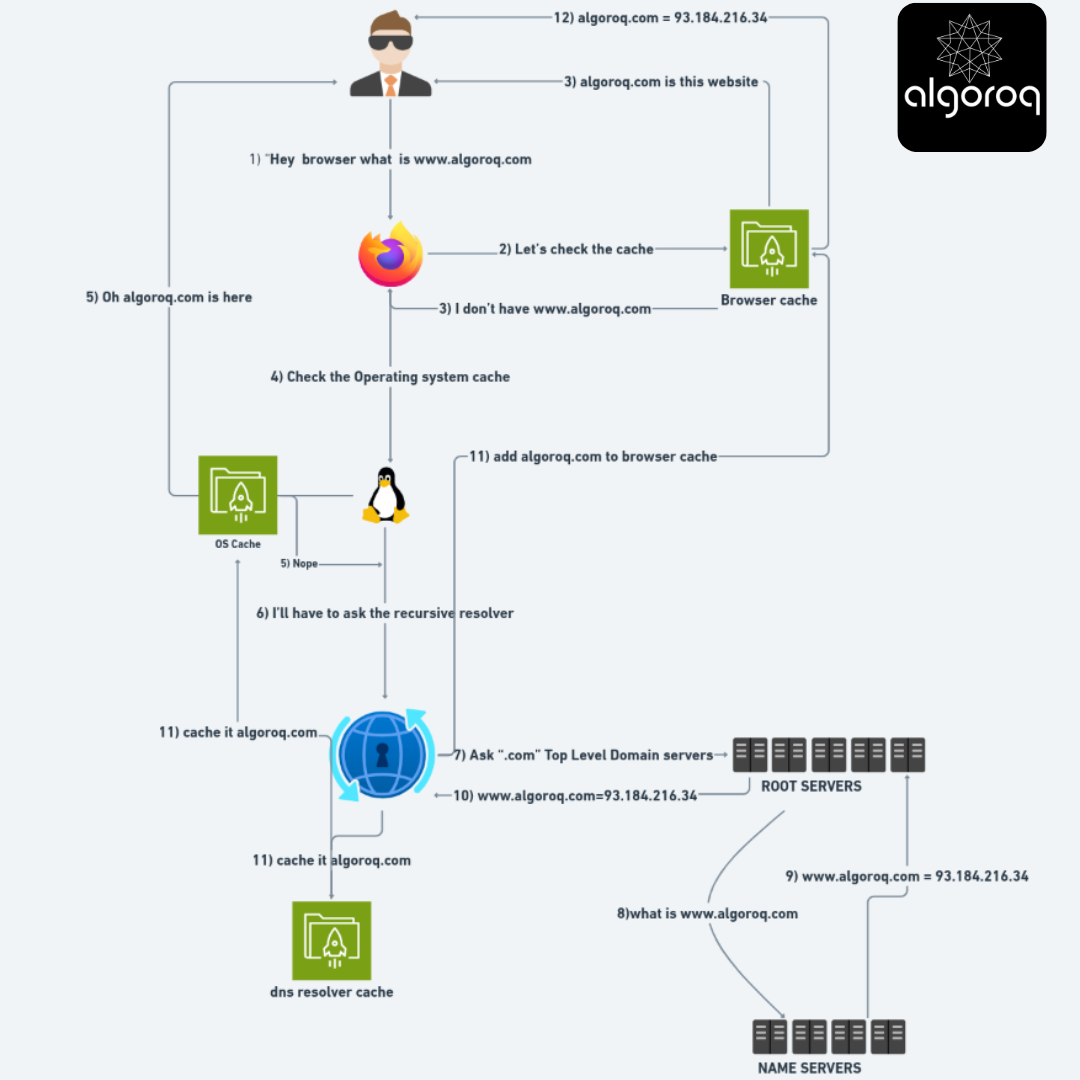
The DNS Resolution Journey: Step by Step
You type www.example.com in your browser. Let's trace EVERY step:
Phase 1: Check Local Cache
Browser: "Do I have www.example.com cached?"
Browser cache: "Yes! It's 93.184.216.34 (cached 5 minutes ago)"
Browser: "Great, connecting directly!"
[Resolution complete - 0ms]
If cached, resolution is instant!
If not cached, continue to Phase 2:
Phase 2: Check OS Cache
Browser: "Hey Operating System, what's www.example.com?"
OS: "Let me check my cache..."
OS: "Not found. Let me ask the DNS resolver."
Phase 3: Recursive Resolver
OS → Recursive Resolver (usually your ISP or 8.8.8.8)
OS: "What's www.example.com?"
Resolver: "I don't know yet, but I'll find out for you!"
"I'll handle all the work, you just wait."
This is called RECURSIVE resolution - the resolver does the work.
Phase 4: Root Server Query
Resolver → Root Server (there are 13 root server addresses)
Resolver: "What's www.example.com?"
Root: "I don't know the full answer, but .com domains are handled by:"
"a.gtld-servers.net (192.5.6.30)"
Root servers know: Which servers handle each TLD (.com, .org, .uk, etc.)
Phase 5: TLD Server Query
Resolver → .com TLD Server (e.g., a.gtld-servers.net)
Resolver: "What's www.example.com?"
TLD Server: "I don't know www.example.com, but example.com is handled by:"
"ns1.example.com (198.51.100.1)"
TLD servers know: Which nameservers handle each domain in their TLD
Phase 6: Authoritative Server Query
Resolver → ns1.example.com (198.51.100.1)
Resolver: "What's www.example.com?"
Authoritative Server: "That's MY domain! Here you go:"
"www.example.com → 93.184.216.34"
"TTL: 3600 seconds (cache for 1 hour)"
Authoritative servers know: The actual IP addresses for their domains
Phase 7: Return to Client
Resolver → OS: "www.example.com is 93.184.216.34"
[Caches answer for 1 hour]
OS → Browser: "www.example.com is 93.184.216.34"
[Caches answer for 1 hour]
Browser: "Finally! Connecting to 93.184.216.34..."
[Caches answer for 1 hour]
Total time: 50-200ms for uncached query
Cached time: <1ms
Visualization: The Complete Flow
Key Takeaways
- DNS translates human-readable domain names to IP addresses — the internet's phone book, resolving billions of queries daily
- DNS resolution follows a hierarchy — browser cache → OS cache → recursive resolver → root → TLD → authoritative nameserver
- DNS records serve different purposes — A (IPv4), AAAA (IPv6), CNAME (alias), MX (email), TXT (verification), NS (nameserver)
- DNS caching at multiple levels reduces lookup latency — but TTL controls how long cached records are trusted
- DNS is a critical single point of failure — use multiple DNS providers and low TTLs for services that need fast failover
Log in to keep reading
Create a free account to keep reading and track your progress.
Log in — it's free