Transport Layer Security

. TLS (Transport Layer Security) - Interactive Learning Guide
Challenge 1: The Postcard Problem
Imagine this scenario: You're sending your credit card number to an online store. Your data travels through:
- Your home router
- Your ISP's routers
- Multiple internet backbone routers
- The store's ISP
- The store's firewall
- Finally, their server
That's at least 10+ different computers handling your data!
Pause and think: If TCP just ensures your data arrives intact, who's ensuring nobody along the route can READ your credit card number?
The Answer: TLS (Transport Layer Security) is the internet's secure envelope system. While TCP guarantees delivery, TLS guarantees privacy and authenticity.
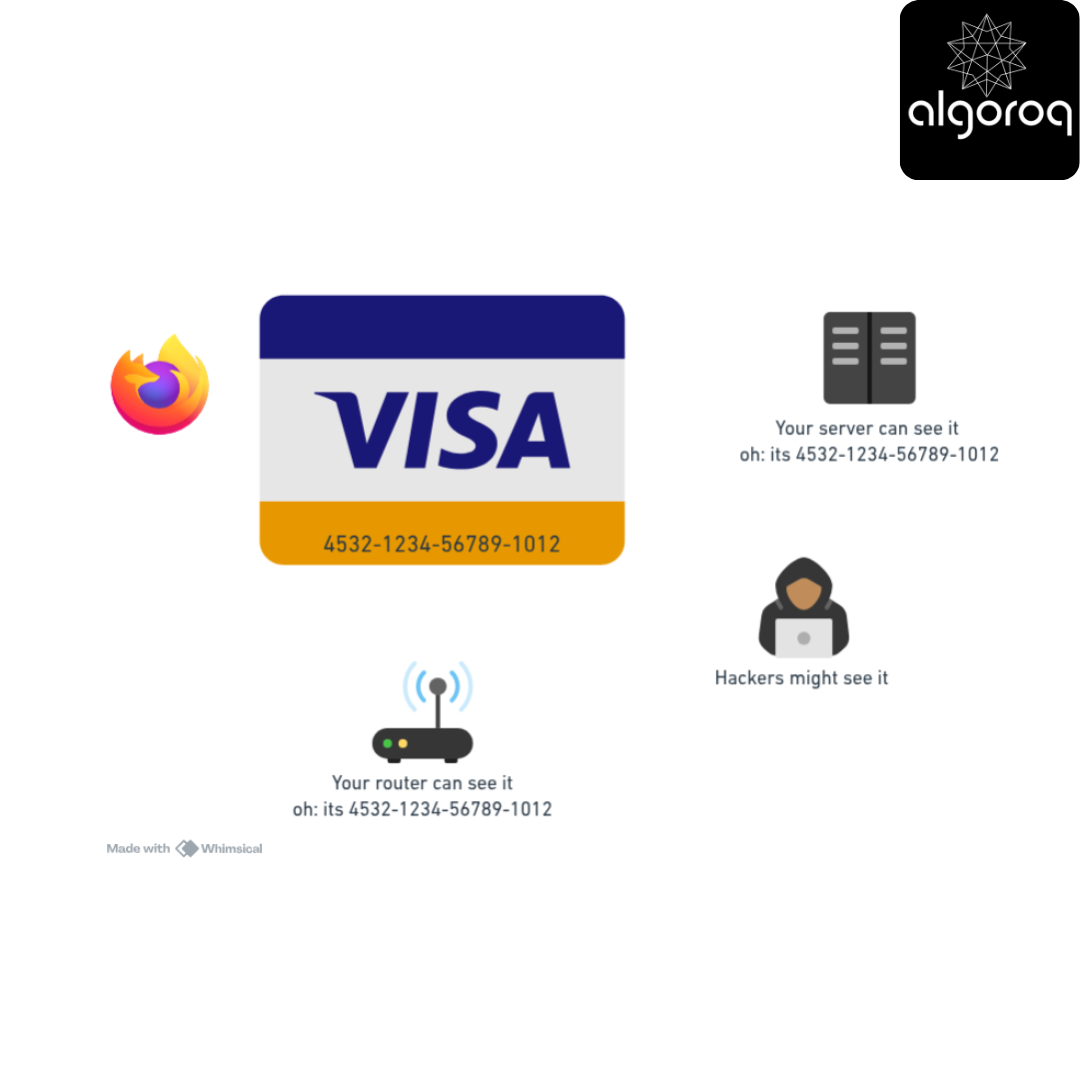
Without TLS:
Your browser → "Card: 4532-1234-5678-9012" → [Readable by everyone] → Server
↑
Any router can read this!
With TLS:
Your browser → "XK#9$mQ2@pL..." → [Encrypted gibberish] → Server
↑
Looks like random noise to routers!
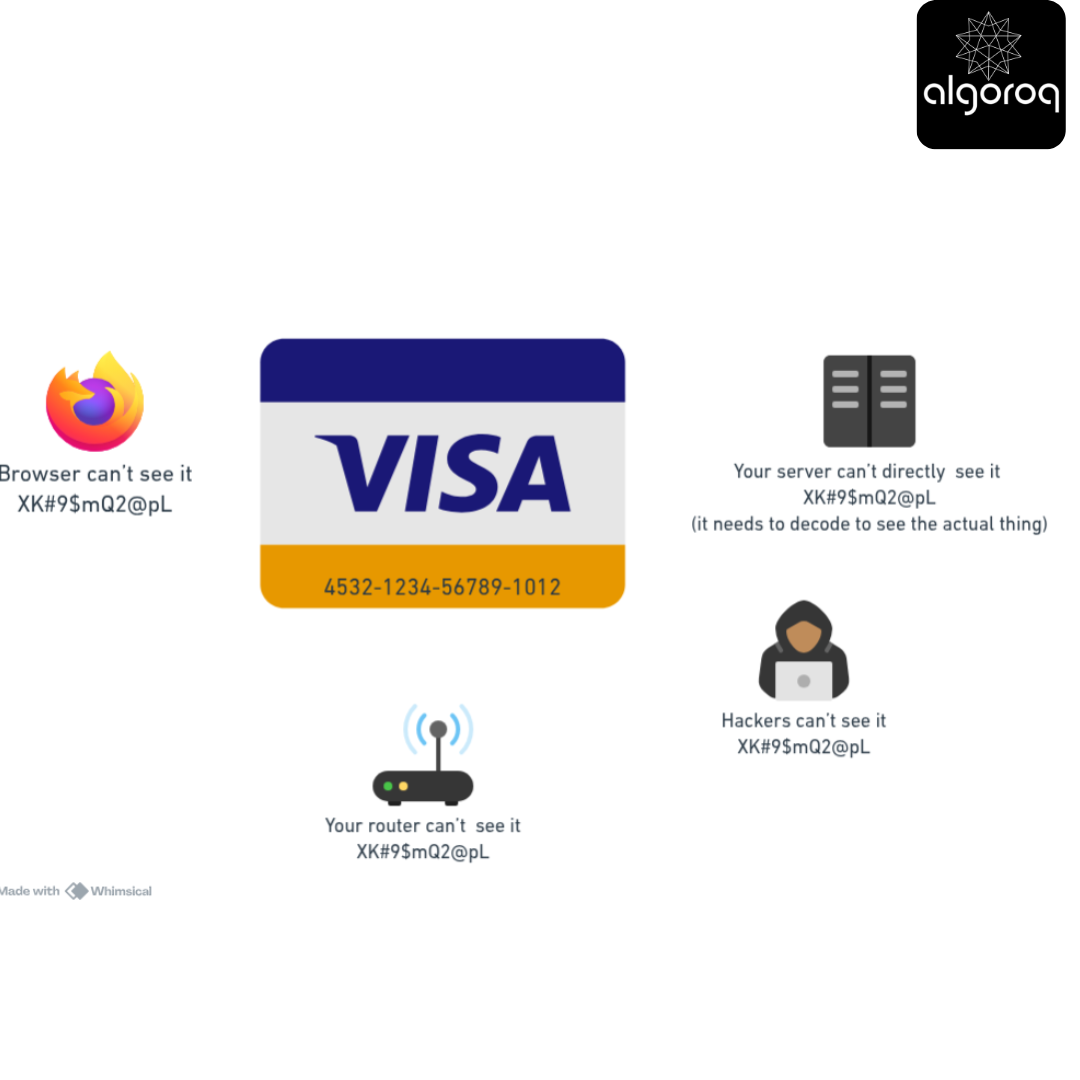
Key insight: TLS creates a private tunnel through the public internet. Even if someone intercepts your data, they can't read it!
Interactive Exercise: The Lockbox Exchange
Scenario: You want to send a secret message to your friend, but you can only communicate through a public bulletin board where everyone can see your posts.
Think about this challenge:
- You could encrypt the message, but how do you share the decryption key?
- If you post the key on the bulletin board, everyone can decrypt it!
- If you meet in person to share the key, you didn't need the bulletin board...
This is the fundamental problem TLS solves!
Question: How can two parties establish a secret when all their communication is public?
The Brilliant Solution: Public Key Cryptography
Think of it like a magical lockbox:
Step 1: The Server's Public Lockbox
Server: "Here's my lockbox (public key)"
"Anyone can LOCK it, but only I can UNLOCK it (private key)"
Step 2: You Send a Secret
You: Takes a random secret number
Puts it in the server's lockbox
Step 3: Both Share a Secret
Server: Opens box with private key
Reads your secret number
Now you BOTH know the secret number, but nobody else does!
Real-world parallel: It's like a mailbox with a slot. Anyone can drop mail IN (public key), but only you have the key to open it and take mail OUT (private key).
Common Misconception: "TLS Encrypts the Entire Connection... Right?"
You might think: "Once I enable HTTPS, everything about my connection is secret, right? Even the destination?"
Actually: TLS encrypts the CONTENT but not the METADATA.
What IS encrypted:
- URL path:
/account/credit-cards✅ - Request body: Your form data ✅
- Response body: The HTML/JSON ✅
- Cookies and headers ✅
What is NOT encrypted:
- Destination IP address:
142.250.185.46❌ - Domain name:
amazon.com(during initial DNS lookup) ❌ - Packet size and timing ❌
- Port number:
443❌
Why? Routers need to know WHERE to send packets (IP address). They just can't see WHAT's inside.
Mental model:
Unencrypted envelope (visible to routers):
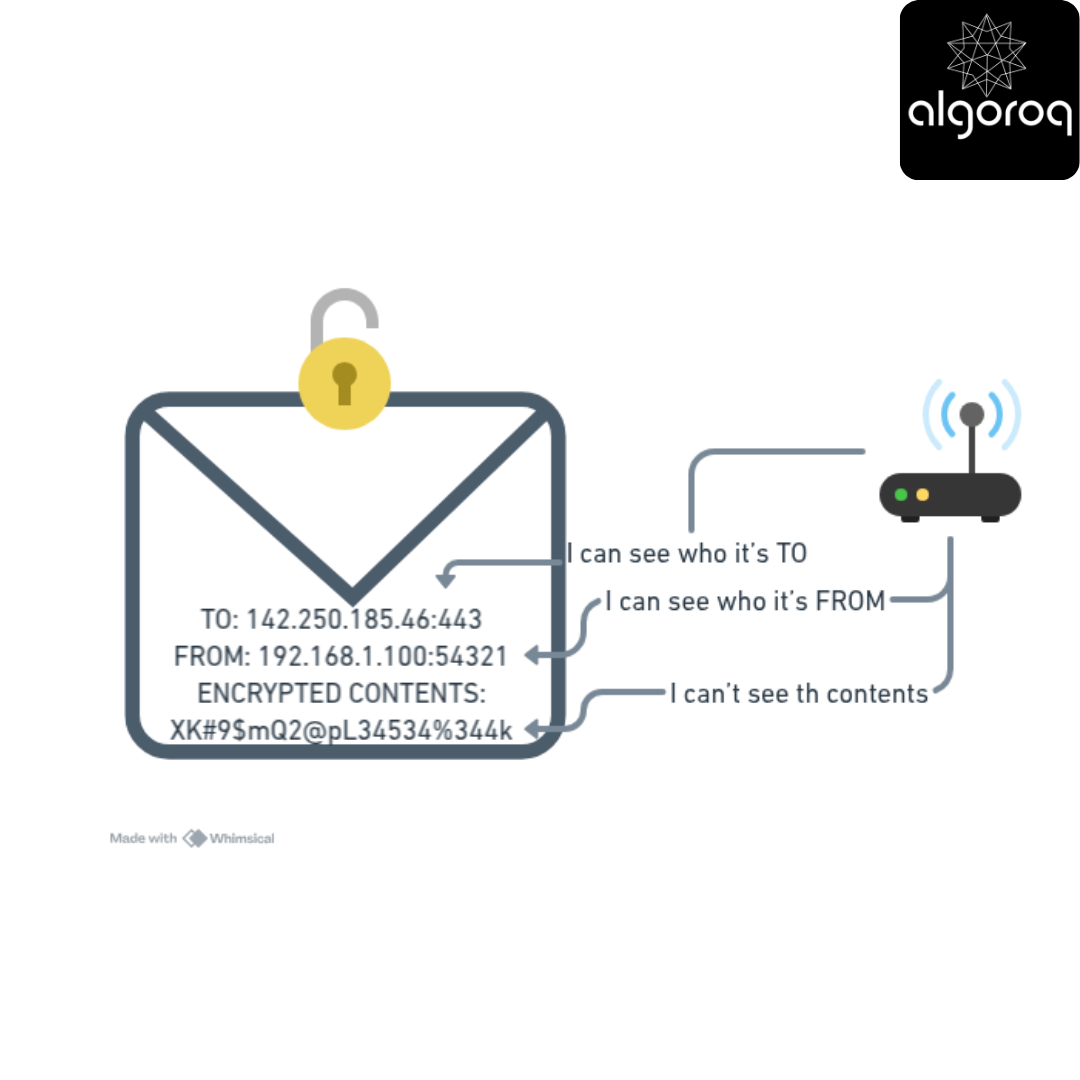
This is why VPNs exist! They encrypt even the envelope by wrapping it in another encrypted envelope.
Decision Game: The Certificate Authority Problem
Context: The public key system works great, but there's a flaw...
Scenario: You connect to bank.com. A server responds:
"Hi! I'm bank.com! Here's my public key: [KEY123]"
But what if it's actually a hacker?
Hacker: "Hi! I'm bank.com! Here's MY public key: [HACKER_KEY]"
"Now encrypt your password with my key!"
How do you know you're talking to the REAL bank.com?
A. Trust the first key you receive B. The bank posts their key on their website (wait, that's the site we're trying to verify!) C. A trusted third party vouches for them D. We can't solve this problem
Think about who you'd trust...
Answer: C - Certificate Authorities (CAs)
The Trust Chain:
Step 1: Certificate Authorities (Pre-installed trust)
Your browser comes with ~100 trusted CAs pre-installed:
-
DigiCert
-
Let's Encrypt
-
GlobalSign
-
etc.
You're saying: "I trust these organizations to verify identities"
Step 2: The Bank Gets Certified
Bank.com → "I want a certificate"
DigiCert → "Prove you own bank.com"
Bank.com → [Proves ownership via DNS/email/files]
DigiCert → "Verified! Here's your signed certificate"
Signs with DigiCert's private key
Step 3: You Connect
You → "Hello bank.com"
Server → "Here's my certificate (signed by DigiCert)"
Your browser:
-
"Is this signed by a CA I trust?" → Checks DigiCert
-
"Is DigiCert's signature valid?" → Verifies cryptographically
-
"Does the certificate match bank.com?" → Checks domain
-
"Is it expired?" → Checks dates
-
All pass → "✓ This is the real bank.com"
Real-world parallel: Like a passport:
- Government (CA) verifies your identity
- Issues passport (certificate) with their official seal
- Border control (browser) trusts the government's seal
- You can travel (connect securely) anywhere
Challenge question: What happens if a CA gets hacked?
Answer: Massive security breach! All certificates they issued become suspect. (This happened to DigiNotar in 2011, they went bankrupt.)
The TLS Handshake: A Step-by-Step Journey
Now let's see the complete TLS connection process:
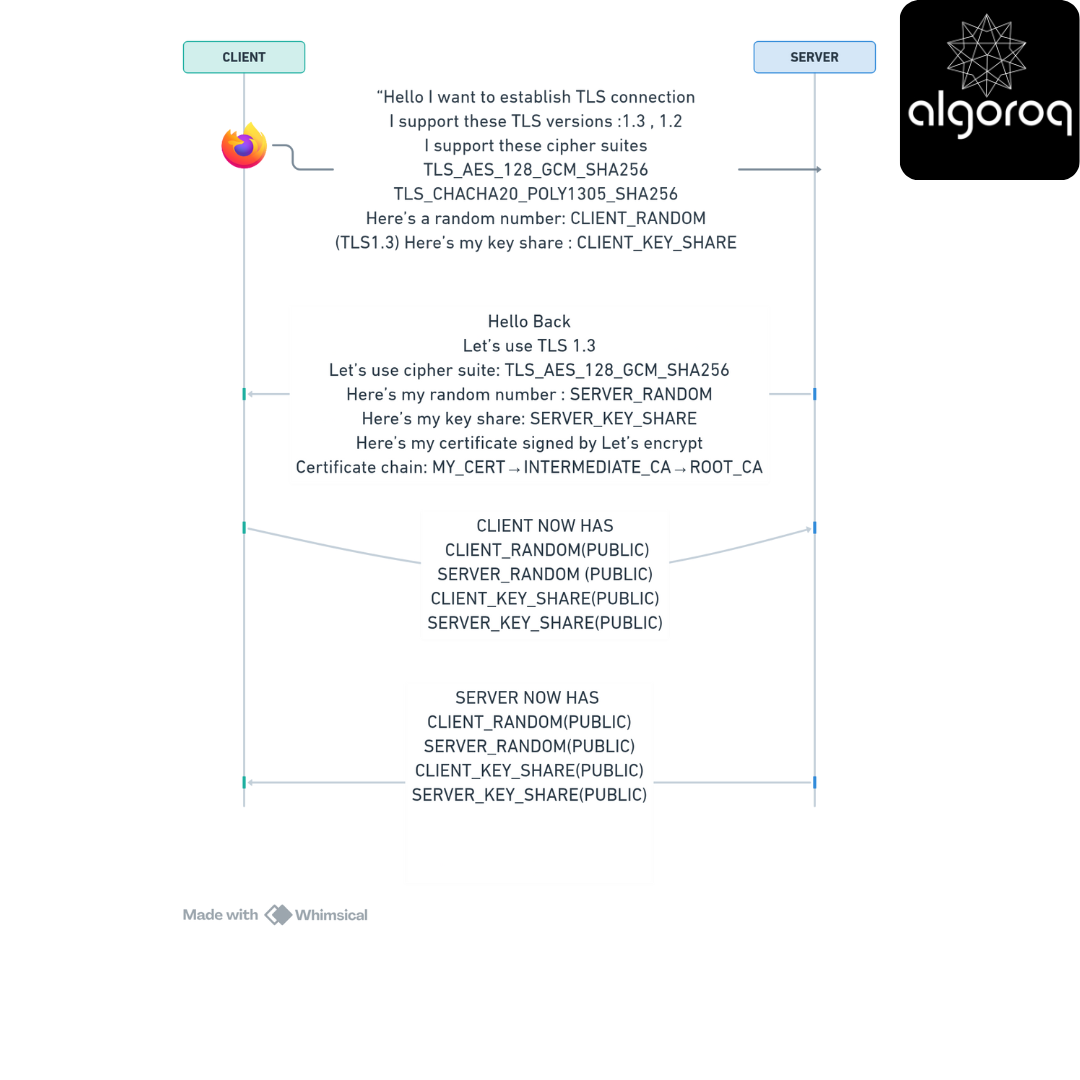
Phase 1: ClientHello (TCP already established)
Your browser → Server:
"Hello! I want to establish TLS connection
-
I support these TLS versions: 1.3, 1.2
-
I support these cipher suites:
-
TLS_AES_128_GCM_SHA256
-
TLS_CHACHA20_POLY1305_SHA256
-
-
Here's a random number: [CLIENT_RANDOM]
-
(TLS 1.3) Here's my key share: [CLIENT_KEY_SHARE]"
Mental model: "Here's what I can speak and understand, what about you?"
Phase 2: ServerHello
Server → Your browser:
"Hello back!
-
Let's use TLS 1.3
-
Let's use cipher suite: TLS_AES_128_GCM_SHA256
-
Here's my random number: [SERVER_RANDOM]
-
Here's my key share: [SERVER_KEY_SHARE]
-
Here's my certificate (signed by Let's Encrypt)
-
Certificate chain: [MY_CERT] → [INTERMEDIATE_CA] → [ROOT_CA]"
Mental model: "I'll match your capabilities, here's my proof of identity"
Phase 3: Key Exchange (The Magic Moment)
Both sides now have:
-
CLIENT_RANDOM (public)
-
SERVER_RANDOM (public)
-
CLIENT_KEY_SHARE (public)
-
SERVER_KEY_SHARE (public)
They combine these using Diffie-Hellman key exchange:
→ Both derive the SAME secret key (symmetric key)
→ Nobody watching the connection can derive this key!
This is mathematical magic! 🎩✨
Simplified analogy:
Imagine mixing paint:
You start with: Yellow (public)
Server starts with: Blue (public)
You add secret: Red (private) → Yellow + Red = Orange
Server adds secret: Green (private) → Blue + Green = Teal
You send: Orange (public)
Server sends: Teal (public)
You mix: Teal + Red = [Final Color]
Server mixes: Orange + Green = [SAME Final Color]
Attacker sees: Yellow, Blue, Orange, Teal
Attacker CANNOT figure out: Red or Green
Attacker CANNOT derive: [Final Color]
Phase 4: Encrypted Communication
Both sides now use the shared secret key:
Browser → Server: (encrypted with symmetric key)
| "GET /account HTTP/1.1" |
|---|
Server → Browser: (encrypted with symmetric key)
| "HTTP/1.1 200 OK {account data}" |
|---|
Why switch to symmetric encryption?
- Public key crypto is SLOW (100-1000x slower)
- Symmetric crypto is FAST
- Use public key just to establish the symmetric key
- Use symmetric key for all actual data
Real-world parallel:
- Public key = Armored truck to deliver a house key
- Symmetric key = Using that house key for everyday entry
- You don't use the armored truck every time, just once!
Comparison: TLS 1.2 vs TLS 1.3
TLS 1.3 (2018) made significant improvements:
| Feature | TLS 1.2 | TLS 1.3 |
|---|---|---|
| Handshake | 2 round trips | 1 round trip |
| Speed | ~200ms | ~100ms |
| Cipher suites | 37 options | 5 options (removed weak ones) |
| Forward secrecy | Optional | Mandatory |
| Handshake encryption | No | Yes (mostly) |
| 0-RTT | No | Yes (with caveats) |
TLS 1.2 Handshake:
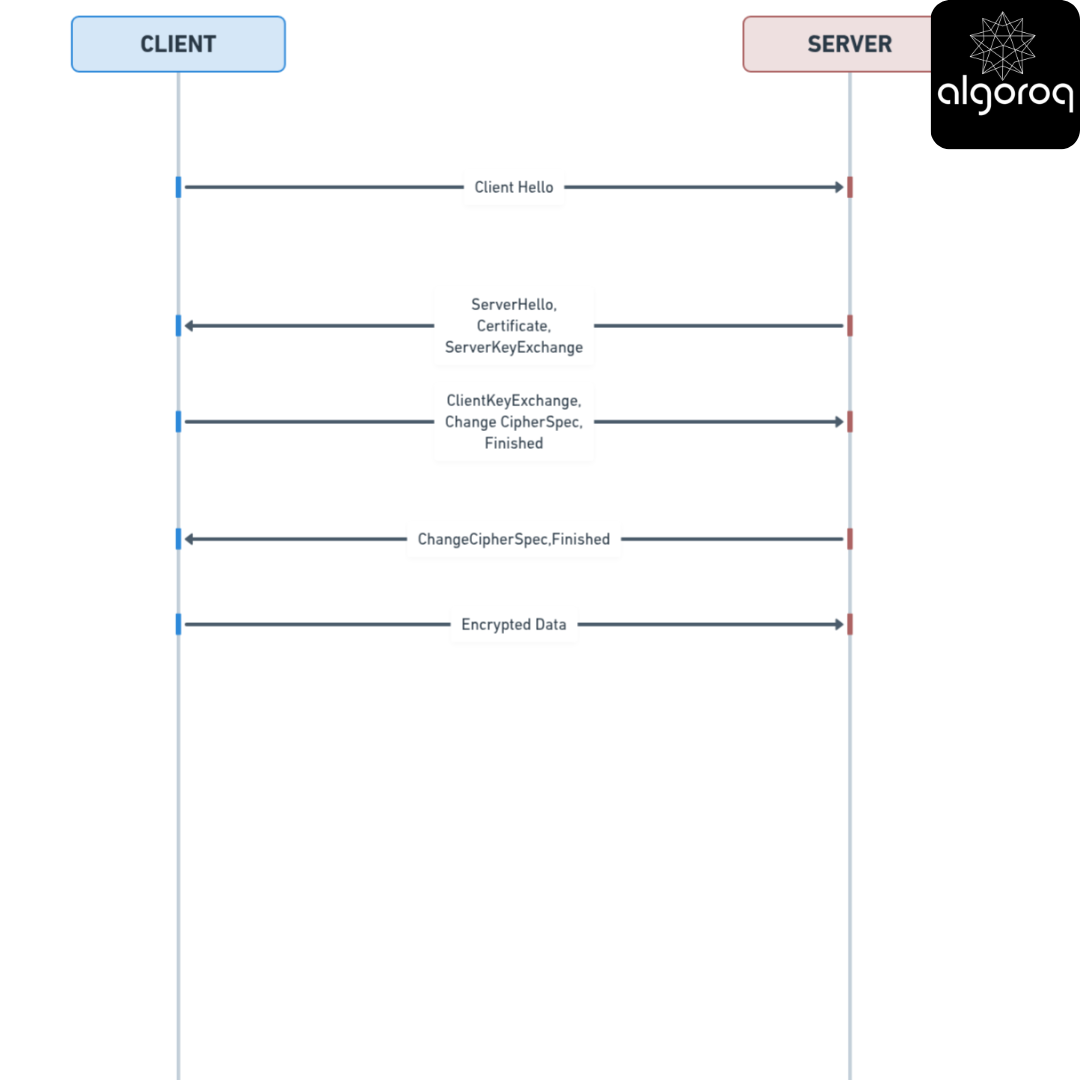
Total: 2 round trips before data flows
TLS 1.3 Handshake:
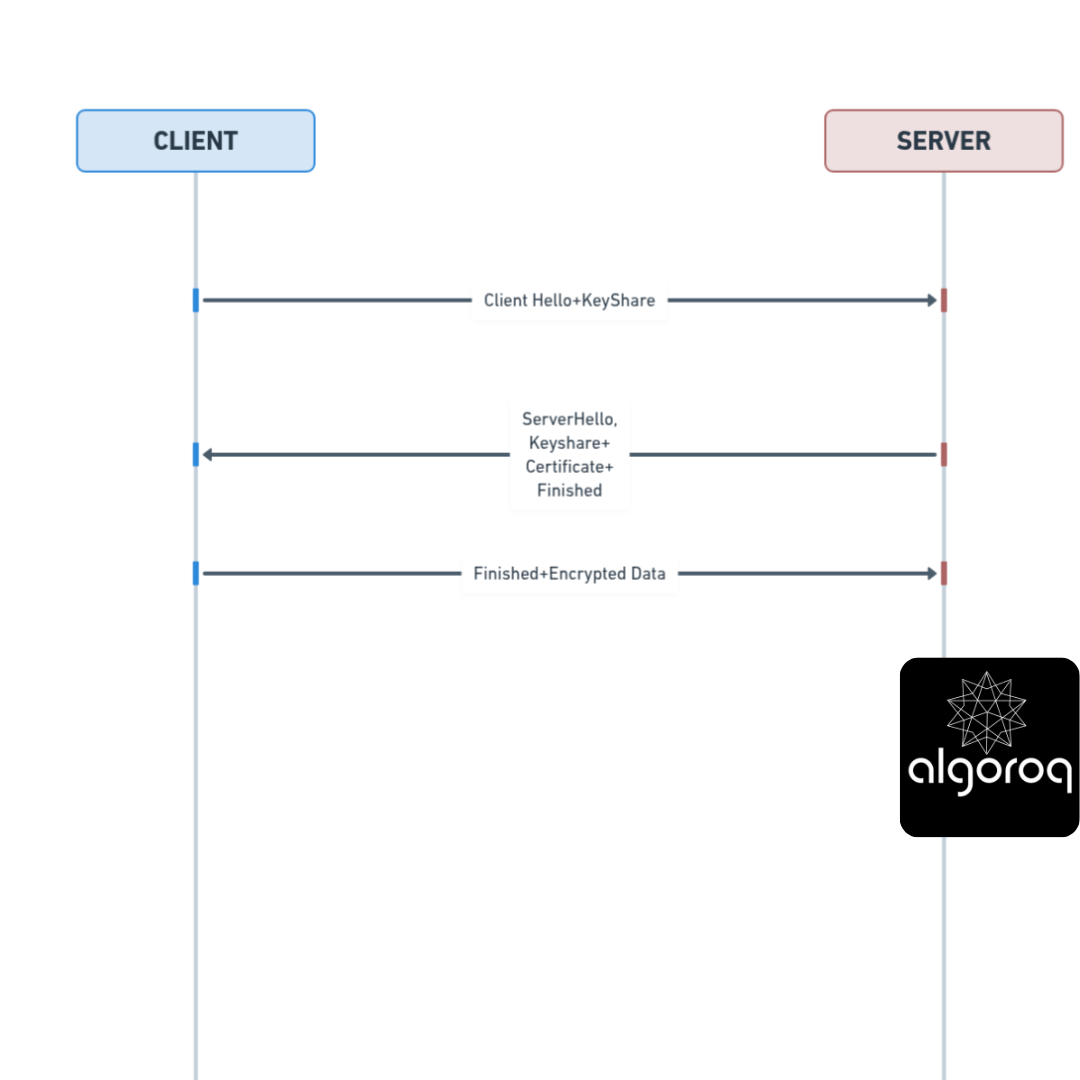
Total: 1 round trip before data flows
Performance improvement:
Old system (TLS 1.2):
TCP handshake: 100ms
TLS handshake: 200ms
Total: 300ms before first byte
New system (TLS 1.3):
TCP handshake: 100ms
TLS handshake: 100ms
Total: 200ms before first byte
33% faster!
Key Takeaways
- TLS encrypts data in transit between client and server — preventing eavesdropping, tampering, and impersonation
- The TLS handshake establishes encryption keys — using asymmetric cryptography for key exchange, then symmetric cryptography for data transfer
- Certificates verify server identity — Certificate Authorities (CAs) sign certificates to prove a server is who it claims to be
- TLS 1.3 reduced the handshake to one round trip — significantly faster than TLS 1.2's two round trips
- HTTPS = HTTP + TLS — always use HTTPS in production to protect user data and improve SEO rankings
Log in to keep reading
Create a free account to keep reading and track your progress.
Log in — it's free