Fundamentals of Caching

What is Caching? - Your Speed Multiplier
🎯 Challenge 1: The Library Puzzle
Scenario: You're a librarian. A student asks for "Harry Potter and the Sorcerer's Stone" - a book requested 20 times per day.
Method A: The Thorough Approach
- Walk to back storage room (5 minutes)
- Search through shelves (3 minutes)
- Retrieve book (2 minutes)
- Walk back to front desk (5 minutes)
- Total: 15 minutes per request
- Daily time: 15 min × 20 requests = 300 minutes (5 hours!)
Method B: The Smart Approach
- Keep a copy of popular books at the front desk
- Student asks → grab from desk (10 seconds!)
- Total: 10 seconds per request
- Daily time: 10 sec × 20 requests = 200 seconds (3 minutes!)
Question: Which method serves students better? How much time do you save?
Answer: Method B saves 297 minutes (almost 5 hours!) daily - that's 99.97% faster!
The Answer: This is Caching!
Definition: Caching stores frequently accessed data in a fast, nearby location so you don't have to retrieve it from the slow, distant source every time.
🧠 The Memory Hierarchy: Why Caching Exists
Your computer has different storage speeds:
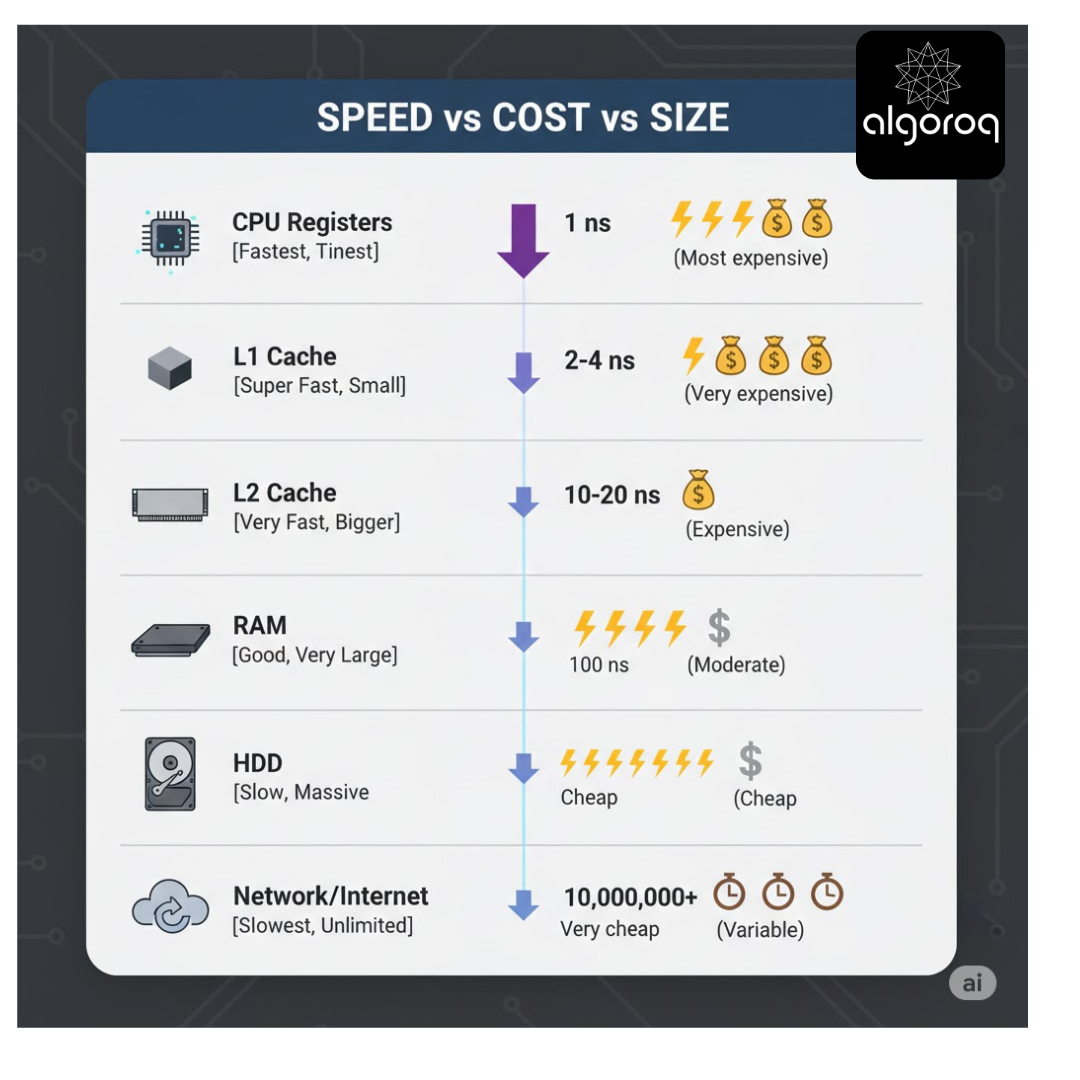
**Speed comparison in human terms (**all theoretical comparisons only)
If accessing RAM takes 1 second: ()
- L1 Cache: 0.02 seconds (blink of an eye)
- SSD: 16 minutes (theoretically)
- HDD: 1.5 days
- Network: 1+ weeks
Key insight: Caching moves data from slow storage to fast storage!
🏪 Real-World Caching Analogy: The Grocery Store
Without Cache (Always go to the warehouse):
You need milk:
- You drive to warehouse (30 min) 🚗
- You search for milk (10 min) 🔍
- You drive back home (30 min) 🚗 Total: 70 minutes
You need bread:
- You drive to warehouse again (30 min) 🚗
- You search for bread (10 min) 🔍
- You drive back home (30 min) 🚗 Total: 70 minutes
Daily time for 5 items: 350 minutes! 😰
With Cache (Local grocery store):
You need milk:
- You walk to corner store (2 min) 🚶
- You grab the milk (1 min) 🥛
- You walk back home (2 min) 🚶 Total: 5 minutes
You need bread:
- You walk to corner store (2 min) 🚶
- You grab the bread (1 min) 🍞
- You walk back home (2 min) 🚶 Total: 5 minutes
Daily time for 5 items: 25 minutes! ⚡
Mental model: The corner store is your cache - it stocks popular items locally for quick access. The warehouse is your database - it has everything but it's far away!
💻 Caching in Web Applications
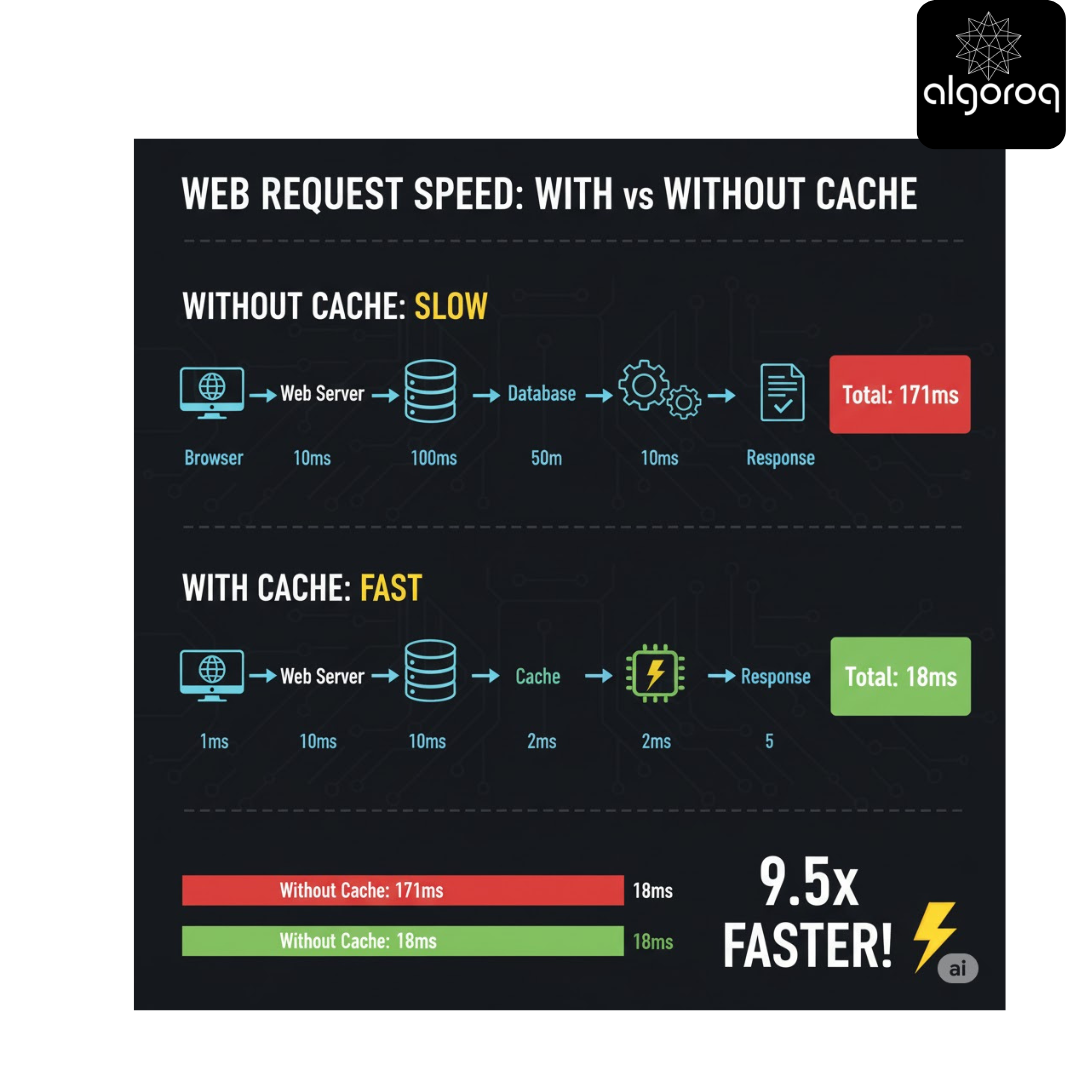
🎪 Types of Caching: Where Data Gets Stored
1. Browser Cache
Location: It is located in our computer Stores: It basically stores images, CSS, JavaScript, HTML Speed: Instant (already on your device) Example: Facebook logo doesn't re-download every page load
2. CDN Cache
Location: It is located at edge servers worldwide across different locations around the world Stores: It generally stores static content (images, videos, files) Speed: It is very fast (geographically close) Example: Netflix videos served from nearby servers
3. Server Cache
Location: It is a web server memory (Redis, Memcached) Stores: It generally stores database query results, session data, computed values Speed: Fast (in-memory) Example: User profile data, product listings
4. Database Cache
Location: It is located at the database memory Stores: It queries results, frequently accessed rows Speed: Fast (avoids disk I/O) Example: Most-read blog posts
5. Application Cache
Location: Application memory Stores: Object instances, computed results Speed: Very fast (in-process) Example: Configuration settings, lookup tables
🎮 Interactive Exercise: What Should You Cache?
Decide if each scenario should use caching:
| Scenario | Cache It? | Why? |
|---|---|---|
| User's account balance in banking app | ? | ? |
| Product catalog with 10,000 items | ? | ? |
| Weather forecast for a city | ? | ? |
| Live stock prices | ? | ? |
| User's profile picture | ? | ? |
Think about each one...
Answers:
-
Account Balance: ❌ NO (or very short TTL (time to live))
- Account Balances changes frequently
- It must always be accurate
- Cache for 1-2 seconds max if needed
- Mental model: Money must be precise!
-
Product Catalog: ✅ YES
- A product catalog changes infrequently
- It is read far more than written
- We can cache it for 5-60 minutes
- Mental model: Products don't change every second
-
Weather Forecast: ✅ YES
- Weather forecast updates every 30-60 minutes
- It is usually the same data for all users in city
- Cache for 30 minutes
- Mental model: Weather doesn't change instantly
-
Live Stock Prices: ❌ NO (or 1-second cache)
- Stock prices changes every millisecond
- Users expect real-time prices to carry out high frequency trade
- Maybe 1-second cache for high traffic
- Mental model: "Live" means fresh!
-
Profile Picture: ✅ YES
- Rarely changes
- Same for all viewers
- Cache for 24 hours or longer
- Mental model: People don't change photos often
📋 The Caching Decision Framework
Cache when data is:
- ✅ Read frequently (high traffic)
- ✅ Expensive to generate (complex queries)
- ✅ Relatively stable (doesn't change often)
- ✅ Identical for multiple users
- ✅ Acceptable if slightly stale
Don't cache when data is:
- ❌ Written more than read
- ❌ Must be 100% fresh (financial transactions)
- ❌ User-specific and rarely reused
- ❌ Cheap to generate
- ❌ Privacy-sensitive
The Golden Rule:
Cache value = (Access frequency × Generation cost) / Freshness requirement
If Cache value > Threshold → Cache it!
💡 Simple Caching Example
Without Cache: // Every request hits database
🚨 Common Caching Mistakes
| ❌ Mistake 1: Caching Everything
// BAD: Cache user's shopping cart
// Changes every second
// BAD: Cache current time
// Always stale
// Mental model: Don't cache what changes constantly !❌ Mistake
2: Never Expiring Cache
// BAD: Cache forever
// What if product prices change?
// GOOD: Set expiration (TTL - Time To Live)
Mistake 3: Cache Stampede
PROBLEM: Cache expires, 1000 requests hit database simultaneously
// All 1000 requests see cache miss
All 1000 query database at once
// Database overload! 💥
// SOLUTION: Use locking or cache warming
Common Mistakes
| Mistake | Why it's wrong | Correct approach |
|---|---|---|
| Caching everything | Wastes memory on rarely accessed data | Cache only hot, frequently read data |
| No TTL on cached items | Stale data served indefinitely | Always set a TTL; shorter for volatile data |
| Ignoring cache stampede | Thousands of requests hit DB when cache expires | Use locking, stale-while-revalidate, or jittered TTLs |
| Caching user-specific data globally | Users see each other's data | Include user ID in the cache key |
| Not monitoring hit rate | No visibility into cache effectiveness | Track hit/miss ratio; investigate drops immediately |
Key Takeaways
- Caching stores frequently accessed data in fast, nearby storage — reducing latency from seconds to milliseconds
- Cache when data is read-heavy, expensive to generate, and tolerant of slight staleness — don't cache rapidly changing or security-sensitive data
- Multiple cache layers exist — browser cache, CDN cache, server cache (Redis/Memcached), database cache, and application cache
- Cache stampede is a critical failure mode — when cache expires and thousands of requests hit the database simultaneously
- Always set a TTL (Time To Live) — caching forever leads to stale data and memory exhaustion
Log in to keep reading
Create a free account to keep reading and track your progress.
Log in — it's free