The 8 Core protocol properties and the Open Systems Interconnection Model

The 8 core protocol properties
What Even IS a Protocol?
Simple definition: A protocol is a set of rules that allows two parties to communicate
Think of it like a language. If we both speak English, we can understand each other. If I speak English and you speak Mandarin, we're stuck. Protocols are the "language" computers use to talk to each other. Follow the same rules = communication works. Different rules = chaos.
Property #1: Data Format
How is your data actually encoded when it travels across the network? Two main options:
- Text-Based: Readable by humans (HTTP/1.1 / JSON/XML)
- Binary: Readable by machines not meant for humans (HTTP/2 Protocol Buffers Redis RESP)
- A restaurant menu can be in plain words (“Pasta”) or just icons only the chef understands. Similarly, data can be text-based (JSON/XML) or binary (Protocol Buffers).
Property #2: Transfer Mode
How does data flow? Does it come in discrete chunks (messages) or as a continuous stream?
- Messaged- Based: Each message has a clear start and end . It’s like sending individual letters in envelopes (UDP)
- Stream-Based: Just a continuous flow of bytes. No clear boundaries like a river of data (TCP/ RTP (real-time protocol))
- Postcards come in neat chunks with clear boundaries — like message-based (UDP) communication. A live phone call is a flowing stream, just like stream-based (TCP).
Property #3: Addressing System
Where is this data going? How do we identify the destination (and source)?
- You can’t mail a letter without the right street or house number. Computers use IP addresses, DNS names, and MAC addresses to make sure data finds the right door.
- DNS (Domain Names) www.google.com (data is coming from google.com (source)
- IP Address 172.168.2.1
- MAC Address : 00:1A:2B:3C
Property #4: Directionality
Can both parties send at the same time? Or does it have to take turns?
Walkie-talkies force you to say “over” and wait — that’s half-duplex. A video call lets both people talk at once — that’s full-duplex.
- Full Duplex : Both can send simultaneously! (whatsapp messages)
- Half Duplex: Take turns only one can send at a time (walkie-talkie)
Property #5: Protocol State
Does the protocol remember previous interactions, or is each message independent?
- Some people remember your order every time you visit (like a stateful protocol). Others treat you as brand new each time (like a stateless HTTP request).
- Stateless Protocols: The server doesn’t remember you from the last request
- Stateful: Both server client remember conversation state.
Property #6: Routing
How does your protocol work with gateways, proxies, and intermediate hops?
- A parcel might pass through several post offices before reaching you. On the internet, that’s how routers, gateways, and proxies forward packets across networks.
Property #7: Flow & Congestion Control
Does your protocol manage data flow rates? Does it guarantee delivery?
A careful waiter pours water slowly to avoid spilling — like TCP adjusting flow and retransmitting lost packets. A careless one dumps the jug at once — like UDP with no flow or congestion control.
TCP: The Careful One
- ✅ Flow Control: Adjusts rate to receiver's capacity
- ✅ Congestion Control: Backs off when network busy
- ✅ Reliable Delivery: Retransmits lost packets
UDP: YOLO Mode
- ❌ No Flow Control: Sends at whatever rate
- ❌ No Congestion Control: Doesn't care about network
- ❌ No Reliability: Lost? Too bad!
Property #8: Error Management
What happens when things go wrong? How does the protocol handle errors?
At a café, you might hear: “Sorry, item unavailable” (like an HTTP 404). Sometimes your food never arrives — that’s a timeout. A smart system may stop taking new orders until things settle — that’s a circuit breaker.
The next section describes/explains and protocols/standards which addresses the above said properties while communicating across the internet .
6: The OSI Model:
🤔 Why Do We Even Need This?
The Problem: Without a standard, the internet couldn't exist.
Imagine if every postal service had completely different rules:
- FedEx letters must be in blue envelopes
- USPS requires you to write addresses backwards
- DHL needs addresses in binary code
- UPS won't deliver unless you include your height and weight
You'd need to rewrite every letter depending on which service you use. Insane, right?
The OSI model is like the universal postal standard. It doesn't matter if your letter travels by:
- Truck (Ethernet)
- Plane (fiber optic)
- Drone (WiFi)
- Bicycle (satellite)
Your address format stays the same. The delivery service handles the "how," you just write the letter.
Why This Matters for Your Code
Imagine if your app had to know whether it's running on:
- WiFi (radio waves)
- Ethernet (electrical signals)
- Fiber (light signals)
- LTE (radio waves)
- Satellite (space radio!)
You'd need different versions of your app for each medium. That's insane!
How the OSI model saves you: Each layer handles ONE responsibility. Your app doesn't care about WiFi vs Ethernet because Layer 1 (Physical) handles that. You just say "send this data" and the layers below figure out the rest.
Smart people built standards so we don't have to worry about this. Your app works everywhere because of layered abstraction. We take this for granted, but it's genuinely brilliant.
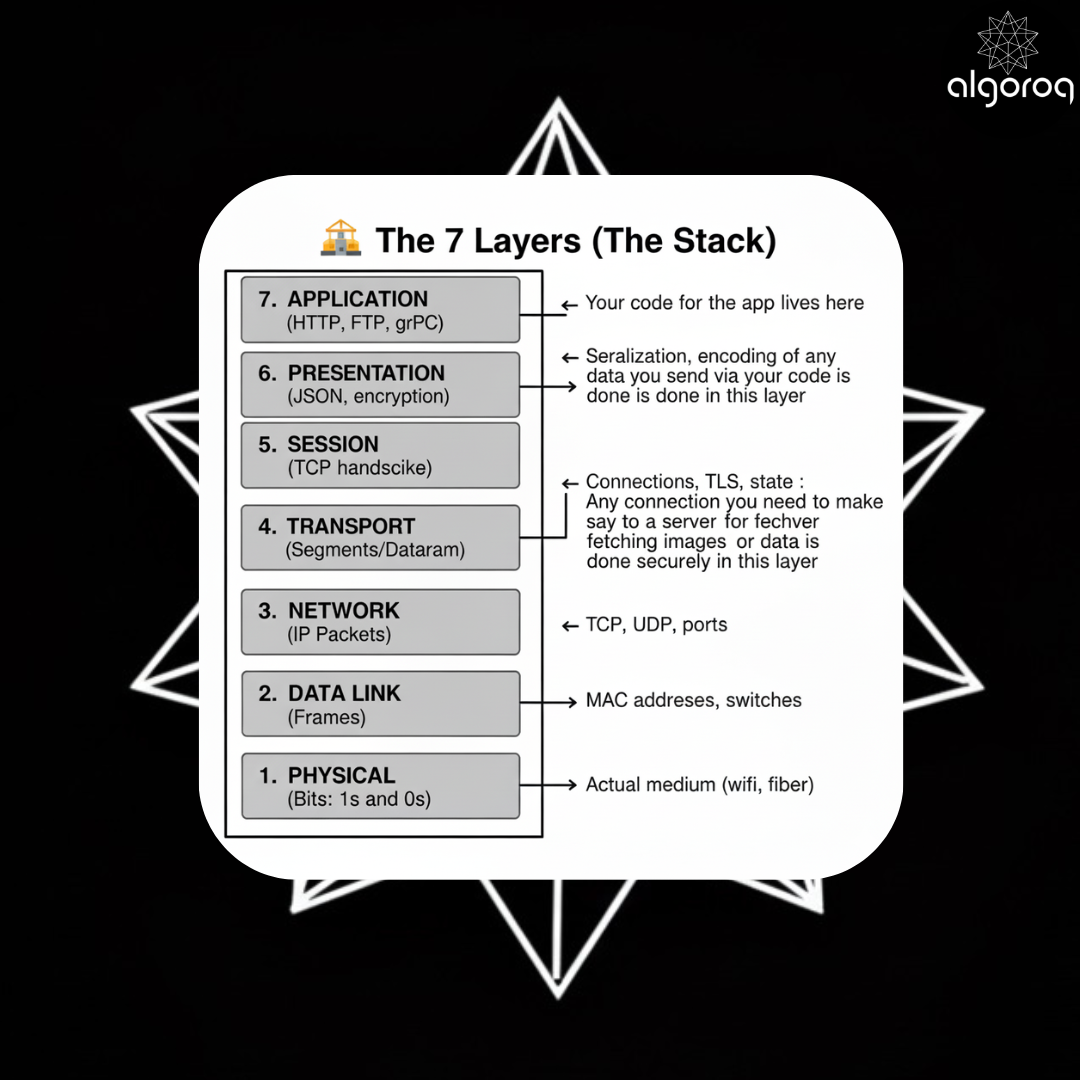
Remember this terminology:
- Layer 2: Frames
- Layer 3: Packets
- Layer 4 TCP: Segments
- Layer 4 UDP: Datagrams
📍 Layer 1: Physical
The bare metal. The actual stuff.
📻 Think of Layer 1 like different types of radio broadcasts:
- AM Radio = Ethernet (electrical signals)
- FM Radio = WiFi (radio waves)
- Satellite Radio = Fiber (light through glass)
Your car radio doesn't care WHAT music is playing (that's the higher layers). Layer 1 only cares about: "Am I receiving AM, FM, or Satellite signal?"
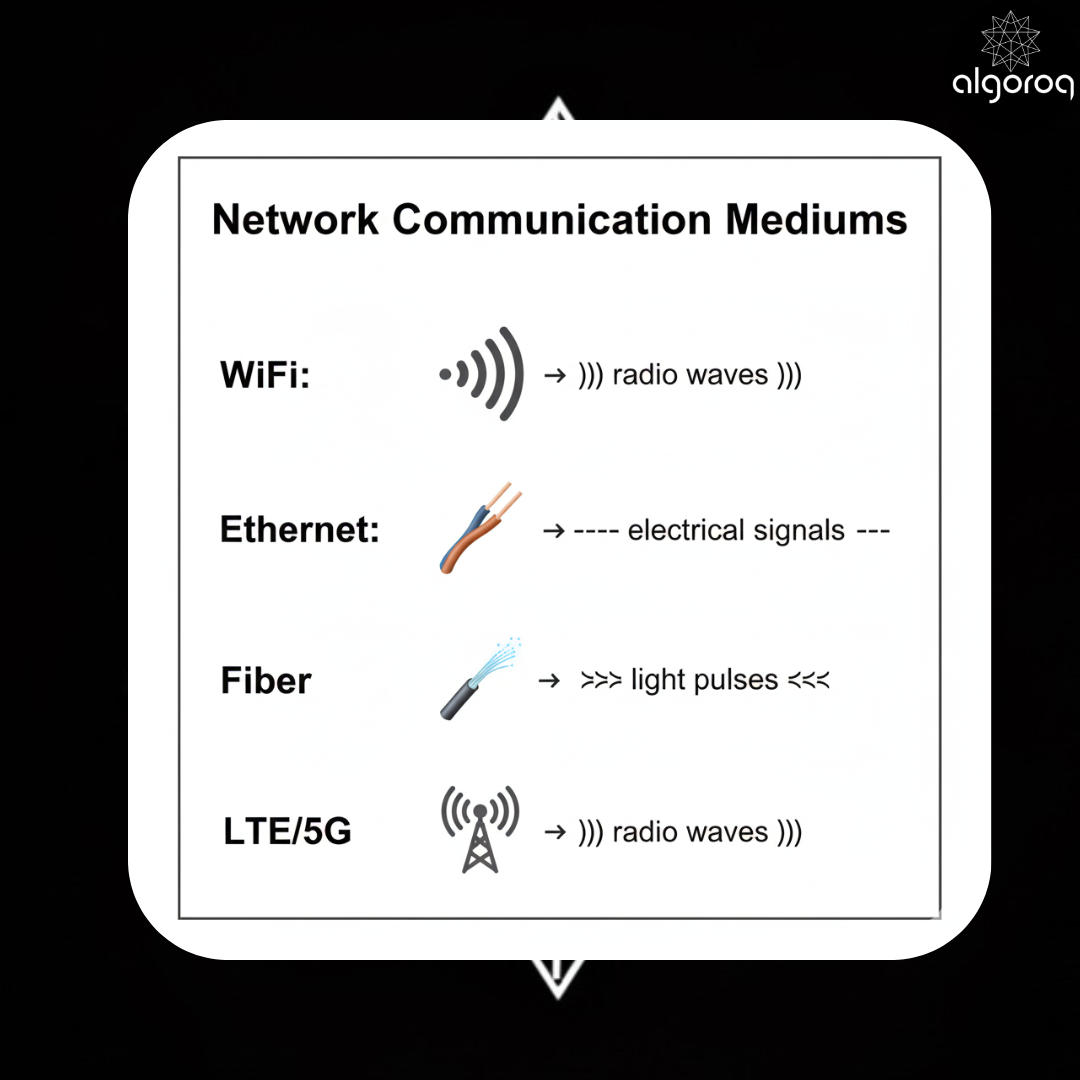
How It Works:
- Sender: Takes digital bits (1010110) and converts them to physical signals
- Medium: Signal travels through copper/air/glass
- Receiver: Converts signals back to digital bits
Why You Don't Touch This:
Your network card (NIC) handles all of this automatically. You write code that says "send this data" and Layer 1 figures out whether to use electricity, light, or radio waves.
You never touch this layer. Your network card handles it.
📦 Layer 2: Data Link (MAC Addresses)
How devices on the same local network talk.
🏠 Imagine an apartment building (your local network):
- Each apartment has a number: 101, 102, 103 (these are like MAC addresses)
- The building has a street address: 123 Main St (this is the IP address, Layer 3)
- Mail carrier delivers to the building, then apartment manager delivers to the right apartment
Layer 2 is the apartment manager. They only care about apartment numbers within the building, not street addresses.
DATA PACKET STRUCTURE
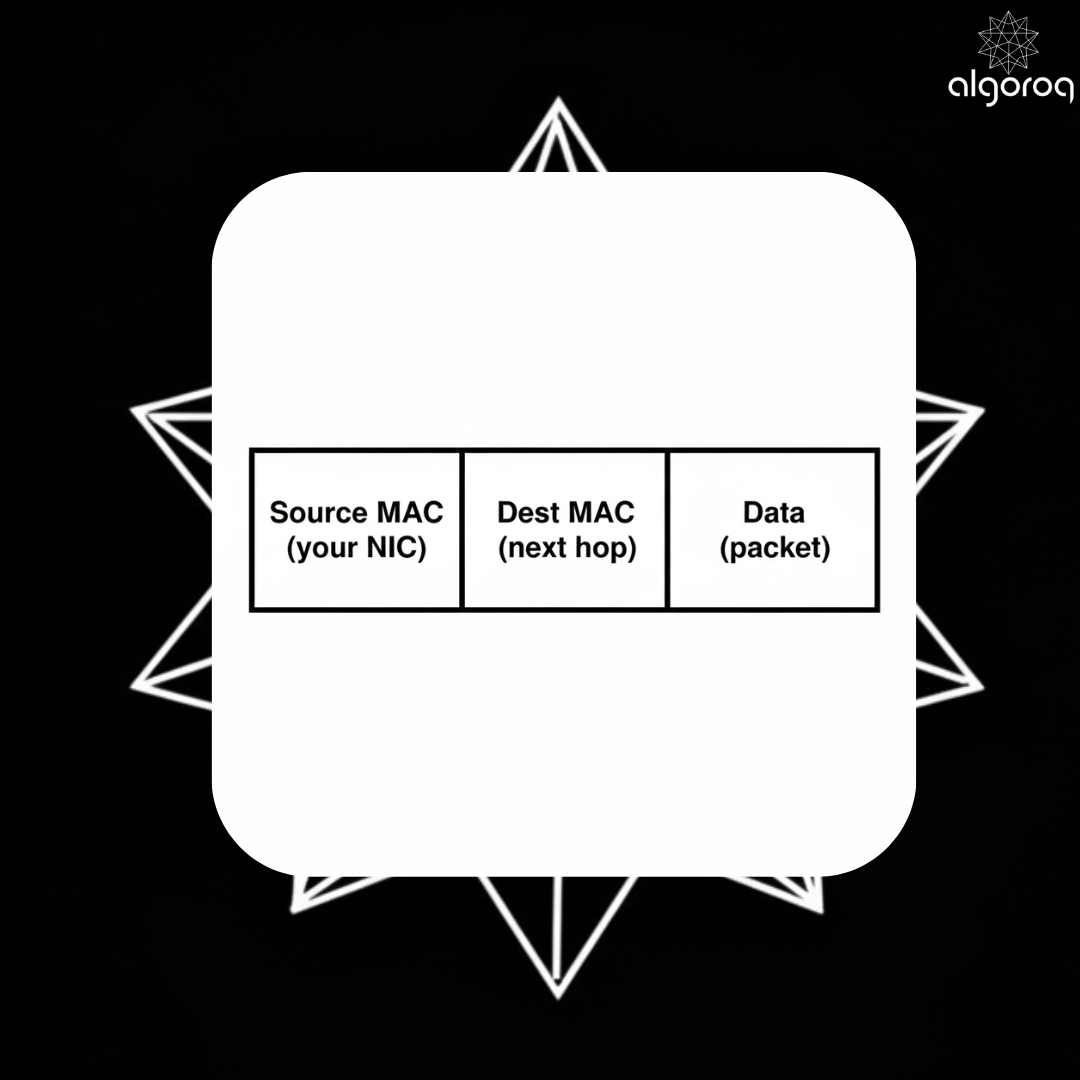
MAC Address example: 00:1A:2B:3C:4D:5E
How It Works:
- Your computer wants to send data to another device on the same network
- ARP (Address Resolution Protocol) asks: "Who has IP 192.168.1.5? What's your MAC address?"
- Target responds: "That's me! My MAC is 00:1A:2B:3C:4D:5E"
- Frame created with source MAC, destination MAC, and the data payload
- Switch reads MAC addresses and forwards frame to the correct port
Why This Layer Exists:
- Physical addressing for devices on the same network segment
- Switches use this to efficiently forward traffic (no broadcasting like old hubs)
- MAC addresses are burned into network cards (unique hardware identifiers)
Key protocols: Ethernet, WiFi (802.11), ARP
What lives here: Switches (Layer 2 devices)
- Switches look at MAC addresses to forward frames to the right port
- They DON'T look at IP addresses
🌐 Layer 3: Network (IP Addresses)
🌍 Layer 3 is the international postal service.
- MAC address (Layer 2) = Apartment number (only matters inside the building)
- IP address (Layer 3) = Full street address (works globally)
When you mail a letter from New York to Tokyo:
- The letter goes through MANY post offices (routers)
- Each post office looks at the address and decides where to send it next
- The letter's destination address NEVER changes
- But it gets handed between different postal workers (MAC addresses change at each hop)
IP Packet structure:
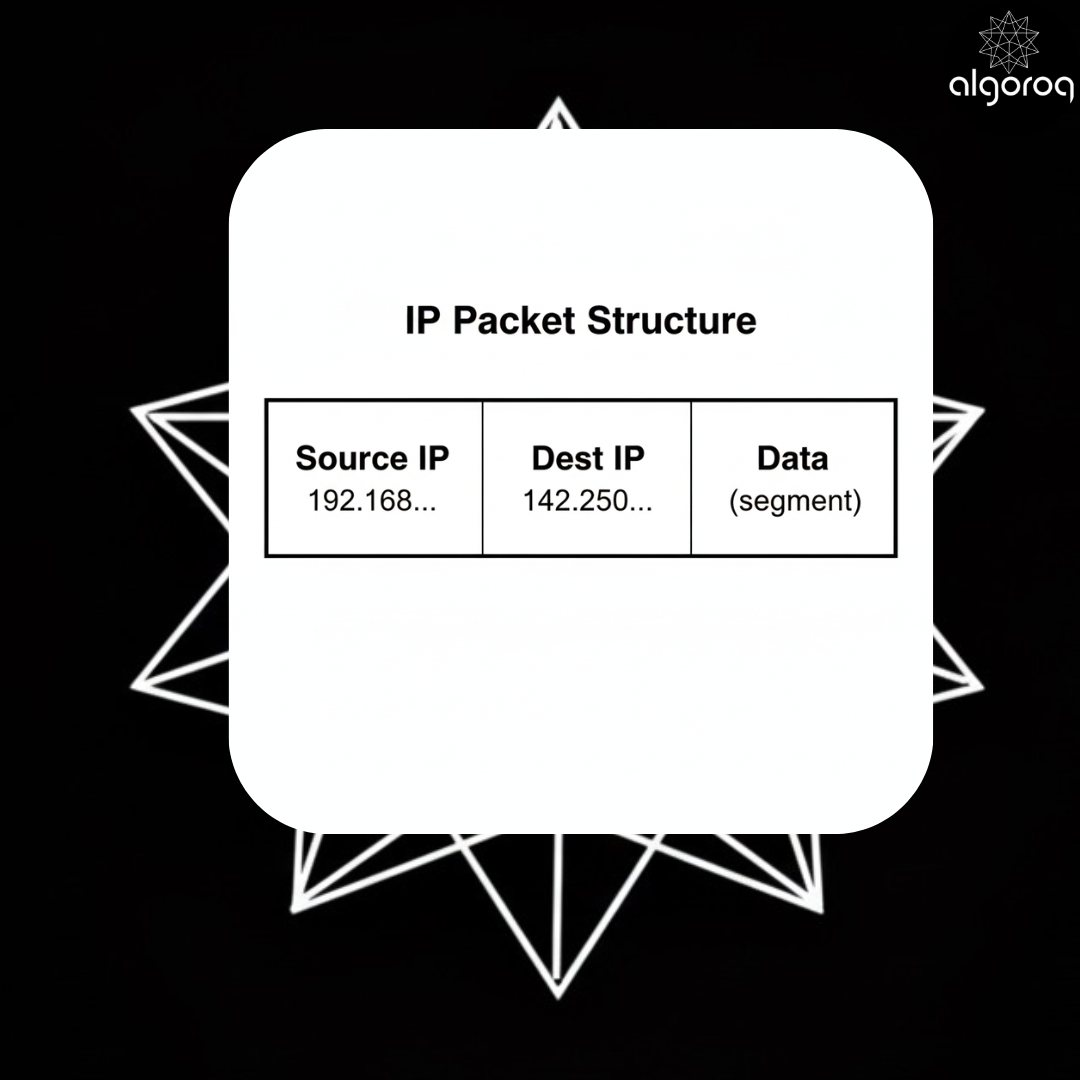
IP Address example: 192.168.1.1 or 2001:0db8::1
How Routing Works:
- DNS resolves domain to IP:
google.com→142.250.185.46 - Your router checks: "Is this IP on my local network?" → No
- Sends to gateway router (usually your ISP)
- Each router along the path checks its routing table:
- "Where's the next hop toward 142.250.185.46?"
- Forwards packet to the next router
- Eventually reaches Google's network
- Final router delivers to the destination server
Why IP Addresses Are Public:
- Every router needs to see the destination IP to route correctly
- Cannot be encrypted (how would routers know where to send it?)
- This is why VPNs encrypt by wrapping your packet in ANOTHER IP packet
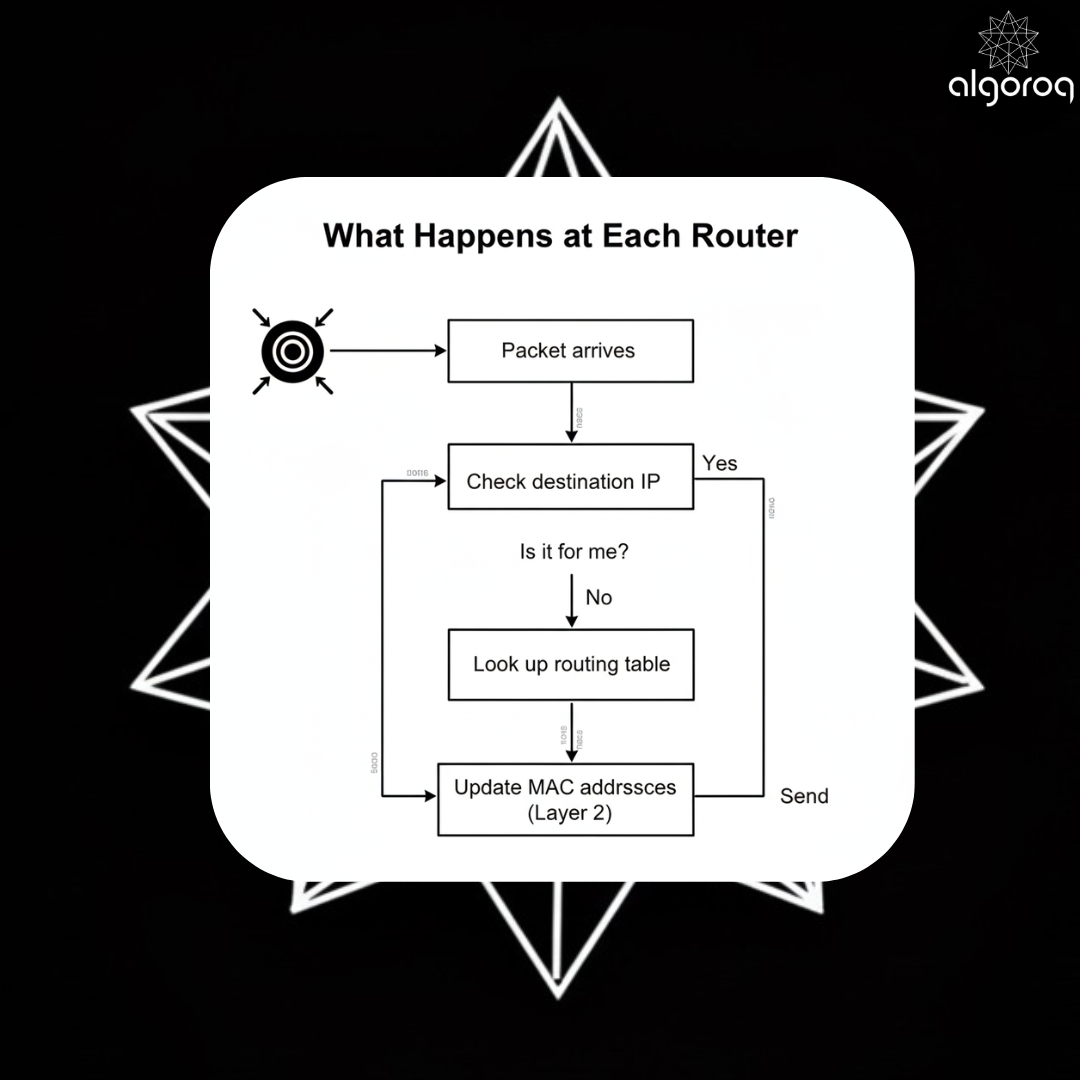
What lives here: Routers (Layer 3 devices)
- Routers look at IP addresses to route packets
- Every router asks: "Is this packet for me? If not, where should I forward it?"
Important: The destination IP stays the same end-to-end, but MAC addresses change at every hop!
🚢 Layer 4: Transport (Ports & Reliability)
How data gets to the right application.
🏢 Your server is like an office building:
- IP address = Building's street address (Layer 3)
- Ports = Specific office room numbers (Layer 4)
- Room 80 = HTTP department
- Room 443 = HTTPS department
- Room 22 = SSH department
- Room 3306 = MySQL department
The postal service (Layer 3) delivers mail to the building. But which office inside should get it? That's what ports do—they route to the correct application.
TCP vs UDP: The Courier Analogy
Consider TCP has a reliable registered mail who does the following
- Signs for delivery
- Tracks every package
- Resends if lost
- Delivers in order
- Slow but guaranteed
On the other hand UDP is like throwing packages over the fence (Fast)
- No signature required
- No tracking
- If it gets lost, oh well
- Might arrive out of order
- Fast but unreliable
TCP (Reliable, Connection-oriented)
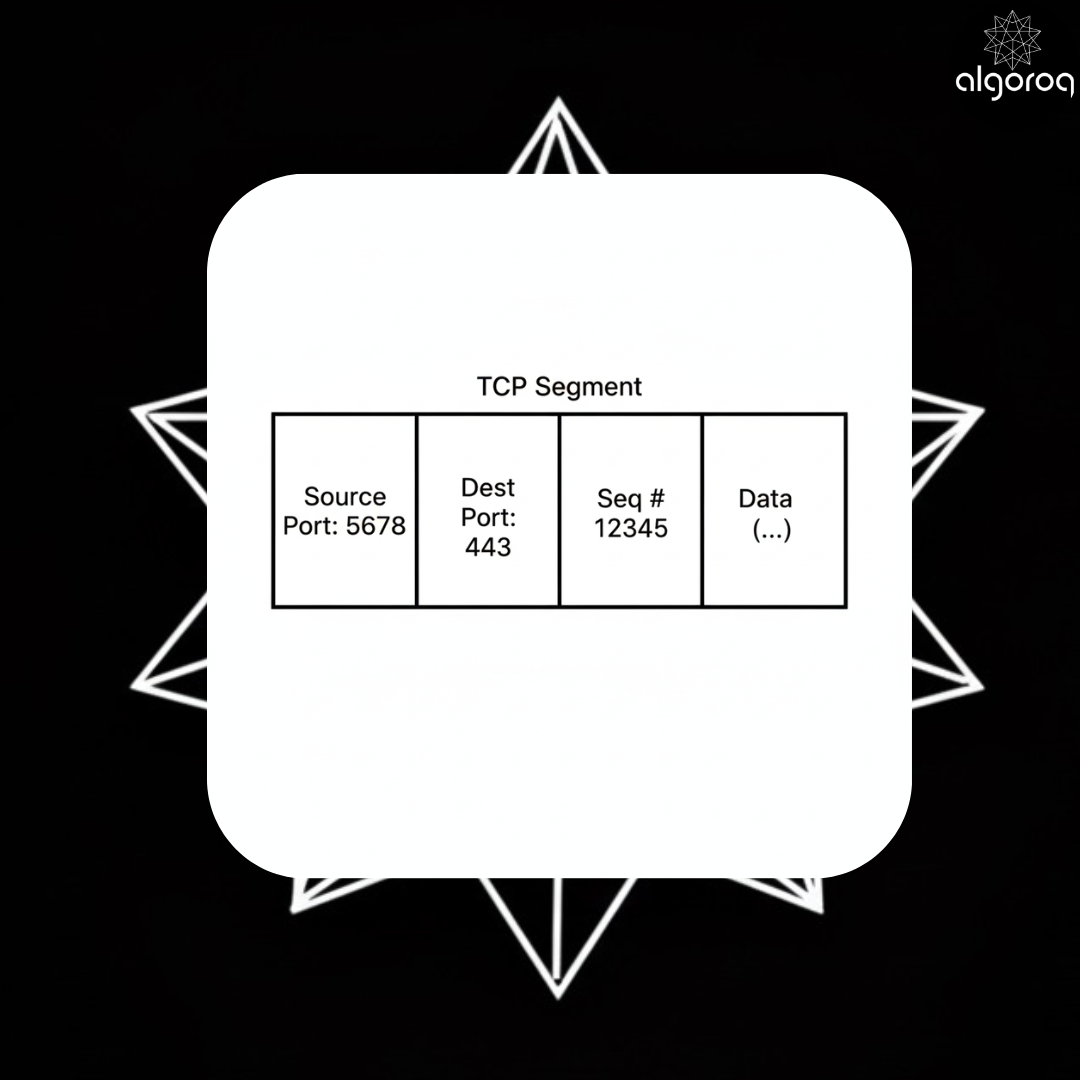
How TCP Works:
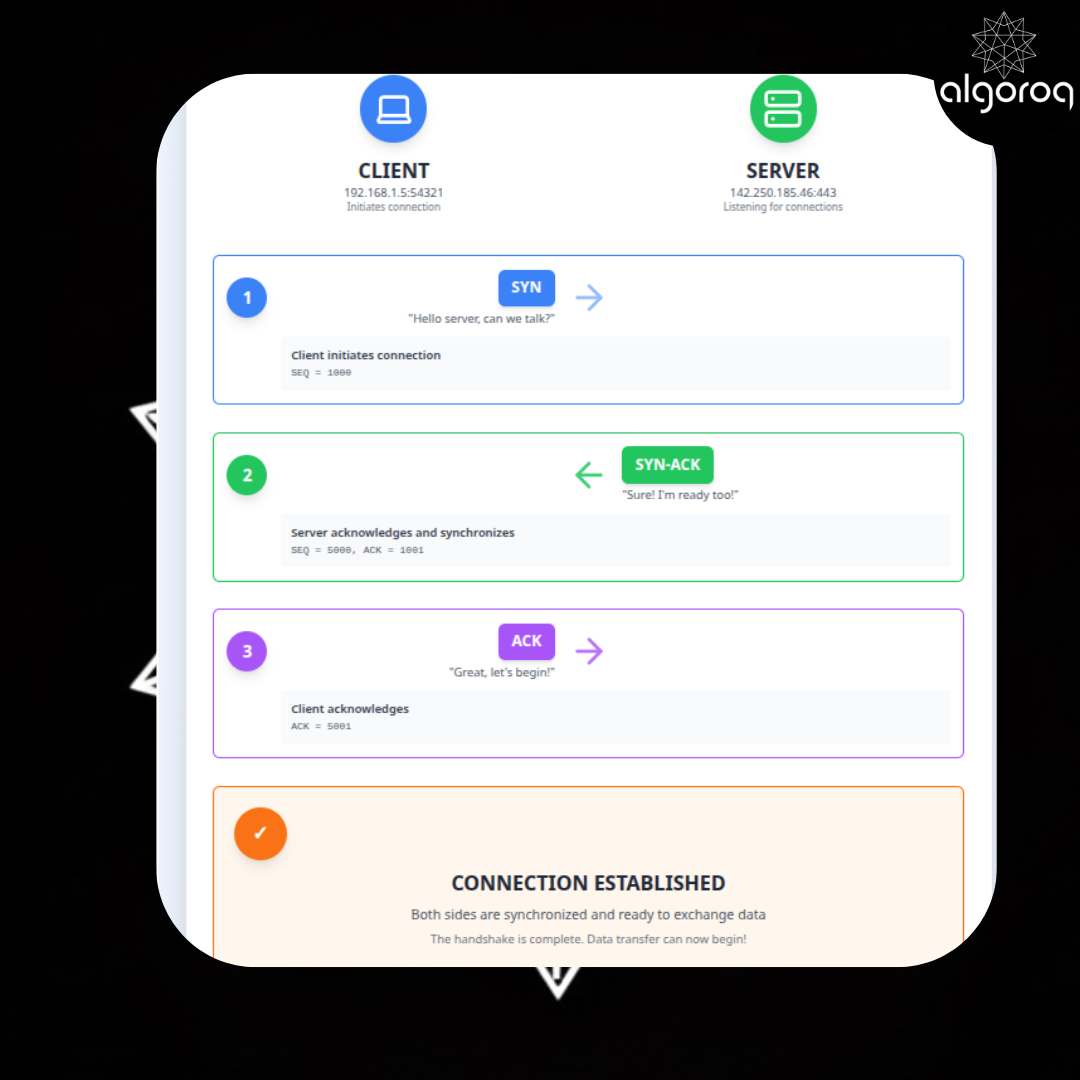
- 3-Way Handshake (establish connection):
- The client which is usually a browser/phone/tablet or anything sends the "SYN - Can we talk?"
- The server then seds the "SYN-ACK - Yes, I'm ready!"
- Client: "ACK - Let's go!"
- Data Transfer with guarantees:
- Each segment has a sequence number
- Receiver sends ACKs (acknowledgments)
- If ACK doesn't come back it is retransmitted
- Receiver reorders packets if they arrive out of order
- Flow Control: Receiver says "slow down" if overwhelmed
- Congestion Control: Sender detects network congestion and backs off
Why use TCP:
- ✅ It guarantees delivery (retransmits lost packets)
- ✅ It provides In-order delivery
- ✅ Flow control & congestion control
- ✅ Connection state (knows the conversation context)
- ❌ Slower due to overhead
UDP (Fast, Fire-and-forget)
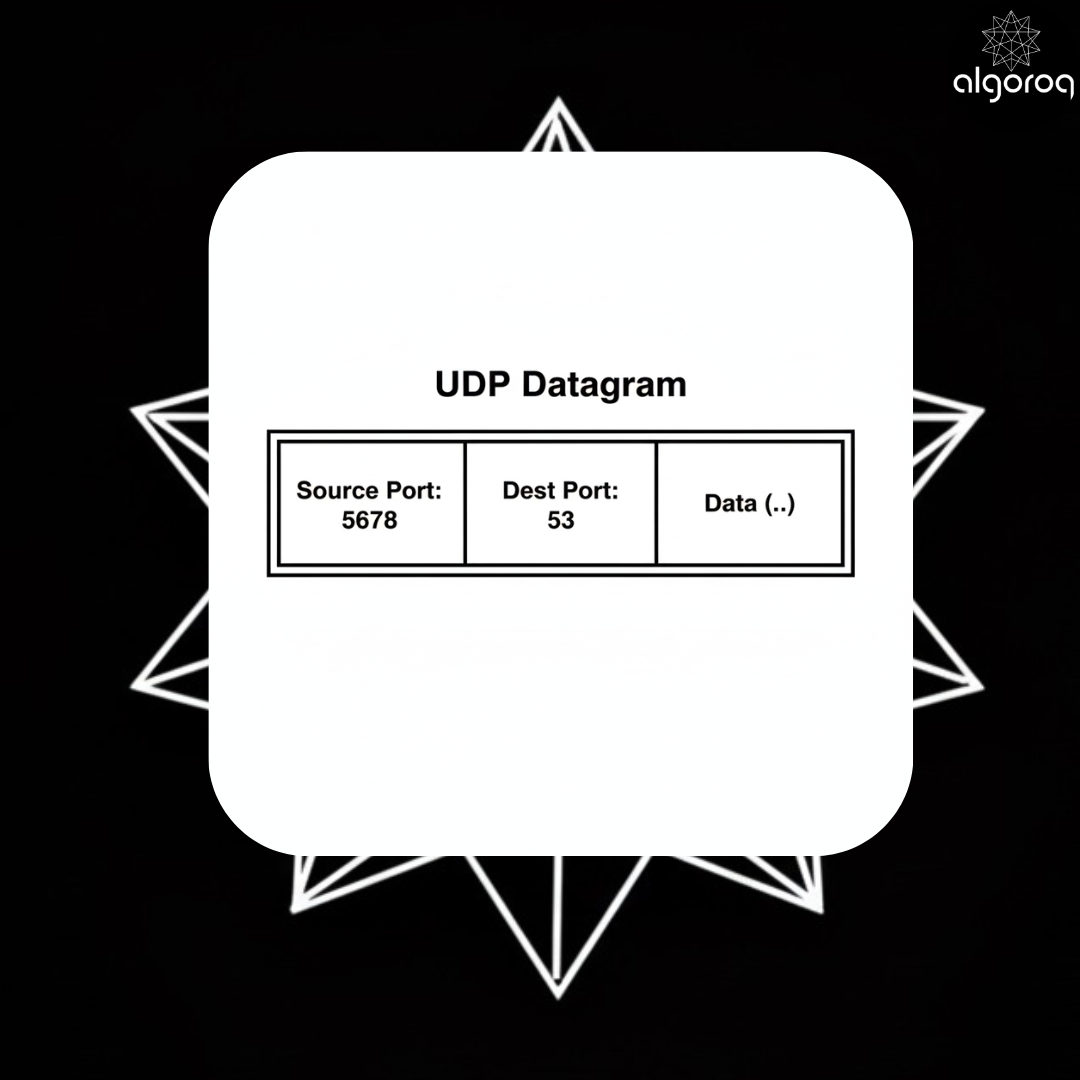
How UDP Works:
- Just send it → No handshake, no connection
- No retransmission → Lost packet? Sender doesn't even know
- No ordering → Packets arrive however they arrive
- Minimal overhead → Just source port, dest port, checksum, data
Why use UDP:
- ✅ FAST (no handshake, no ACKs, no retransmission)
- ✅ Good for real-time apps (video calls, gaming, streaming)
- ✅ Can tolerate some loss (one dropped video frame is fine)
- ❌ No guarantees
- ❌ No retransmission
- ❌ No ordering
Port examples:
- Port 80: HTTP
- Port 443: HTTPS
- Port 22: SSH
- Port 53: DNS
- Port 3306: MySQL
- Port 5432: PostgreSQL
Why This Matters:
When you write server code listening on port 8080, you're working at Layer 4. The operating system routes incoming segments to your process based on the port number.
As a backend engineer, you live here (Layer 4) and Layer 7.
🔐 Layer 5: Session
Managing connections and state.
📞 Layer 5 is like establishing a phone call:
-
Without Layer 5 (like sending letters):
- You write a letter → Mail it → Wait days for response
- Write another letter → Mail it → No guarantee they got the first one
- No ongoing conversation, just discrete messages
-
With Layer 5 (like a phone call):
- You dial → They answer → NOW you have a session
- You can have back-and-forth conversation
- Both sides know the connection is active
- When done, you hang up (close session)
This is where:
- TCP 3-way handshake happens (SYN, SYN-ACK, ACK) - "Dialing and answering"
- TLS encryption is negotiated - "Setting up secure line"
- Connection state is maintained - "Keeping the line open"
- Sessions are established and torn down - "Calling and hanging up"
Why This Layer Exists:
- Establishes context: Both sides know they're in a conversation
- State management: Server remembers this client, client remembers server
- Security negotiation: TLS/SSL happens here (cipher suites, certificates)
- Connection pooling: Some proxies operate here (like Linkerd)
Important Concept: Stateful vs Stateless
Stateful (has Layer 5):
- TCP: Connection tracked on both sides
- WebSocket: Long-lived connection with state
- gRPC: Maintains connection state
Stateless (no Layer 5):
- UDP: No connection, fire and forget
- HTTP (base protocol): Each request independent (though TCP below it IS stateful)
What lives here: Some proxies like Linkerd (connection pooling)
Controversial: Many people say "really, a whole layer just for sessions?" But it matters for understanding where connection logic lives!
📝 Layer 6: Presentation
Encoding, serialization, encryption.
🌍 The Universal Translator
Imagine you speak English, your friend speaks Japanese. You need a translator (Layer 6) to convert between languages.
Layer 6 is the translator between your application and the network:
- Your app thinks in: JavaScript objects, Python dictionaries, Go structs
- The network only understands: Raw bytes (10101011...)
- Layer 6 converts between them
What Happens Here
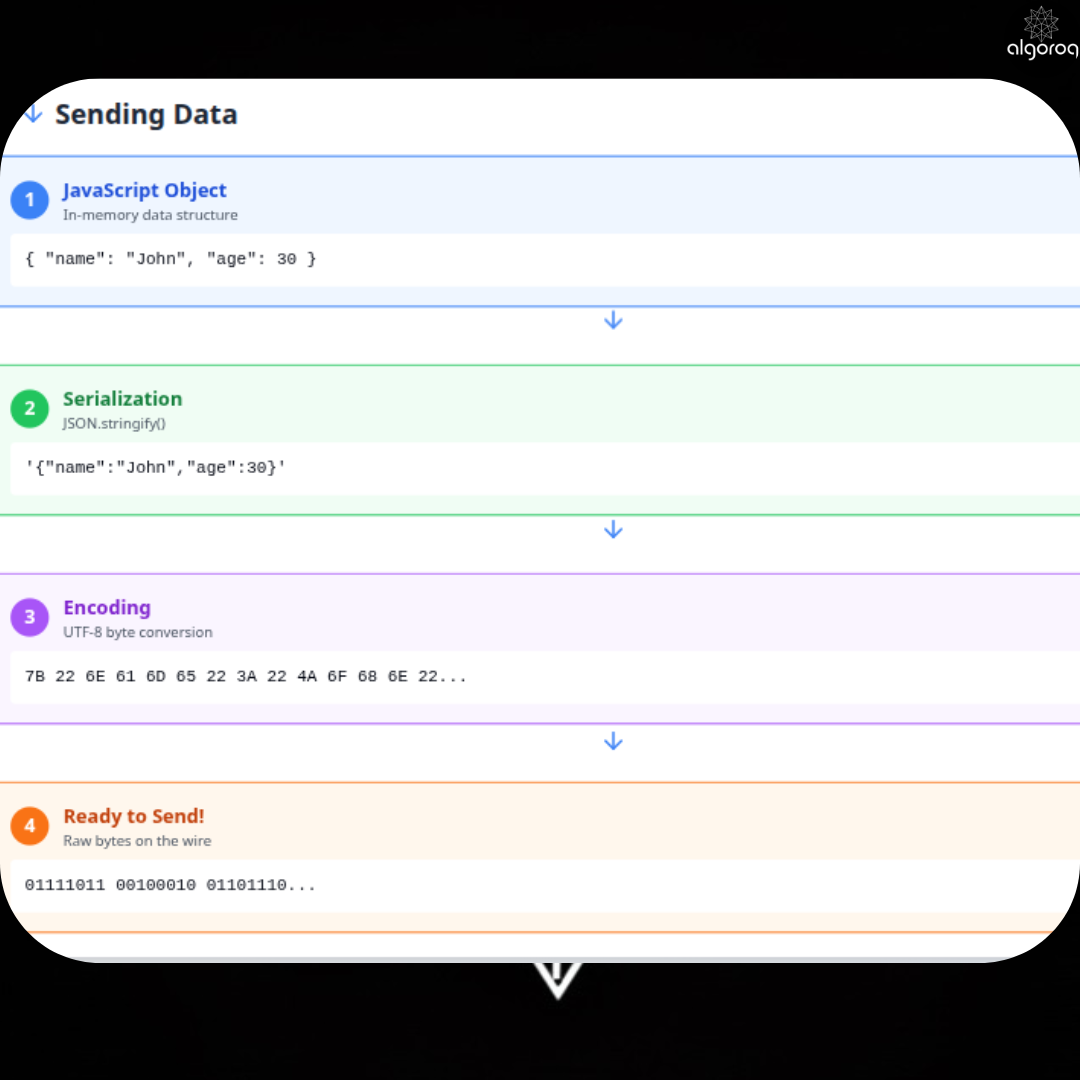
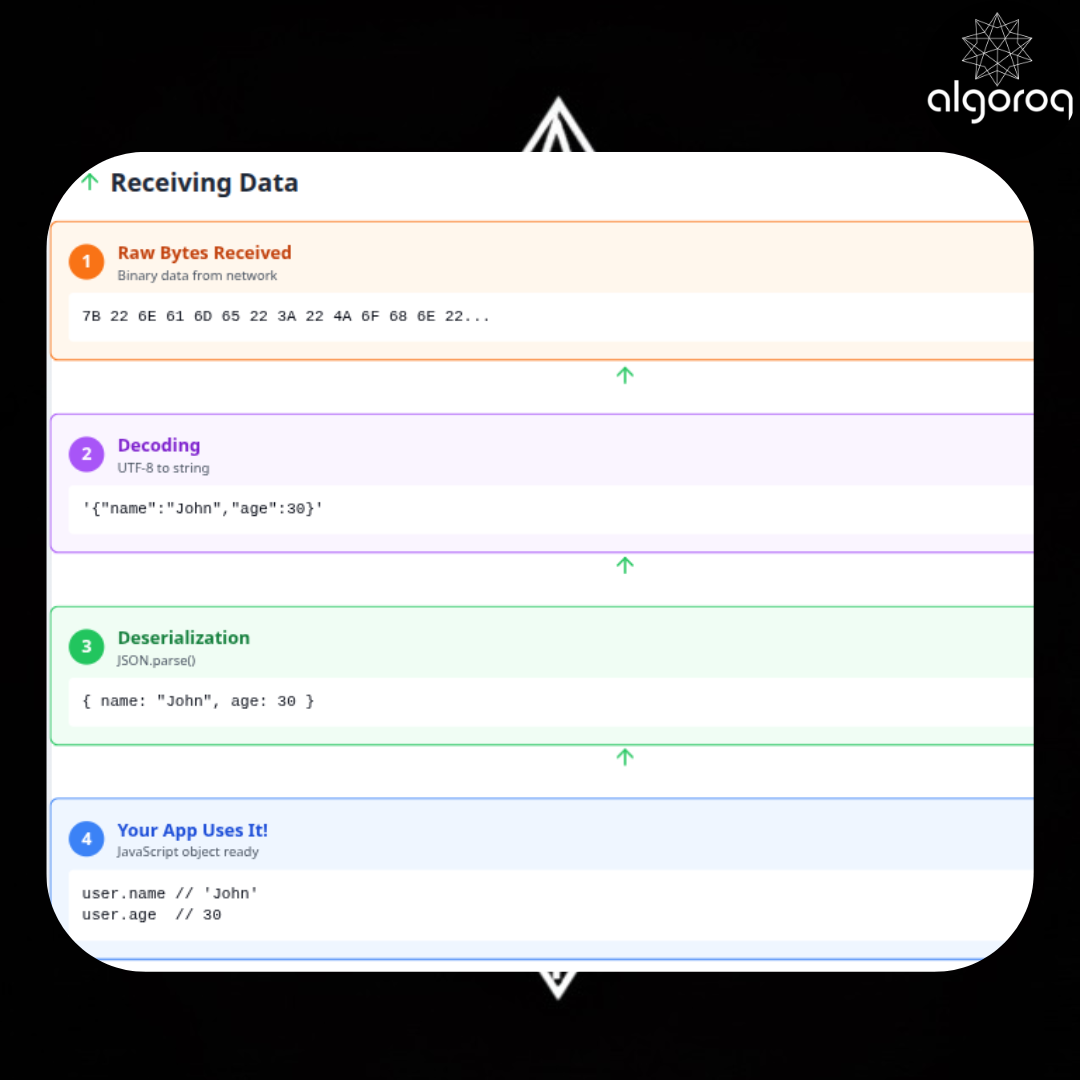
Why This Layer Exists:
-
Serialization: Convert data structures to byte strings
- JSON serialization
- Protocol Buffers encoding
- XML parsing
-
Encoding: Character set conversion
- UTF-8, UTF-16, ASCII
- Ensures both sides interpret bytes the same way
-
Compression: Make data smaller
- GZIP, Brotli
- Reduces bandwidth
-
Encryption (sometimes): Make data unreadable
- Though usually this happens in Layer 5 (TLS) or Layer 7
- Layer 6 handles the encoding of encrypted data
Important Note:
Your framework (Express, Django, Flask) probably does this for you automatically. When you do res.json({...}), that's Layer 6 serialization happening behind the scenes.
Real talk: This layer gets blurry with the application layer. Some argue they should be combined. Your framework probably handles this for you anyway.
💻 Layer 7: Application
YOUR CODE LIVES HERE.
This layer is what you see as user on your screens/mobiles/laptops as an app or a website etc
This is where protocols like HTTP, FTP, SMTP, gRPC, and DNS live.
Example HTTP Request:
POST /api/users HTTP/1.1
Host: example.com
Content-Type: application/json
| POST /api/users HTTP/1.1 |
|---|
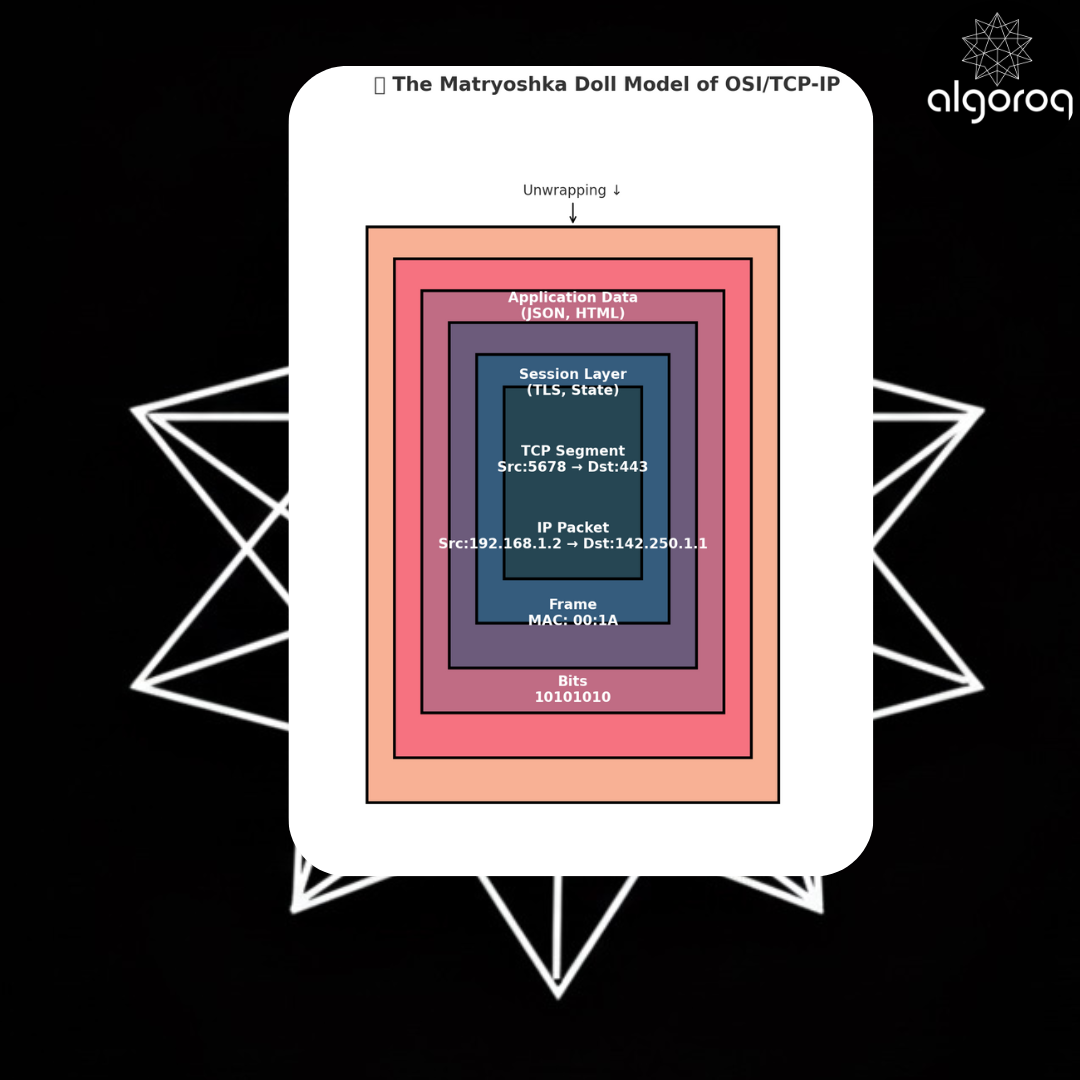
🎎 The Matryoshka Doll Model
Each layer wraps the previous one. To read data, you unwrap layer by layer!
Key Takeaways
- The OSI model organizes networking into 7 layers — each layer handles a specific concern from physical signals to application data
- Protocols are standardized rules for communication — without them, devices from different manufacturers couldn't communicate
- The TCP/IP model is the practical 4-layer model used on the internet — application, transport, internet, and network access layers
- Understanding networking layers helps you debug connectivity issues — you can isolate whether a problem is DNS, TCP, HTTP, or application-level
Log in to keep reading
Create a free account to keep reading and track your progress.
Log in — it's free