Database Transactions

Database Transactions
Grouping multiple database operations into a single atomic unit — either everything succeeds or everything rolls back, protecting your data from partial failures.
Database Transactions - The All-or-Nothing Guarantee
🎯 Challenge 1: The Concert Ticket Catastrophe
Scenario: You're buying concert tickets online. The purchase involves multiple steps:
- Check if seats are available (2 tickets for Section A)
- Reserve those seats
- Charge your credit card $200
- Send confirmation email
- Update ticket inventory
Question: Your internet crashes after Step 3 (card charged). What should happen?
A. Card charged, tickets not reserved → You paid but got nothing! 😱 B. Tickets reserved, card not charged → Free tickets! (Chaos for venue) C. Partial completion → Database is confused about what happened D. Entire purchase cancelled, card refunded → Everything rolls back safely
Think carefully... What protects both you and the venue?
The Answer: Database Transactions!
A transaction is a group of operations that either ALL succeed or ALL fail together - never partial!
Real-world parallel: Think of a transaction like a legal contract signing ceremony. You don't partially sign a contract! Either all parties sign and it's binding, or someone refuses and nothing happens. There's no "half-signed" contract.
🎬 How Transactions Work: The Movie Analogy
Imagine filming a scene in a movie:
Without Transactions (Disaster!):
Director: "Action!" Actor 1: Delivers perfect line ✓ Actor 2: Forgets their line ✗ Actor 3: Hasn't even started
Director: "Cut! But Actor 1's part is already filmed..." Result: Unusable footage, must reshoot everything
With Transactions (Protected!):
Director: "BEGIN TRANSACTION - Action!" Actor 1: Delivers perfect line ✓ Actor 2: Forgets their line ✗
Director: "ROLLBACK! Reset to starting positions" Result: Like it never happened, start fresh!
Second take: Director: "BEGIN TRANSACTION - Action!" Actor 1: Perfect ✓ Actor 2: Perfect ✓ Actor 3: Perfect ✓
Director: "COMMIT! That's the take we're keeping!" Result: Scene is officially recorded
🎮 Transaction Commands: Your Control Panel
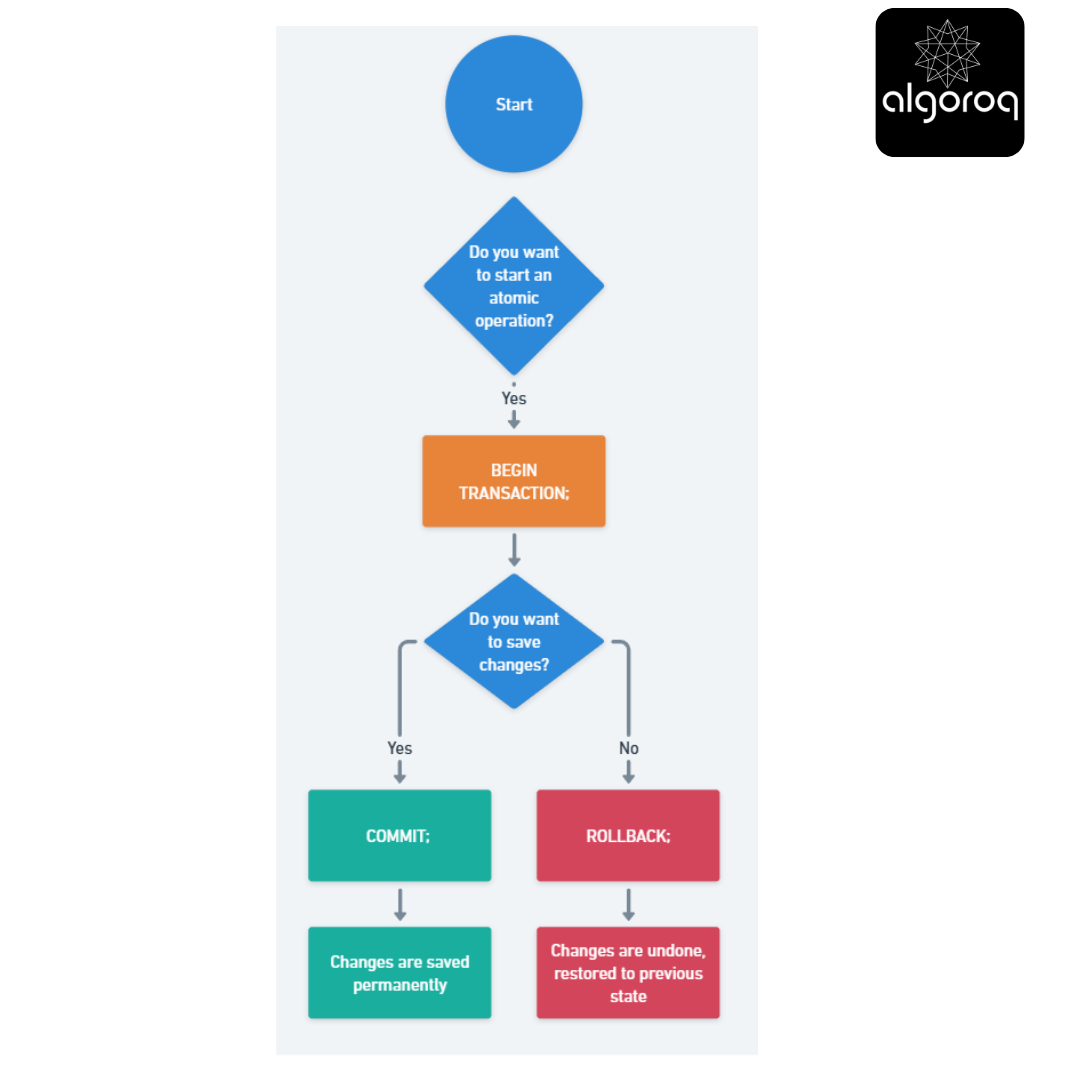
The Three Essential Commands:
1️⃣ BEGIN TRANSACTION (or START TRANSACTION)
BEGIN TRANSACTION; -- Like saying "Start recording, this is one atomic operation"
2️⃣ COMMIT
COMMIT; -- Like saying "Save it! Make all changes permanent"
3️⃣ ROLLBACK
ROLLBACK; -- Like saying "Undo everything! Restore to how it was before"
💰 Real-World Example: The Bank Transfer
Scenario: Transfer $500 from Alice to Bob
Without Transaction (DISASTER ZONE):
-- Step 1: Deduct from Alice
-- ✓ Success! Alice now has $500 less
-- Step 2: Add to Bob
-- 💥 DATABASE CRASHES HERE!
-- Result: Alice lost $500, Bob never received it! Money vanished! 😱
With Transaction (PROTECTED):
BEGIN TRANSACTION;
-- Step 1: Deduct from Alice
-- Balance: Alice $1000 → $500 (temporary, not permanent yet!)
-- Step 2: Add to Bob
Balance: Bob $500 → $1000 (temporary, not permanent yet!)
-- Check if both succeeded
IF both_steps_successful THEN
COMMIT;
-- Make both changes permanent!
-- Result: Alice $500, Bob $1000 ✓
ELSE
ROLLBACK;
-- Undo both changes!
-- Result: Back to original state: Alice $1000, Bob $500
END IF;
Visualization: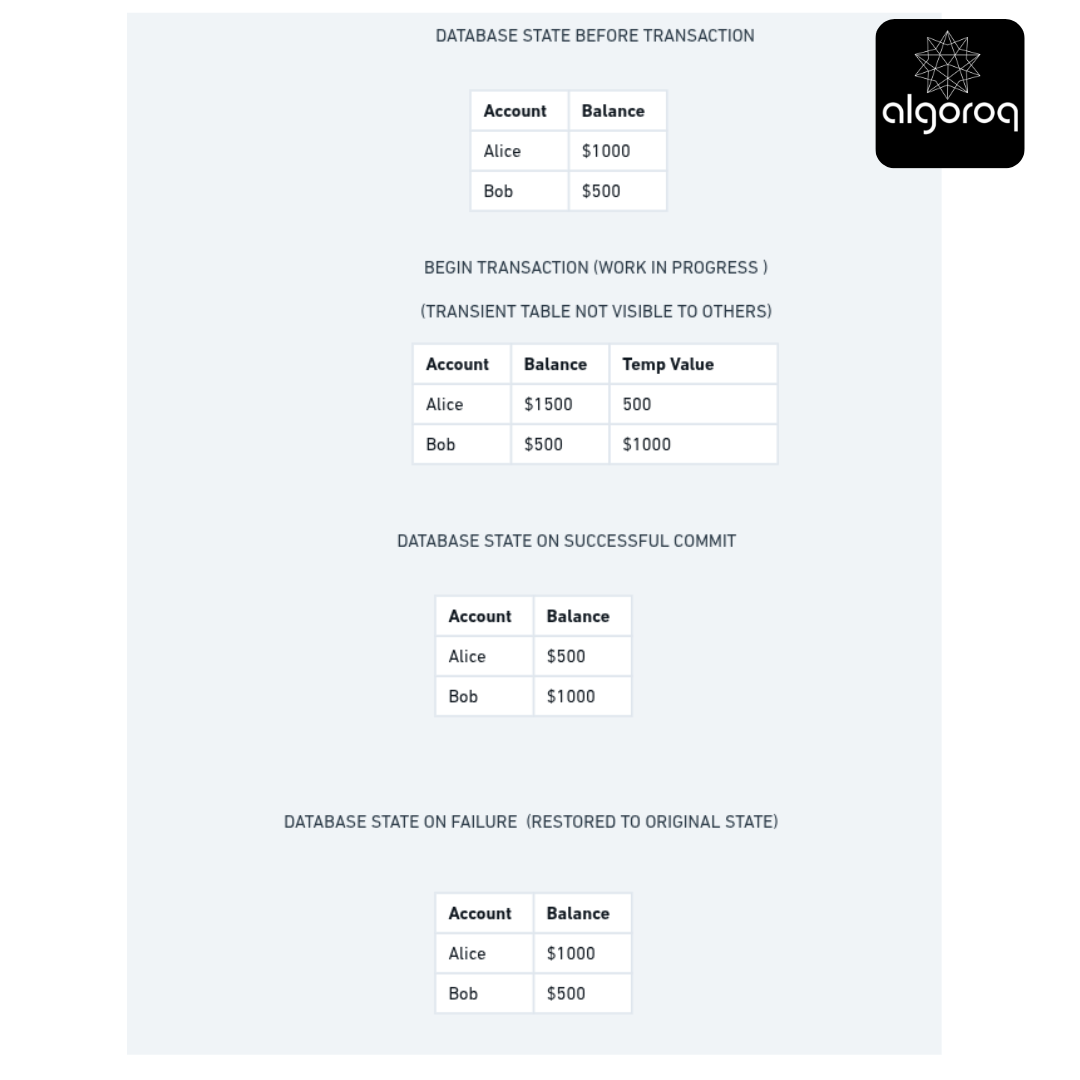
🔍 Investigation: Transaction States
A transaction goes through distinct states like a package in shipping:
📦 PACKAGE ANALOGY:
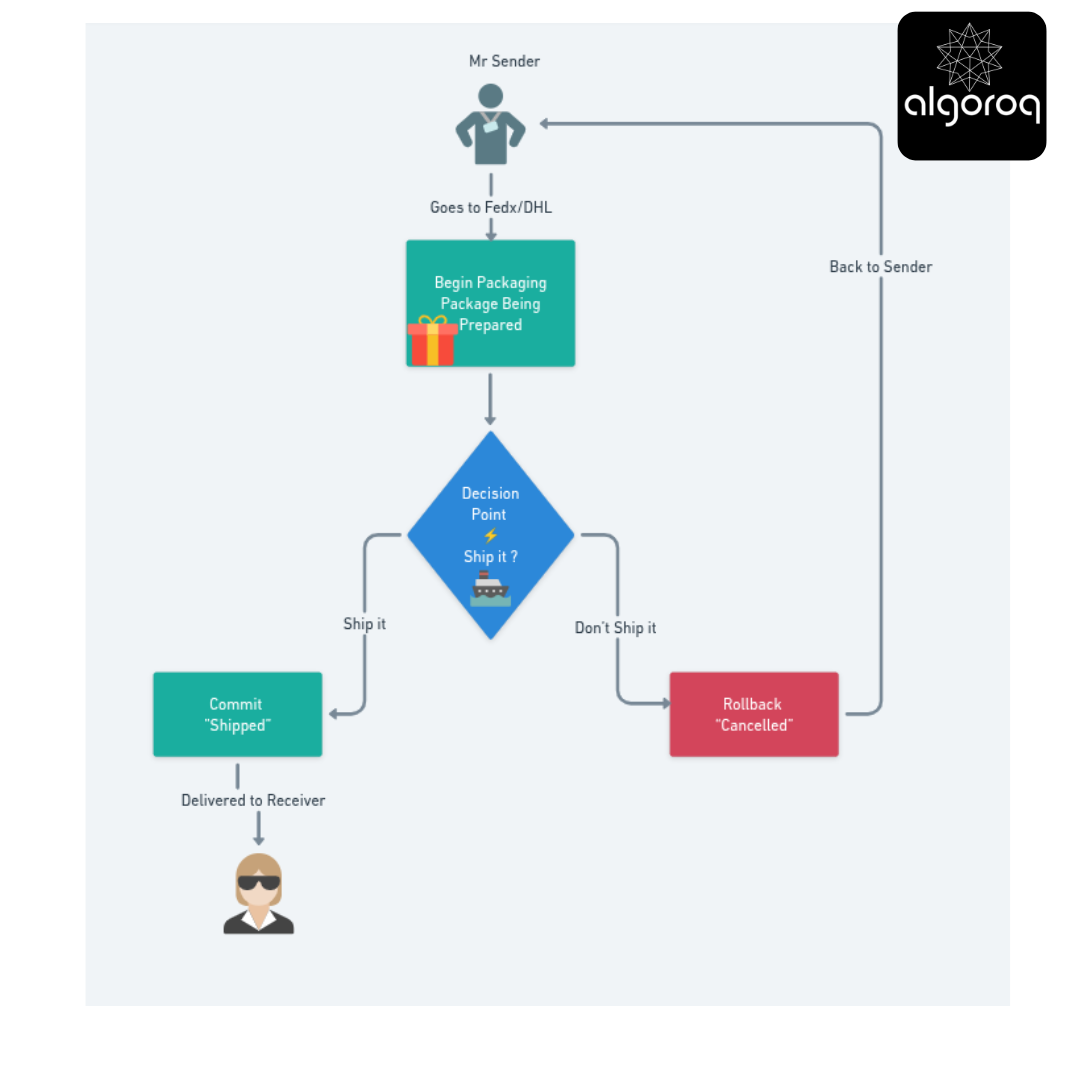
In SQL terms:
-- State 1: ACTIVE (Transaction in progress)
State 2a: COMMITTED (Success path)
COMMIT;
All changes now permanent and visible to everyone
OR State 2b:
ABORTED (Failure path)
ROLLBACK; -- All changes discarded, database unchanged!
🎪 Interactive Exercise: Can This Be One Transaction?
Which of these should be a SINGLE transaction? Think about it:
Scenario A: User registration
- Insert new user record
- Send welcome email
- Create default preferences
- Log registration event
Should this be ONE transaction? 🤔
Answer: NO! Here's why:
-- User record and preferences: YES, one transaction
BEGIN TRANSACTION
-- Email and logging: SEPARATE operations -- (External services, can fail independently) send_email('alice@email.com', 'Welcome!'); log_event('user_registered', user_id);
Mental model: Only database operations that MUST succeed together should be in one transaction. External services (email, APIs) should be separate!
Scenario B: E-commerce checkout
- Deduct items from inventory
- Create order record
- Process payment
- Update customer points
Should this be ONE transaction? 🤔
Answer: MOSTLY YES, but payment is tricky!
-- Payment processing happens separately -- (External payment gateway, different rules)
Key insight: Transactions are for database consistency, not for orchestrating external systems!
🚨 Common Transaction Pitfalls
| ❌ Mistake 1: Transaction Too Long
Bad transaction example:
Good transaction example:
Get data first (outside transaction)
// User thinks... no locks held
// Only use transaction for the actual update
Done in milliseconds! ⚡ |
Mental model: Transactions are like holding your breath underwater - keep them SHORT!
❌ Mistake 2: Forgetting to COMMIT or ROLLBACK
Bad transaction example:
-- Always end your transactions!
Or use try-catch:
❌ Mistake 3: Nested Transactions (Not What You Think!)
Confusing:
Most databases don't support true nested transactions! Instead, they flatten to one transaction.
Better approach - Savepoints:
💡 Transaction Isolation Levels: How Isolated Are You?
Remember isolation from ACID? Here's the depth:
The Dinner Party Analogy:
Read Uncommitted (Least Isolated)
You: Reading someone's plate while they're still cooking on it Problem: You might see raw chicken! (Dirty Read) Real issue: You read data that might get rolled back
Read Committed (Default for most databases)
You: Only eat dishes that are served (finished cooking) Protection: No dirty reads Problem: If chef replates the dish, it looks different (Non-repeatable Read)
Repeatable Read
You: Your plate is photographed at start Protection: Your view stays consistent throughout meal Problem: New dishes might appear (Phantom Reads)
Serializable (Most Isolated)
You: Eat alone, one person at a time Protection: Complete isolation, as if transactions run in sequence Problem: Slowest performance
Example showing the differences:
-- Scenario: Two people checking same account balance
Transaction B (Someone else, simultaneous)
🎯 Quick Recap: Transaction Essentials
Test yourself - without looking back:
- What happens if a transaction is interrupted mid-execution?
- Why should transactions be kept short?
- What's the difference between COMMIT and ROLLBACK?
- Can you have transactions within transactions?
Answers:
- If not committed, all changes are automatically rolled back (ACID's Atomicity!)
- Long transactions hold locks, blocking other users and increasing deadlock risk
- COMMIT makes changes permanent, ROLLBACK discards all changes
- Most databases don't support true nesting; use savepoints instead
Key Takeaways
- Transactions group multiple operations into a single atomic unit — either all operations succeed or none do
- BEGIN, COMMIT, and ROLLBACK control transaction boundaries — COMMIT saves changes permanently, ROLLBACK undoes them all
- Isolation levels control what concurrent transactions can see — higher isolation prevents more anomalies but reduces throughput
- Deadlocks occur when two transactions wait for each other's locks — databases detect and resolve these by aborting one transaction
Log in to keep reading
Create a free account to keep reading and track your progress.
Log in — it's free