Understanding Where Your Data Lives

Storage Fundamentals: Understanding Where Your Data Lives
Let’s see what happens at every growing tech company.
Your startup is doing great. You've got 10,000 users, and they're uploading photos, videos, documents—everything. One morning, your CTO walks in and says: "We're spending $50,000 a month on storage. Why is it so expensive? Can we fix this?"
You look at the bill and realize: you've been storing everything the same way. Profile pictures from 2015 that nobody looks at? Same expensive, fast storage as today's viral videos. User documents? Same storage as your database that needs millisecond access times.
This is like storing your winter coat, your daily clothes, and your favorite t-shirt all in the same place—hanging in your closet. Sure, it works, but it's not optimal.
Today, you’ll learn about about storage—the different types, how they work, and most importantly, how to choose the right one for your data. By the end, you'll understand why some data belongs on $0.023/GB storage and other data needs $0.50/GB storage.
Let's dive in.
Actually before we dive we need to learn a few terms which
Will notoriously appear again and again in the explanations
i) AWS is Amazon Web Services is the Cloud Service Provided by Amazon
ii) Azure is Microsoft’s Cloud Service
iii) GCP is Google’s Cloud Service (Google Cloud Service)
iv) We are also going to use lot of terms like EBS,EC2,S3,Glacier, EFS,CDN you can come back and refer to this photo whenever you get confused
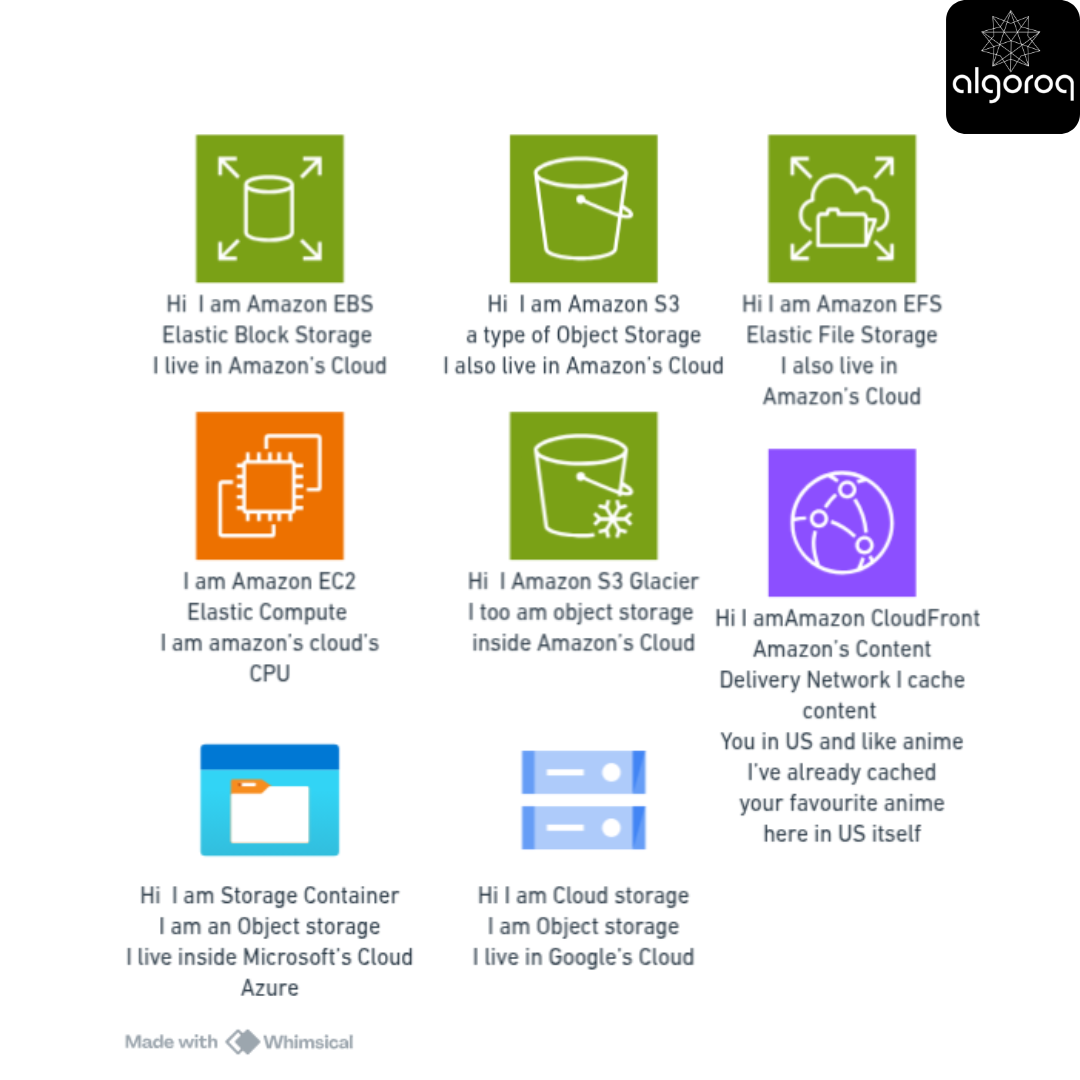
📦 Types of Storage: Block, File, and Object Storage
The Library Analogy
Imagine three different types of libraries, each organized completely differently:
Library 1: The Block Storage Library
The Warehouse:
━━━━━━━━━━━━━━━━━━━━━━━━━━━━━━━━
Floor plan: ┌─────┬─────┬─────┬─────┬─────┐
│ 001 │ 002 │ 003 │ 004 │ 005 │
├─────┼─────┼─────┼─────┼─────┤
│ 006 │ 007 │ 008 │ 009 │ 010 │
├─────┼─────┼─────┼─────┼─────┤
│ 011 │ 012 │ 013 │ 014 │ 015 │
└─────┴─────┴─────┴─────┴─────┘
Each box (block):
-
Same size block (512 bytes or 4KB)
-
Just a number (no label)
-
Can contain ANYTHING
Your book "War and Peace" is stored across:
-
Blocks 003, 004, 005, 007, 009
-
No one knows what's in each block
-
You need a separate map to track which blocks belong to your book
This is BLOCK STORAGE.
Library 2: The File Storage Library
The Traditional Library:
━━━━━━━━━━━━━━━━━━━━━━━━━━━━━━━━
Organization:
📁 Fiction/
📁 Tolstoy/
📁 Non-Fiction/
📁 History/
📄 World War II.pdf
Each item:
-
Has a name
-
Lives in a folder (directory)
-
Organized hierarchically
You find your book by path:
/Fiction/Tolstoy/War and Peace.txt
This is FILE STORAGE.
Library 3: The Object Storage Library
The Amazon Warehouse:
━━━━━━━━━━━━━━━━━━━━━━━━━━━━━━━━
Everything gets a unique ID: 📦 Item #7f8e9a2b3c4d
Content: "War and Peace" book
Tags:
- author: "Tolstoy"
- genre: "fiction"
- year: 1869
- language: "English"
- size: 1.2MB
Metadata: Last accessed, created date, etc.
No folders! Just objects with IDs and tags. You search by tags or retrieve by ID.
This is OBJECT STORAGE.
Block Storage: The Raw Blocks
What it actually is:
Think of a Hard Drive:
━━━━━━━━━━━━━━━━━━━━━━━━━━━━━━━━
Physical disk divided into blocks:
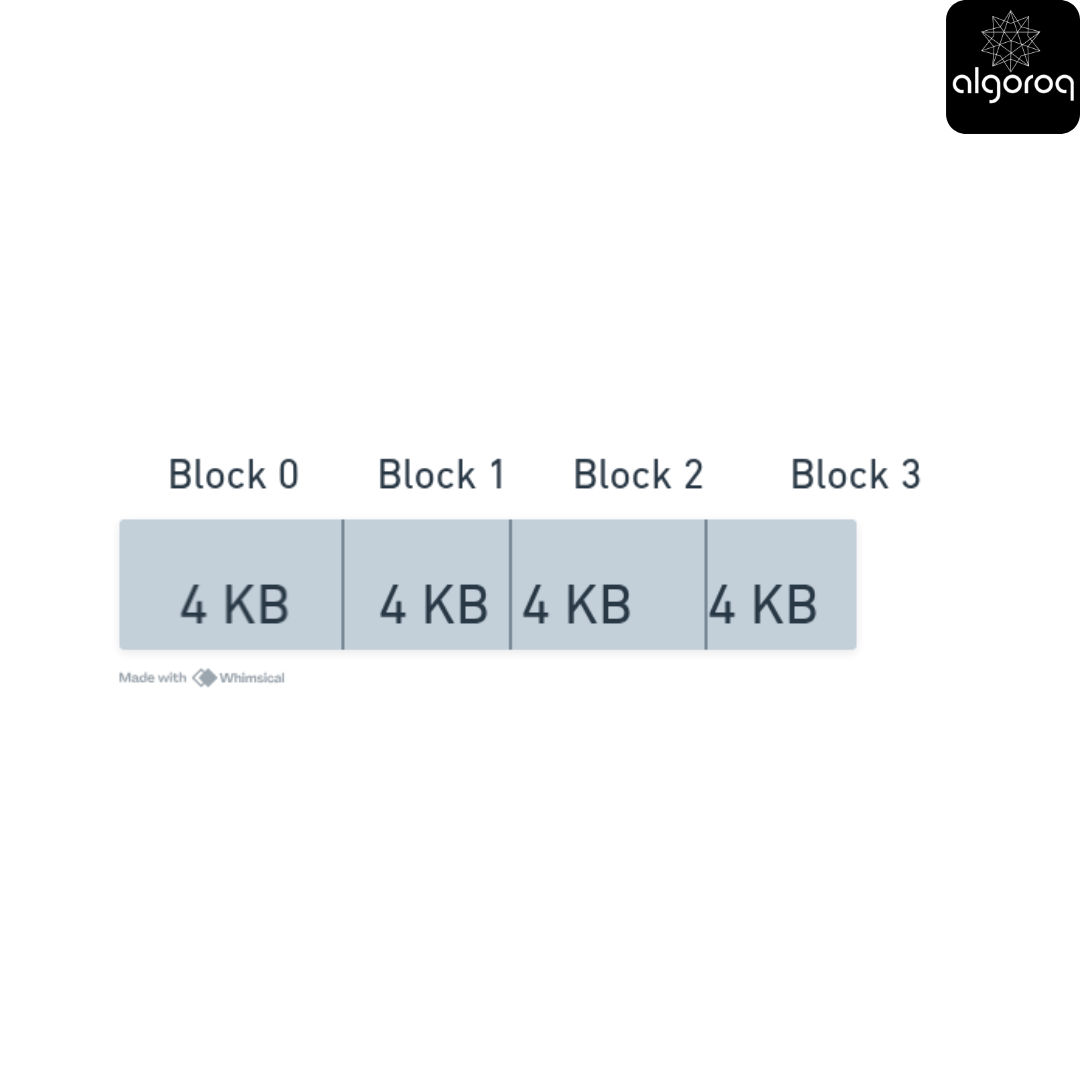
Each block in a block storage has
-
Fixed size (usually 4KB)
-
Addressable by number
-
No built-in organization
-
No metadata
It's like raw memory on disk!
How data is stored:
Example: Storing "HELLO WORLD" (11 bytes)
━━━━━━━━━━━━━━━━━━━━━━━━━━━━━━━━━━━━━━━
Operating system:
-
"I need to write 11 bytes"
-
"Let me allocate blocks... I'll use block 42"
-
Writes to block 42: "HELLO WORLD"
-
Remembers: "This file uses block 42"
The block itself doesn't know:
-
What data it contains
-
What file it belongs to
-
Who owns it
The filesystem (ext4, NTFS, etc.) tracks all this!
Real-World Usage:
Perfect for:
━━━━━━━━━━━━━━━━━━━━━━━━━━━━━━━━
-
Databases
Why: Need raw, fast access
Example:
-
MySQL/PostgreSQL writing directly to blocks
-
No filesystem overhead
-
Can optimize exactly how data is laid out
-
-
Virtual Machine Disks
Why: VM needs to think it has a physical disk
Example:
-
AWS EBS (Elastic Block Store)
-
Your VM sees: "I have a 100GB hard drive"
-
Actually: 100GB of blocks on AWS infrastructure
-
-
Boot Drives
Why: Operating system needs direct block access
Example:
-
Your laptop's hard drive
-
Server's boot volume
-
Examples in the Cloud:
━━━━━━━━━━━━━━━━━━━━━━━━━━━━━━━━
AWS EBS (Elastic Block Store provided by Amazon Cloud )
-
Attach to EC2(AWS’s computer) instance like a hard drive
-
Appears as /dev/xvda
-
Use it just like a physical disk
Azure Managed Disks (Microsoft Cloud)
-
It is similar concept to AWS EB2
-
Attach to VMs
Google Persistent Disks
- Block storage for Compute Engine
The Performance Characteristics:
Block Storage Performance:
━━━━━━━━━━━━━━━━━━━━━━━━━━━━━━━━
Speed: VERY FAST ⚡
-
Direct access to blocks
-
Low latency (~1ms)
-
High IOPS (Input/Output Operations Per Second)
Use case example:
Database write:
"Write 4KB to block 12345"
-
Direct operation: 1ms
-
No filesystem traversal
-
No metadata lookup
Perfect for: Applications needing speed
Cost: More expensive (you're paying for performance)
File Storage: The Familiar Filesystem
What it actually is:
Your Computer's Files:
━━━━━━━━━━━━━━━━━━━━━━━━━━━━━━━━
| C:\Users\YourName\
── Documents ├── Resume.pdf ├── Cover Letter.docx
This is file storage!
-
Hierarchical in nature (folders in folders)
-
Each file has a path
-
Familiar and intuitive
How it works under the hood:
When you save "Resume.pdf":
━━━━━━━━━━━━━━━━━━━━━━━━━━━━━━━━
-
Filesystem creates entry:
/Users/YourName/Documents/Resume.pdf
-
Stores metadata:
| - Size: 245KB - Created: 2025-10-19 - Modified: 2025-10-19 - Permissions: Read/Write - Owner: YourName |
|---|
-
Allocates blocks (under the hood!):
-
Uses block storage beneath
-
File uses blocks: 100, 101, 102, 103
-
-
Updates directory structure: /Documents/ now contains "Resume.pdf"
The filesystem manages the complexity!
Real-World Usage:
Perfect for:
━━━━━━━━━━━━━━━━━━━━━━━━━━━━━━━━
-
Shared File Systems
Why: Multiple servers need to access same files
Example:
-
Company shared drive
-
Web servers accessing same static files
-
Media files accessed by multiple apps
-
-
Application Data
Why: Apps expect filesystem semantics
Example:
-
Log files: /var/log/app.log
-
Config files: /etc/config.yaml
-
Static assets: /public/images/
-
-
User Home Directories
Why: Natural organization
Example:
-
Each user has /home/username/
-
Familiar folder structure
-
Examples in the Cloud:
━━━━━━━━━━━━━━━━━━━━━━━━━━━━━━━━
AWS EFS (Elastic File System)
-
Network file system (NFS)
-
Multiple EC2 instances can mount it
-
Appears like a regular directory
Azure Files
-
SMB file shares in the cloud
-
Windows-style file sharing
Google Filestore
- Managed NFS for Compute Engine
Network File Storage Example:
Multiple Web Servers Sharing Files:
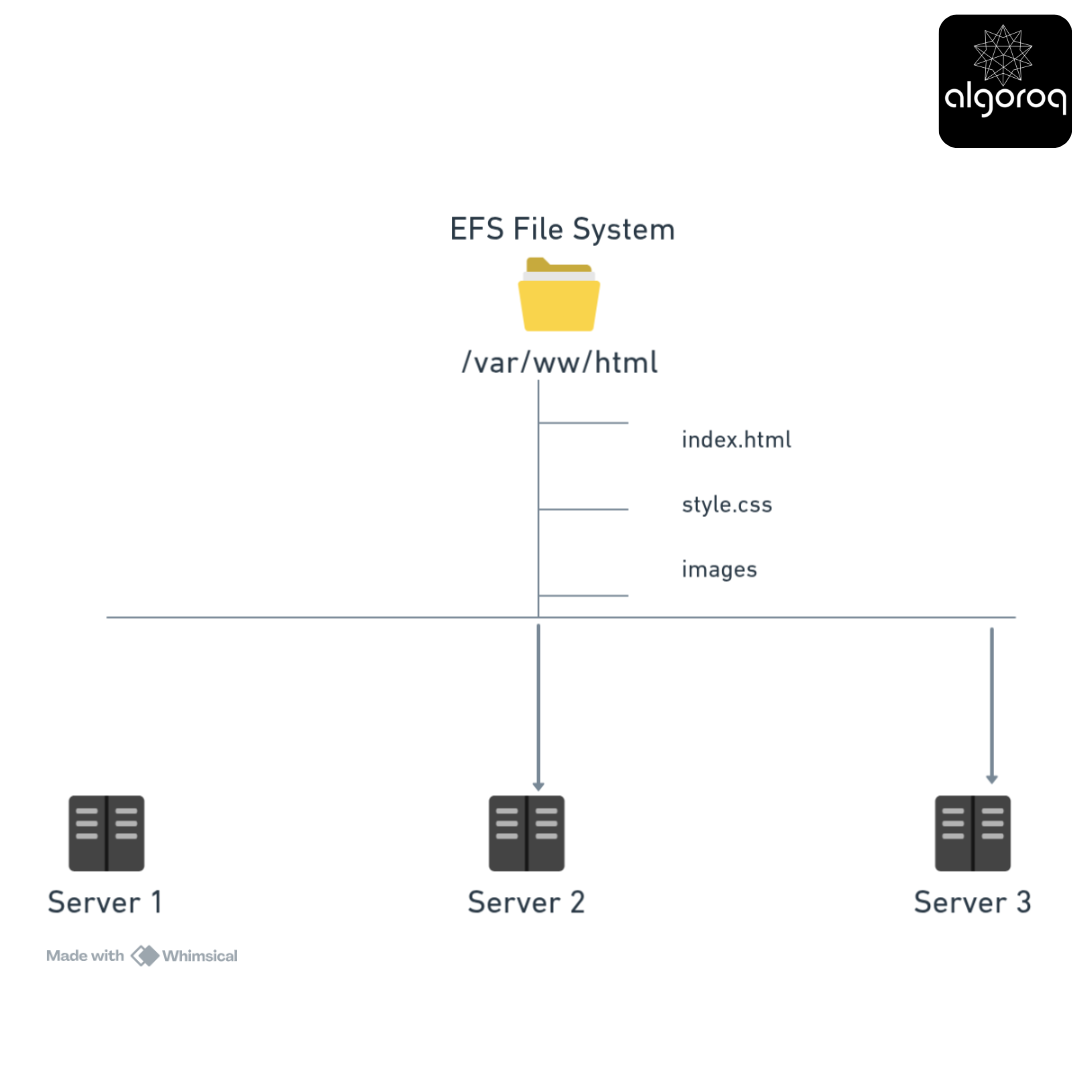
All servers see same files! Update index.html once → All servers see the change
Use case:
-
Static website assets
-
Uploaded user content
-
Shared configuration files
Benefit:
✓ No need to sync files between servers
✓ Central management
✓ Familiar filesystem operations
Code example:
Performance Characteristics:
File Storage Performance:
━━━━━━━━━━━━━━━━━━━━━━━━━━━━━━━━
Speed: FAST (but slower than block)
-
Need to traverse directory structure
-
Latency: ~10ms (network file systems)
-
Good throughput for sequential reads
Example operation: Read /path/to/deep/folder/file.txt
-
Look up "/path" → 1ms
-
Look up "/path/to" → 1ms
-
Look up "/path/to/deep" → 1ms
-
Look up "/path/to/deep/folder" → 1ms
-
Look up "file.txt" → 1ms
-
Read file data → 5ms
Total: 10ms
Slower than block (10ms vs 1ms) but more convenient! Cost: Moderate
Object Storage: The Cloud-Native Solution
What it actually is:
The Flat Namespace:
━━━━━━━━━━━━━━━━━━━━━━━━━━━━━━━━
No folders are involved ! Just objects with unique IDs:
Each object is self-contained!
The "key" looks like a path, but it's not!
Common Misconception:
━━━━━━━━━━━━━━━━━━━━━━━━━━━━━━━━
This looks like a folder structure:
But it's actually just a STRING (the key)!
There's no actual "user-photos" folder. There's no actual "john" folder. It's all flat!
Think of it like hashtags:
| /user-photos/john/vacation/beach.jpg #user-photos-john-vacation-beach.jpg |
|---|
So what are the "folders" in the S3 console you may ask ? It’s just for UI convenience! They group objects by common prefix.
Real-World Usage:
Perfect for:
━━━━━━━━━━━━━━━━━━━━━━━━━━━━━━━━
-
Static Assets (Images, Videos, PDFs) Why: Cheap, scalable, durable Example:
-
User profile pictures
-
Product images for e-commerce
-
Video streaming content
-
-
Backups and Archives Why: Extremely durable
Example:
-
Database backups can be directly added to object storage
-
Log archives can also be archived to object storage
-
Historical data
-
-
Big Data / Data Lakes
Why: It is a good option for big data as it has unlimited scale and it is very cheap
Example:
-
Analytics data can be added to object storage
-
Machine learning datasets can
-
IoT sensor data can be streamed to object storage
-
-
Static Website Hosting
Why: Simple, cheap, fast with CDN
Example:
-
HTML/CSS/JS files
-
SPA (Single Page Application)
-
Examples in the Cloud:
━━━━━━━━━━━━━━━━━━━━━━━━━━━━━━━━
AWS S3 (Simple Storage Service)
-
The original and most popular object storage
-
Buckets contain objects
-
Virtually unlimited storage
Azure Blob Storage
-
Similar to S3
-
Containers hold blobs
Google Cloud Storage
-
Buckets and objects
-
Similar model to S3
Performance Characteristics:
Object Storage Performance:
━━━━━━━━━━━━━━━━━━━━━━━━━━━━━━━━
Speed: SLOWER ( block storage is optimized for throughput, not latency)
-
Latency: ~100ms first byte
-
High throughput: GB/s for large files
-
REST API (HTTP) overhead
Example the operation: GET https://s3.amazonaws.com/bucket/key.jpg
Involves the following steps
-
HTTP request → 20ms
-
Authentication → 10ms
-
Locate object → 30ms
-
Start streaming → 40ms
Total: 100ms (vs 1ms for block storage)
BUT:
-
Unlimited scale ✓
-
Extremely cheap ✓
-
Built-in redundancy ✓
-
Global accessibility ✓
Cost: VERY CHEAP (~$0.023/GB/month for S3)
Connection to REST APIs: Object storage is accessed via HTTP REST APIs! Remember GET, PUT, DELETE? That's how you interact with S3. Each object has a URL!
The Comparison Table
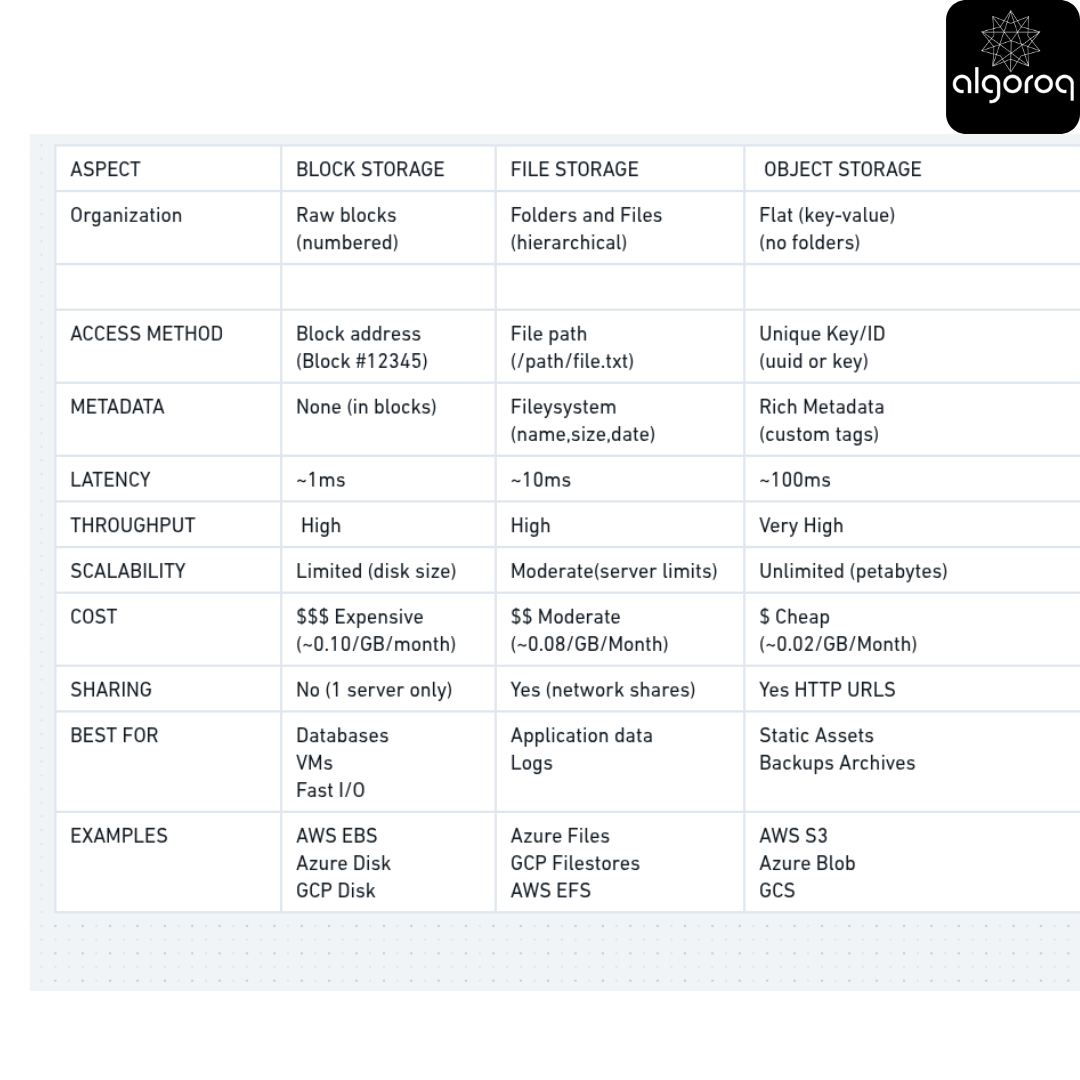
Real-World Architecture Example
E-commerce Platform Storage Design:
━━━━━━━━━━━━━━━━━━━━━━━━━━━━━━━━━━━━━━━━━
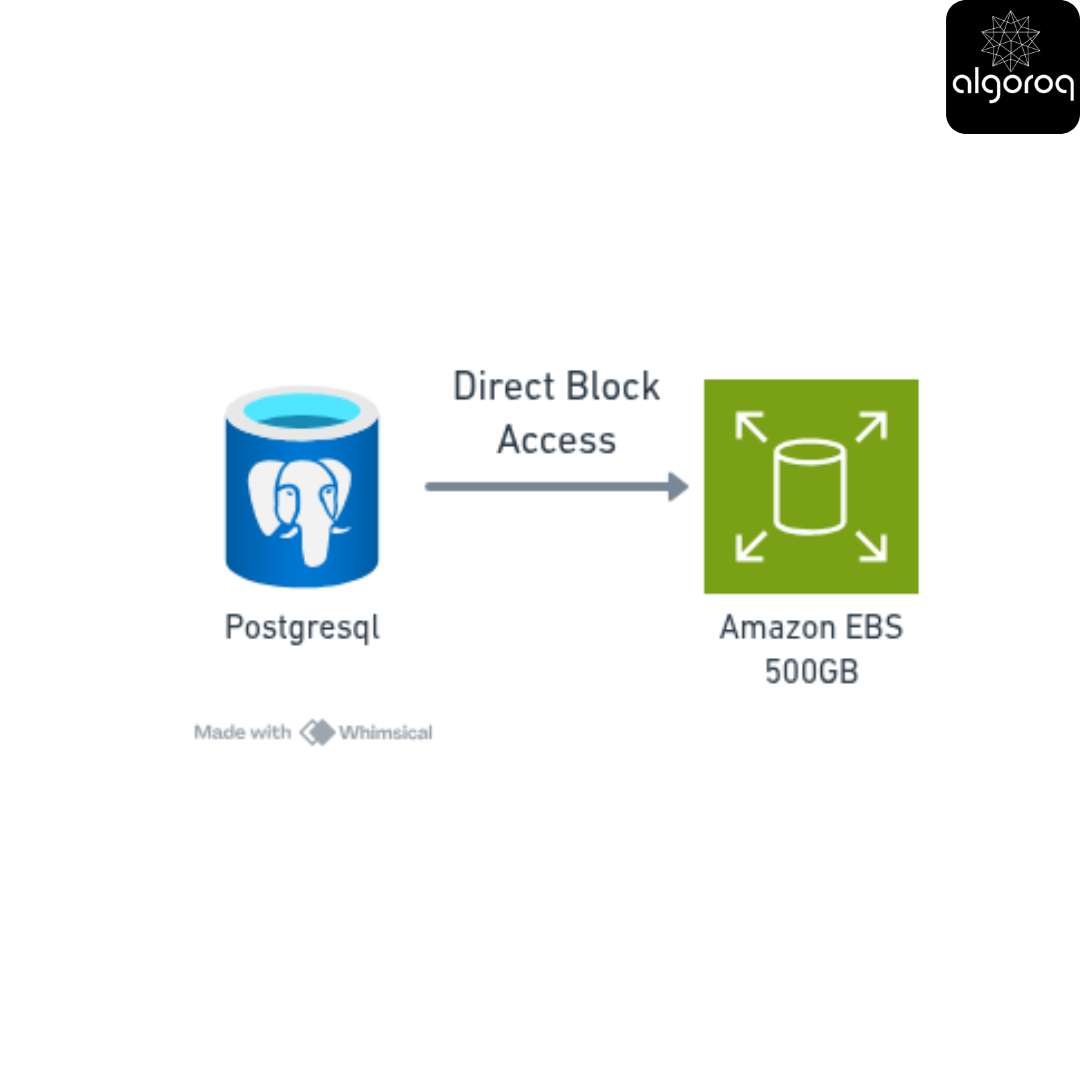
Component 1: Database
━━━━━━━━━━━━━━━━━━━━━━━━━━━━━━━━
Storage Type: BLOCK STORAGE (AWS EBS)
Why block storage?: Needs fast, consistent access
What Data does it store? : User accounts, orders, inventory
Volume: 500 GB
Cost: $50/month
[PostgreSQL] → [EBS Volume 500GB] (Direct block access)
Component 2: Application Servers
━━━━━━━━━━━━━━━━━━━━━━━━━━━━━━━━
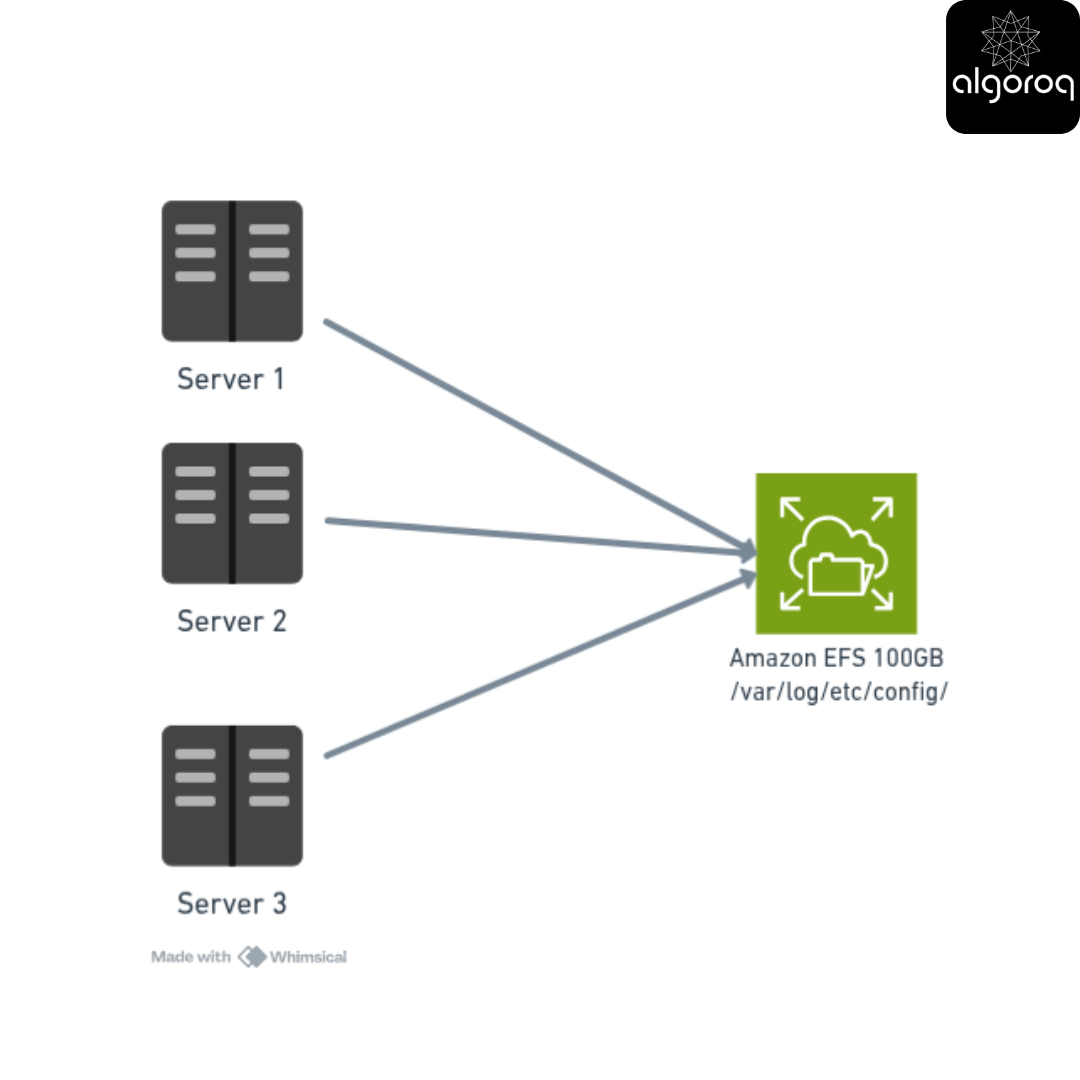
Storage Type: FILE STORAGE (AWS EFS)
Why file storage?: Multiple servers need same files
What data does it store? : Application logs, temp files, configs
Volume: 100 GB
Cost: $30/month
Component 3: Product Images
━━━━━━━━━━━━━━━━━━━━━━━━━━━━━━━━
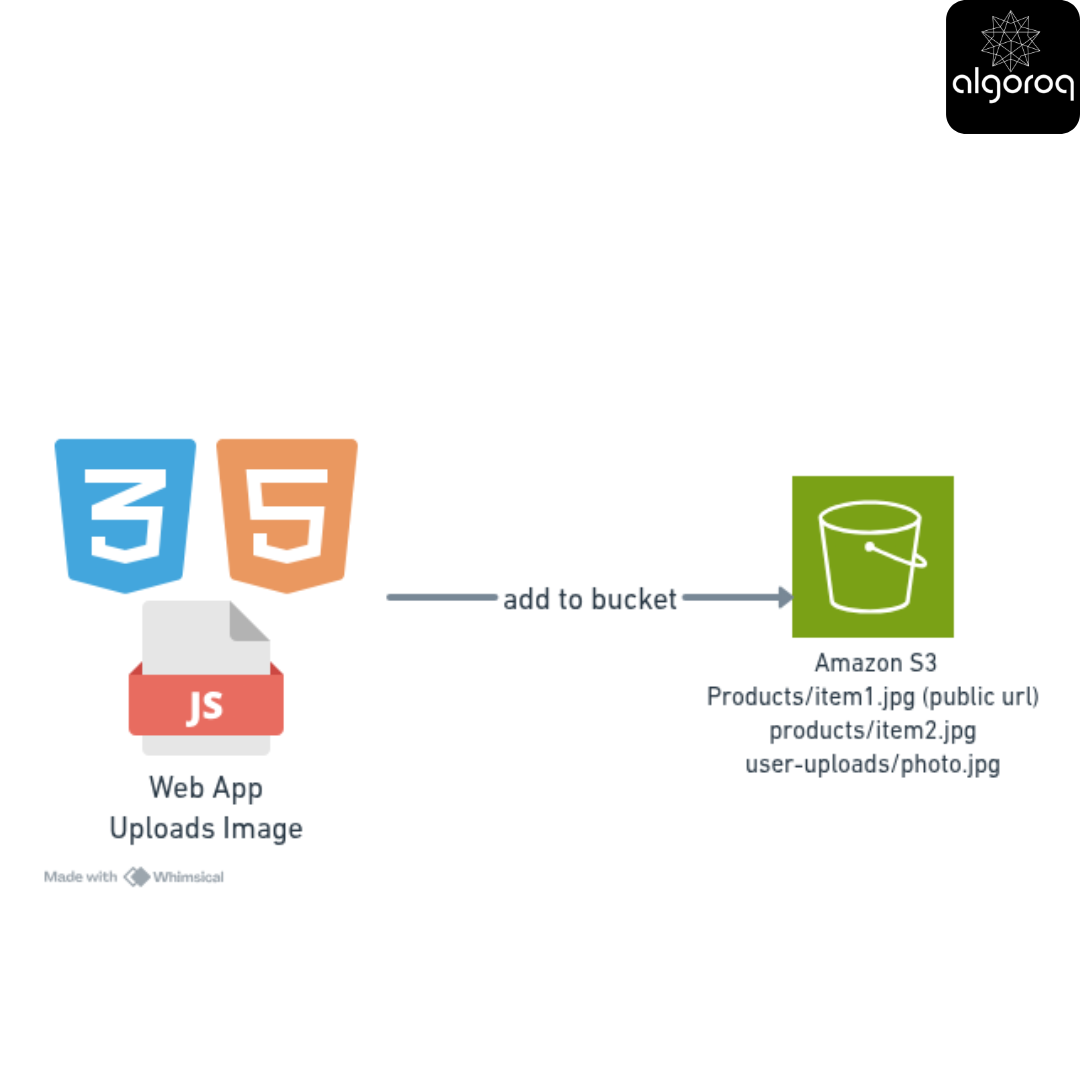
Storage Type: OBJECT STORAGE (AWS S3)
Why: Cheap, scalable, public URLs
Data: Product photos, user uploads
Volume: 5 TB
Cost: $115/month
Component 4: Database Backups
━━━━━━━━━━━━━━━━━━━━━━━━━━━━━━━━
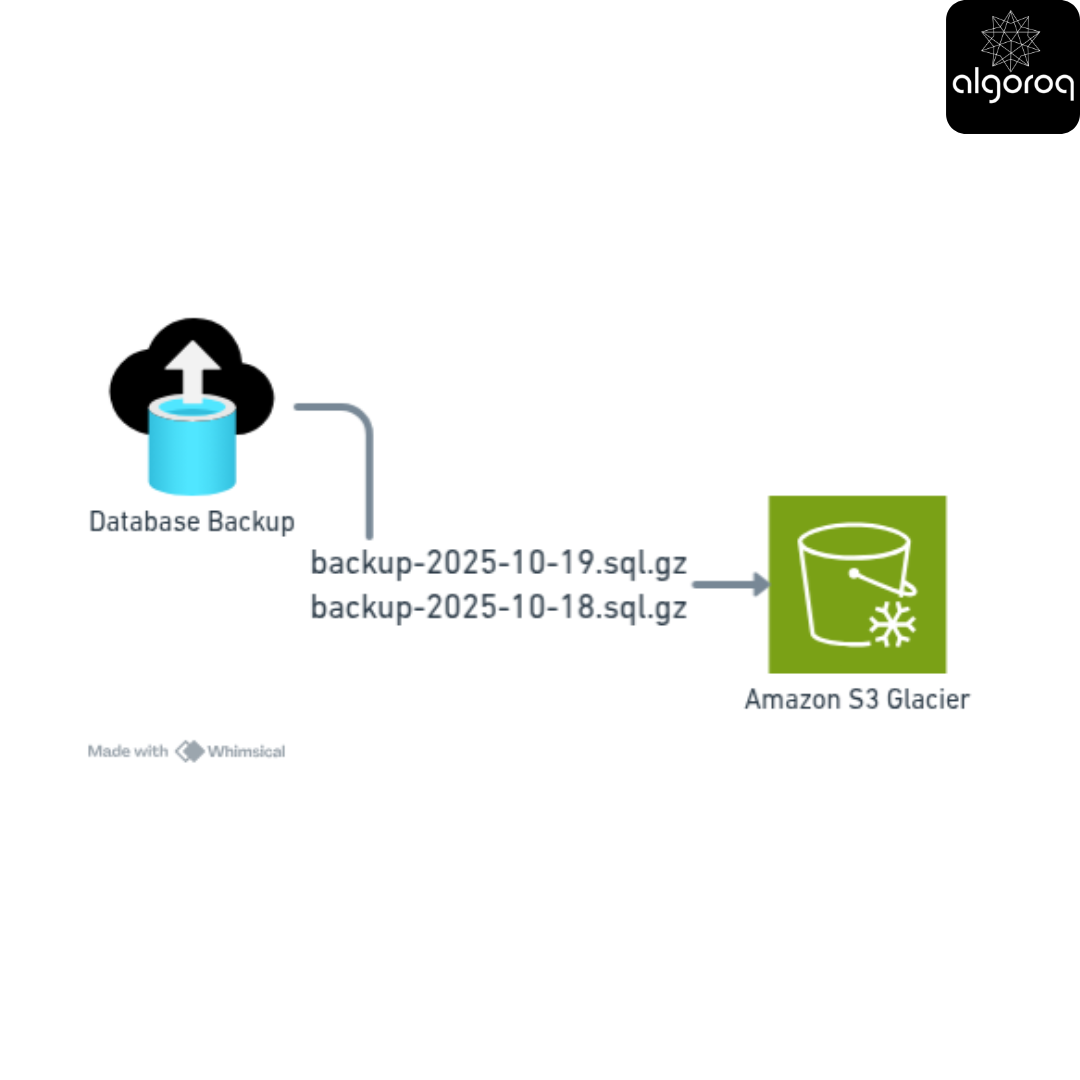
Storage Type: OBJECT STORAGE (S3 Glacier object storage provided by AWS)
Why: Extremely cheap for archives
Data: Daily database backups
Volume: 10 TB
Cost: $40/month (Glacier Deep Archive!)
Total Monthly Cost: $235 Total Storage: 15.6 TB
If everything was block storage: $1,560/month! 😱 Savings: $1,325/month (85% savings!)
Key Takeaways
- Data lives in a hierarchy from fast/expensive to slow/cheap — registers, cache, RAM, SSD, HDD, tape, cloud storage
- Choosing the right storage tier is a cost vs performance trade-off — hot data in RAM, warm data on SSD, cold data in archival storage
- Understanding storage fundamentals helps you design systems that are both fast and cost-effective — most data is rarely accessed after creation
- Cloud storage abstracts the physical hardware — but the performance characteristics of the underlying storage tier still matter
Log in to keep reading
Create a free account to keep reading and track your progress.
Log in — it's free