Fundamentals of Rest API

REST APIs: Your Complete Guide to Modern Web Communication
🎯 Challenge 1: The Restaurant Revelation
Imagine this scenario: You walk into a restaurant. You don't go into the kitchen, you don't cook your own food, and you don't know the chef's secret recipes. Yet somehow, you get exactly the meal you ordered.
Pause and think: How does this work? What's the system that lets you get what you need without knowing how it's made?
The Answer: REST APIs Work Just Like Restaurants!
You (the customer) → Waiter (the API) → Kitchen (the server/database)
Key insight: APIs are the "waiters" of the internet. They take your requests, communicate with the backend (kitchen), and bring back responses. You never need to know what's happening behind the scenes!
REST (Representational State Transfer) is simply a set of rules for how this "waiter service" should work on the web.
🌐 What is REST? The Six Guiding Principles
Think of REST as the "etiquette rules" for APIs. Just like restaurants have standard practices (menus, ordering, paying), REST APIs follow conventions:
The Restaurant-REST Parallel:
1. Client-Server Separation
- Restaurant: Customers and kitchen are separate
- REST: Your app (frontend) and the server (backend) are independent
- Why it matters: The kitchen can change recipes without customers noticing
2. Stateless
- Restaurant: Each order is independent - the waiter doesn't remember your previous visits
- REST: Each API request contains ALL the information needed
- Why it matters: Makes systems scalable and reliable
3. Uniform Interface
- Restaurant: Standardized menu format, consistent ordering process
- REST: Standard HTTP methods (GET, POST, etc.) and URL structures
- Why it matters: Any developer can understand your API
4. Cacheable
- Restaurant: "We serve the same coffee to everyone from the same pot"
- REST: Responses can be stored temporarily to speed things up
- Why it matters: Faster responses, less server load
5. Layered System
- Restaurant: Order → Waiter → Kitchen Manager → Chef → Sous Chef
- REST: Request → Load Balancer → API Gateway → Server → Database
- Why it matters: Each layer does one job well
6. Resource-Based
- Restaurant: Menu items have names (not "give me food item #47")
- REST: Everything is a resource with a URL (
/users/123, not/getUserById)
🤔 Interactive Exercise: Guess the Method
Scenario: You're building a blog application. You need to interact with posts.
Match the action to what you think it should do:
Actions:
- View all blog posts
- Create a new post
- Update an existing post
- Delete a post
- View one specific post
Think about the pattern...
📬 14. HTTP Methods: The Verbs of the Internet
HTTP methods are like verbs in a sentence. They tell the API what action you want to perform.
GET - The Reader 📖
Restaurant analogy: Looking at the menu
What it does: Retrieves information without changing anything
Examples:
Real-world parallel: Like reading a library book - you look at the information but don't change it.
Key characteristics:
- Safe: Doesn't modify data
- Idempotent: Calling it 100 times = same result as calling it once
- Can be bookmarked/cached
Common mistake: Never use GET to delete or modify data! That's like saying "looking at the menu should cancel your order" - chaos!
POST - The Creator 🎨
Restaurant analogy: Placing a new order
What it does: Creates new resources
Examples:
Body:
Creates new post, returns Post ID: 43
Real-world parallel: Filling out a job application - you're submitting NEW information to create a new record.
Key characteristics:
- Not idempotent: Calling it twice creates two items
- Sends data in the request body
- Returns the newly created resource
Challenge Question: What happens if you POST the same data twice?
- Answer: You get TWO resources! Unlike PUT, POST creates duplicates.
PUT - The Replacer 🔄
Restaurant analogy: Completely changing your order ("Actually, make that a salad instead of pasta")
What it does: Replaces an entire resource
Examples:
Body:
Replaces ALL fields of post #42
Real-world parallel: Renovating a house completely - you tear down everything and rebuild.
Key characteristics:
- Idempotent: Calling it 100 times = same result
- Must send COMPLETE resource
- Creates resource if it doesn't exist (sometimes)
PATCH - The Updater ✏️
Restaurant analogy: Small modification ("Add extra cheese to my order")
What it does: Updates specific fields only
Examples:
Only changes the title, keeps everything else
Real-world parallel: Editing one paragraph in your essay, not rewriting the whole thing.
Key characteristics:
- Sends only the fields to change
- More efficient than PUT for small updates
- Not always idempotent (depends on implementation)
DELETE - The Eraser 🗑️
Restaurant analogy: Canceling your order
What it does: Removes a resource
Examples:
"Remove post #42"
Real-world parallel: Shredding a document - once it's gone, it's gone.
Key characteristics:
- Idempotent: Deleting twice = same result as once
- Usually returns confirmation
- May return 404 on second attempt (resource already gone)
🎮 Decision Game: Which Method?
Scenario 1: A user wants to view their profile information.
- GET ✓ (just reading data)
- POST ✗
- PUT ✗
- DELETE ✗
Scenario 2: A user wants to sign up for your website.
- GET ✗
- POST ✓ (creating a new user)
- PUT ✗
- DELETE ✗
Scenario 3: A user wants to change their email address (but keep everything else the same).
- GET ✗
- POST ✗
- PATCH ✓ (updating just one field)
- DELETE ✗
Scenario 4: A user wants to completely redo their entire profile.
- GET ✗
- POST ✗
- PUT ✓ (replacing all fields)
- DELETE ✗
Scenario 5: A user wants to close their account.
- GET ✗
- POST ✗
- PUT ✗
- DELETE ✓ (removing the resource)
🔐 HTTP vs HTTPS: The Security Upgrade
The Postcard vs Sealed Letter Analogy
HTTP (Hypertext Transfer Protocol):
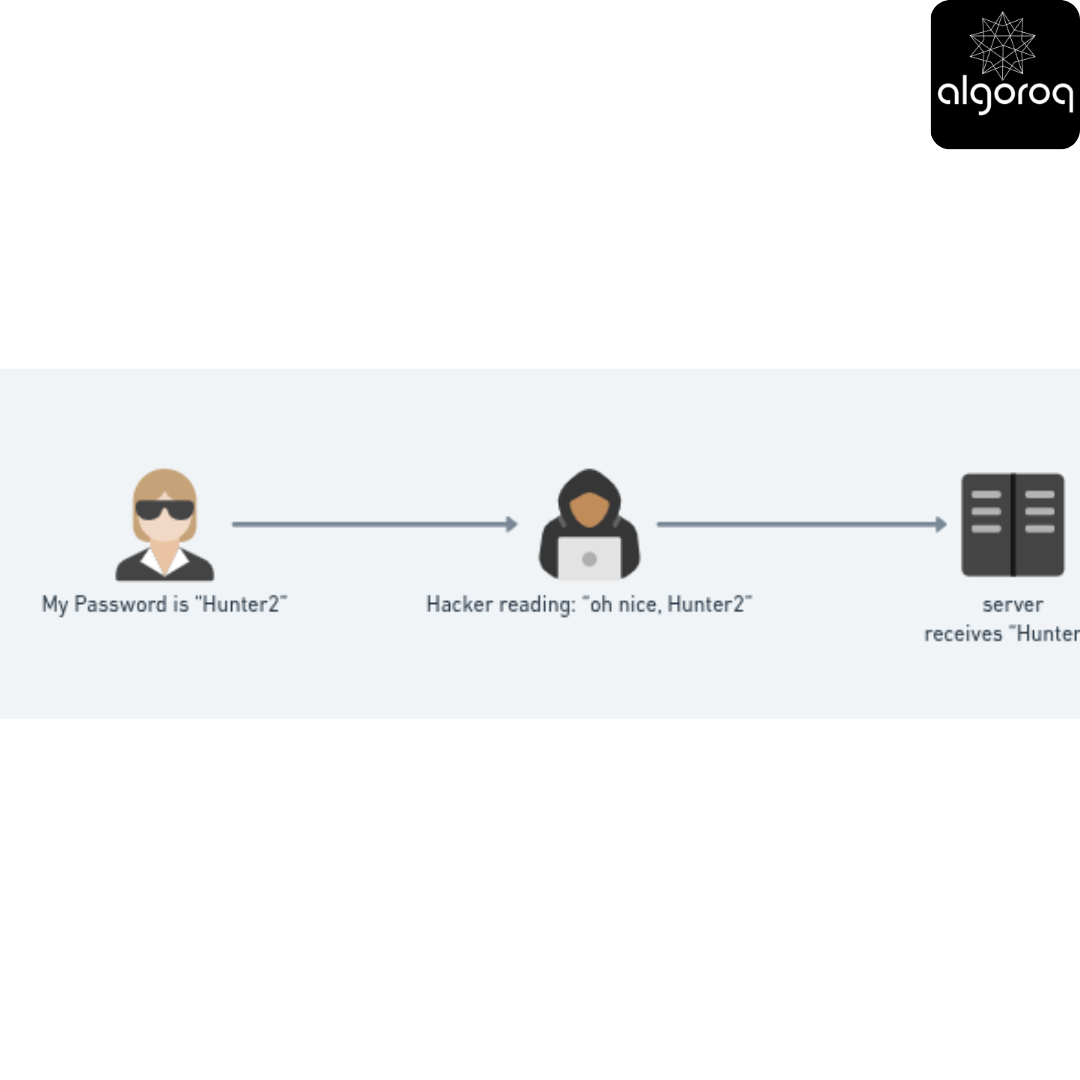
Your Computer → [Anyone can read this!] → Server
Like sending a postcard - anyone handling it can read your message.
HTTPS (HTTP Secure):
Your Computer → [Encrypted message 🔒] → Server
Like sending a sealed, locked letter - only the recipient can read it.
Interactive Visualization:
Without HTTPS (HTTP):
With HTTPS:
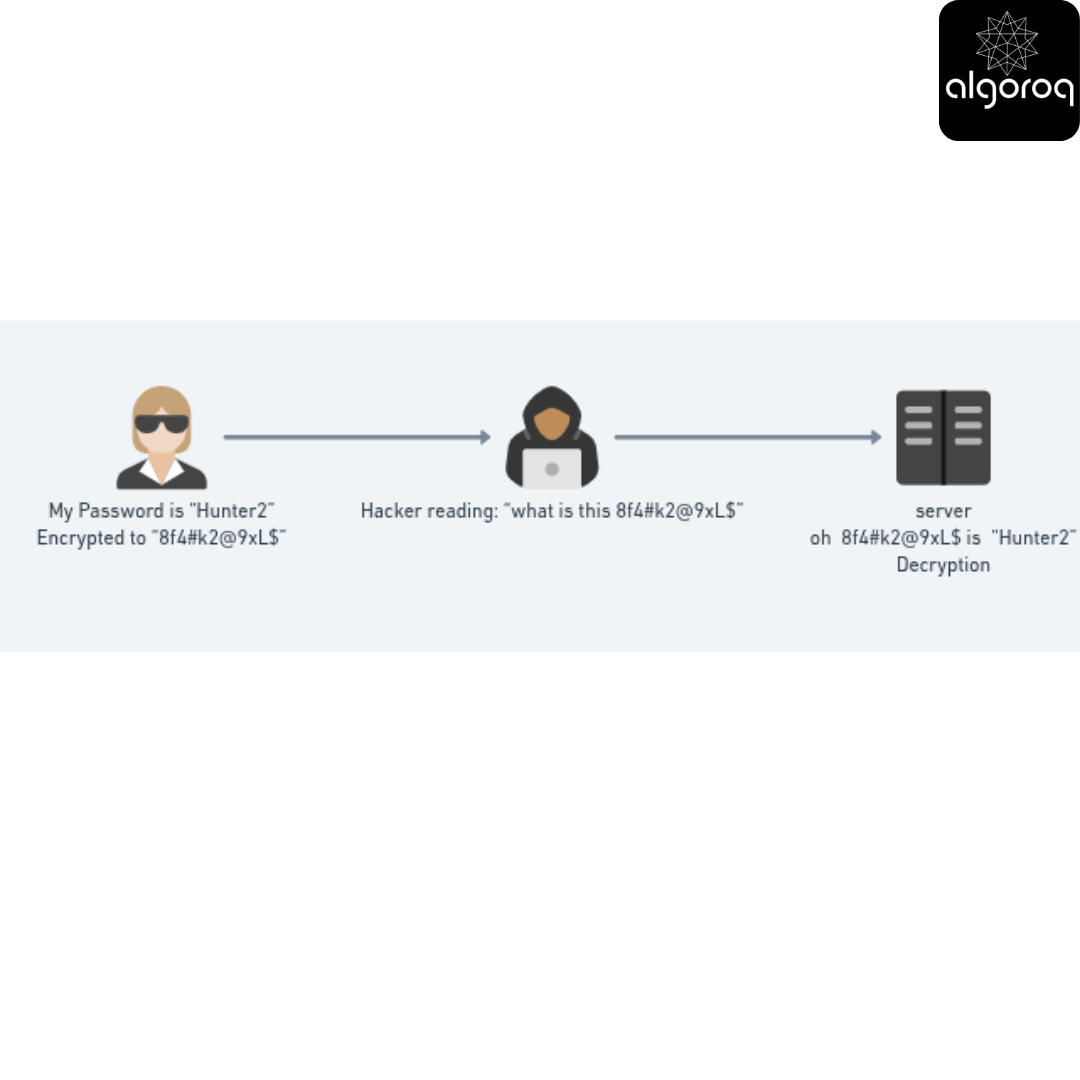
Key insight: ALWAYS use HTTPS for anything sensitive. HTTP is like shouting your credit card number across a crowded room!
How to recognize HTTPS:
- 🔒 Padlock icon in browser
- URL starts with
https://nothttp:// - Modern browsers warn you if a site uses HTTP
Key Takeaways
- REST uses standard HTTP methods to represent operations — GET (read), POST (create), PUT (update), PATCH (partial update), DELETE (remove)
- Resources are identified by URLs and represented as JSON — the URL structure should be noun-based (/users/42) not verb-based (/getUser)
- REST is stateless — each request contains all information needed to process it, enabling horizontal scaling
- Use proper HTTP status codes — 2xx for success, 4xx for client errors, 5xx for server errors
Log in to keep reading
Create a free account to keep reading and track your progress.
Log in — it's free