Database Backup

Database Backup Types - Your Safety Net
🎯 Challenge 4: The Photo Album Disaster
Scenario: You have 10,000 family photos:
Backup Strategy A:
- Monday: Copy all 10,000 photos (2 hours)
- Tuesday: Copy all 10,000 photos again (2 hours)
- Wednesday: Copy all 10,000 photos again (2 hours)
- ...every day
Backup Strategy B:
- Monday: Copy all 10,000 photos (2 hours)
- Tuesday: Copy only the 10 new photos taken today (1 minute)
- Wednesday: Copy only the 5 new photos taken today (30 seconds)
- ...
Backup Strategy C:
- Monday: Copy all 10,000 photos (2 hours)
- Tuesday: Copy 10 new + record "changed since Monday" (1 minute)
- Wednesday: Copy 5 new + record "changed since Tuesday" (30 seconds)
- Saturday: Copy all changes since Monday (100 photos, 10 minutes)
Question: Which strategy is most efficient for regular backups? What if you need to restore?
The Answer: These are Full, Incremental, and Differential Backups!
💽 Backup Type 1: FULL BACKUP
Definition: Copy EVERYTHING - the entire database from scratch.
How it works:

Real-world analogy: Moving to a new house - you pack and move EVERY single item you own.
Example: Full Backup Command
What's included:
✅ All database structures (tables, views, procedures)
✅ All data in all tables
✅ All indexes
✅ User accounts and permissions
✅ Database configuration
Result: Complete standalone backup!
✅ Advantages:
- Simple: One file = complete database
- Independent: Don't need any other backups to restore
- Fast restore: Just restore one file
- Easy to verify: One backup to test
❌ Disadvantages:
- Large size: 100 GB database = 100 GB backup
- Slow: Takes hours for large databases
- Resource intensive: High I/O and CPU during backup
- Storage expensive: Daily full backups eat storage fast
When to use:
✓ Weekly baseline backup
✓ Before major changes (migrations, upgrades)
✓ Small databases (<10 GB)
✓ Regulatory compliance requirements
✓ Long-term archival
📦 Backup Type 2: INCREMENTAL BACKUP
Definition: Copy only data that changed SINCE THE LAST BACKUP (of any type).
How it works:
Real-world analogy: Packing for a trip where you add only new items each day - Day 1: Full suitcase, Day 2: Add toothbrush, Day 3: Add sunglasses.
Example: Incremental Backup
Visual timeline:
Database changes over time:
Sunday: [Table1: 1000 rows][Table2: 500 rows] = FULL BACKUP
Monday: [Table1: +50 rows] = INCR (50 rows)
Tuesday: [Table2: +20 rows] = INCR (20 rows)
Wednesday: [Table1: +100 rows][Table2: +30 rows] = INCR (130 rows)
✅ Advantages:
- Fast: Only backs up changes (minutes vs hours)
- Small: Each backup is tiny (1-5 GB vs 100 GB)
- Efficient: Minimal resource usage
- Frequent: Can run every hour if needed
❌ Disadvantages:
- Complex restore: Need ALL backups in chain
- Fragile: If one backup corrupts, chain breaks
- Slower restore: Must apply each backup sequentially
- Chain management: Must track dependencies
Restore process (the pain!):
To restore Wednesday data:
Step 1: Restore FULL (Sunday) ⏱️ 2 hours
Step 2: Apply INCR (Monday) ⏱️ 10 minutes
Step 3: Apply INCR (Tuesday) ⏱️ 5 minutes
Step 4: Apply INCR (Wednesday) ⏱️ 8 minutes
Total restore time: ~2.5 hours
(And if any backup is corrupt, restore FAILS!)
When to use:
✓ Frequent backups (hourly/every few hours)
✓ Large databases with small daily changes
✓ When storage space is limited
✓ Between differential backups
✓ Continuous data protection
🔄 Backup Type 3: DIFFERENTIAL BACKUP
Definition: Copy all data that changed SINCE THE LAST FULL BACKUP (not since last backup).
How it works:
Sunday (Full): ████████████████████ 100 GB
Monday (Diff): ██ 2 GB (changed since Sunday)
Tuesday (Diff): ███ 3 GB (changed since Sunday!)
Wednesday (Diff): █████ 5 GB (changed since Sunday!)
Thursday (Diff): ███████ 7 GB (changed since Sunday!)
Total storage: 117 GB (more than incremental)
Chain dependency:
FULL (Sun) → DIFF (Mon) ✓ Can restore from these two
↑
FULL (Sun) → DIFF (Tue) ✓ Can restore from these two
↑
FULL (Sun) → DIFF (Wed) ✓ Can restore from these two
↑
FULL (Sun) → DIFF (Thu) ✓ Can restore from these two
Only need: FULL + Latest DIFF (much simpler!)
Real-world analogy: Writing a book - you keep the original manuscript (full backup) and each day you save a copy with ALL changes made since the original (not just today's changes).
Example: Differential Backup
Visual timeline:
Database changes over time:
Sunday: [1000 rows total] = FULL BACKUP
Monday: [+50 new rows] DIFF = 50 rows
Tuesday: [+20 more new rows] DIFF = 50 + 20 = 70 rows (cumulative!)
Wednesday: [+100 more new rows] DIFF = 50 + 20 + 100 = 170 rows (cumulative!)
✅ Advantages:
- Simple restore: Only need FULL + Latest DIFF
- Fast restore: Two backups = quick recovery
- Safer: Less fragile than incremental chain
- Good balance: Faster than full, simpler than incremental
❌ Disadvantages:
- Growing size: Each diff gets bigger over time
- More storage: Larger than incremental
- Redundancy: Backs up same changes multiple times
Restore process (much simpler!):
To restore Wednesday data:
Step 1: Restore FULL (Sunday) ⏱️ 2 hours Step 2: Apply DIFF (Wednesday only) ⏱️ 30 minutes
Total restore time: 2.5 hours (Only need 2 backups - much simpler!)
When to use:
✓ Daily backups (good middle ground)
✓ Medium-to-large databases
✓ When restore speed matters
✓ When simplicity is important
✓ Most common strategy for production!
📊 Side-by-Side Comparison
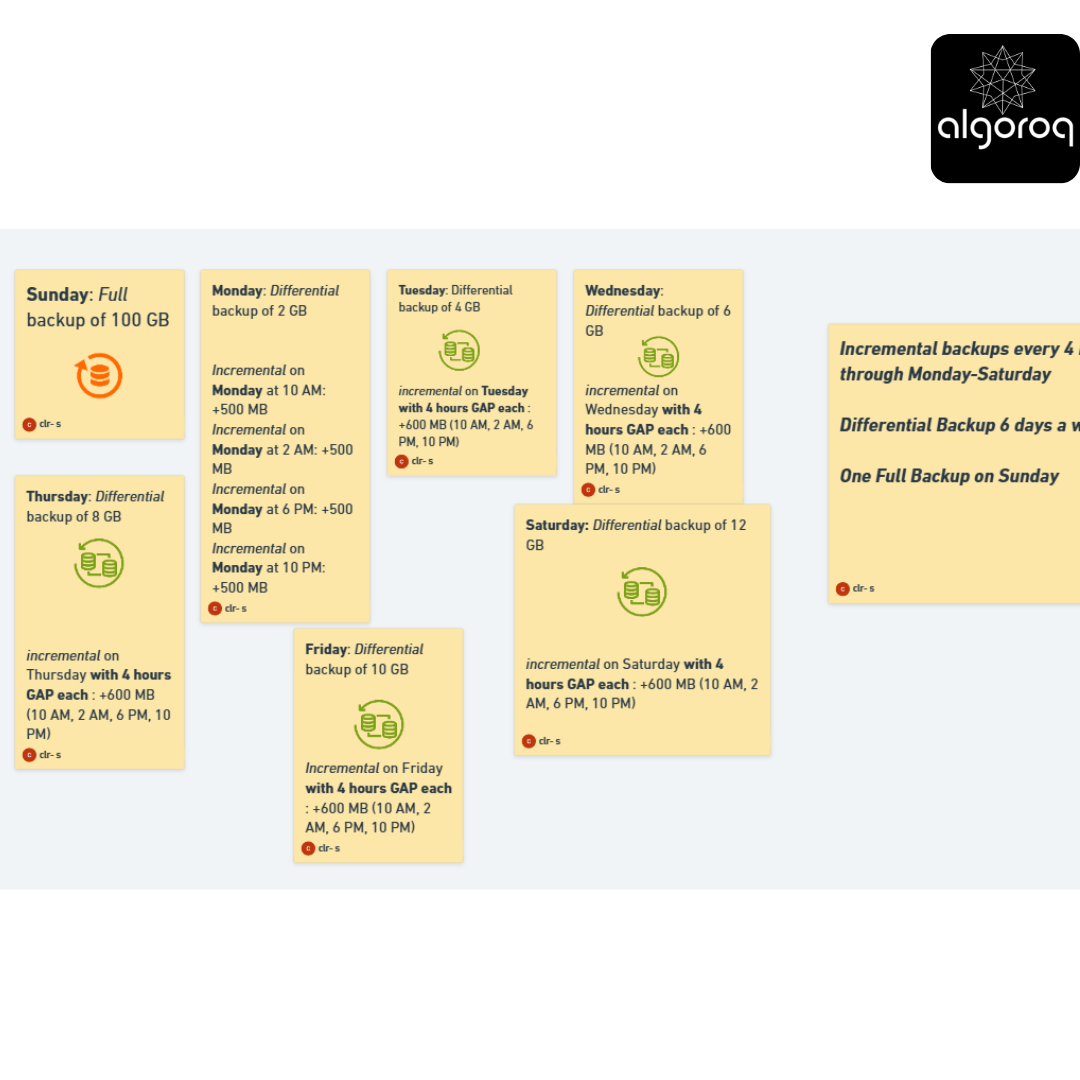
Scenario: 100 GB database, 2 GB changes per day
| Day | Full | Incremental | Differential |
|---|---|---|---|
| Sun | 100 GB | 100 GB | 100 GB |
| Mon | 100 GB | 2 GB | 2 GB |
| Tue | 100 GB | 2 GB | 4 GB |
| Wed | 100 GB | 2 GB | 6 GB |
| Thu | 100 GB | 2 GB | 8 GB |
| Fri | 100 GB | 2 GB | 10 GB |
| Sat | 100 GB | 2 GB | 12 GB |
| TOTAL | 700 GB | 112 GB ✓ | 142 GB |
Restore complexity:
Full: ⭐ Easiest (1 file)
Differential: ⭐⭐ Easy (2 files: Full + Latest Diff)
Incremental: ⭐⭐⭐⭐⭐ Complex (7 files: Full + 6 Incrementals)
Restore time:
Full: 2 hours (restore 1 file)
Differential: 2.5 hours (restore Full + Diff)
Incremental: 3+ hours (restore Full + all Incrementals)
🎪 Real-World Backup Strategy: The 3-2-1 Rule
Best practice: Combine all three types!
┌The 3-2-1 Rule: 3 = Keep 3 copies of data - Production database - Local backup - Offsite backup
2 = Use 2 different storage types - Local disk/SAN - Cloud storage (S3, Azure Blob)
1 = Keep 1 copy offsite - Different geographic location - Protected from local disasters
🎮 Interactive Exercise: Design a Backup Strategy
Your database:
- Size: 500 GB
- Daily changes: 10 GB
- Business hours: 8am - 8pm
- Recovery Time Objective (RTO): 2 hours
- Recovery Point Objective (RPO): 4 hours max data loss
Design a backup strategy. Consider:
- When to run full backups?
- When to run differential backups?
- When to run incremental backups?
- Where to store backups?
Think about it...
Sample Solution:
STRATEGY:
FULL BACKUP:
- Sunday 2am (weekly)
- Time: 4 hours (runs overnight)
- Retention: 4 weeks
DIFFERENTIAL BACKUP:
- Daily at 2am (Mon-Sat)
- Time: 1 hour
- Retention: 1 week
INCREMENTAL BACKUP:
- Every 4 hours during business hours (8am, 12pm, 4pm, 8pm)
- Time: 15 minutes each
- Retention: 3 days
STORAGE:
- Local: Fast SSD (last 7 days)
- Remote: Cloud (S3) for everything
- Offsite: Different region for weekly fulls
WHY THIS WORKS:
✓ RPO: 4 hours (matches incremental schedule)
✓ RTO: ~2 hours (restore Full + Diff + few Incrementals)
✓ Balance: Not too much storage, not too risky
✓ 3-2-1 compliant
🚨 Backup Disasters (What Can Go Wrong)
Horror Story 1: Untested Backups
❌ Problem:
- Ran backups daily for 2 years
- Never tested restore
- Database crashed
- Tried to restore: ALL BACKUPS CORRUPTED! 😱
✅ Solution:
- Test restore monthly
- Automate restore tests
- Verify backup integrity
Horror Story 2: No Offsite Storage
❌ Problem:
- All backups on same server as database
- Server room flooded
- Lost database AND all backups! 💦
✅ Solution:
- Store backups in different location
- Use cloud storage
- 3-2-1 rule!
Horror Story 3: Backup Windows Missed
❌ Problem:
- Full backup takes 6 hours
- Business needs 24/7 uptime
- Can't find backup window
- Backup fails/incomplete
✅ Solution:
- Use online backups (snapshot technology)
- Implement incremental forever
- Use read replicas for backups
💡 Best Practices Checklist
✅ DO:
- Test restores regularly (monthly minimum)
- Automate backup process
- Monitor backup success/failure
- Encrypt backups (especially offsite)
- Document restore procedures
- Use 3-2-1 rule
- Set retention policies (how long to keep)
- Verify backup integrity
- Time backups during low-traffic periods
❌ DON'T:
- Assume backups work (test them!)
- Store all backups in one location
- Keep backups forever (costs add up)
- Forget to backup configuration files
- Run backups during peak hours
- Ignore backup failure alerts
- Use same credentials for backup and production

🎯 Quick Decision Guide: Which Backup Type?
Choose FULL when:
✓ Starting new backup cycle (weekly baseline)
✓ Small database (<10 GB)
✓ Before major changes
✓ Regulatory requirements
Choose DIFFERENTIAL when:
✓ Daily backups (best for most cases)
✓ Need balance of speed and simplicity
✓ Restore speed is important
✓ Medium changes daily
Choose INCREMENTAL when:
✓ Very frequent backups (hourly)
✓ Large database with small changes
✓ Storage space is limited
✓ Between differential backups
Key Takeaways
- Regular backups are your last line of defense against data loss — hardware failures, human errors, and ransomware all happen
- Full backups capture everything, incremental backups capture only changes — combine both for a practical backup strategy
- Test your backups by actually restoring them — an untested backup is not a backup, it's a hope
- Point-in-time recovery (PITR) lets you restore to any moment — using WAL replay on top of a base backup
- Follow the 3-2-1 rule — 3 copies of data, on 2 different media types, with 1 copy offsite
Log in to keep reading
Create a free account to keep reading and track your progress.
Log in — it's free