Database Read Write Operations

Database Read Write Operations
Understanding the performance characteristics of reads vs writes — and the techniques that let you scale each one independently.
Read vs Write Operations - Understanding the Flow
🎯 Challenge 2: The Library Rush
Scenario: A library has 1000 students:
- 950 students are browsing books (reading data)
- 50 students are checking out books (writing data)
Question: Which operation is more demanding on the library system?
Think about it:
- Reading is just looking at information
- Writing requires updating records, checking availability, locking resources
- Which needs more coordination?
The Answer: Writes Are Much More Expensive!
The fundamental truth: Reads are cheap, writes are expensive.
📚 Understanding Read Operations
What happens during a READ:
Behind the scenes:
-
Find data location (using index if available) ⚡
-
Read from disk/memory 📖
-
Return result ✓
No locks (in most cases)
No validation needed
No disk writes
Multiple reads can happen simultaneously
Mental model: Reading is like looking at a museum painting - everyone can look at the same time, no one interferes with each other!
Types of Reads:
Read characteristics:
-
✅ Fast and efficient
-
✅ Can happen in parallel
-
✅ Don't block other reads
-
✅ Cheap to scale (add read replicas)
-
❌ Can block writes (in some isolation levels)
✏️ Understanding Write Operations
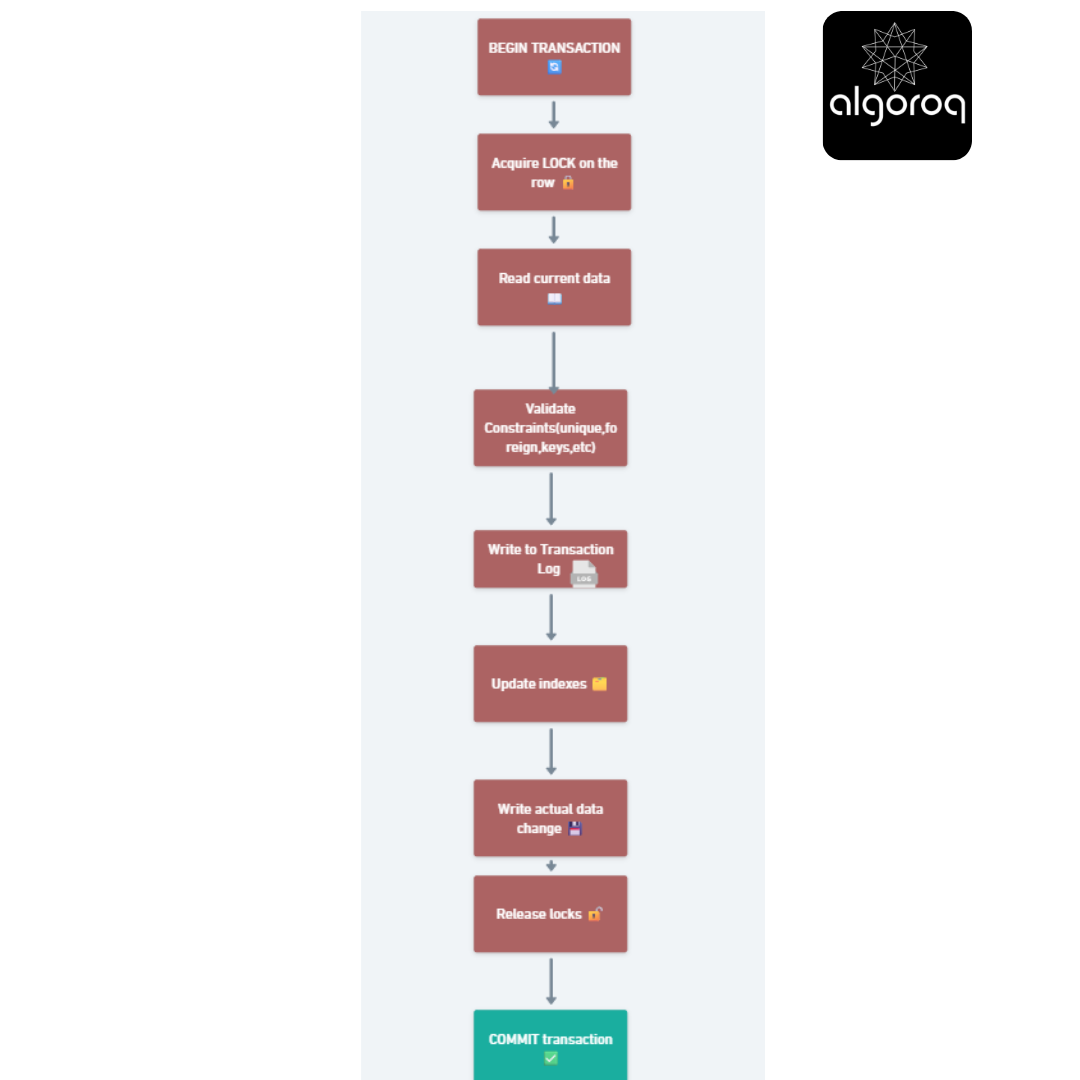
What happens during a WRITE:
Behind the scenes (so much more complex!):
-
BEGIN TRANSACTION 🔄
-
Acquire LOCK on the row 🔒
-
Read current data 📖
-
Validate constraints (unique, foreign keys, etc.) ✓
-
Write to transaction log (WAL) 📝
-
Update indexes 🗂️
-
Write actual data change 💾
-
Release locks 🔓
-
COMMIT transaction ✅

Blocks concurrent writes to same row
Requires validation
Multiple disk writes
Slower than reads
Mental model: Writing is like editing a shared Google Doc - only one person can edit a specific paragraph at a time, changes must be saved, version history updated, etc.
Types of Writes:
INSERT (simplest write):
Must:- Generate new ID
Check constraints (email unique?)
Update indexes
Write to log
UPDATE (complex write):
Must:
-
Find all matching rows
-
Lock them
-
Update each one
-
Update all relevant indexes
-
Maintain consistency
DELETE (most complex):
sqlMust:
Check foreign key constraints (does anything reference this?)
Lock the row
Remove from indexes
Mark as deleted
Handle cascade deletes
Write characteristics:
-
❌ Slower than reads
-
❌ Require locks (blocking)
-
❌ Multiple validation steps
-
❌ Multiple disk writes
-
❌ Harder to scale
-
✅ Ensure data integrity
📊 The 80/20 Rule (or 95/5 in reality!)
Real-world application traffic:
📊 Typical Web Application:
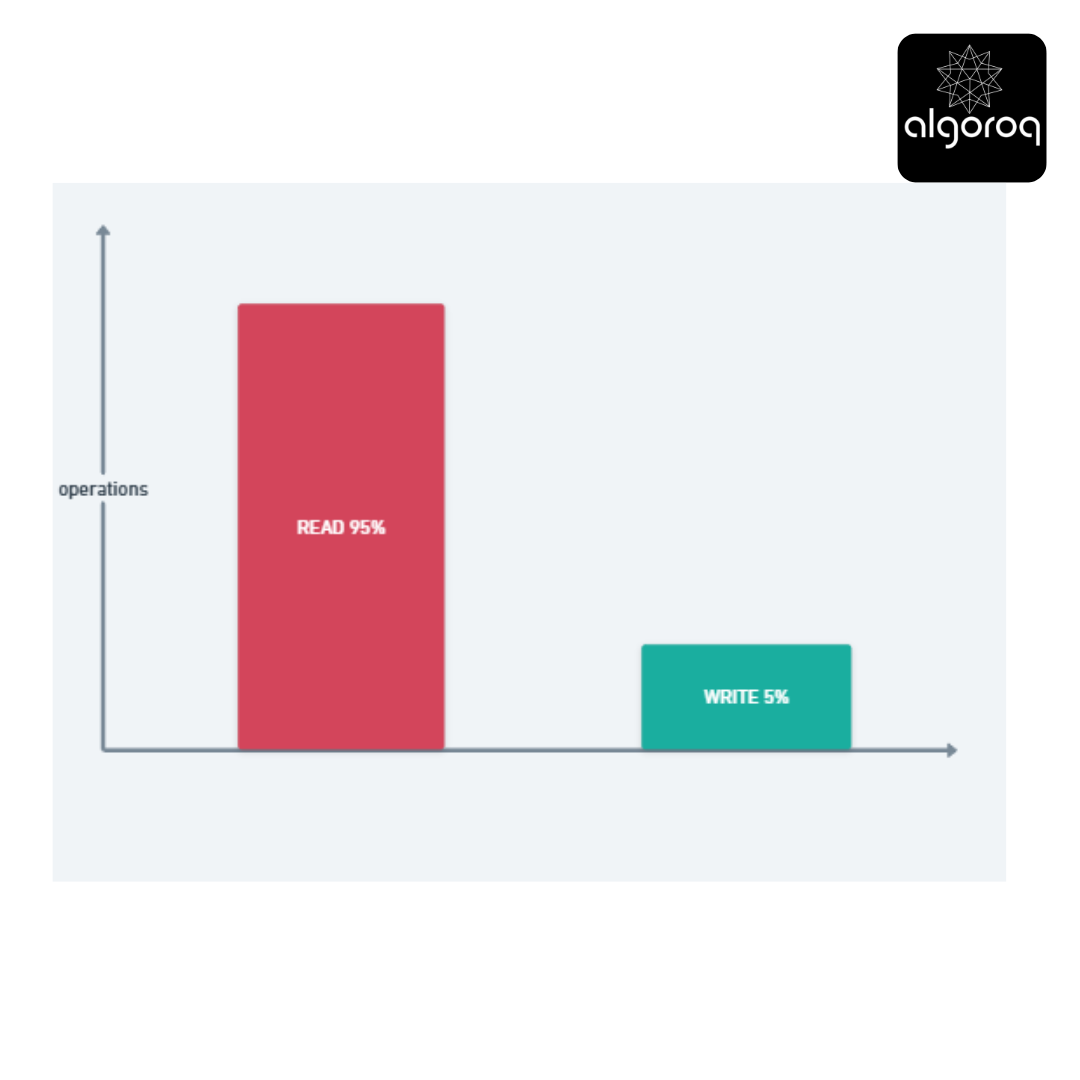
Examples:
-
Social media: 99% reading posts, 1% creating posts
-
E-commerce: 95% browsing, 5% purchasing
-
News sites: 99.9% reading, 0.1% commenting
Why this matters for architecture:
Read-Heavy Application (like Twitter):
Strategy: Optimize for reads!
-
Use caching heavily (Redis, Memcached)
-
Add read replicas
-
Denormalize data for faster reads
-
Use CDNs for static content
Write-Heavy Application (like logging systems):
Strategy: Optimize for writes!
-
Batch writes together
-
Use write-optimized databases
-
Async processing
-
Eventual consistency
🎮 Interactive Exercise: Read or Write?
Classify these operations:
| Operation | Read or Write? | Why? |
|---|---|---|
SELECT COUNT(*) FROM users | ? | ? |
UPDATE users SET last_login = NOW() WHERE id = 1 | ? | ? |
SELECT * FROM posts ORDER BY created_at | ? | ? |
INSERT INTO logs (message) VALUES ('error') | ? | ? |
Think about each one...
Answers:
-
READ - Counting doesn't modify data
-
WRITE - Modifying data, requires transaction, locks
-
READ - Just retrieving and sorting data
-
WRITE - Adding new data, requires transaction
🔥 Performance Comparison: Real Numbers
Scenario: Database with 1 million users
Read Operation:
Time: 0.5-2ms ⚡ Disk I/O: 1 read Locks: None (Read Committed) Concurrent: Unlimited simultaneous reads
Write Operation:
Time: 5-50ms ⏱️ Disk I/O: 3-5 writes (data, log, indexes) Locks: Row-level lock 🔒 Concurrent: Blocks other writes to same row Validation: Check constraints, update indexes
Visual comparison:
READ: ⚡ ────✓ (Fast! One hop)
Write is 10-25x slower than read!
🚀 Optimization Strategies
For Read-Heavy Systems:
1. Caching (we shall learn more about caching in the upcoming sections)
First request: User → Database → 50ms ⏱️
With Cache: User → Cache → 1ms ⚡ (50x faster!)
Only hit database on cache miss
2. Read Replicas (read replicas will be discussed in upcoming lessons as well)
Primary Database (handles writes) ↓ (replicates to) Read Replica 1 Read Replica 2 Read Replica 3 ↓ ↓ ↓ Users Users Users
Distribute read load across replicas!
3. Indexing
Without index: Scan 1,000,000 rows ⏱️
With index: Jump to specific row ⚡
For Write-Heavy Systems:
1. Batch Writes
| // Bad example:
1000 individual writes
// Good: 1 batched write
2. Async Processing
User Action (POST /order) ↓
Quick Response: "Order received!" ✅ ↓
Background Job Queue 📋 ↓
Process writes asynchronously
3. Write-Optimized Storage
Traditional Database: Update in place
-
Read old value
-
Modify
-
Write back
-
Update indexes
(Slow! Many disk seeks)
Log-Structured Storage: Append only
-
Just write new entry at end
-
Never modify existing data
-
Periodically compact
(Fast! Sequential writes)
🎯 Mental Models Summary
Reading = Looking at a book
- Many people can look at the same time
- No permission needed
- Fast and easy
- Doesn't change anything
Writing = Editing a shared document
- Need to coordinate with others
- Requires permission (locks)
- Must validate changes
- Changes need to be saved
- Slower and more complex
Key insight: Design your application architecture around the read/write ratio! Most applications are read-heavy, so optimize for reads first.
Key Takeaways
- Read and write operations have fundamentally different performance characteristics — most applications are 90%+ reads
- Read replicas scale read throughput horizontally — route read queries to replicas, writes to the primary
- Write amplification occurs when a single write triggers multiple disk operations — indexes, WAL, and replication all add write overhead
- Connection pooling reduces the overhead of establishing database connections — essential for high-throughput applications
Log in to keep reading
Create a free account to keep reading and track your progress.
Log in — it's free