Database Crud Operations

CRUD Operations - The Four Essential Database Actions
🎯 Challenge 5: The Todo App
Scenario: You're building a simple todo list app. What actions do users need?
Think about it:
- How do you add a new task?
- How do you see your tasks?
- How do you mark a task as complete?
- How do you remove a task?
Answer: CRUD Operations!
🔤 What is CRUD?
CRUD = The four basic operations you can do with data
- Create - Add new records
- Read - View/retrieve records
- Update - Modify existing records
- Delete - Remove records
Real-world parallel: Think of a contact list on your phone:
- 📝 Create: Add new contact
- 👁️ Read: View contact info
- ✏️ Update: Change phone number
- 🗑️ Delete: Remove old contact
📝 CREATE: Adding New Data (to an already created table i.e., you already have a table with datatypes for each field now you are adding data to it)
SQL Command: INSERT
Example: Adding a new user
What happens:
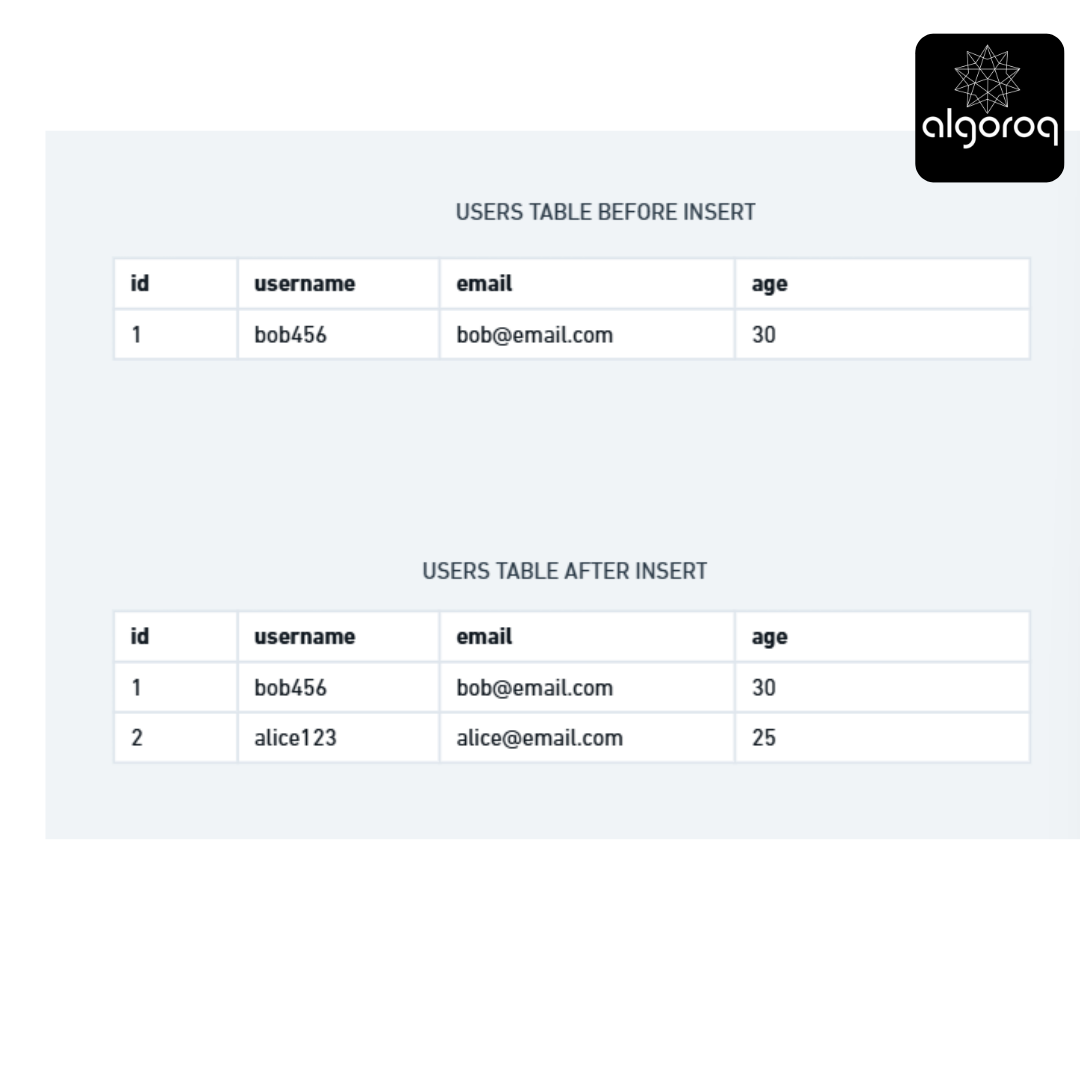
Multiple records at once:
Real-world scenarios:
- 🛒 Adding items to shopping cart
- 👤 User registration
- 📧 Posting a comment
- 📅 Creating a calendar event
Mental model: INSERT is like writing a new entry in a logbook - you're adding permanent information!
👁️ READ: Retrieving Data
SQL Command: SELECT
Example: View all users
Result: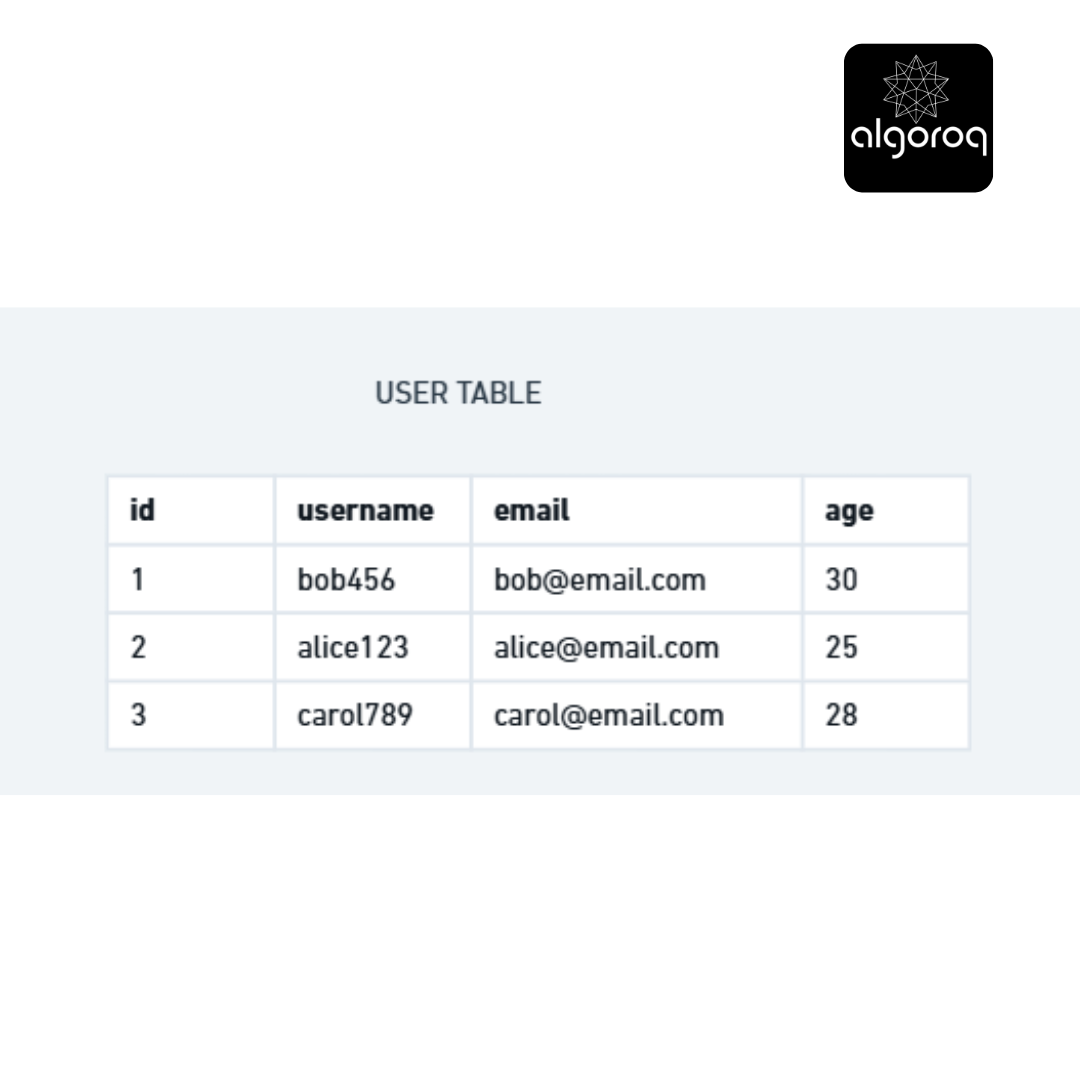
Select specific columns:
Result:

Filtering with WHERE:
Result:
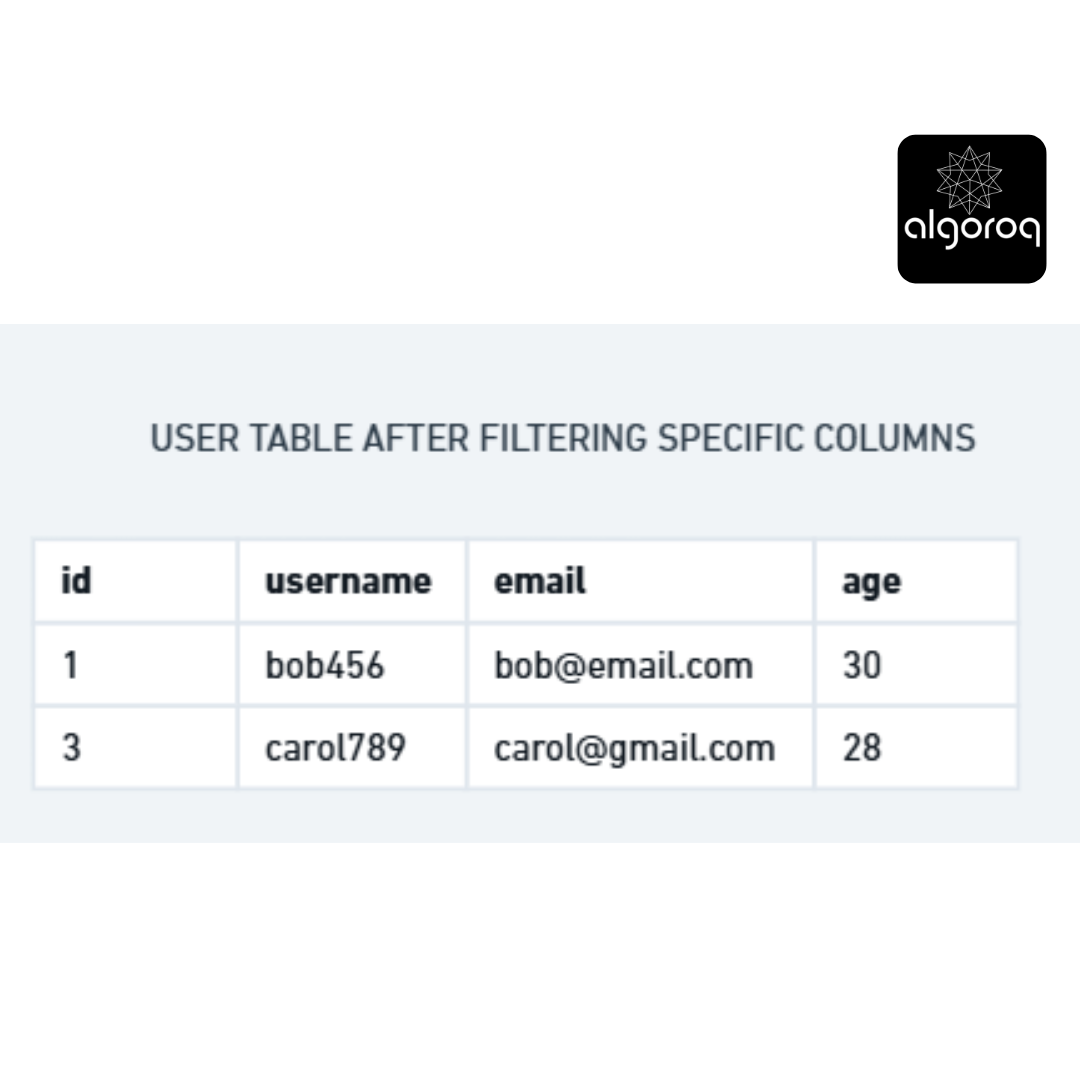
Sorting results:
Result:
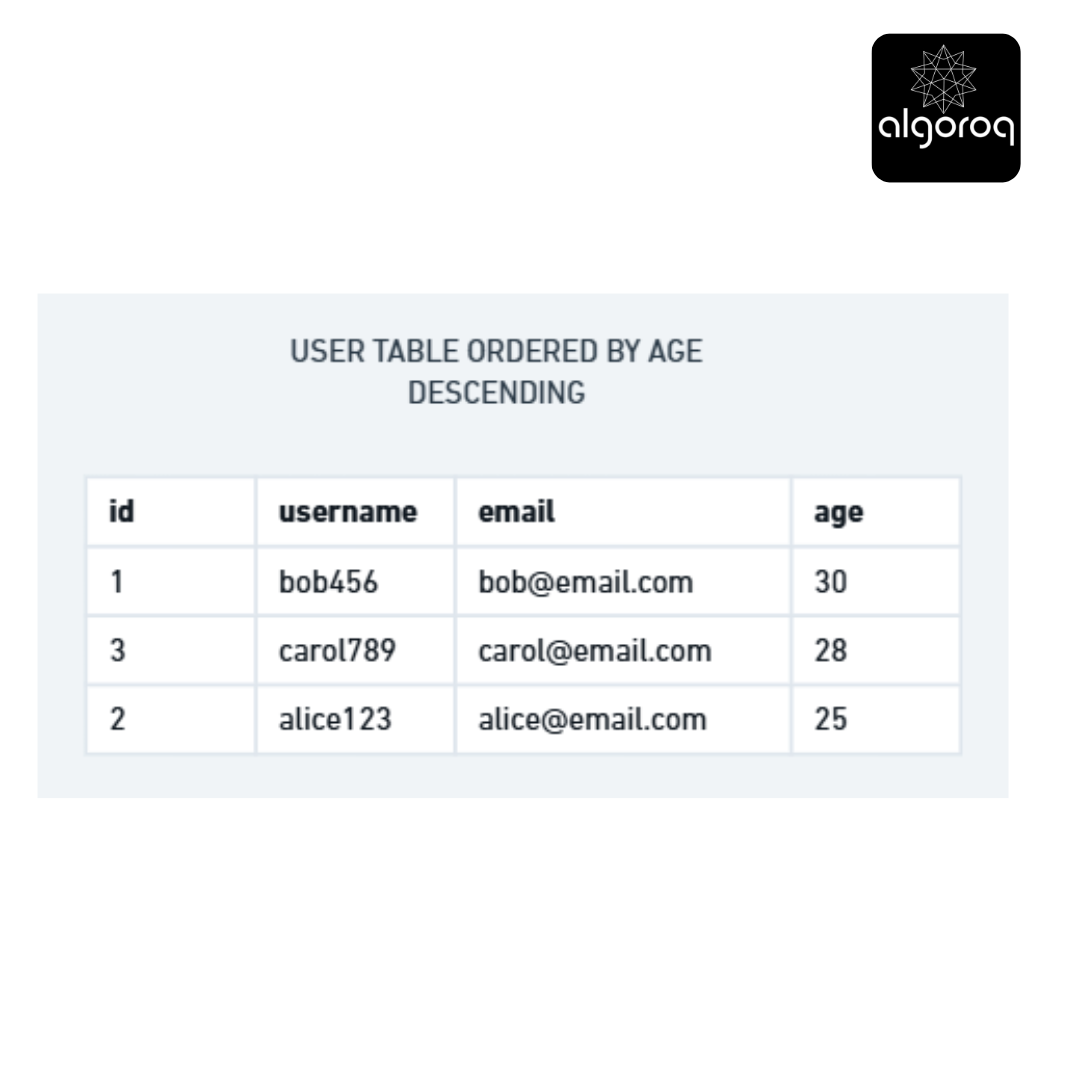
Advanced: Joining tables
SELECT users.username, orders.order_date, orders.total FROM users JOIN orders ON users.id = orders.user_id WHERE users.username = 'alice123'; Real-world scenarios:
- 📱 Loading your profile
- 📰 Viewing news feed
- 🔍 Searching for products
- 📊 Generating reports
Mental model: SELECT is like looking through a filing cabinet with superpowers - you can view, filter, and organize information instantly!
✏️ UPDATE: Modifying Existing Data
SQL Command: UPDATE
Example: Change user's email
What happens:

Update multiple columns:
Update multiple rows:
⚠️ WARNING: Always use WHERE clause!
-- DANGEROUS! Updates ALL rows:
-- Everyone is now 50! |
-- SAFE: Updates specific user:
Real-world scenarios:
- 📝 Editing your profile
- ✅ Marking tasks as complete
- 📊 Updating inventory quantities
- 🔄 Changing order status
Mental model: UPDATE is like using correction fluid and writing over old information - the record stays, but the content changes!
🗑️ DELETE: Removing Data
SQL Command: DELETE
Example: Remove a user
What happens:
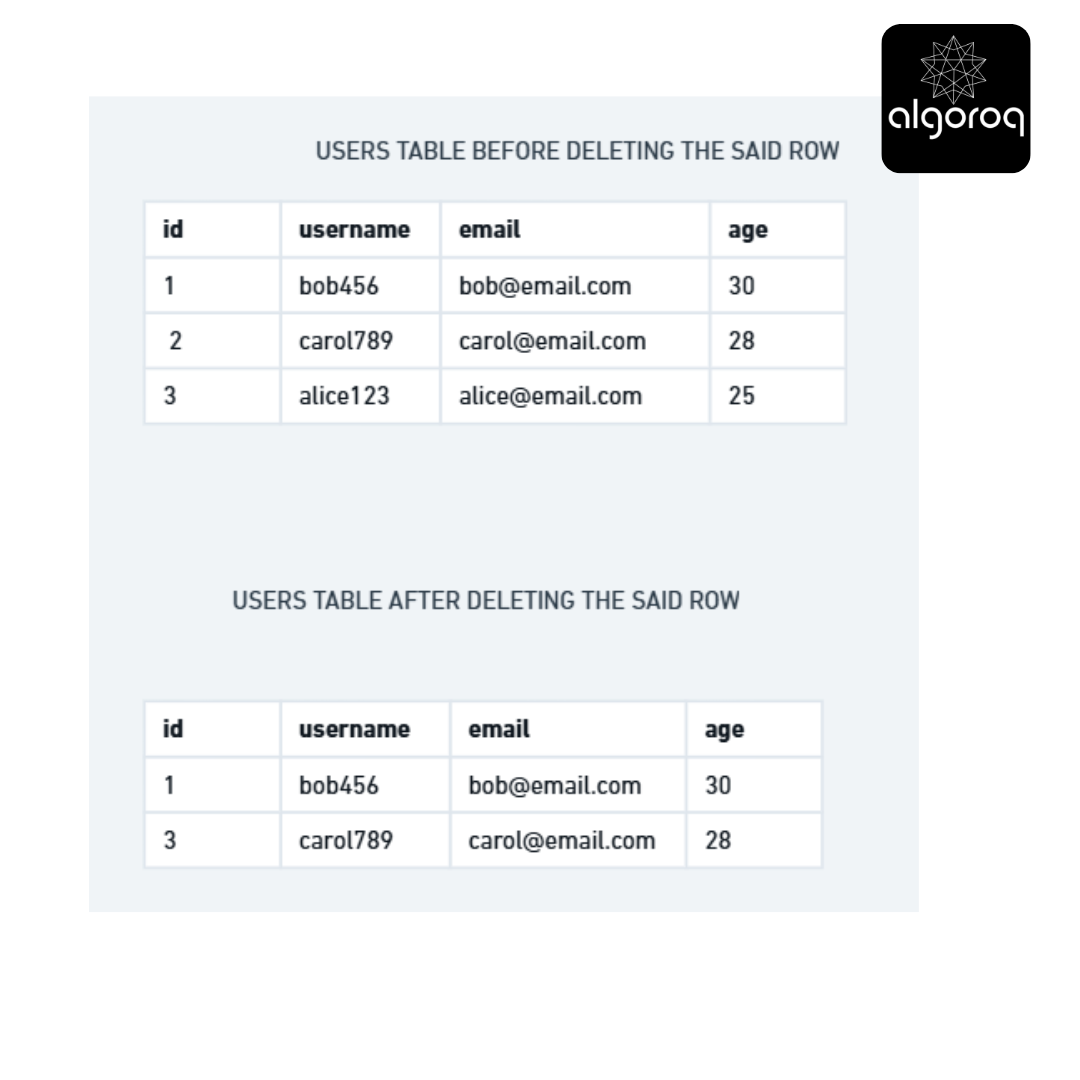
alice123 is GONE!
Delete multiple rows:
Remove old orders
⚠️ WARNING: Always use WHERE clause!
CATASTROPHIC! Deletes ALL data:
-- Table now empty! 😱
-- SAFE: Deletes specific user:
Soft Delete vs Hard Delete:
Hard Delete (permanent):
-- User is completely removed from database
Soft Delete (mark as deleted but keep data):
-- Add deleted_at column to table
Later, when querying:
-- Only active users Real-world scenarios:
- 🗑️ Removing items from cart
- 🚫 Deleting your account
- 🧹 Cleaning up old data
- ❌ Canceling an order
Mental model: DELETE is like shredding a document - once it's gone, it's gone (unless you have backups!)
🎮 CRUD in Action: Complete Example
Scenario: Managing a blog
1️⃣ CREATE: Write new post
2️⃣ READ: View all posts
3️⃣ UPDATE: Edit post
🌐 CRUD in REST APIs
CRUD maps to HTTP methods:
| CRUD Operation | HTTP Method | Example URL | Action |
|---|---|---|---|
| Create | POST | POST /api/users | Create new user |
| Read | GET | GET /api/users/123 | Get user #123 |
| Update | PUT/PATCH | PUT /api/users/123 | Update user #123 |
| Delete | DELETE | DELETE /api/users/123 | Delete user #123 |
Example API calls:
CREATE
fetch('/api/posts', { method: 'POST', body: JSON.stringify({ title: 'New Post', content: '...' })})
READ
fetch('/api/posts/123');
UPDATE
fetch('/api/posts/123', {method: 'PUT', body: JSON.stringify({ title: 'Updated Title' })});
DELETE
fetch('/api/posts/123', { method: 'DELETE' });
💡 CRUD Best Practices
✅ DO:
- Always use WHERE clauses with UPDATE and DELETE
- Validate input data before creating
- Consider soft deletes for important data
- Use transactions for related operations
- Add indexes on frequently queried columns
❌ DON'T:
- Run UPDATE or DELETE without WHERE (unless intentional)
- Store sensitive data without encryption
- Forget to back up before bulk operations
- Expose database directly to users
- Trust user input (always validate!)
Key Takeaways
- CRUD (Create, Read, Update, Delete) covers all basic database operations — every application ultimately performs some combination of these
- INSERT creates new records, SELECT reads them, UPDATE modifies them, DELETE removes them — master these four SQL statements first
- Most applications are read-heavy — optimize for reads with proper indexing and caching
- Soft deletes (marking as inactive) are safer than hard deletes — you can always recover soft-deleted data
Log in to keep reading
Create a free account to keep reading and track your progress.
Log in — it's free