User Datagram Protocol

9. UDP (User Datagram Protocol) - Interactive Learning Guide
🎯 Challenge 1: The Speed vs Reliability Dilemma
Imagine this scenario: You're watching a live sports match streaming online. A few pixels glitch for a split second, but the stream keeps playing smoothly without pausing. Meanwhile, your friend is downloading the same match recording, and it pauses occasionally to ensure every frame is perfect.
Pause and think: Why would a live stream tolerate small glitches while a download can't afford any errors? What's the fundamental difference?
The Answer: UDP (User Datagram Protocol) is the internet's express delivery service - no signatures required, no tracking, just pure speed!
Unlike TCP's reliability guarantees:
- No connection setup - Start sending immediately
- No delivery confirmation - Fire and forget
- No ordering - Packets arrive as they come
- Minimal overhead - Tiny 8-byte header vs TCP's 20+ bytes
Key insight: UDP trades reliability for speed. When timing matters more than perfection, UDP is your protocol!
🚀 Interactive Exercise: The Live Concert Broadcast
Scenario: Imagine you're at a live concert, and someone is describing it to you over the phone in real-time.
Think about these two approaches:
Approach A (TCP-style):
- Caller: "The guitarist just... wait, did you hear that?"
- You: "Hear what?"
- Caller: "Let me repeat: The guitarist just played a solo"
- You: "Got it, but now what's happening?"
- Caller: "Well, 30 seconds ago..."
Approach B (UDP-style):
- Caller: "Guitarist solo! Singer jumps! Crowd cheers! Drums intensify!"
- You: Missed "Singer jumps" but you're still following along
- The concert continues, you get 95% of the experience in real-time
Question: Which approach keeps you engaged with the LIVE moment?
UDP's Connectionless Nature
UDP has no handshake. It just starts talking:
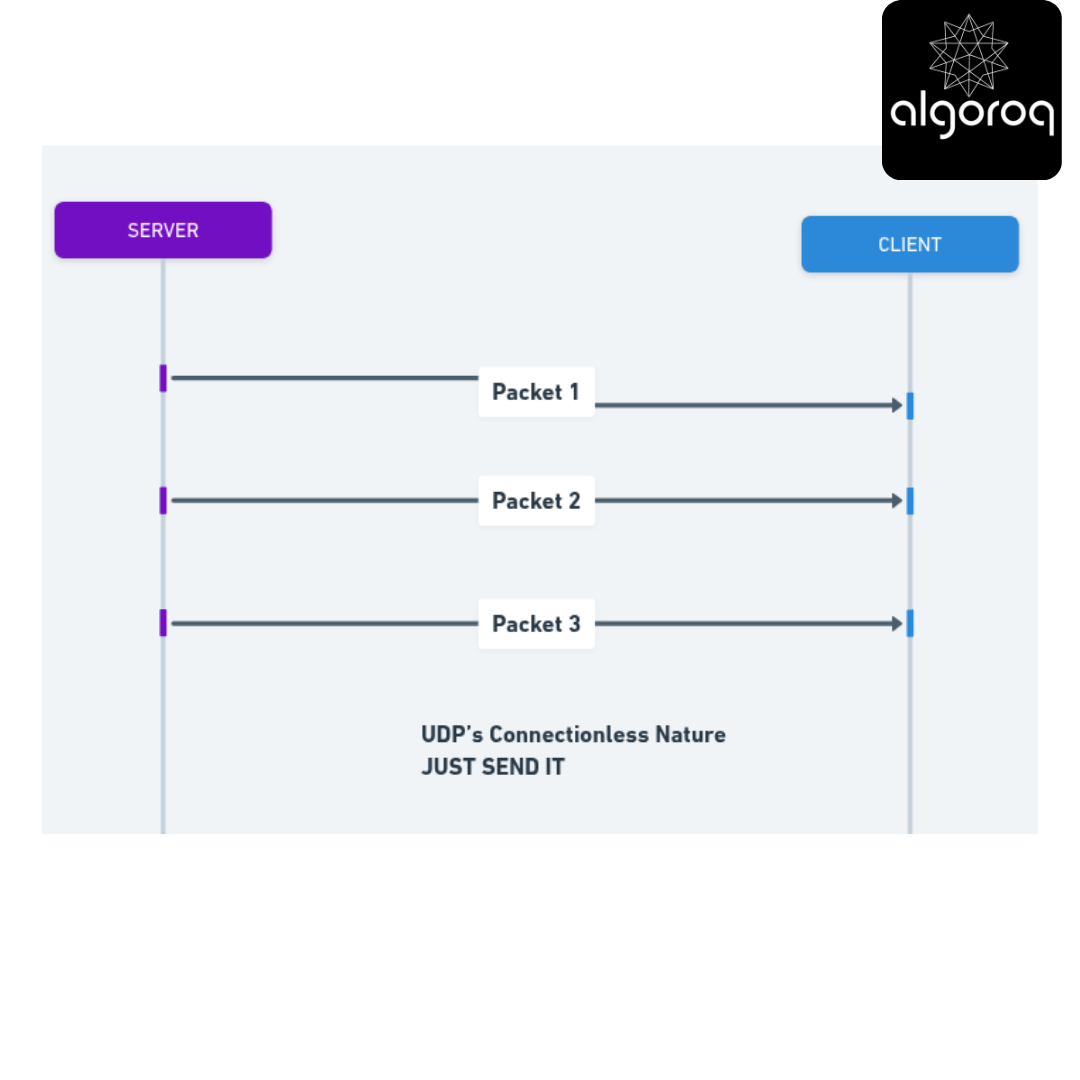
Real-world parallel: UDP is like shouting announcements through a megaphone. You don't check if everyone heard you, you just keep announcing. Fast, efficient, but some people might miss information!
The UDP "non-handshake":
- No SYN, no ACK, no ceremony
- Just grab the data and throw it on the network
- Receiver better be listening... or not! UDP doesn't care!
🚨 Common Misconception: "UDP is Broken TCP... Right?"
You might think: "No reliability? No ordering? No connection? This sounds terrible! Why would anyone use this?"
The UDP reality check: UDP isn't broken - it's optimized for different use cases!
Consider these scenarios:
Scenario 1: Video Call
- You're having a video chat
- One video frame gets lost
- Should we pause the call to retransmit that old frame?
- NO! Keep playing the NEW frames. Old news is useless!
Scenario 2: Online Gaming
- Your character's position updates 60 times per second
- Position packet #573 is lost
- Should we wait to retransmit #573?
- NO! Packet #574, #575 are already here with newer positions!
Scenario 3: DNS Lookup
- You ask: "What's the IP for google.com?"
- Server responds: "142.250.185.46"
- That's it! One question, one answer.
- Why establish a connection for 2 packets? UDP is perfect!
Mental model: UDP is like a radio broadcast. If you miss a second of the song, you don't rewind the radio station - you keep listening to what's playing NOW!
🎮 Decision Game: Lost Packet - Now What?
Context: A UDP packet gets lost somewhere in the network.
What happens next?
A. UDP detects the loss and retransmits automatically B. The receiver sends a "missing packet" notification C. The sender waits for an acknowledgment timeout D. Nothing - the packet is gone forever, and life moves on
Think about UDP's design philosophy...
Answer: D - The packet is gone forever!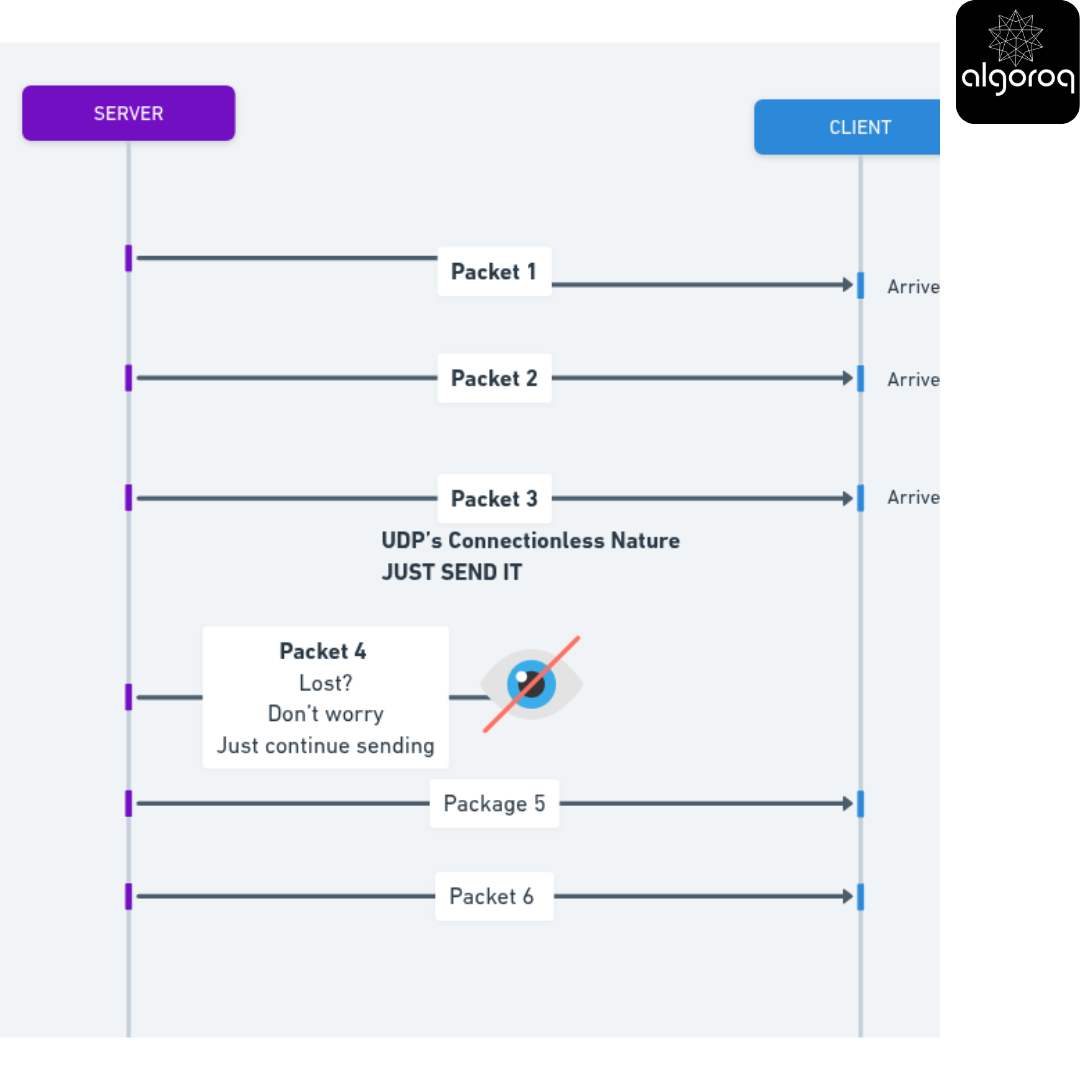
Why is this okay?
Because the application decides what to do:
- Video streaming: Next frame already here, old frame irrelevant
- DNS query: Just resend the query if no response in 2 seconds
- Gaming: New position updates make old ones obsolete
- Voice calls: Brief audio gap is better than delayed conversation
Real-world parallel: Like listening to a live radio show with occasional static. You don't call the station to repeat what you missed - you just keep listening!
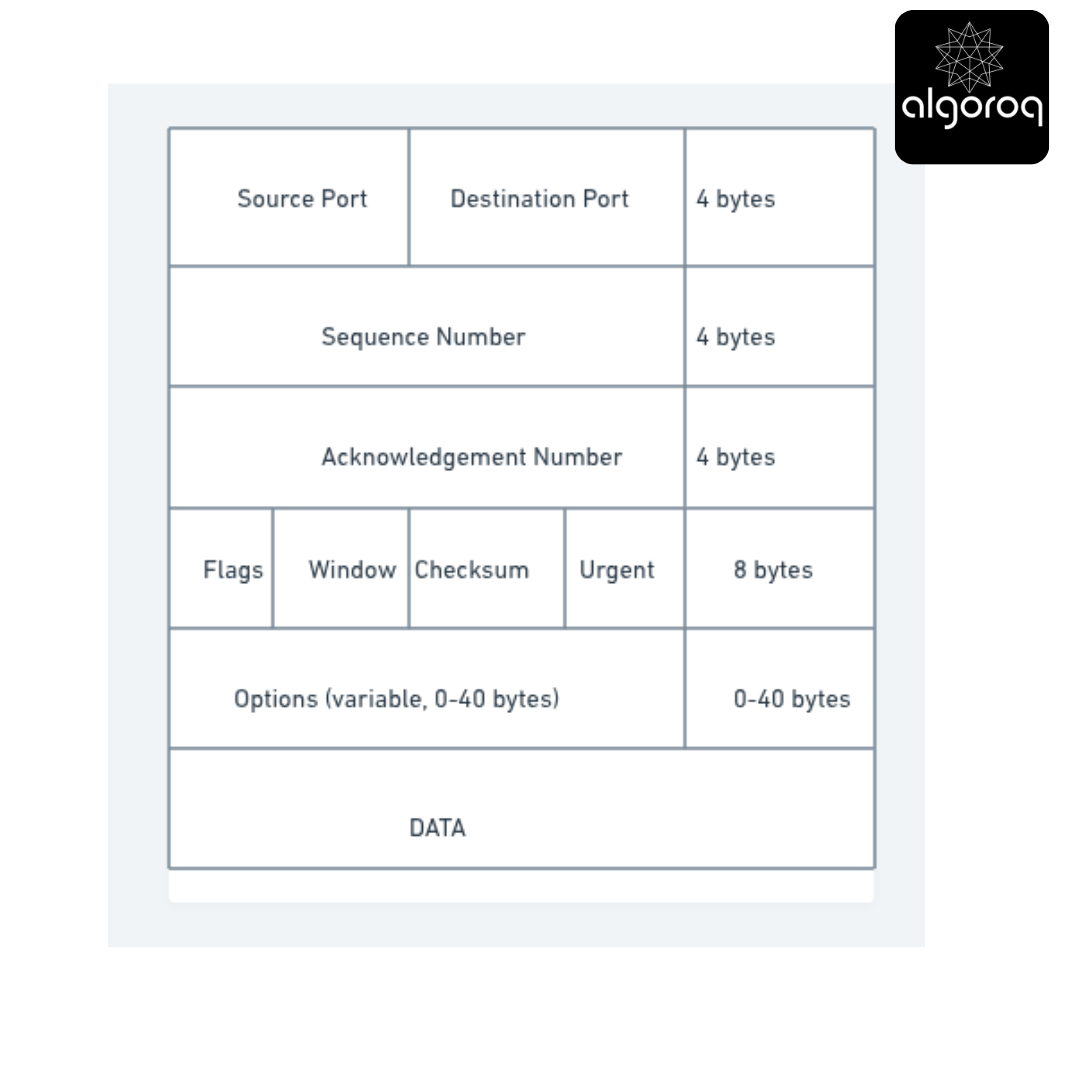
📦 The Header Size Challenge
Visual comparison time!
TCP Header: 20 bytes minimum (often 32+ with options)
UDP Header: 8 bytes total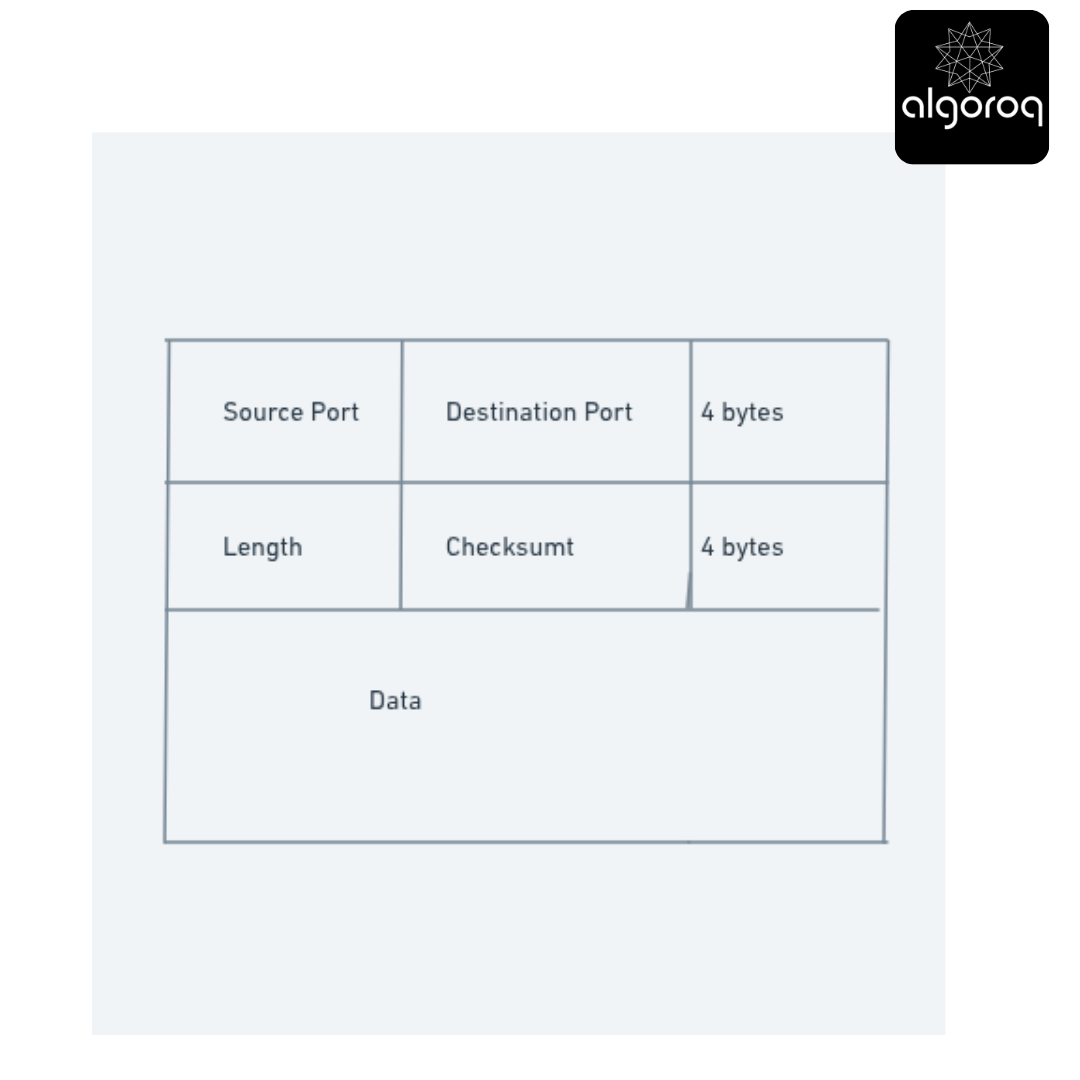
Challenge question: If you're sending 100 bytes of data, what percentage is overhead?
TCP: 20 bytes header / 120 bytes total = 16.7% overhead UDP: 8 bytes header / 108 bytes total = 7.4% overhead
For small messages, this makes a HUGE difference!
Real-world parallel: TCP is like shipping with extensive packaging, insurance forms, tracking labels, and signature requirements. UDP is like putting a stamp on a postcard and dropping it in the mailbox!
🔍 Investigation: The Four Communication Styles
Scenario: You need to send a message. How many recipients?
Let's explore the four ways to address network messages:
1️⃣ UNICAST - One-to-One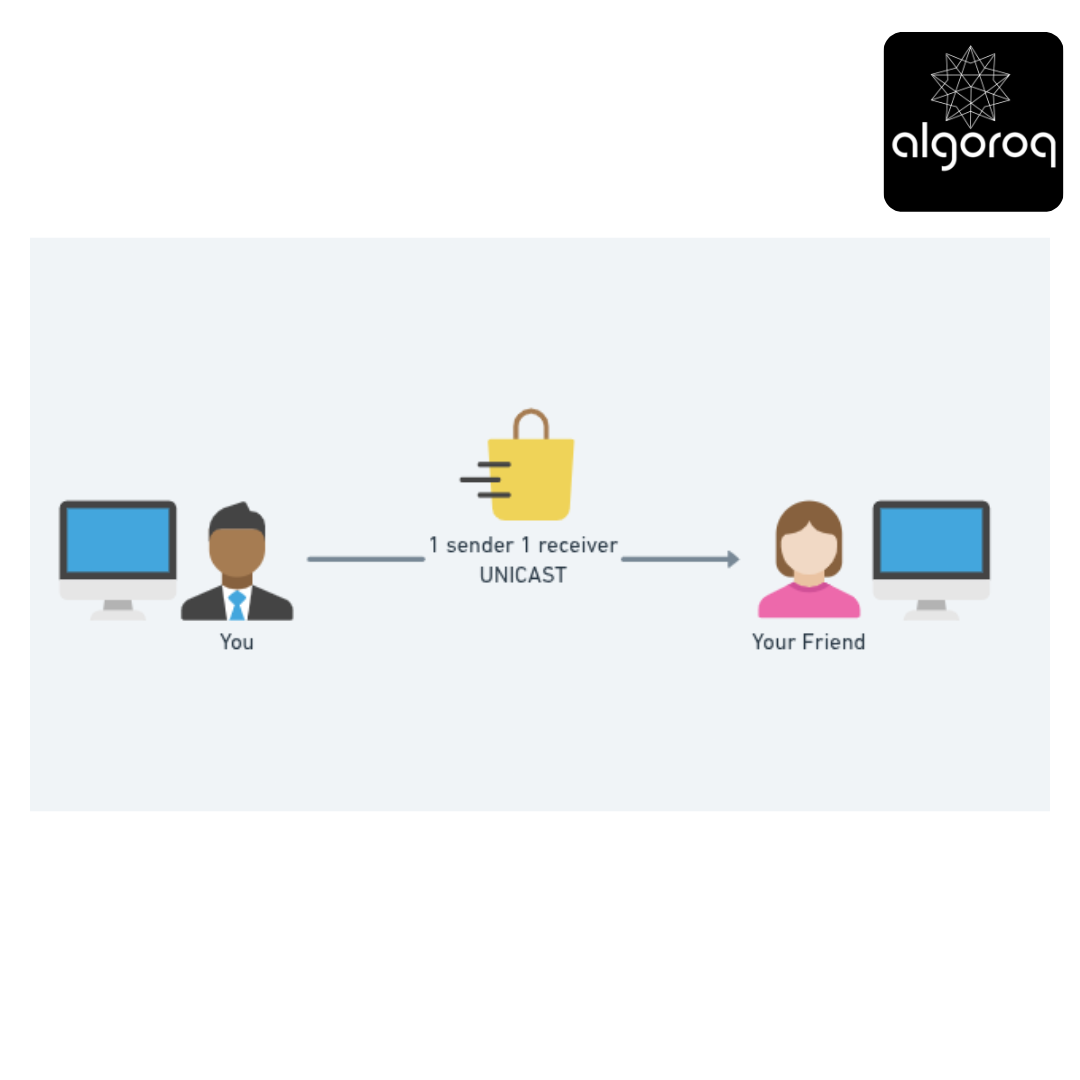
Both TCP and UDP support this!
Use cases:
- Web browsing (you ↔ server)
- Email delivery (you ↔ mail server)
- File download (you ↔ file server)
2️⃣ BROADCAST - One-to-All (in local network)
Analogy: Using a megaphone in a room - everyone hears you whether they want to or not!
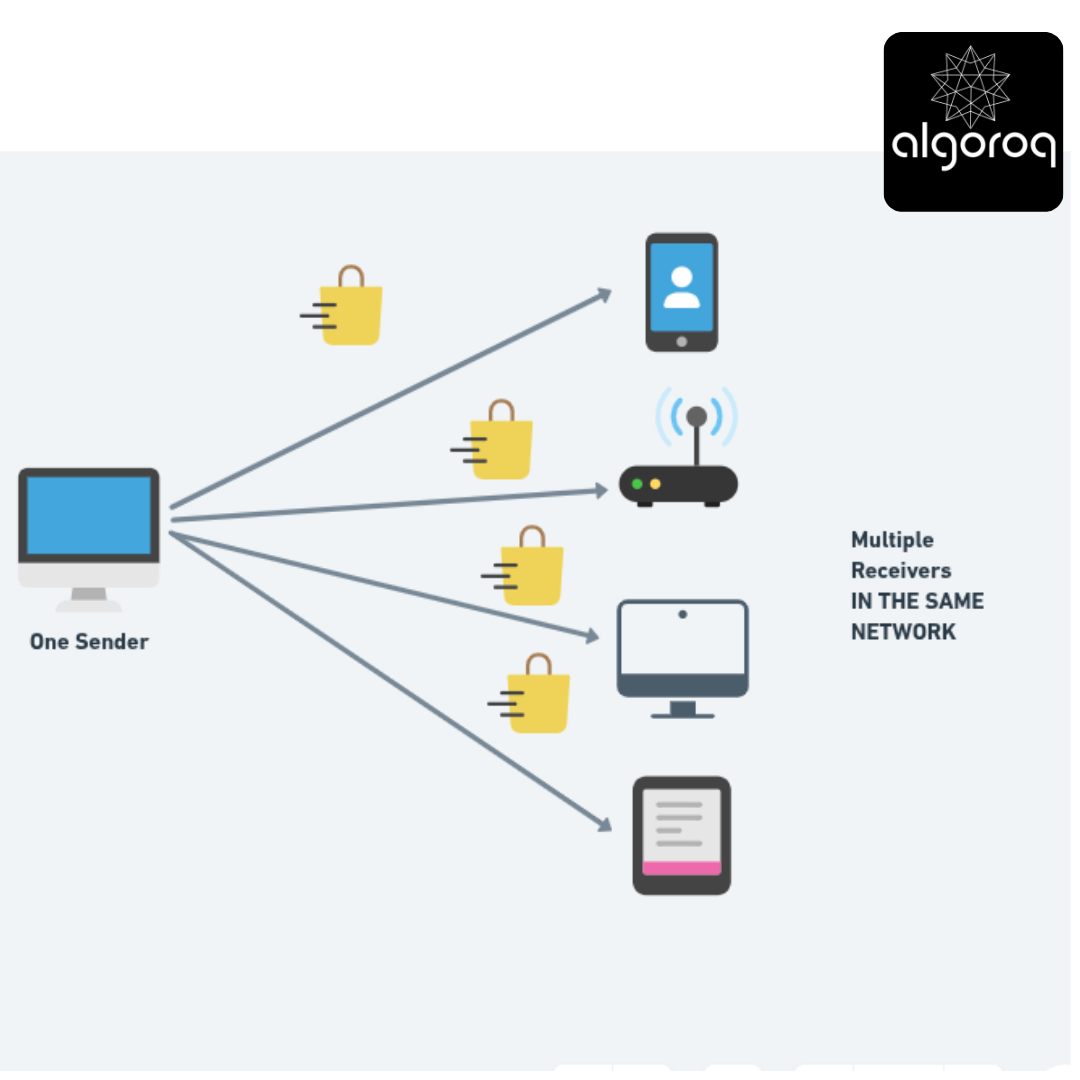
Only UDP supports broadcast! TCP cannot broadcast.
Special address: 255.255.255.255 (local network broadcast)
Use cases:
- DHCP (finding a network configuration server)
- ARP (finding MAC address of a local IP)
- Network discovery (finding devices on your network)
The catch: Broadcasts don't cross routers - they're confined to your local network segment!
Real-world example: Your computer shouts "Is anyone here a DHCP server?" and the router responds "I am!"
3️⃣ MULTICAST - One-to-Many (interested parties)
Analogy: Subscribing to a newsletter - only people who signed up receive it!
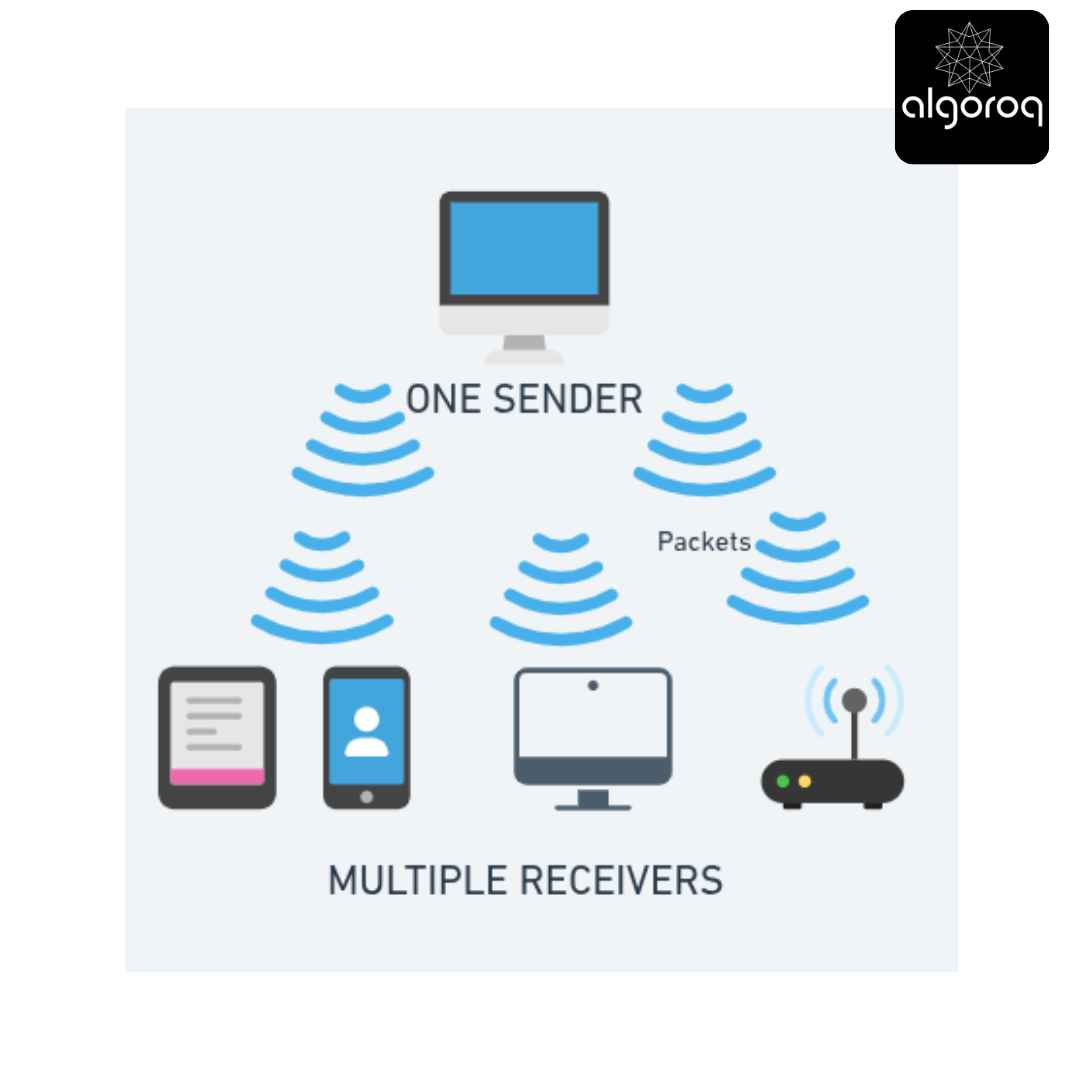
Only UDP supports multicast! TCP cannot multicast.
Special addresses: 224.0.0.0 to 239.255.255.255
How it works:
- Devices join a multicast group (e.g., address
224.1.1.1) - Sender transmits to the group address
- Only group members receive the data
- Network infrastructure optimizes delivery (routers duplicate packets only where needed)
Use cases:
- IPTV streaming (one stream, many watchers)
- Video conferencing (one speaker, multiple listeners)
- Stock market tickers (one source, many traders)
- Online multiplayer games (one server, multiple nearby players)
Real-world parallel: Like a radio station frequency. The station broadcasts once, but only people tuned to that frequency hear it!
Challenge question: Why is multicast better than sending individual unicast packets to each recipient?
Answer: Network efficiency! Instead of sending 1000 separate packets for 1000 viewers, send ONE packet that gets intelligently duplicated only where needed.
4️⃣ ANYCAST - One-to-Nearest
Analogy: Calling "911" - you reach the nearest emergency center, not a specific one.
Anycast allows multiple servers to have the same IP address, and enables clients to automatically connect to a server close to them. This is similar to emergency phone networks (911, 112, etc.) which connect you to the closest emergency communications center in your area.
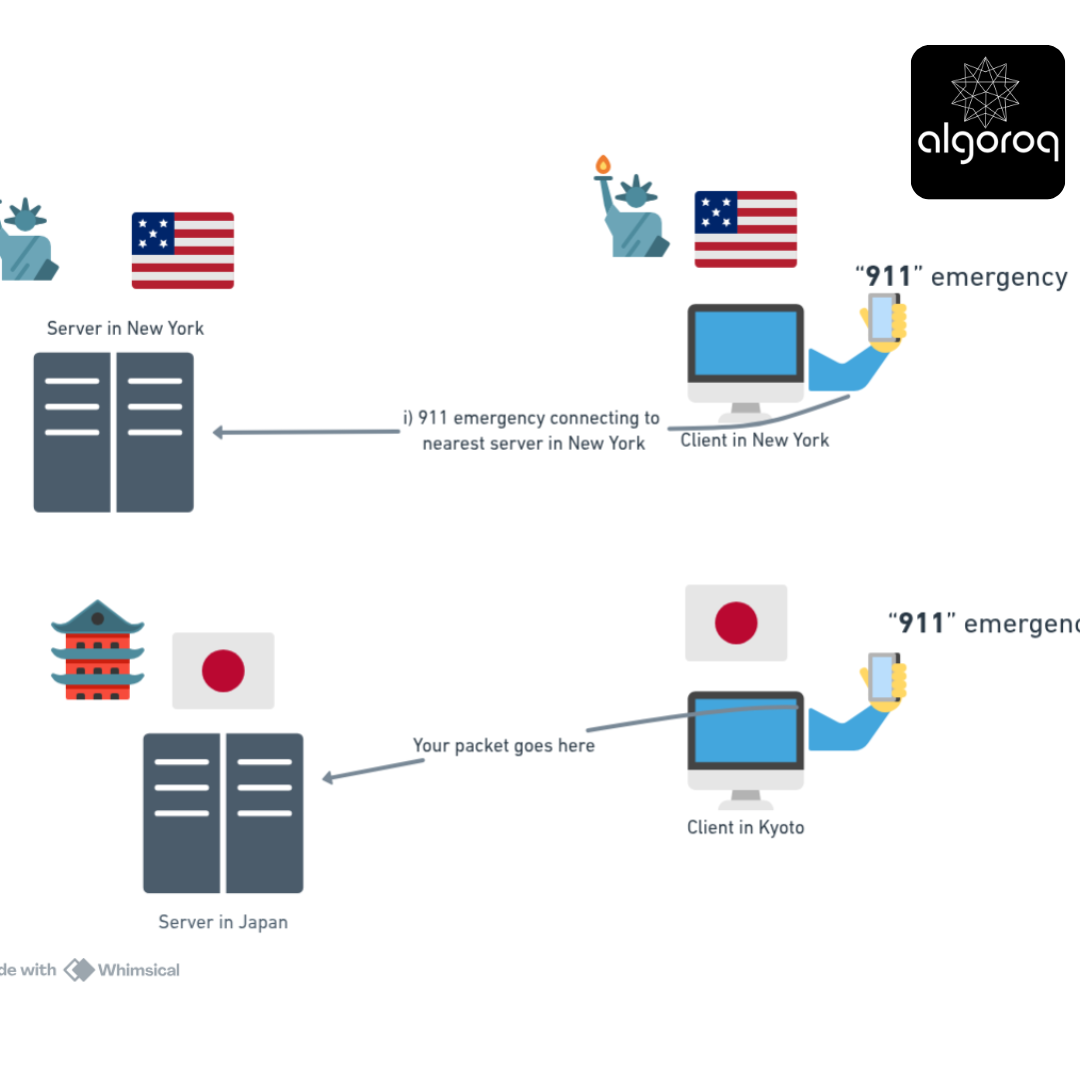
Both TCP and UDP can use anycast addresses!
How it works:
- Multiple servers share the SAME IP address
- Network routing directs you to the closest server
- You don't know (or care) which specific server you reach
Use cases:
- DNS root servers (e.g.,
198.41.0.4exists in hundreds of locations worldwide!) - Content Delivery Networks (CDN) - get content from nearest server
- Load balancing - spread traffic to multiple servers
Real-world example: When you access 8.8.8.8 (Google DNS), you're not reaching one server in California - you're reaching the nearest Google DNS server, which might be in your city!
📊 Comparison Matrix: The Four Styles
| Feature | Unicast | Broadcast | Multicast | Anycast |
|---|---|---|---|---|
| Recipients | One specific | All on network | Group members | Nearest one |
| TCP Support | ✅ Yes | ❌ No | ❌ No | ✅ Yes |
| UDP Support | ✅ Yes | ✅ Yes | ✅ Yes | ✅ Yes |
| Efficiency | Medium | Low | High | High |
| Crosses routers | ✅ Yes | ❌ No | ✅ Yes | ✅ Yes |
| Example address | 192.168.1.5 | 255.255.255.255 | 224.1.1.1 | 8.8.8.8 |
Key insight: UDP's flexibility makes it perfect for creative network applications that TCP can't handle!
💡 Problem-Solving Exercise: Choosing the Right Style
Match the use case to the communication style:
- Netflix streaming the same movie to 10,000 users in a city
- Finding your home router when you plug in your laptop
- Accessing the fastest Facebook server automatically
- Your banking app connecting to your bank
Think about each scenario's needs...
Answers:
- Multicast - One stream, many interested subscribers, efficient bandwidth use
- Broadcast - DHCP request sent to everyone on local network
- Anycast - Same address routes to nearest server
- Unicast - Secure one-to-one connection to specific server
🎪 Real-World Applications: Where UDP Shines
Let's explore why UDP is chosen for specific applications:
🎮 Online Gaming
Why UDP?
Game state updates 60 times per second:
Time: 0.00s → Player position: (100, 200)
Time: 0.01s → Player position: (101, 202)
Time: 0.02s → Player position: (102, 204) [LOST!]
Time: 0.03s → Player position: (103, 206) ← Use this!
Time: 0.04s → Player position: (104, 208)
If we retransmitted the lost packet:
- By the time it arrives, it's outdated!
- The player is now at position (104, 208)
- Who cares about where they were at (102, 204)?
UDP advantage: Keep the game in sync with NOW, not the past!
📹 Video/Audio Streaming (Live)
Why UDP?
Consider this livestream:
Frame 1000: Speaker says "Hello" → ✓ Arrives
Frame 1001: Speaker says "everyone" → ✗ LOST
Frame 1002: Speaker says "welcome" → ✓ Arrives
Frame 1003: Speaker says "to" → ✓ Arrives
With TCP: Stream pauses to retransmit "everyone" - now you're 2 seconds behind LIVE!
With UDP: You hear "Hello... welcome to..." - slightly glitchy but still LIVE!
Real-world parallel: Like live TV with occasional pixelation vs a buffering wheel that pauses everything.
🌐 DNS Queries
Why UDP?
DNS is typically 2 packets:
You: "What's the IP for google.com?" (50 bytes)
Server: "It's 142.250.185.46" (60 bytes)
DONE!
TCP overhead for this:
- 3-way handshake (3 packets)
- 2 data packets
- 4-way handshake (4 packets)
- Total: 9 packets!
UDP overhead for this:
- 2 data packets
- Total: 2 packets!
UDP wins: 77% reduction in traffic!
🎵 VoIP (Voice Calls)
Why UDP?
Human speech tolerates:
- Small gaps (we interpolate naturally)
- Slight distortion (still intelligible)
Human speech CANNOT tolerate:
- Delays (conversation becomes awkward)
- Buffering pauses (kills natural flow)
UDP advantage: Low latency > Perfect accuracy for human conversation
Key Takeaways
- UDP is connectionless and unreliable by design — no handshake, no acknowledgments, no guaranteed delivery or ordering
- UDP is faster than TCP due to minimal overhead — no connection setup, no retransmission, smaller header (8 bytes vs TCP's 20+)
- UDP is ideal for real-time applications — video streaming, online gaming, VoIP, and DNS all use UDP because speed matters more than perfect delivery
- Applications using UDP must handle reliability themselves if needed — many protocols (like QUIC) build their own reliability on top of UDP